
1. Uvod
Thank you for choosing the Temtop W100 Lite Professional Weather Station. This device provides real-time monitoring of indoor and outdoor temperature and humidity, atmospheric pressure, weather forecasts, moon phases, and includes an alarm clock function. This manual will guide you through the setup, operation, and maintenance of your weather station to ensure optimal performance.
2. Vsebina paketa
Po razpakiranju preverite vsebino paketa:
- Glavna enota vremenske postaje
- Zunanji senzor
- Napajalni adapter
- Uporabniški priročnik

Image: Contents of the Temtop W100 Lite package, showing the main weather station unit, the outdoor sensor, and the power adapter.
3. Izdelek je končanview
Familiarize yourself with the main components and display features of your Temtop W100 Lite Weather Station.
3.1 Zaslon glavne enote

Slika: spredaj view of the Temtop W100 Lite Weather Station, displaying various weather parameters and time information.
The main unit features a clear color display that shows the following information:
- Zunanja temperatura in vlažnost
- Notranja temperatura in vlažnost
- Weather Forecast (Sunny, Partially Sunny, Cloudy, Rainy, Snowy)
- Čas in datum
- Lunina faza
- Atmosferski tlak
- Comfort Level Indicator (Wet, Comfort, Dry)
- Sunrise and Sunset Times (for selected city)
3.2 Main Unit Buttons and Outdoor Sensor

Slika: Podrobna view of the weather station display with labels indicating each data field.
Slika: Zadaj view of the weather station, highlighting the battery compartment, power input, and control buttons.
The main unit features several control buttons on the back for settings adjustment:
- Gumb SET: Enters/confirms settings.
- Gumb GOR/CH: Adjusts values upwards, changes channels.
- DOWN/MEM Button: Adjusts values downwards, accesses min/max memory.
- ALERT Button: Sets temperature alerts.
- Gumb ALARM: Sets alarm time.
- CITY Button: Selects city for sunrise/sunset times.
The outdoor sensor transmits temperature and humidity data wirelessly to the main unit.
4. Nastavitev
4.1 Napajanje naprave
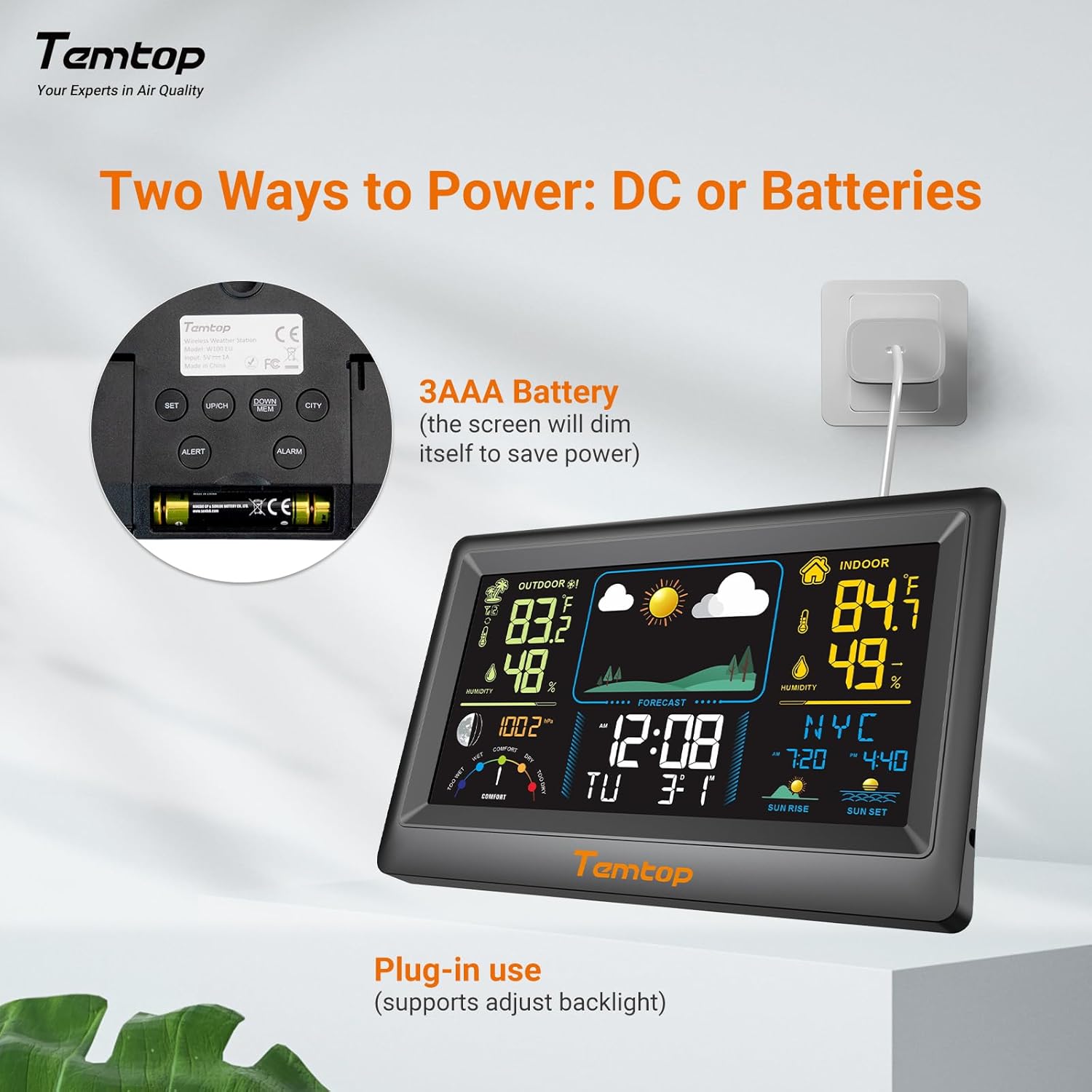
The weather station can be powered by either the included AC adapter or 3x AAA batteries (not included for the main unit, but included for the outdoor sensor). For continuous backlight and optimal performance, AC power is recommended.
- Glavna enota: Insert the AC adapter into the power port on the back of the unit and plug it into a wall outlet. Alternatively, insert 3x AAA batteries into the battery compartment.
- Zunanji senzor: Insert 2x AAA batteries into the outdoor sensor's battery compartment.

Slika: nprample of digital displays, illustrating the clear readouts of temperature and humidity.

Image: Illustration of power modes, showing the weather station connected via AC adapter and the battery compartment. AC mode allows adjustable backlight, while battery mode conserves power by dimming the display.
4.2 Namestitev zunanjega senzorja
Place the outdoor sensor in a shaded area, protected from direct sunlight and rain, to ensure accurate temperature and humidity readings. The sensor has a wireless range of up to 100 meters (328 feet) in an open, unobstructed area.

Image: Diagram showing the wireless range of the outdoor sensor from the main unit, suitable for gardens, terraces, or rooftops.
4.3 Začetne nastavitve (ura, datum, mesto)
Follow these steps to set the correct time, date, and city for accurate sunrise/sunset times:
- Pritisnite in držite NASTAVI button to enter setting mode. The hour field will begin to flash.
- Uporabite GOR/CH in DOL/MEM gumbi za nastavitev ure.
- Pritisnite NASTAVI to confirm the hour and move to the next item (minute, year, month, day). Repeat the adjustment and confirmation process for each.
- After setting the date, briefly press the MESTO button. The city code will flash.
- Uporabite GOR/CH button to scroll through the list of cities until you find your location.
- Na koncu pritisnite NASTAVI to confirm your city selection. The sunrise, sunset times, and date will now be accurately displayed.
Video: This video demonstrates how to set the time, date, and city on your Temtop W100 Lite Weather Station to ensure accurate display of local sunrise and sunset times.
5. Delovanje
5.1 Interpretacija prikaza
The main display is divided into several sections for easy reading:
- Zunanji del: Shows current outdoor temperature and humidity, and temperature trend.
- Notranji del: Displays current indoor temperature and humidity, and temperature trend.
- Vremenska napoved: Icons indicate the predicted weather for the next 12 hours (Sunny, Partially Sunny, Cloudy, Rainy, Snowy).
- Čas in datum: Trenutni čas, dan v tednu in datum.
- Lunina faza: Prikazuje trenutno lunino fazo.
- Zračni tlak: Shows current barometric pressure and its trend.
- Raven udobja: A gauge indicating indoor comfort levels (Wet, Comfort, Dry).
- Sončni vzhod sončni zahod: Displays the local sunrise and sunset times for the selected city.

Image: Visual representation of the five weather forecast modes and moon phases displayed on the weather station.
5.2 Izbira enote temperature
To switch between Celsius (°C) and Fahrenheit (°F), briefly press the GOR/CH button during normal display mode.
5.3 Min/Max Temperature and Humidity Records
The weather station automatically records the minimum and maximum temperature and humidity values over a 24-hour period. Briefly press the DOL/MEM gumb za view these records. Press again to cycle through min/max indoor and outdoor values.
5.4 Nastavitev alarmov
The device supports both time alarms and temperature alerts.
- Časovni alarm: Pritisnite ALARM button to enter alarm setting mode. Use GOR/CH in DOL/MEM to adjust the alarm time, and ALARM to confirm. The snooze function can be activated by pressing any button (except ALARM) when the alarm sounds.
- Temperaturna opozorila: Pritisnite OPOZORILO button to set high/low temperature alerts for indoor or outdoor readings. Use GOR/CH in DOL/MEM to set the desired temperature thresholds.
6. Vzdrževanje
- Očistite zaslon in casing z mehkim, damp krpo. Ne uporabljajte abrazivnih čistil ali topil.
- Baterije v zunanjem senzorju zamenjajte, ko se na glavni enoti prikaže indikator nizke napolnjenosti baterij.
- Glavne enote ne izpostavljajte neposredni sončni svetlobi, ekstremnim temperaturam ali vlagi.
7. Odpravljanje težav
| Težava | Možen vzrok | rešitev |
|---|---|---|
| Na glavni enoti ni prikaza. | Ni napajanja ali so baterije prazne. | Prepričajte se, da je napajalnik pravilno priključen, ali zamenjajte baterije. |
| Outdoor readings are inaccurate or not displayed. | Sensor out of range, interference, or low sensor batteries. | Move sensor closer to main unit, reduce obstructions, or replace sensor batteries. |
| Vremenska napoved se zdi napačna. | The forecast is based on atmospheric pressure changes and is an estimation. | Allow time for the station to calibrate (up to 24 hours). It provides a general trend, not a precise forecast. |
8. Specifikacije
| Funkcija | Podrobnost |
|---|---|
| Znamka | Tempop |
| Model | EU-W100-Lite |
| Vir napajanja | Battery (Main Unit: 3x AAA, Sensor: 2x AAA) / AC Adapter |
| Posebne lastnosti | Customizable Alarms, Wireless Connectivity |
| Tehnologija povezljivosti | Brezžično |
| barva | Črna |
| Senzorska tehnologija | Brezžično |
| Delovna temperatura (zgornja) | 40 stopinj Celzija |
| Vrsta zaslona | Barvni zaslon |
| Teža predmeta | 100 gramov |
9. Garancija in podpora
Temtop products are designed for reliability and performance. For warranty information, technical support, or service inquiries, please refer to the warranty card included in your package or visit the official Temtop webspletno mesto. Shranite račun kot dokazilo o nakupu.