
Uvod
Thank you for choosing the SuperRC M23 Mini RC Drone. This manual provides essential information for the safe operation, setup, maintenance, and troubleshooting of your drone. Please read this manual thoroughly before operating the drone to ensure proper function and to avoid damage or injury. This drone is designed for adult beginners and features a lightweight, portable design with an HD camera and intelligent flight functions.
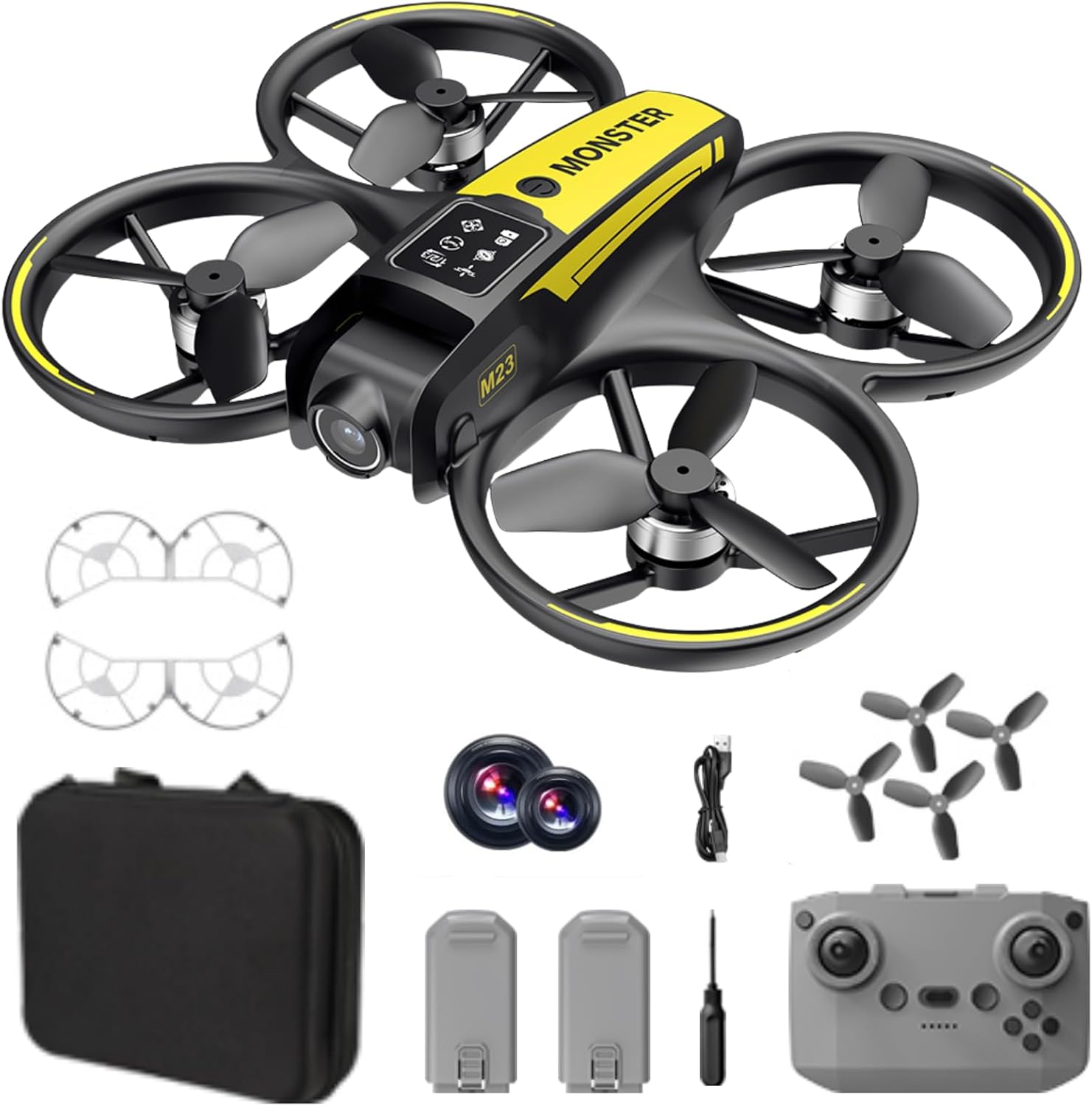
Kaj je v škatli
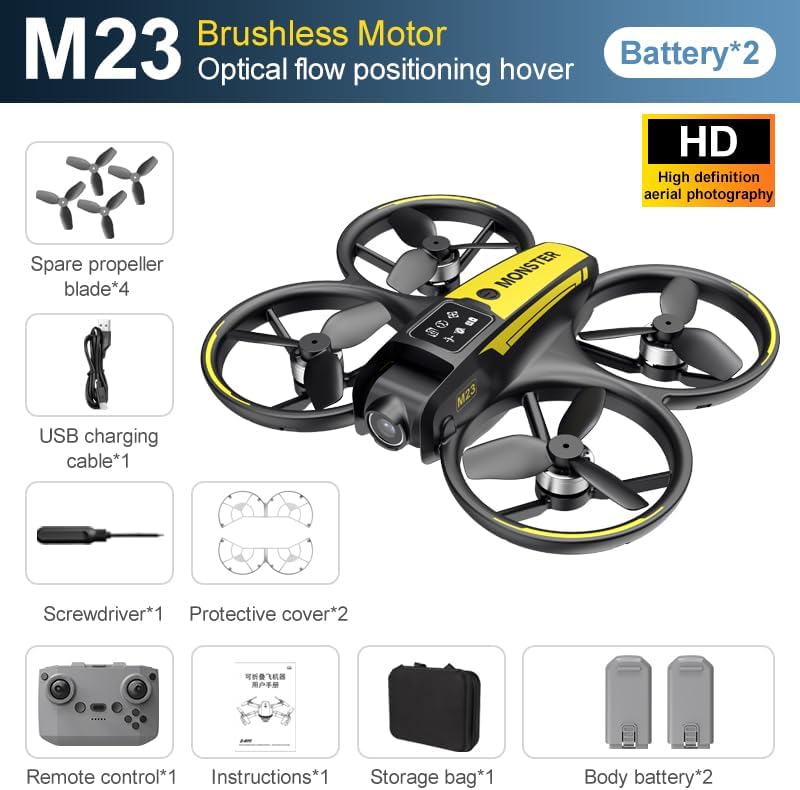
The SuperRC M23 drone package includes the following components:
- M23 Dron
- Daljinski upravljalnik
- 2 x 3.7 V 1050 mAh polnilne baterije
- 4 x rezervni propelerji
- 2 x ščitniki za propelerje
- Pomnilniška kartica
- Čitalec kartic
- Izvijač
- USB polnilni kabel
- Torba za shranjevanje
- Uporabniški priročnik (ta dokument)

Konec izdelkaview
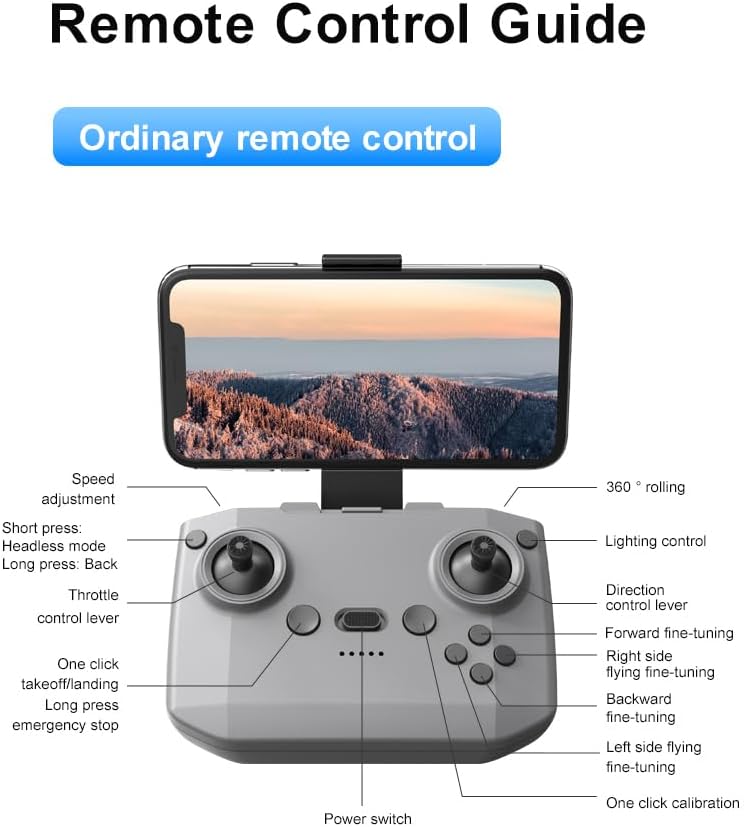
Postavitev daljinskega upravljalnika
Familiarize yourself with the remote control buttons and their functions before flight.
Nastavitev
1. Namestitev baterije
- Ensure the drone and remote control are powered off.
- Poiščite predal za baterijo na dronu.
- Insert a charged 3.7V 1050mAh battery into the compartment until it clicks securely into place.
- For the remote control, open the battery cover and insert the required batteries (not specified in product data, assume standard AA/AAA, user should refer to physical manual for exact type).
2. Namestitev propelerja
Dron ima že nameščene propelerje. Če je potrebna zamenjava:
- Prepoznajte oznaki 'A' in 'B' na propelerjih in ustreznih ročicah motorja.
- Attach 'A' propellers to 'A' motor shafts and 'B' propellers to 'B' motor shafts. Ensure they are firmly secured.
3. Namestitev zaščite propelerja
For added safety, attach the propeller guards:
- Align each propeller guard with the designated slots on the drone's motor arms.
- Gently push until they snap into place.
4. Polnjenje
Charge the drone batteries using the provided USB charging cable.
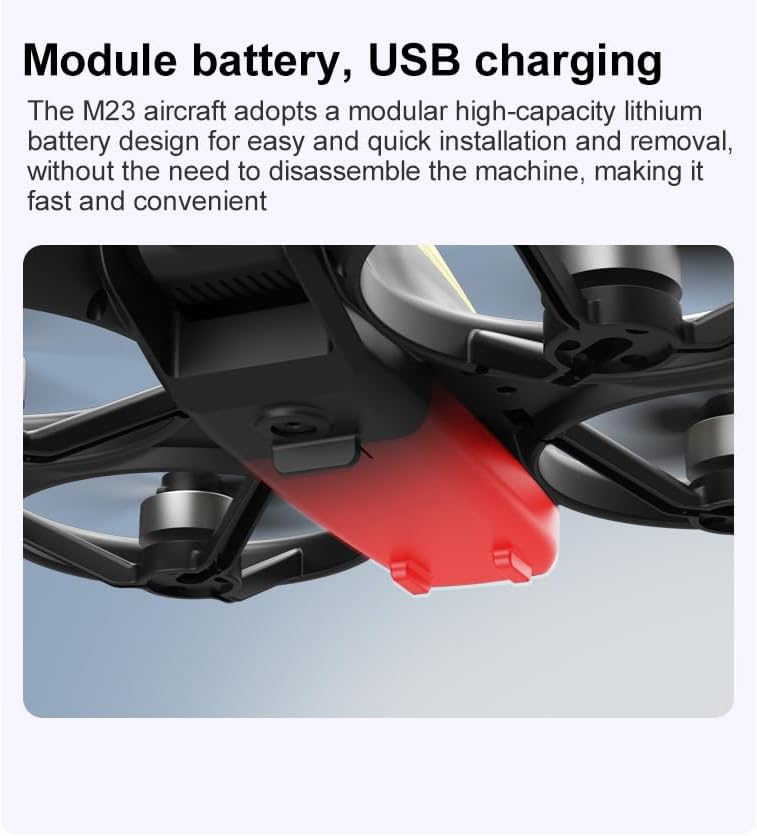
- Priključite polnilni kabel USB na baterijo drona.
- Plug the other end into a USB power source (e.g., computer, USB wall adapter).
- The indicator light on the cable will show charging status (refer to physical manual for specific light indications).
- Charging time is approximately 60-90 minutes for a full charge.
Navodila za uporabo
Kontrolni seznam pred letom
- Prepričajte se, da sta bateriji drona in daljinskega upravljalnika popolnoma napolnjeni.
- Propelerji so pravilno nameščeni in varno pritrjeni.
- Propeller guards are attached (recommended for beginners).
- Izberite odprto, čisto območje brez ovir, ljudi in živali.
- Check local drone regulations before flying.
Osnovne letalske operacije
The following video demonstrates key flight features including one-key takeoff, optical flow positioning, 360-degree roll, and speed switching.
One-Key Takeoff and Landing
- Vzlet: Place the drone on a flat surface. Press the One-Key Takeoff button on the remote control. The drone will automatically ascend and hover at a stable altitude.
- Pristanek: Press the One-Key Landing button. The drone will slowly descend and land automatically.
Načini letenja in funkcije
- Brezglavi način: Press the Headless Mode button. In this mode, the drone's orientation is relative to the pilot, making it easier to control without worrying about the drone's front direction.
- Prilagoditev hitrosti: Use the speed adjustment button (or switch) on the remote control to cycle through low, medium, and high speeds. This allows for adaptable flight control based on skill level and environment.
- 360° Roll: Press the 360° Roll button and then move the right joystick in any direction to perform an aerial flip. Ensure sufficient altitude before attempting.
- Pozicioniranje optičnega toka: The drone utilizes a bottom camera for optical flow positioning, which helps maintain stable hovering, especially indoors or in areas with good ground texture. This feature assists in precise altitude hold.
- Trajektorski let: Through the mobile application, you can draw a desired flight path on your screen. The drone will then follow this trajectory automatically.

Delovanje kamere
The M23 drone is equipped with an HD camera with a 90-degree adjustable lens for capturing photos and videos.

- Snemanje fotografij/videoposnetkov: Use the dedicated buttons on the remote control or the mobile app to start/stop video recording or take photos.
- Prenos slike v realnem času: Povežite pametni telefon z omrežjem Wi-Fi drona, da view foo v realnem časutage from the drone's camera on your device.
Vzdrževanje
Čiščenje
- Regularly clean the drone body with a soft, dry cloth.
- Ensure propellers are free from dust, dirt, or debris.
- Clean the camera lens gently with a microfiber cloth to maintain image quality.
Shranjevanje
- Store the drone and its components in the provided storage bag to protect them from dust and physical damage.
- Dron hranite na hladnem in suhem mestu, stran od neposredne sončne svetlobe in ekstremnih temperatur.
Skrb za baterijo
- Baterij ne prepolovljajte ali prepraznite.
- Če baterije shranjujete dlje časa, jih napolnite do približno 50–60 % njihove zmogljivosti.
- Avoid exposing batteries to high temperatures or direct sunlight.
Odpravljanje težav
If you encounter issues with your SuperRC M23 drone, refer to the following common problems and solutions:
| Težava | Možen vzrok | rešitev |
|---|---|---|
| Dron se ne odziva na daljinski upravljalnik | Low battery on drone or remote; Not paired correctly; Interference | Charge batteries; Re-pair drone and remote (refer to physical manual for pairing steps); Move to an area with less interference |
| Dron med letom zanaša zrak | Not calibrated; Wind interference; Damaged propeller | Perform calibration (refer to physical manual); Fly in calm conditions; Replace damaged propellers |
| Slaba kakovost slike kamere | Dirty lens; Low light conditions; Wi-Fi interference | Clean camera lens; Fly in well-lit areas; Ensure strong Wi-Fi connection |
| Kratek čas letenja | Battery not fully charged; Old battery; Aggressive flying | Ensure battery is fully charged; Consider replacing old batteries; Practice smoother flight maneuvers |
Specifikacije
Key technical specifications for the SuperRC M23 Mini RC Drone:
| Funkcija | Podrobnost |
|---|---|
| Ime modela | M23-Drone |
| Znamka | SuperRC |
| Teža predmeta | 0.2 Kilograms (Under 250g) |
| Mere predmeta (D x Š x V) | 18 x 15 x 5 cm (približno 7 x 6 x 2 cm) |
| Material | Plastika |
| Stopnja spretnosti | Začetnik |
| Starostna skupina (opis) | Odrasel |
| Kamera | HD Camera with 90° Adjustable Lens |
| Ločljivost zajema videa | 720p |
| Ločljivost videa | 720 slikovnih pik |
| Format za zajem videa | MP4 |
| Podprti format slike | JPEG |
| Tehnologija optičnega senzorja | CMOS |
| Tehnologija povezljivosti | Wi-Fi, radiofrekvenčni |
| Vrsta nadzora | Daljinski upravljalnik |
| Kapaciteta baterije | 1050mAh (per battery) |
| Sestava baterijskih celic | Litij ion |
| Posebne lastnosti | Adjustable, One Button Return, One Key Rotation, Rechargeable, Speed Adjustment, Headless Mode, Optical Flow Positioning |
Garancija in podpora
SuperRC provides a standard warranty for the M23 Mini RC Drone against manufacturing defects. Please retain your proof of purchase for warranty claims.
Informacije o garanciji
- The warranty period typically covers defects in materials and workmanship under normal use.
- Damage resulting from misuse, accidents, unauthorized modifications, or improper maintenance is not covered.
- For specific warranty terms and conditions, please refer to the warranty card included in your product packaging or contact SuperRC customer service.
Podpora uporabnikom
If you require further assistance, have questions, or need to report an issue, please contact SuperRC customer support through the following channels:
- Spletna podpora: Visit the official SuperRC webspletno mesto za pogosta vprašanja, vire za podporo in kontaktne obrazce.
- Podpora po e-pošti: Refer to your product packaging or the SuperRC webspletno mesto za e-poštni naslov službe za stranke.
- Podpora prodajalcem: If purchased from a retailer, you may also contact their customer service for assistance.
When contacting support, please provide your product model (M23) and a detailed description of the issue.