
1. Uvod
Thank you for choosing the JOMAA VM604 Wireless Ergonomic Vertical Mouse. This advanced mouse is designed to provide superior comfort and efficiency, reducing wrist strain during prolonged use. Featuring multi-device connectivity, adjustable DPI, and a unique multi-function dial, the VM604 is an ideal tool for various computing environments.
Pred uporabo izdelka natančno preberite ta priročnik, da zagotovite pravilno delovanje in podaljšate njegovo življenjsko dobo.
2. Izdelek je končanview
2.1 Vsebina paketa
- JOMAA VM604 Ergonomic Vertical Mouse
- USB sprejemnik (2.4 G)
- Polnilni kabel USB-C
- Uporabniški priročnik
2.2 Komponente miške
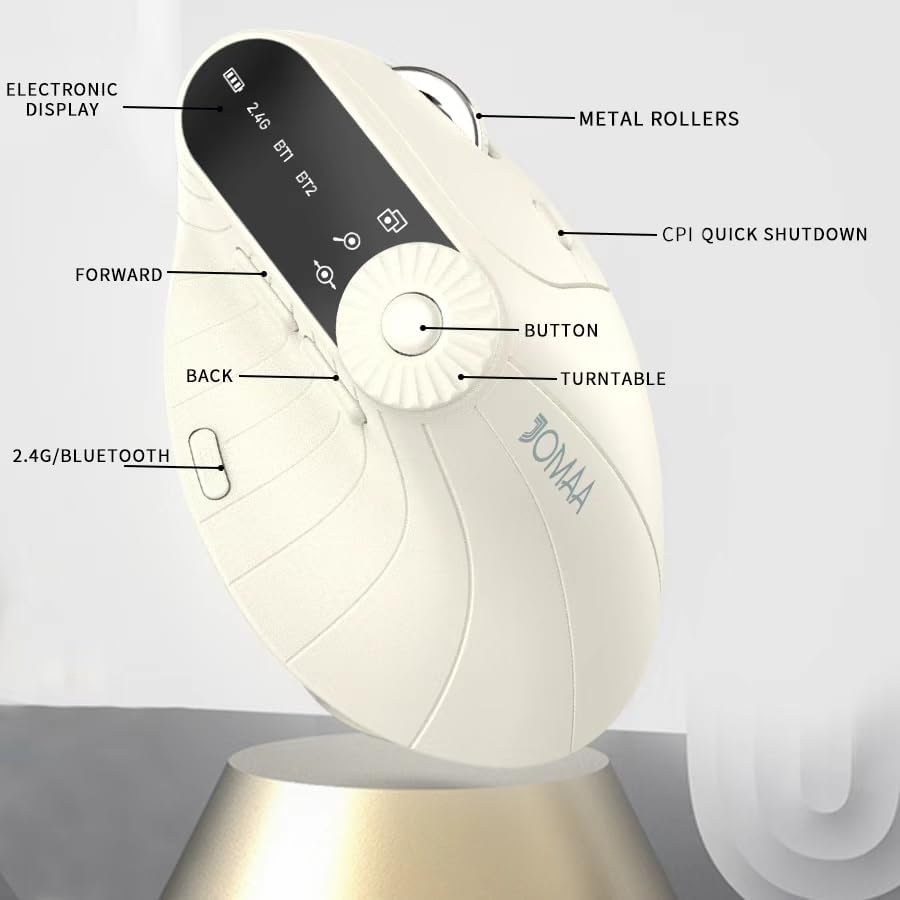
Slika 1: Labeled components of the JOMAA VM604 mouse, highlighting the electronic display, metal rollers, CPI quick shutdown, forward/back buttons, turntable, and 2.4G/Bluetooth switch.
- Levi klik na gumb: Standard left mouse function.
- Desni klik na gumb: Standard right mouse function.
- Kolesce za pomikanje: Za navpično drsenje.
- Gumb za naprej: Navigacija naprej v web brskalniki oz file raziskovalci.
- Gumb za nazaj: Navigacija nazaj v web brskalniki oz file raziskovalci.
- Multi-function Turntable/Dial: Offers three functions: 1. Window switching, 2. Zoom in/out (for pages and images), 3. Page moves left/right (for Excel).
- DPI/CPI Adjustment Button: Preklaplja nastavitve DPI (1000/1200/1600/2400).
- Elektronski prikazovalnik: Shows battery level, connection mode (2.4G, BT1, BT2), and DPI setting.
- Connection Mode Switch (Bottom): Toggles between 2.4G, Bluetooth 1 (BT1), and Bluetooth 2 (BT2) modes.
- Power ON/OFF Switch (Bottom): Vklopi ali izklopi miško.
- Vrata za polnjenje USB-C: Nahaja se na sprednji strani miške.
- Reža za shranjevanje USB sprejemnika: Located at the bottom of the mouse.
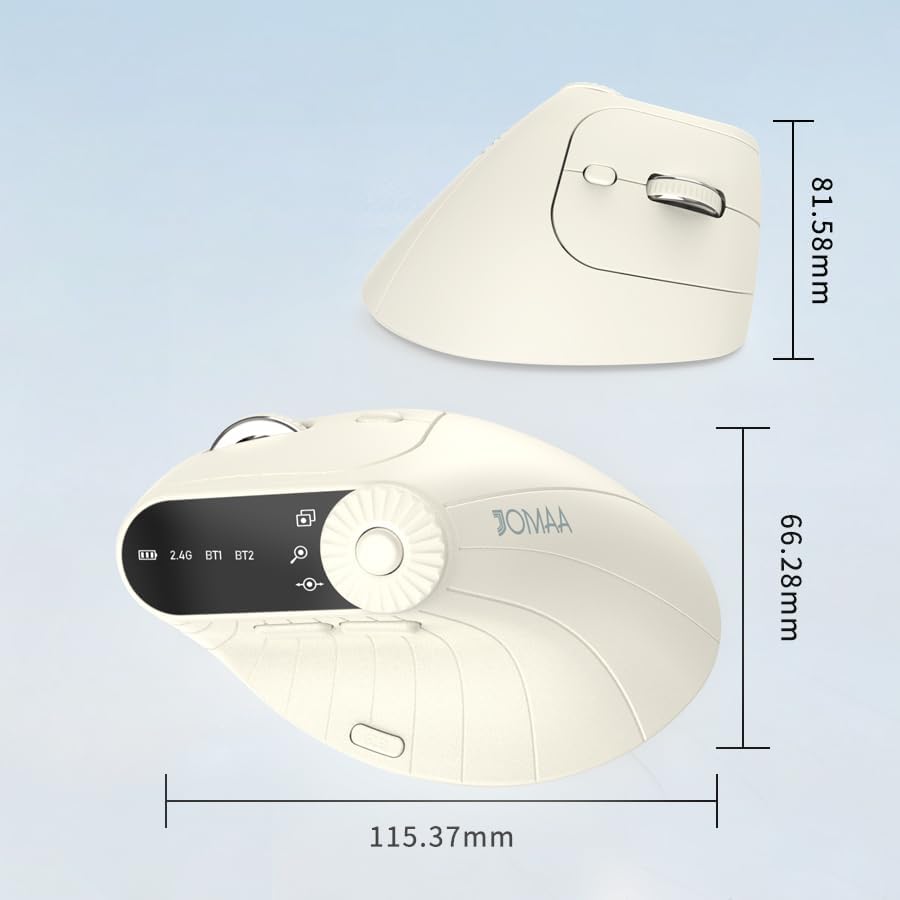
Slika 2: Dimensions of the JOMAA VM604 mouse, showing its ergonomic vertical design.

Slika 3: Illustration of the JOMAA VM604's 57-degree ergonomic design, promoting a natural handshake posture to reduce wrist pressure.
3. Nastavitev
3.1 Polnjenje miške
The JOMAA VM604 mouse features a built-in rechargeable battery. To charge:
- Connect the provided USB-C charging cable to the charging port at the front of the mouse.
- Drugi konec kabla USB priključite na vir napajanja USB (npr. vrata USB računalnika, stenski adapter USB).
- The electronic display will indicate charging status.

Slika 4: The JOMAA VM604 mouse connected via USB-C for charging, with a visible charging indicator on the electronic display.
3.2 Brezžična povezava 2.4G
Za stabilno in hitro brezžično povezavo:
- Locate the USB receiver stored in the slot at the bottom of the mouse.
- USB-sprejemnik priključite v razpoložljiva vrata USB na vašem računalniku.
- Turn on the mouse using the ON/OFF switch at the bottom.
- Slide the connection mode switch to the '2.4G' position. The mouse should automatically connect to your computer.
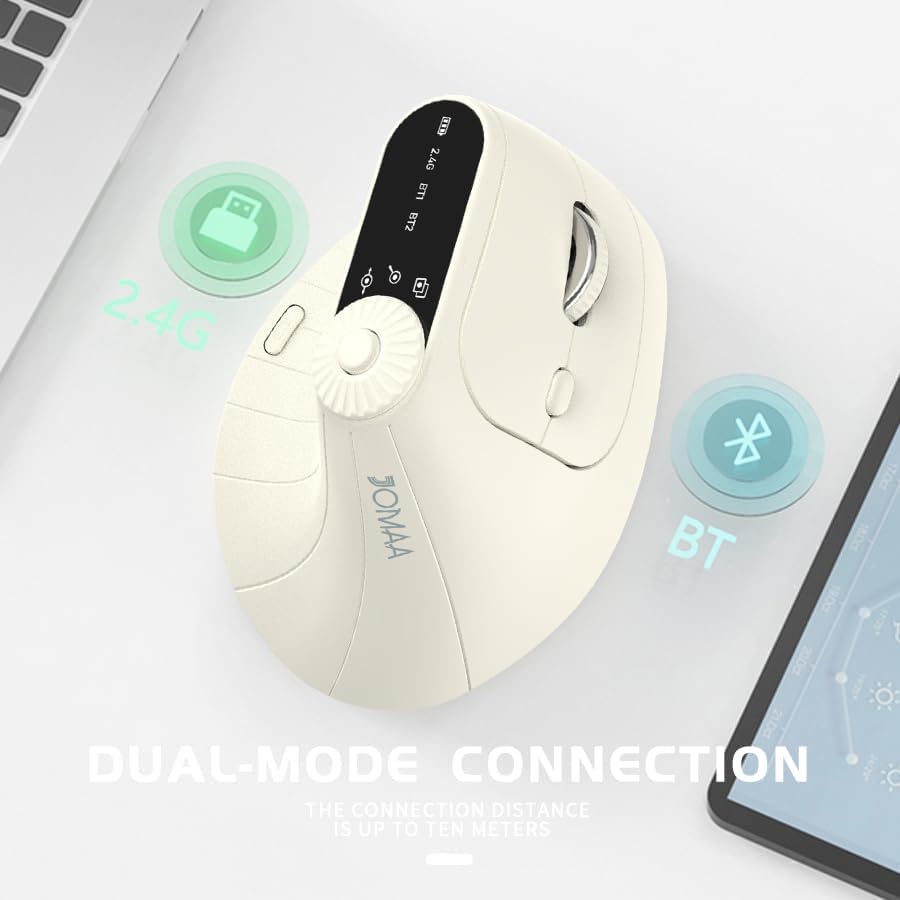
Slika 5: The JOMAA VM604 mouse illustrating its dual-mode connection capabilities, including the 2.4G USB receiver and Bluetooth options.
3.3 Bluetooth Connection (BT1/BT2)
The mouse can connect to two different Bluetooth devices:
- Turn on the mouse using the ON/OFF switch at the bottom.
- Slide the connection mode switch to either 'BT1' or 'BT2' position.
- For the first Bluetooth connection or to reset a connection, press and hold the connection mode switch for 3-5 seconds until the Bluetooth indicator on the electronic display starts blinking.
- On your device (PC, Laptop, MacBook), go to Bluetooth settings and search for 'JOMAA VM604' (or similar name).
- Select the mouse to pair. The indicator light will stop blinking once connected.
- To switch between connected devices, simply double-click the connection mode switch to cycle through 2.4G, BT1, and BT2.
4. Navodila za uporabo
4.1 Prilagoditev DPI
Adjust the mouse sensitivity (DPI/CPI) to suit your preference:
- Press the DPI Adjustment Button (Component 7) located near the multi-function dial.
- Each press will cycle through the available DPI settings: 1000, 1200, 1600, and 2400.
- The electronic display will show the current DPI setting.
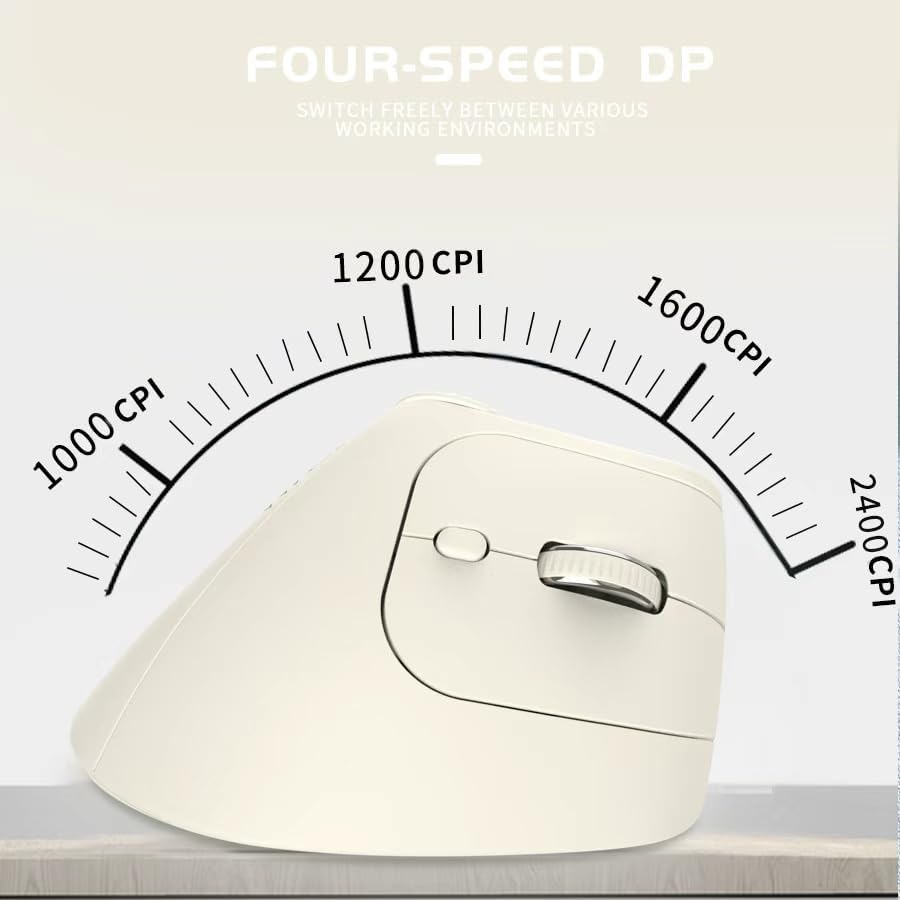
Slika 6: The JOMAA VM604 mouse highlighting its four-speed CPI settings (1000, 1200, 1600, 2400) for precise optical tracking.
4.2 Multi-Function Turntable
The unique turntable (Component 6) provides enhanced control:
- Window Switching: Rotate the dial to quickly switch between open application windows.
- Povečaj/Pomanjšaj: Rotate the dial to zoom in or out on pages and images.
- Page Left/Right: Useful for navigating large spreadsheets in applications like Excel.

Slika 7: The multi-function knob on the JOMAA VM604 mouse, demonstrating its uses for window switching, zooming in/out on pages and images, and moving pages left/right in applications like Excel.
4.3 Forward/Back Buttons
Use the Forward (Component 4) and Back (Component 5) buttons for quick navigation in web brskalniki in file raziskovalci.
5. Vzdrževanje
5.1 Čiščenje
Za ohranjanje optimalne učinkovitosti in higiene:
- Pred čiščenjem miško izklopite.
- Uporabite mehko, damp cloth to wipe the surface of the mouse.
- Izogibajte se uporabi močnih kemikalij ali abrazivnih materialov.
- Periodically clean the optical sensor at the bottom with a cotton swab.
5.2 Skrb za baterije
Za podaljšanje življenjske dobe baterije:
- Izogibajte se pogostemu popolnemu praznjenju baterije.
- Charge the mouse regularly, even if not completely depleted.
- If the mouse will not be used for an extended period, turn it off.

Slika 8: The JOMAA VM604 mouse demonstrating its intelligent hibernate mode, which activates after 60 seconds of inactivity to save power.
6. Odpravljanje težav
- Miška se ne odziva: Ensure the mouse is turned on and fully charged. Check the connection mode (2.4G or Bluetooth) and ensure it's correctly paired/connected to your device. For 2.4G, try plugging the USB receiver into a different port. For Bluetooth, try re-pairing the device.
- Premikanje kurzorja je neenakomerno: Clean the optical sensor at the bottom of the mouse. Ensure the surface you are using is clean and suitable for mouse operation. Adjust the DPI setting to a lower value if the cursor is too fast.
- Težave s povezavo Bluetooth: Ensure your device's Bluetooth is enabled. Try forgetting the device in your Bluetooth settings and re-pairing. Ensure the mouse is in the correct BT1 or BT2 mode and in pairing mode (blinking indicator).
- Multi-function dial not working: Ensure the mouse is properly connected. Some functions may require specific application support.
7. Specifikacije
| Funkcija | Podrobnost |
|---|---|
| Dimenzije izdelka | 6 x 4 x 0.04 palcev |
| Teža predmeta | 7.4 unč |
| Številka modela artikla | VM604 |
| Baterije | 1 9V batteries required (included) - Note: Product features built-in rechargeable battery, 9V battery information may be a listing error. |
| Tehnologija povezljivosti | Bluetooth, USB (brezžično 2.4 G) |
| Posebna funkcija | Ergonomic Design, Multi-function Turntable, Adjustable DPI, Rechargeable |
| Tehnologija zaznavanja gibanja | Optični |
| Nastavitve DPI | 1000/1200/1600/2400 |
| barva | Beiga |
8. Garancija in podpora
JOMAA products are designed and manufactured to the highest quality standards. This product is covered by a limited warranty from the date of purchase. For detailed warranty information, technical support, or customer service inquiries, please refer to the contact information provided on the product packaging or visit the official JOMAA webmesto.
Za garancijske zahtevke shranite dokazilo o nakupu.
9. Uradni videoposnetek izdelka
Posnetek 1: Večview of the JOMAA VM604 Ergonomic Mouse, showcasing its unique vertical design and comfortable grip. This video highlights the physical appearance and ergonomic benefits of the mouse.