
1. Uvod
This manual provides detailed instructions for the installation, operation, and maintenance of your EDUP Starlink Mini PoE Injector 150W and Isolated PoE Splitter Kit 100W. This kit is specifically designed to provide stable 48V Power over Ethernet (PoE) and Gigabit Ethernet connectivity for Starlink Mini satellite internet systems, ensuring optimal network performance.

Figure 1: EDUP Starlink Mini PoE Injector and Splitter Kit.
Vsebina paketa:
- 1 x PoE Splitter
- 1 x 3-in-1 PoE Injector for Starlink Mini
2. Varnostne informacije
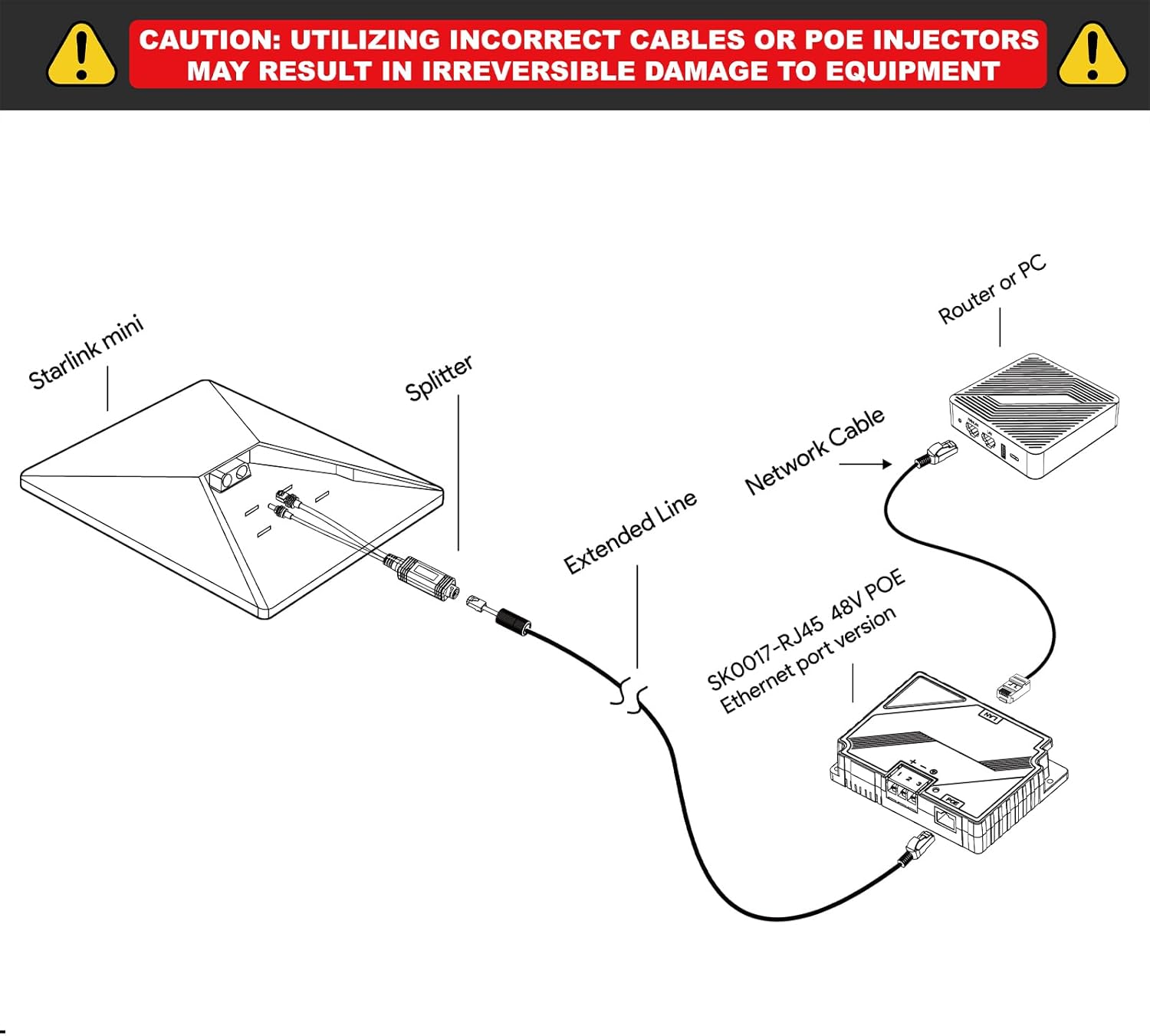
POZOR: Utilizing incorrect cables or PoE injectors may result in irreversible damage to equipment. Always ensure proper connections and compatible power sources.

Figure 2: Important safety caution and connection diagram.
This device is designed for specific Starlink Mini models. Refer to the compatibility section before installation.
3. Izdelek je končanview
The EDUP Starlink Mini PoE Injector and Splitter Kit consists of two main components: a PoE Injector and an Isolated PoE Splitter. These components work together to deliver power and data to your Starlink Mini dish.
Slika 3: Podrobno view of the PoE Injector and Splitter with dimensions and port labels. The splitter features a Starlink Mini DC Power Plug (Male) and an RJ45 Connector. The injector includes LAN, PoE, Positive Pole, Negative Pole, and Ground ports, along with an indicator light.
Ključne značilnosti:
- 150W PoE Injector: DC 9-36V input, 48V/3A output (Max 150W).
- 100W Isolated PoE Splitter: DC 37-52V input, 48V/2.5A output (Max 100W).
- Gigabitni Ethernet: Supports 10/100/1000Mbps data transfer up to 100 meters.
- Industrijska zaščita: ±8KV surge protection (differential mode) and ±15KV ESD air discharge protection (Class A).
4. Nastavitev in namestitev
Follow these steps to correctly install your EDUP Starlink Mini PoE Injector and Splitter Kit.
4.1 Preverjanje združljivosti
This kit is exclusively designed for the Starlink Mini Dishy (2024 & 2025 Version). It is not compatible with other Starlink terminal models.

Figure 4: Compatibility chart showing the EDUP kit is compatible only with Starlink Mini Dishy (2024 & 2025 Version).
4.2 Koraki povezave
- Connect the Starlink Mini dish to the PoE Splitter. The splitter has a DC power plug and an RJ45 connector for this purpose.
- Connect an extended network cable (Cat5e or higher) from the PoE Splitter to the PoE Injector. This cable carries both power and data.
- Connect the LAN port of the PoE Injector to your router or PC using a standard network cable.
- Connect a 9-36V DC power source to the PoE Injector's power input terminals (Positive Pole, Negative Pole, Ground). Ensure correct polarity.
- Verify the indicator light on the PoE Injector illuminates, indicating power is supplied.
Figure 5: Visual guide for connecting the Starlink Mini, PoE Splitter, PoE Injector, and your network device.
4.3 Prample Installation Scenarios
The compact design and robust protection features make this kit suitable for various environments, including RVs and outdoor setups.

Slika 6: Nprample of the kit installed within an RV, providing internet connectivity.

Slika 7: Nprample of the kit used for internet access during outdoor camping.

Figure 8: The kit providing internet connectivity in a low-light outdoor setting.
5. Navodila za uporabo
Once properly installed and powered, the EDUP Starlink Mini PoE Injector and Splitter Kit operates automatically to provide power and data to your Starlink Mini dish and connect it to your local network.
- Vklop: Ensure the DC power source is connected to the PoE Injector. The indicator light on the injector will confirm power delivery.
- Omrežna povezljivost: The kit facilitates Gigabit Ethernet speeds (10/100/1000Mbps) for stable and fast data transfer between your Starlink Mini and your connected router/PC.
- Optimalna zmogljivost: For best performance, use high-quality Cat5e or higher Ethernet cables, especially for runs approaching the maximum 100-meter distance.
6. Vzdrževanje in nega
To ensure the longevity and reliable operation of your EDUP PoE Injector and Splitter Kit, follow these maintenance guidelines:
6.1 Okoljski vidiki
The kit is designed for robust performance in various conditions:
- Delovna temperatura: PoE Injector: -20°C to +55°C; PoE Splitter: -25°C to +70°C.
- Temperatura shranjevanja: -40°C do +80°C.
- Vlažnost: 10%-90% (non-condensing).
- Ocena vodoodpornosti: IP68 (for the splitter component, as indicated in product imagery).

Figure 9: The kit's resilience to various weather conditions, highlighting its IP68 waterproof rating.
6.2 Zaščitne funkcije
The device incorporates industrial-grade surge and ESD protection to safeguard your equipment:
- Prenapetostna zaščita: ±8KV (differential mode).
- ESD zaščita: ±15KV air discharge (Class A).
6.3 Čiščenje
Wipe the device with a soft, dry cloth. Do not use liquid or aerosol cleaners.
7. Odpravljanje težav
If you encounter issues with your EDUP Starlink Mini PoE Injector and Splitter Kit, refer to the following common problems and solutions:
| Težava | Možen vzrok | rešitev |
|---|---|---|
| No power to Starlink Mini / Injector indicator light off | Incorrect or no DC power input; faulty cable connection; incorrect polarity. | Verify the DC power source (9-36V) is connected and functional. Check all power cable connections and ensure correct polarity. Ensure the PoE Injector is receiving power. |
| No internet connection / Data not transmitting | Faulty Ethernet cable; incorrect connection order; incompatible Starlink model; issue with router/PC. | Ensure all Ethernet cables are securely connected and undamaged. Confirm the connection order as per Section 4.2. Verify your Starlink Mini is compatible (Figure 4). Test with a different router or PC if possible. |
| Počasne omrežne hitrosti | Low quality or damaged Ethernet cable; network congestion; Starlink service issue. | Replace Ethernet cables with Cat5e or higher quality. Check for other devices consuming bandwidth. Contact Starlink support if the issue persists and is not related to the kit. |
| Physical damage after electrical event | Severe power surge or lightning strike exceeding protection limits. | While the device has surge protection, extreme events can cause damage. Disconnect power immediately. Contact support for potential replacement under warranty. |
If the problem persists after attempting these solutions, please contact EDUP customer support.
8. Specifikacije
| Funkcija | Podrobnost |
|---|---|
| Znamka | EDUP |
| Številka modela | EP-SK0091S |
| Strojni vmesnik | Ethernet |
| Združljive naprave | Starlink Mini Dishy |
| Protokol podatkovne povezave | Ethernet |
| Hitrost prenosa podatkov | 1000 megabitov na sekundo (gigabit) |
| PoE Injector Output | 48 V / 3 A (največ 150 W) |
| PoE Splitter Output | 48 V / 2.5 A (največ 100 W) |
| Prenapetostna zaščita | ±8KV (differential mode) |
| ESD zaščita | ±15KV air discharge (Class A) |
| Operating Temperature (Injector) | -20°C do +55°C |
| Operating Temperature (Splitter) | -25°C do +70°C |
| Vlažnost | 10% -90% (brez kondenzacije) |
| Garancija | 2 leti |
9. Garancija in podpora
9.1 Informacije o garanciji
The EDUP Starlink Mini PoE Injector and Splitter Kit comes with a 2-letna garancija od datuma nakupa. Ta garancija krije proizvodne napake in okvare pri normalni uporabi. Ne krije škode, ki jo povzročijo nepravilna uporaba, nesreče, nepooblaščene spremembe ali naravne nesreče.
9.2 Podpora strankam
For technical assistance, troubleshooting, or warranty claims, please contact EDUP customer support. Refer to the product packaging or the official EDUP webspletno mesto za najnovejše kontaktne podatke.
When contacting support, please have your product model number (EP-SK0091S) and proof of purchase readily available.