
1. Uvod
Thank you for choosing the COTOE G7 Bluetooth Headset. This manual provides detailed instructions for setting up, operating, and maintaining your headset. Please read this manual carefully before use to ensure optimal performance and longevity of your device.
The COTOE G7 is a wireless Bluetooth headset designed for clear communication and audio playback. It features an LED digital display for battery status, extended standby time, and Active Noise Cancellation (ANC) for an enhanced audio experience.
2. Vsebina paketa
Prosimo, preverite paket za naslednje artikle:
- COTOE G7 Bluetooth Headset (Gray)
- etui za polnjenje
- USB polnilni kabel
- Ušesni nastavki (različne velikosti)
- Uporabniški priročnik
3. Izdelek je končanview
Familiarize yourself with the components of your COTOE G7 Bluetooth Headset.
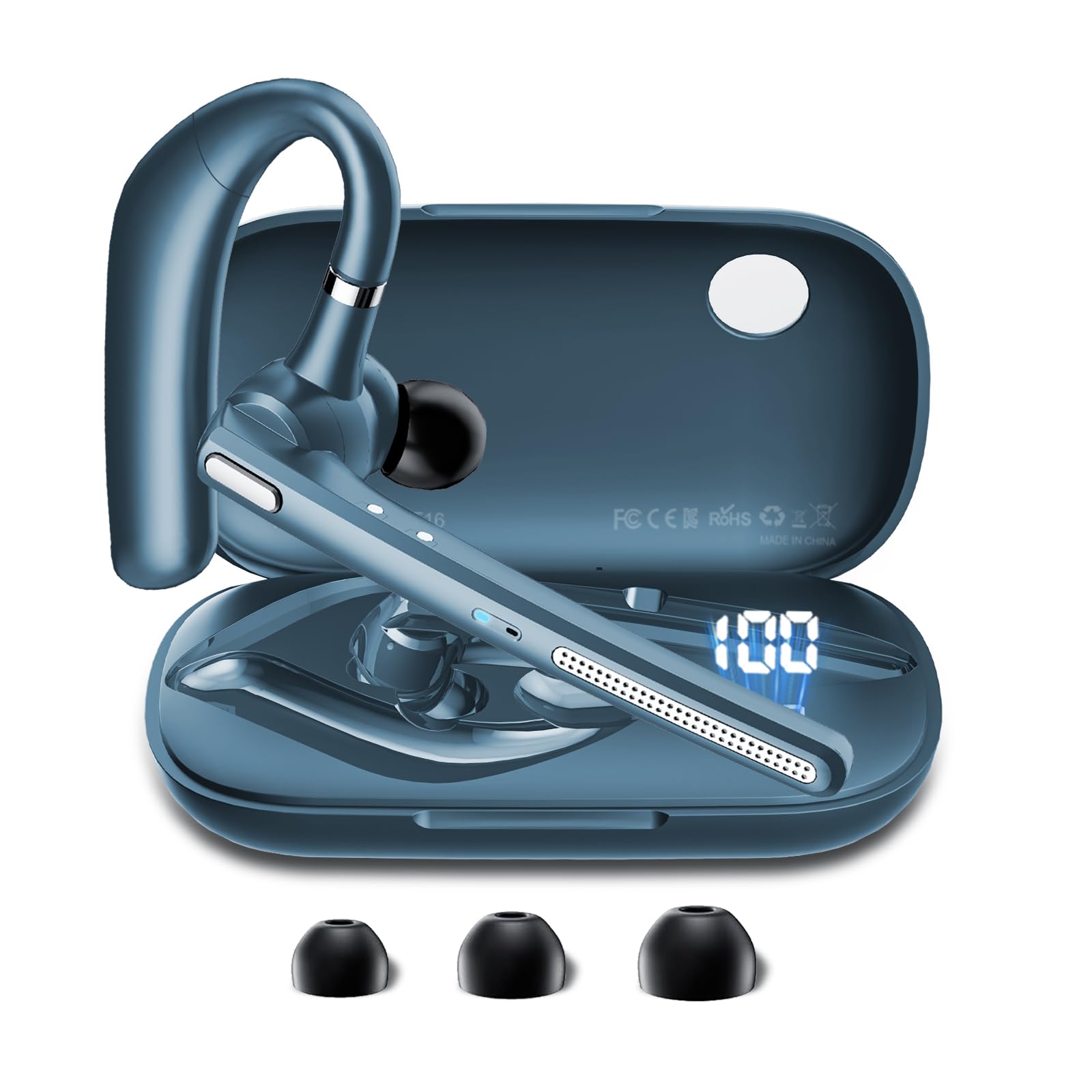
Image: The COTOE G7 Bluetooth Headset (gray) shown with its charging case. The headset features an ergonomic in-ear design, and the charging case is compact.
Ključne komponente:
- Slušalka: The main unit worn in the ear, containing the speaker, microphone, and control buttons.
- Polnilna torbica: Used to store and charge the headset. Features an LED digital display.
- LED digitalni zaslon: Located on the charging case, indicates the charging status of the headset and the power level of the case.
4. Nastavitev
4.1 Polnjenje slušalk in ohišja
- Polnilni kabel USB priključite na polnilno vtičnico na ohišju in na vir napajanja (npr. stenski adapter USB, vrata USB računalnika).
- The LED digital display on the charging case will show the current battery level and charging status.
- Place the headset into the charging case. Ensure proper alignment for charging. The headset's indicator light will show charging status.
- A full charge typically takes approximately 1-2 hours for the headset and 2-3 hours for the charging case.
Opomba: The headset offers up to 12 hours of music playback and the charging case provides 120 hours of standby time.
4.2 Seznanjanje z napravo Bluetooth
- Prepričajte se, da so slušalke napolnjene.
- Take the headset out of the charging case. It will automatically enter pairing mode, indicated by a flashing LED light (usually blue and red).
- On your mobile phone or other Bluetooth-enabled device, go to the Bluetooth settings.
- Iskanje available devices. You should see "COTOE G7" in the list.
- Select "COTOE G7" to connect. Once connected, the headset's LED light will stop flashing and may turn solid blue or turn off.
- Če boste pozvani k vnosu gesla, vnesite »0000« (štiri ničle).
- Slušalke se bodo samodejno ponovno povezale z zadnjo seznanjeno napravo, ko bodo vklopljene in v dosegu.
5. Navodila za uporabo
5.1 Vklop/izklop
- Vklop: Take the headset out of the charging case, or press and hold the Multi-function Button for approximately 3 seconds.
- Ugasniti: Place the headset back into the charging case, or press and hold the Multi-function Button for approximately 5 seconds.
5.2 Upravljanje klicev
- Sprejmi klic: Enkrat pritisnite večnamenski gumb.
- Končaj klic: Med klicem enkrat pritisnite večnamensko tipko.
- Zavrni klic: Pritisnite in držite večfunkcijski gumb približno 2 sekundi.
- Ponovno klicanje zadnje številke: Dvakrat pritisnite večfunkcijski gumb.
5.3 Predvajanje glasbe
- Predvajanje/pavza: Enkrat pritisnite večnamenski gumb.
- Naslednja skladba: Pritisnite in držite gumb za povečanje glasnosti.
- Prejšnja skladba: Pritisnite in držite gumb za zmanjšanje glasnosti.
5.4 Nadzor glasnosti
- Povečajte glasnost: Pritisnite gumb za povečanje glasnosti.
- Zmanjšaj glasnost: Pritisnite gumb za zmanjšanje glasnosti.
5.5 Aktivno odpravljanje hrupa (ANC)
The COTOE G7 features Active Noise Cancellation to reduce ambient noise. To activate or deactivate ANC, locate the dedicated ANC button (if present) or refer to the specific button combination in your quick start guide. Typically, a long press on a designated button toggles ANC.
6. Vzdrževanje
- Čiščenje: Use a soft, dry, lint-free cloth to clean the headset and charging case. Do not use harsh chemicals or abrasive materials.
- Shranjevanje: Ko slušalk ne uporabljate, jih shranite v polnilno ohišje, da jih zaščitite pred prahom in poškodbami. Izogibajte se ekstremnim temperaturam.
- Vzdrževanje baterije: To prolong battery life, avoid fully discharging the headset frequently. Charge it regularly, even if not used for extended periods.
- Vodoodpornost: The headset is not waterproof. Avoid exposure to liquids and moisture.
7. Odpravljanje težav
| Težava | rešitev |
|---|---|
| Slušalke se ne vklopijo. | Ensure the headset is charged. Place it in the charging case to confirm charging. |
| Seznanitev z napravo ni mogoča. | Make sure Bluetooth is enabled on your device. Ensure the headset is in pairing mode. Try restarting both the headset and your device. Clear previous Bluetooth connections on your device. |
| Ni zvoka ali nizka glasnost. | Check the volume levels on both the headset and your connected device. Ensure the headset is properly connected. Try playing different audio sources. |
| Prekinjena povezava. | Ensure the headset is within the effective range of your Bluetooth device (typically 10 meters/33 feet). Avoid obstacles between the headset and device. |
8. Specifikacije
- Znamka: COTOE
- Model: G7
- barva: siva
- Postavitev ušes: V ušesu
- Faktor oblike: V ušesu
- Nadzor hrupa: Aktivno odpravljanje hrupa
- Čas pripravljenosti: Do 120 ur (s polnilnim ohišjem)
- Čas predvajanja glasbe: Do 12 ur (s polnilnim ohišjem)
9. Garancija in podpora
The COTOE G7 Bluetooth Headset comes with a standard manufacturer's warranty. Please refer to the warranty card included in your package for specific terms and conditions.
For technical support, troubleshooting assistance, or warranty claims, please contact COTOE customer service through the retailer where you purchased the product or visit the official COTOE webspletno mesto za kontaktne podatke.