
1. Pomembna varnostna navodila
Pred uporabo te naprave natančno preberite vsa navodila in jih shranite za poznejšo uporabo. Neupoštevanje teh navodil lahko povzroči električni udar, požar ali resne telesne poškodbe.
- Prepričajte se, da je napajalnik voltage se ujema z nalepko z nazivnimi vrednostmi na napravi.
- Ventilatorja ne uporabljajte s poškodovanim kablom ali vtičem. Če je kabel poškodovan, ga mora zamenjati proizvajalec, njegov serviser ali podobno usposobljena oseba, da se izognete nevarnosti.
- Pred čiščenjem, servisiranjem ali premikanjem ventilator vedno izključite iz električne vtičnice.
- Med delovanjem ventilatorja ne vstavljajte prstov ali kakršnih koli predmetov v rešetko.
- Keep the fan away from water or other liquids. Do not use it in wet or damp okoljih.
- Ta naprava je namenjena samo notranji uporabi. Ne uporabljajte na prostem.
- Do not place the fan near heat sources such as radiators, heat registers, stoves, or other appliances that produce heat.
- Otroke nadzorujte in se prepričajte, da se ne igrajo z napravo.
- Do not use the fan in areas where gasoline, paint, or flammable liquids are stored.
2. Izdelek je končanview
The Altus AL 40 TFB is a sleek and efficient tower air cooler designed for indoor use. It features a compact design, multiple speed settings, and easy-to-use push-button controls.
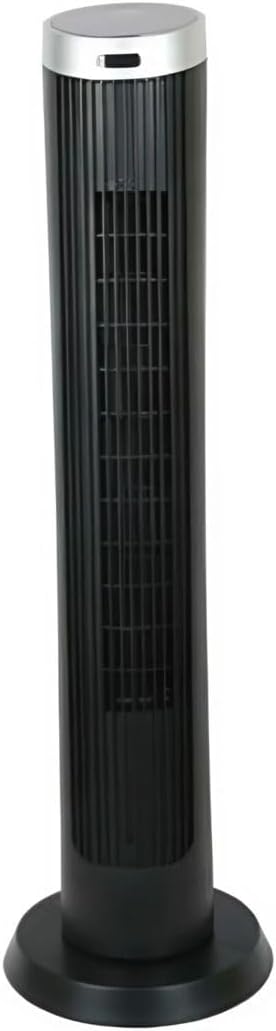
Slika 2.1: Spredaj view of the Altus AL 40 TFB Tower Air Cooler. This image shows the tall, slender black body of the fan with its air outlet grille and a stable round base.
Sestavine:
- Nadzorna plošča: Nahaja se na vrhu enote za enostaven dostop do vseh funkcij.
- Rešetka za izpust zraka: Vertical grille on the front for air dispersion.
- Osnova: Stabilno okroglo podnožje za varno postavitev.
- Napajalni kabel: Nahaja se na zadnji strani enote.

Slika 2.2: Podrobno view of the control panel on top of the Altus AL 40 TFB Tower Air Cooler. The panel features a digital display showing '28' and several push buttons for various functions.
3. Nastavitev
Follow these steps to set up your Altus AL 40 TFB Tower Air Cooler:
- Razpakiraj: Carefully remove the fan from its packaging. Retain the packaging for future storage or transport.
- Osnovna montaža (če je potrebno): Some models may require minor base assembly. If your unit's base is detached, align the base sections and secure them according to the diagrams in the packaging. Ensure it is firmly attached.
- Umestitev: Place the fan on a firm, level surface. Ensure there is adequate space around the fan for proper airflow, at least 30 cm (12 inches) from walls or furniture. This appliance is designed for indoor use only.
- Napajalni priključek: Plug the power cord into a standard electrical outlet. Ensure the outlet meets the voltagZahteve, navedene na etiketi izdelka.
4. Navodila za uporabo
Your Altus AL 40 TFB Tower Air Cooler is equipped with user-friendly push-button controls on the top panel.
Funkcije nadzorne plošče:
- Gumb za prižig (⏻): Press once to turn the fan ON, press again to turn it OFF.
- Gumb za hitrost (💨): Press repeatedly to cycle through the 3 available fan speeds: Low, Medium, and High. The current speed setting may be indicated on the digital display.
- Gumb za način (M): If available, press to select different operating modes (e.g., Normal, Natural, Sleep). Refer to the digital display for the active mode.
- Gumb za oscilacijo (↔): Press to activate or deactivate the oscillation function, which allows the fan to rotate from side to side to distribute air over a wider area.
- Gumb časovnika (🕒): If available, press to set an automatic shut-off timer. Each press typically increases the timer duration by a set increment (e.g., 1 hour).
Splošno delovanje:
- Ventilator priključite v ustrezno vtičnico.
- Pritisnite gumb za vklop (⏻) to turn on the fan.
- Select your desired fan speed using the Speed Button (💨).
- Activate oscillation if desired by pressing the Oscillation Button (↔).
- To turn off the fan, press the Power Button (⏻) znova.
5. Vzdrževanje
Regular maintenance ensures optimal performance and extends the lifespan of your Altus AL 40 TFB Tower Air Cooler.
Čiščenje:
- Pred čiščenjem vedno odklopite ventilator.
- Čiščenje zunanjosti: Zunanje površine ventilatorja obrišite z mehko,amp krpo. Ne uporabljajte abrazivnih čistil, voskov ali loščil, saj lahko poškodujejo površino.
- Rešetke za dovod/izhod zraka: Use a vacuum cleaner with a brush attachment to gently remove dust and debris from the air inlet and outlet grilles. Do not attempt to disassemble the fan for cleaning.
- Preden ventilator ponovno priključite in ga zaženete, se prepričajte, da je popolnoma suh.
Shranjevanje:
Ko ventilatorja dlje časa ne uporabljate, ga shranite na hladnem in suhem mestu. Priporočljivo je, da ga shranite v originalni embalaži, da ga zaščitite pred prahom in poškodbami.
6. Odpravljanje težav
If you encounter any issues with your Altus AL 40 TFB Tower Air Cooler, please refer to the following common problems and solutions:
- Ventilator se ne vklopi:
- Preverite, ali je napajalni kabel varno priključen v delujočo električno vtičnico.
- Ensure the power button on the control panel has been pressed.
- Verify that the household circuit breaker or fuse has not tripped.
- Šibek pretok zraka:
- Check if the fan speed is set to a higher setting.
- Ensure the air inlet and outlet grilles are not blocked by dust or obstructions. Clean them if necessary.
- Nenavaden hrup:
- Prepričajte se, da je ventilator postavljen na stabilno, ravno površino.
- Check for any foreign objects that might have fallen into the fan grilles.
- Če hrup ne preneha, prenehajte z uporabo in se obrnite na podporo strankam.
If the problem cannot be resolved using the above steps, please contact Altus customer support.
7. Specifikacije
Detailed technical specifications for the Altus AL 40 TFB Tower Air Cooler:
| Funkcija | Specifikacija |
|---|---|
| Znamka | Altus |
| Ime modela | AL 40 TFB |
| barva | Črna |
| Dizajn električnega ventilatorja | Floor Fan (Tower Type) |
| Vir napajanja | Električni na kabel |
| Mere izdelka (D x Š x V) | 29 G x 29 Š x 101 V cm |
| Vrsta namestitve | Talni nosilec |
| Vrsta zaključka | Pobarvan |
| Notranja/zunanja uporaba | Notranja |
| Nadzorna metoda | Pritisni gumb |
| Število ravni moči | 3 |
| Brezžično | št |
8. Garancija in podpora
Altus provides comprehensive support for its products. For any assistance or warranty-related inquiries, please contact our customer service.

Slika 8.1: Altus customer service and warranty information. The image displays the Altus logo, a message about service availability, and a contact number for support.
Our services are always available for your Altus products. You can benefit from our door-to-door service by calling our support line for any assistance you may need.
Arçelik Service Warranty: For products under warranty, our home product pickup service is provided free of charge.
Customer Support Line: 0850 210 0 888
Please have your product model number (AL 40 TFB) and purchase details ready when contacting support.