
Uvod
Thank you for choosing the Greadio CD03P Portable Bluetooth CD Player. This manual provides essential information for the safe and efficient operation of your device. Please read it thoroughly before use and retain it for future reference.
The Greadio CD03P is a versatile audio device featuring CD playback, Bluetooth 5.3 connectivity, dual wireless karaoke microphones, dynamic LED lights, and multiple input options including USB, TF card, and AUX. It is powered by a 4000mAh rechargeable battery, offering portability for various environments.
Konec izdelkaview
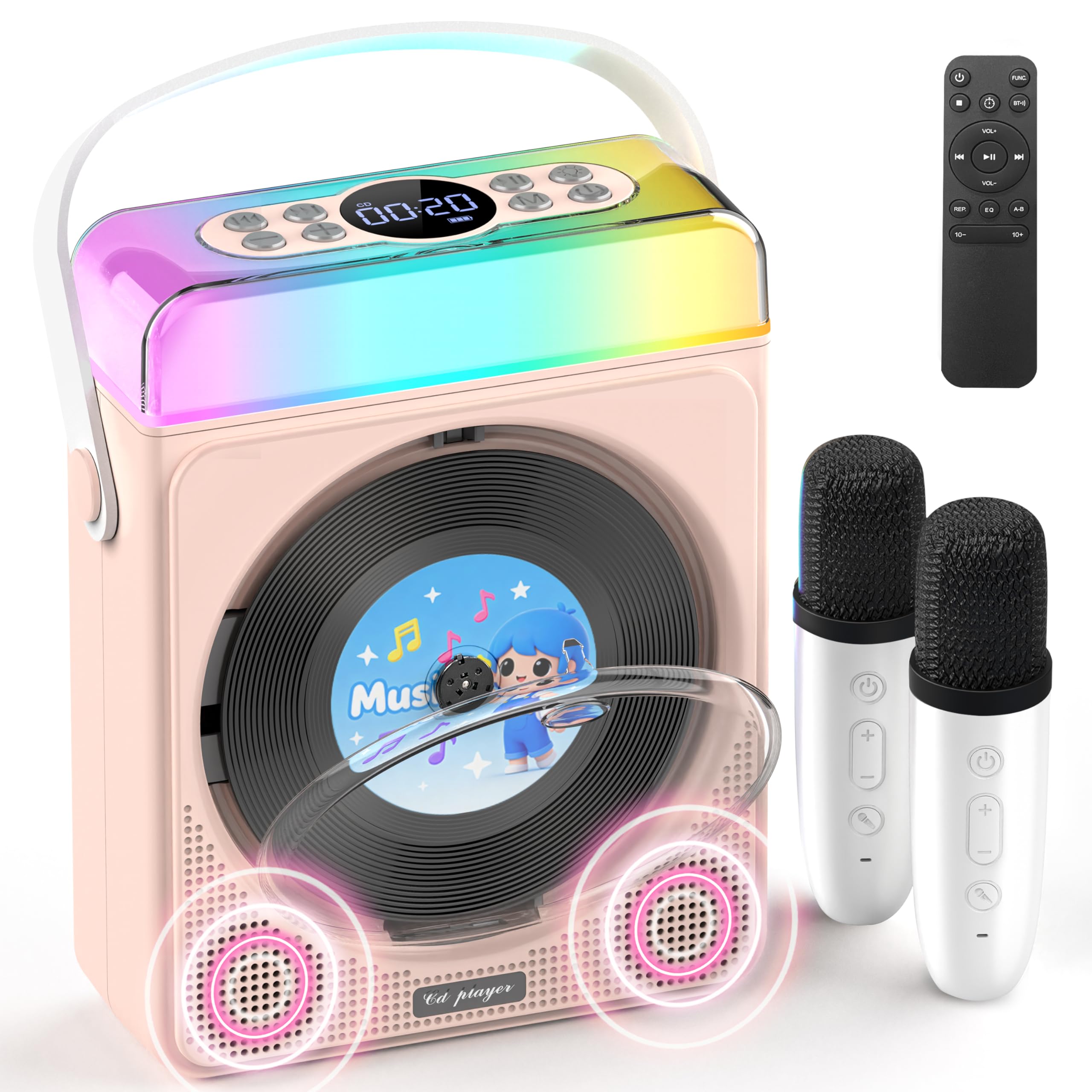
Slika 1: Greadio CD03P Portable Bluetooth CD Player with two microphones and LED lights.

Slika 2: Vrh view of the CD03P showing control buttons and LED light bar.
Vsebina paketa:
- Portable CD Player x 1
- Karaoke mikrofon x 2
- Polnilni kabel Type-C x 1
- Daljinski upravljalnik x 1
- AUX kabel x 1
Nastavitev
Polnjenje naprave:
Before first use, fully charge the CD player using the provided Type-C charging cable. Connect the cable to the Type-C port on the device and a compatible 5V/2A power adapter (not included). The battery indicator on the display will show charging status.
Polnjenje mikrofonov:
The two wireless microphones are rechargeable. Connect them to a power source using their respective charging cables (if provided, or compatible USB cables). Each microphone offers over 30 hours of playtime on a full charge.
Navodila za uporabo
1. Vklop/izklop:
Dolgo pritisnite gumb za vklop (⏻) on the device or remote control to turn the unit on or off.
2. Izbira načina:
Pritisnite M (Mode) button on the device or the FUNC. button on the remote control to cycle through available modes: CD, Bluetooth, USB, TF Card, and AUX.
3. Predvajanje CD-ja:
- Press the release button to open the CD compartment cover.
- Carefully insert a CD (compatible with CD/CD-R/CD-RW/MP3/WMA formats) with the label side facing up.
- Pokrov predala za CD-je trdno zaprite.
- Select "CD" mode using the Mode/FUNC. button. The device will begin loading and playing the CD.
- Uporabite |< in >| buttons for track navigation (short press) or fast forward/rewind (long press).
- Pritisnite ▶|| gumb za predvajanje ali premor.
Opis videoposnetka: This video demonstrates how to play CDs, USB, and TF cards on the Greadio CD03P. It shows inserting a CD, selecting the CD mode, and using playback controls.
4. Bluetooth Connectivity (Receiving Mode):
- Pritisnite M (Mode) button until "Bluetooth" mode is selected. The display will show "BLUE" and a blinking Bluetooth icon.
- On your mobile device, enable Bluetooth and search for "CD03P".
- Select "CD03P" to pair. A confirmation tone will sound upon successful connection.
- Play audio from your mobile device, and it will stream through the Greadio CD03P speakers.
Opis videoposnetka: This video illustrates the Bluetooth receiving mode, showing how to connect a mobile phone to the Greadio CD03P for audio playback.
5. Bluetooth Connectivity (Transmitting Mode):
The CD03P can transmit audio to external Bluetooth speakers or headphones when in CD, USB, TF, or AUX mode (not in Bluetooth receiving mode).
- Ensure the CD03P is in CD, USB, TF, or AUX mode.
- Kratek pritisk na BT button on the remote control. The Bluetooth icon on the display will blink.
- Zunanji Bluetooth zvočnik ali slušalke preklopite v način seznanjanja.
- Once connected, the Bluetooth icon on the CD03P will stop blinking. Audio will now play through the external Bluetooth device.
- To disconnect, short press the BT gumb znova.
Opis videoposnetka: This video demonstrates the Bluetooth transmitting mode, showing how to connect the Greadio CD03P to external Bluetooth speakers or headphones.
6. Predvajanje z USB/TF kartice:
- Insert a USB flash drive into the USB port or a TF card into the TF card slot on the back of the device.
- Pritisnite M (Način) gumb oz FUNC. button on the remote to select "USB" or "TF" mode.
- Naprava bo samodejno zaznala in predvajala združljiv zvok files (MP3/WMA/WAV/APE/FLAC).
- Uporabite |< in >| buttons for track navigation (short press) or fast forward/rewind (long press).
- Pritisnite ▶|| gumb za predvajanje ali premor.
Note: For best performance with USB/TF cards, use 64GB or less. Reformat 128GB cards to FAT32 if needed.
7. AUX vhod:
- Connect an external audio device (e.g., smartphone, MP3 player) to the AUX port on the back of the CD03P using the provided AUX cable.
- Pritisnite M (Način) gumb oz FUNC. button on the remote to select "AUX" mode.
- Play audio from your external device. The sound will be output through the CD03P speakers.
8. Karaoke Microphones:
- Turn on the microphones by pressing their power buttons. They will automatically connect to the CD03P.
- Uporabite +/- buttons on the microphone to adjust microphone volume.
- Pritisnite MIC button on the microphone to cycle through five voice effects: Female, Monster, Baby, Original, and KTV mode.
- Pritisnite Moč button on the microphone to switch between microphone modes (e.g., adjust background music, microphone volume, reverb).
Opis videoposnetka: This video demonstrates how to connect and use the wireless microphones with the Greadio CD03P, including switching voice effects and adjusting settings.
9. LED luči:
- The RGB light (LED1) turns on automatically when the device is powered on.
- Kratek pritisk na Svetloba button on the device or remote to cycle through various light effects: breathing light (red, purple, blue, cyan, green, yellow, orange) and solid colors.
- Dolgo pritisnite Svetloba button to turn the LED lights off.
Opis videoposnetka: This video showcases the dynamic LED light features of the Greadio CD03P, demonstrating how to cycle through different light modes and colors.
10. Nadzor glasnosti:
Uporabite GLASNOST+ in ZV.- buttons on the device or remote control to adjust the main speaker volume.
11. Načini izenačevalnika:
Kratek pritisk na EQ button on the remote control to switch between different equalizer modes (e.g., Pop, Jazz, Classic, Bass, Flat, Rock).
12. Časovnik za spanje:
The CD03P can function as a night light with a sleep timer. Refer to the full user manual for detailed instructions on setting the sleep timer.
Vzdrževanje
- Napravo hranite ločeno od vode in vlage.
- Napravo očistite z mehko, suho krpo. Ne uporabljajte abrazivnih čistil ali topil.
- Naprave ne izpostavljajte ekstremnim temperaturam ali neposredni sončni svetlobi.
- Do not press the CD base directly.
- Ko naprave dalj časa ne uporabljate, jo shranite na hladnem in suhem mestu.
Odpravljanje težav
| Težava | Možen vzrok | rešitev |
|---|---|---|
| Naprava se ne vklopi. | Težava z nizko baterijo ali napajanjem. | Napravo popolnoma napolnite. Prepričajte se, da je polnilni kabel pravilno priključen. |
| CD se ne predvaja ali preskakuje. | CD je umazan, opraskan ali nepravilno vstavljen. | Clean the CD with a soft cloth. Ensure the CD is inserted correctly with the label side up. Try a different CD. |
| Bluetooth seznanjanje ne uspe. | Device is not in Bluetooth mode or too far from the paired device. | Ensure the CD03P is in Bluetooth receiving mode. Move devices closer. Disconnect from other Bluetooth devices. |
| Mikrofon ne deluje. | Microphone is off, uncharged, or out of range. | Turn on the microphone. Charge the microphone. Ensure it is within range of the CD03P. |
| Brez zvoka. | Glasnost je prenizka ali utišana. Izbran je napačen način. | Increase volume. Check if the device is muted. Ensure the correct input mode (CD, Bluetooth, USB, TF, AUX) is selected. |
| Naprava se ne odziva. | Začasna programska napaka. | Use a thin object to press the PONASTAVI button on the back of the device. |
Specifikacije
| Funkcija | Podrobnost |
|---|---|
| Številka modela | CD03P |
| Dimenzije izdelka | 6.81 x 2.52 x 8.15 palcev |
| Teža predmeta | 1.97 funtov |
| Kapaciteta baterije | 4000 mAh (za ponovno polnjenje) |
| Povezljivost | Bluetooth 5.3, USB, TF kartica, AUX |
| Združljivost s CD-ji | CD/CD-R/CD-RW/MP3/WMA |
| Vključene komponente | Portable CD Player, 2 Karaoke Microphones, Type-C Charging Cable, Remote Control, AUX Cable |
Garancija in podpora
Greadio products come with a full year of coverage. For any issues or support needs, please contact Greadio customer service. Refer to the official Greadio webZa kontaktne podatke glejte spletno mesto ali dokumentacijo o nakupu.
Note: This device is designed for personal and recreational use. Any unauthorized modifications or misuse may void the warranty.