
1. Uvod
Thank you for choosing the monTEK Single Monitor Arm with USB (Model: MA1007UCBK). This adjustable monitor desk mount is designed to enhance your workspace ergonomics and efficiency. It supports a wide range of flat or curved screens from 17 to 45 inches, with a maximum load capacity of 35.27 lbs (16 kg), and is compatible with VESA 75x75mm and 100x100mm standards. Featuring full motion adjustments, integrated cable management, and convenient USB 3.0 ports, this monitor arm provides a versatile and clutter-free setup.

Image: monTEK Single Monitor Arm with USB, showcasinnjegovo zasnovo in lastnosti.
2. Varnostne smernice
- Pred namestitvijo in uporabo natančno preberite vsa navodila.
- Ensure your monitor's weight and VESA pattern are within the specified limits.
- Do not overtighten screws during assembly to avoid damage.
- Always hold the monitor arm horizontally when adjusting spring tension.
- Med namestitvijo hranite otroke in hišne ljubljenčke proč.
- Če naletite na kakršne koli težave, glejte razdelek za odpravljanje težav ali se obrnite na podporo strankam.
3. Specifikacije izdelka
| Funkcija | Podrobnost |
|---|---|
| Znamka | monTEK |
| Model | MA1007UCBK |
| Material | Aluminij |
| barva | Črna |
| Združljiva velikost zaslona | 17" to 45" (Flat or Curved) |
| Največja nosilnost | 35.27 lbs (16 kg) |
| Združljivost VESA | 75x75 mm, 100x100 mm |
| Vrsta namestitve | C-Clamp / Grommet |
| Debelina mize (C-Clamp/Grommet) | 0.39" - 2" (10-50mm) |
| Vrsta gibanja | Tilt, Swivel, Rotate, Height Adjustment |
| Razpon nagiba | +90° do -45° |
| Vrtljiv domet | ±90° |
| Območje vrtenja | ±180° |
| Območje nastavitve višine | 8.8" - 20.4" |
| Razširitev obsega | 22.6" - 24.5" |
| Integrated Ports | USB 3.0 |

Image: Detailed compatibility and installation requirements for the monitor arm.
4. Vodič za namestitev
The monTEK Single Monitor Arm offers two installation methods: C-Clamp and Grommet mounting. All necessary hardware is included.
4.1. Izberite način montaže

Image: Visual guide for C-Clamp and Grommet mounting, indicating compatible desk thickness.
4.2. Namestitev po korakih
For a comprehensive visual guide, please refer to the installation video below.
Video: Official monTEK Single Monitor Arm Installation Guide. This video demonstrates the complete setup process from mounting the base to attaching the monitor.
- Namestite osnovo: Secure the chosen base (C-Clamp or Grommet) to your desktop according to the instructions provided in the package. Ensure it is tightly fastened to prevent movement.
- Assemble the Arms: Connect the arm segments to the mounted base. Use the provided tools to secure the connections.
- Attach the Monitor: Secure the VESA plate to the back of your monitor. Then, slide the monitor with the attached VESA plate onto the arm's mounting head. Ensure the monitor is securely locked in place.

Image: Three easy steps for quick monitor arm installation.
5. Delovanje in nastavitve
The monTEK monitor arm offers full motion capabilities for optimal viewudobje.

Slika: Konecview of the monitor arm's flexible adjustment ranges.
5.1. Height Adjustment (Spring Tension)
The arm features a built-in spring tension mechanism for effortless height adjustment. If the arm rises or drops unexpectedly, you may need to adjust the tension.
- Če se roka dvigne: Turn the adjustment screw towards the "-" direction (counter-clockwise) to decrease tension.
- Če roka pade: Turn the adjustment screw towards the "+" direction (clockwise) to increase tension.
Note: Always hold the monitor arm horizontally before and during adjustment to prevent sudden movement.

Image: Guide to adjusting the mechanical spring tension.
Video: How to Adjust Your Monitor Arm Spring. This video provides a visual demonstration of adjusting the arm's tension.
Video: Tips for Adjusting Your Monitor Arm and Screen. This video offers additional guidance on fine-tuning your monitor's position.
5.2. Tilt, Swivel, and Rotation
Once the monitor is mounted and tension is adjusted, you can freely manipulate its position:
- Nagib: Adjust the screen angle from +90° to -45° to reduce glare and optimize viewing.
- Vrtljiva: Rotate the screen horizontally up to ±90° for easy sharing or viewz različnih zornih kotov.
- Vrtenje: Rotate the screen 360° (±180°) to switch between landscape and portrait modes.
6. Ključne značilnosti
6.1. Integrated USB Ports
The monitor arm's base includes integrated USB 3.0 ports for convenient charging of smartphones, game gear, and high-speed data transfer.
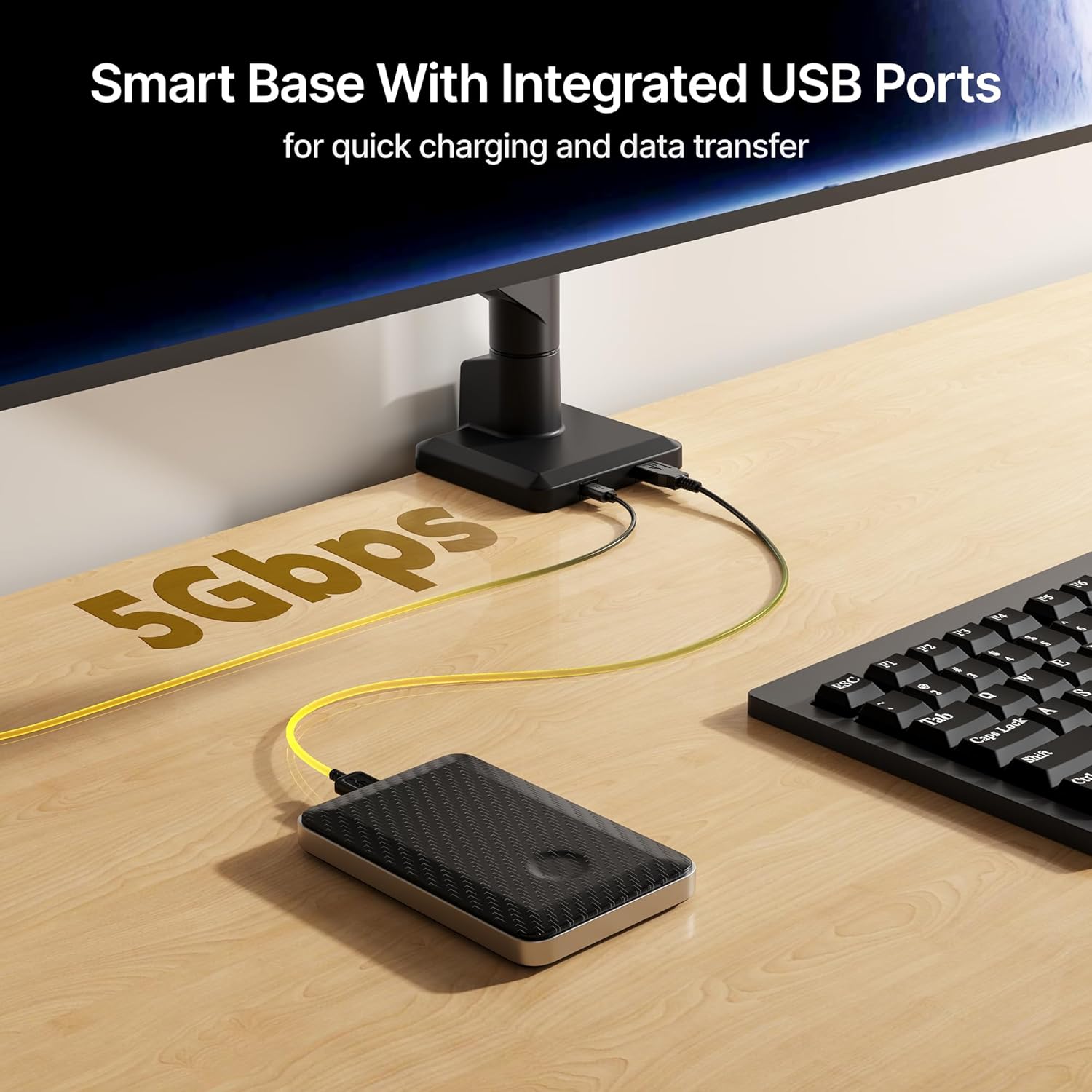
Image: Smart base with integrated USB ports for quick charging and data transfer.
6.2. Upravljanje kablov
Keep your workspace tidy and clutter-free with the integrated cable management system. Cables can be routed along the arm to maintain a clean aesthetic.

Image: Demonstrating effective cable management for a tidy desk.
7. Nega in vzdrževanje
- Redno preverjajte vse vijake in povezave, da se prepričate, da so trdno priviti.
- Držalo monitorja očistite z mehko krpoamp krpo. Izogibajte se abrazivnim čistilom ali topilom.
- Ne prekoračite največje dovoljene nosilnosti 35.27 kg (16 lbs).
8. Odpravljanje težav
8.1. Monitor Arm Not Staying in Place (Sagging or Rising)
This is typically due to incorrect spring tension for your monitor's weight. Refer to the "Height Adjustment (Spring Tension)" section (5.1) and the videos provided to adjust the tension screw. Remember to hold the arm horizontally during adjustment.
8.2. Monitor Screen Sagging or Stiff Movement
If the screen itself is sagging or feels stiff when tilting, swivel, or rotating, check the tightness of the screws at the VESA plate connection point. Tighten or loosen as needed to achieve desired movement.
9. Garancija in podpora
monTEK products are designed for durability and performance. For any questions regarding your monitor mount, please reach out to the monTEK customer support team. Contact information can typically be found on the product packaging or the official monTEK webmesto.