
1. Uvod
Thank you for choosing the Schneider 43A1 4K UHD LED TV. This television combines advanced display technology with smart features to provide an immersive viewing experience. Featuring a 4K Ultra High Definition display, QLED-LCD technology with Direct LED backlighting, and the VIDAA Smart TV platform, your new TV offers vibrant colors, deep blacks, and access to a wide range of entertainment.
This manual provides essential information for the safe and efficient use of your television. Please read it thoroughly before operating the device and retain it for future reference.
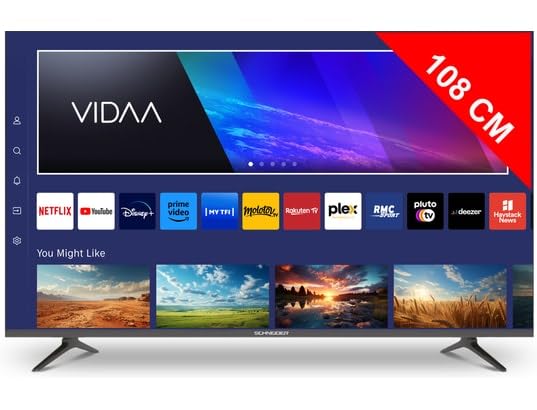
Slika 1.1: Spredaj view of the Schneider 43A1 TV with VIDAA interface.
2. Varnostne informacije
Za zagotovitev varnega delovanja in preprečevanje poškodb upoštevajte naslednje varnostne ukrepe:
- Umestitev: Position the TV on a stable, level surface. Avoid placing it in direct sunlight, near heat sources, or in environments with high humidity or dust.
- Prezračevanje: Ensure adequate ventilation around the TV. Do not block ventilation openings. Maintain a minimum distance of 10 cm from walls or other objects.
- Napajanje: Uporabljajte le navedeno napajalno enoto voltage. Ensure the power cord is not pinched or walked on. Disconnect the power plug during lightning storms or when unused for extended periods.
- Čiščenje: Pred čiščenjem izključite televizor iz električnega omrežja. Uporabite mehko, suho krpo. Ne uporabljajte tekočih ali aerosolnih čistil.
- Tekočine: Do not expose the TV to dripping or splashing liquids. Do not place objects filled with liquids, such as vases, on the TV.
- otroci: Supervise children to ensure they do not climb on the TV or furniture.
- Montaža na steno: If wall-mounting, use a VESA compatible bracket (200 x 200 mm) and ensure proper installation by qualified personnel to prevent injury.
3. Vsebina paketa
Prosimo, preverite, ali so vsi predmeti prisotni in v dobrem stanju:
- Schneider 43A1 4K UHD LED TV
- Daljinski upravljalnik
- Napajalni kabel
- TV stojalo (2 kosa)
- Vijaki za TV stojalo
- Uporabniški priročnik (ta dokument)
4. Nastavitev
4.1 Razpakiranje
Carefully remove the TV from its packaging. It is recommended to keep the original packaging for potential future transport or service needs.
4.2 Namestitev stojala
If you are not wall-mounting the TV, attach the included stand pieces to the bottom of the TV using the provided screws. Ensure the stand is securely fastened before placing the TV upright.
4.3 Stenska montaža (neobvezno)
The Schneider 43A1 is compatible with VESA 200 x 200 mm wall mounts. For safe installation, it is highly recommended to use a professional installer. Refer to your wall mount's instructions for specific details.
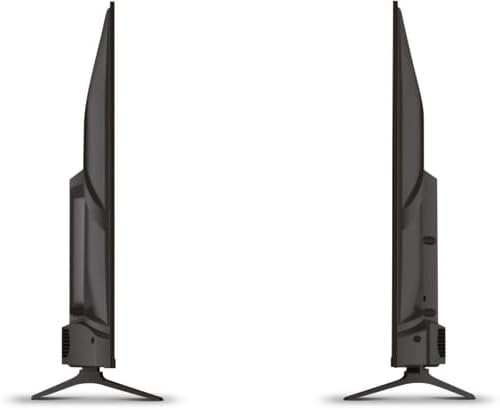
Slika 4.1: Stran view of the Schneider 43A1 TV, illustrating its profile for placement or wall mounting.
4.4 Priključitev zunanjih naprav
Vaš televizor ponuja različne možnosti povezljivosti:
- HDMI: Connect up to three HDMI 2.0 devices (e.g., Blu-ray player, game console, set-top box) to the HDMI ports.
- USB: Two USB ports are available for connecting USB storage devices to play media.
- AV/Audio Input: For older devices requiring composite video and stereo audio.
- Koaksialni izhod: Za priklop zunanjega avdio sistema.
- Vhod za anteno/kabel: Connect your antenna or cable TV signal for DVB-T/T2/C/S2 reception.
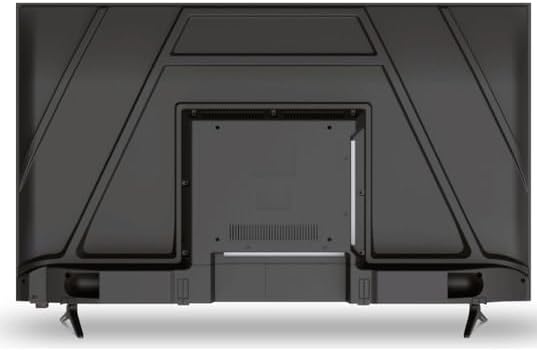
Slika 4.2: Zadaj view of the Schneider 43A1 TV, highlighting connection ports.
4.5 Priključitev napajanja
Plug the power cable into the TV's power input, then into a suitable wall outlet.
4.6 Čarovnik za začetno nastavitev
Upon first power-on, the TV will guide you through an initial setup process. This includes selecting your language, connecting to a Wi-Fi network, and scanning for available channels (DVB-T/T2/C/S2).
5. Delovanje
5.1 Funkcije daljinskega upravljalnika
Daljinski upravljalnik vam omogoča navigacijo po funkcijah televizorja:
- Gumb za vklop: Vklopi ali izklopi TV.
- Povečanje/zmanjšanje glasnosti: Prilagodi raven zvoka.
- Kanal gor/dol: Menjava televizijskih kanalov.
- Vnos/vir: Selects the input source (HDMI, USB, TV Tuner).
- Gumbi za krmarjenje: Za navigacijo po meniju.
- Gumbi pametnega televizorja: Direct access to popular apps like Netflix, Prime Video, YouTube.
5.2 Smart TV (VIDAA)
The integrated VIDAA Smart TV platform provides access to a variety of applications and streaming services. Connect your TV to the internet via Wi-Fi to enjoy features like Netflix, Prime Video, and YouTube. Bluetooth connectivity allows for wireless connection to compatible audio devices.

Slika 5.1: Nagnjena sprednja stran view of the Schneider 43A1 TV, displaying the VIDAA Smart TV interface.
5.3 Izbira vnosa
Press the 'Input' or 'Source' button on your remote control to switch between connected devices (HDMI 1, HDMI 2, HDMI 3, USB, AV, TV Tuner).
5.4 Nastavitve slike in zvoka
Access the TV's menu to adjust picture and sound settings. The 4K UHD resolution, QLED-LCD technology, and Direct LED backlighting ensure a high-quality visual experience. The TV also features upscaling to enhance lower-resolution content. Audio is delivered via 2 x 8 W RMS stereo speakers with Dolby Audio support.
5.5 PC Monitor Mode
The TV can be used as a PC monitor by connecting your computer via an HDMI cable. This mode optimizes the display for computer use.
6. Vzdrževanje
6.1 Čiščenje televizorja
Before cleaning, ensure the TV is unplugged from the power outlet.
- zaslon: Zaslon nežno obrišite z mehko krpo, ki ne pušča vlaken. Za trdovratne madeže rahlo obrišiteampkrpo obrišite z vodo ali specializiranim čistilom za zaslone (ne pršite neposredno na zaslon).
- Zunanjost: Za brisanje televizorja uporabite mehko, suho krpoasing. Izogibajte se abrazivnim čistilom ali topilom.
6.2 Posodobitve programske opreme
Your TV may receive software updates to improve performance and add new features. Ensure your TV is connected to the internet to receive these updates automatically or check for them manually through the settings menu.
7. Odpravljanje težav
Če imate težave s televizorjem, si oglejte naslednje pogoste težave in rešitve:
- Brez napajanja:
- Preverite, ali je napajalni kabel varno priključen v televizor in stensko vtičnico.
- Prepričajte se, da stenska vtičnica deluje (preizkusite z drugo napravo).
- Pritisnite gumb za vklop na daljinskem upravljalniku ali na samem televizorju.
- Brez slike/zvoka:
- Preverite, ali je izbran pravilen vhodni vir (npr. HDMI 1, TV).
- Preverite vse kabelske povezave med televizorjem in zunanjimi napravami.
- Prepričajte se, da glasnost ni utišana ali nastavljena na minimum.
- Če uporabljate anteno, preverite povezavo antene in izvedite skeniranje kanalov.
- Daljinski upravljalnik ne deluje:
- Zamenjajte baterije v daljinskem upravljalniku.
- Prepričajte se, da med daljinskim upravljalnikom in infrardečim senzorjem televizorja ni ovir.
- Smart TV/Network Issues:
- Preverite svoj Wi-Fi usmerjevalnik in internetno povezavo.
- Go to the TV's network settings to re-connect to your Wi-Fi network.
- Znova zaženite televizor in usmerjevalnik.
Če težava po poskusu teh rešitev še vedno obstaja, se obrnite na podporo strankam.
8. Specifikacije
| Funkcija | Specifikacija |
|---|---|
| Model | Schneider 43A1 |
| Velikost zaslona | 109 cm (43 palcev) |
| Resolucija | 4K Ultra HD (3840 x 2160 slikovnih pik) |
| Tehnologija zaslona | QLED-LCD with Direct LED Backlight |
| Kontrastno razmerje | 1100:1 |
| Svetlost | 200 cd/m² |
| Avdio izhod | 2 x 8 W RMS Stereo |
| Avdio tehnologija | Dolby Audio |
| Vrata HDMI | 3 (HDMI 2.0) |
| Vrata USB | 2 |
| Drugi vhodi | AV/Audio Input |
| Izhodi | Koaksialni izhod |
| sprejemnik | DVB-T/T2/C/S2 |
| Pametna TV platforma | VIDAA (Netflix, Prime Video, YouTube) |
| Brezžična povezljivost | Wi-Fi, Bluetooth |
| Združljivost VESA | 200 x 200 mm |
| Teža | 7.5 kilogramov |