
EDUP AX600M
Uporabniški priročnik za USB WiFi 6 adapter EDUP AX600M
Model: AX600M
Konec izdelkaview
The EDUP USB WiFi 6 Adapter AX600M is a compact, dual-band wireless network adapter designed to provide high-speed Wi-Fi 6 connectivity for your PC, laptop, or desktop. It supports the latest 802.11ax standard, offering enhanced performance for streaming, gaming, and video conferencing.

Image: The EDUP USB WiFi 6 Adapter AX600M, a compact black dongle with a gold USB connector and a blue Wi-Fi signal icon.
Ključne značilnosti:
- Hitrost WiFi naslednje generacije 6: Up to 286Mbps on 5.8GHz and 286Mbps on 2.4GHz for smooth performance.
- Kompaktna zasnova: Built-in antenna, ideal for portable use and tight spaces.
- Plug & Play: Easy driver installation, compatible with Windows 11/10/7.
- Izboljšana varnost: Supports WEP, WPA-PSK, WPA2-PSK, and WPA3-PSK encryption.
- Vsestranski načini: Supports Ad-Hoc and Infrastructure modes.
Vsebina paketa
Preverite, ali so v paketu vsi elementi:
- 1x EDUP WiFi Adapter (AX600M)
Če kateri koli predmet manjka ali je poškodovan, se obrnite na podporo strankam.
Vodnik za namestitev
Follow these steps to install and set up your EDUP USB WiFi 6 Adapter AX600M:
- Step 1: Insert the WiFi Adapter
Insert the EDUP USB WiFi adapter into an available USB port on your desktop or laptop computer. Ensure it is fully seated in the port.
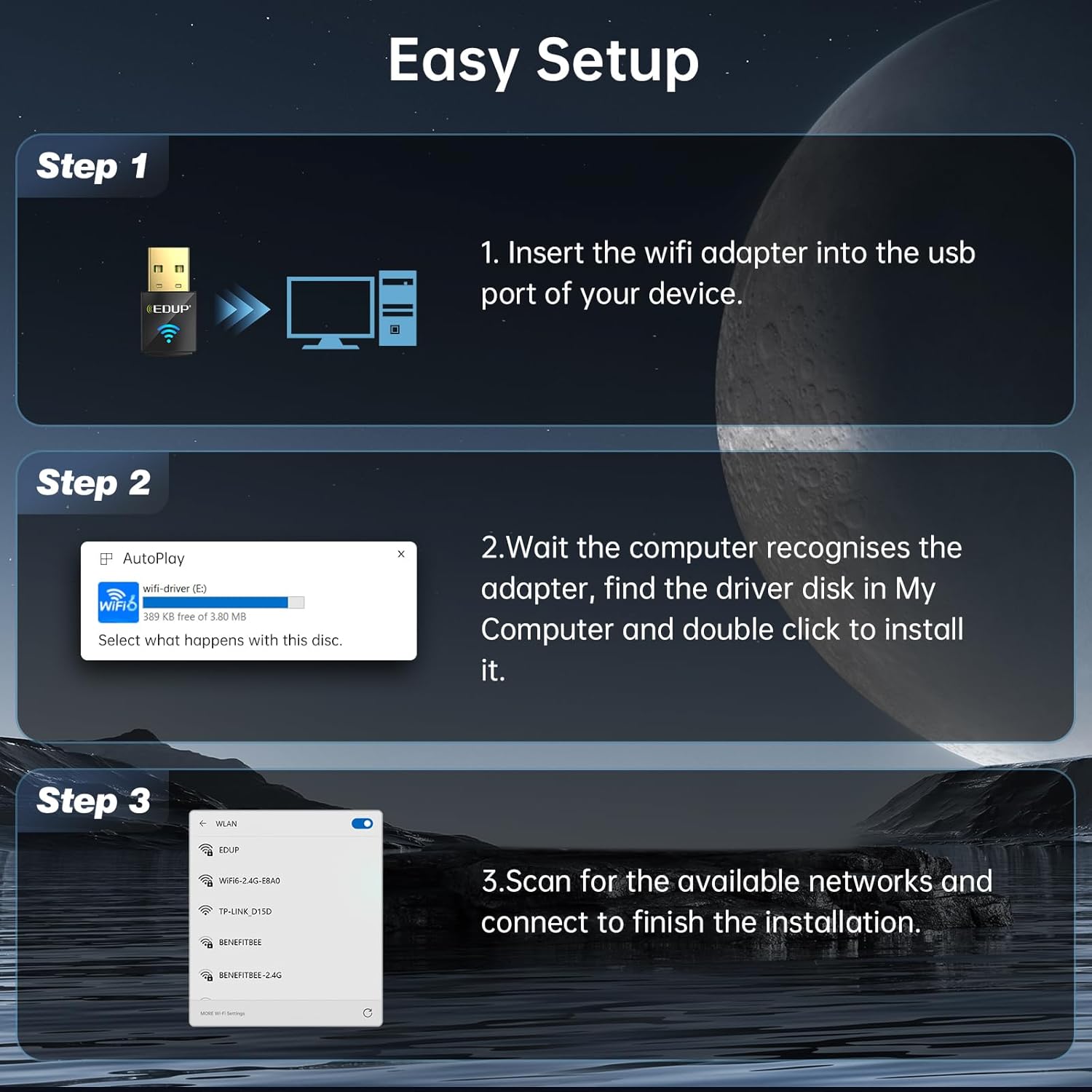
Image: Diagram showing the EDUP USB WiFi adapter being inserted into a computer's USB port.
- 2. korak: Namestitev gonilnika
Most Windows 11/10/7 systems will automatically detect the adapter and install the necessary drivers. If an auto-play prompt appears, follow the on-screen instructions to install the driver from the adapter's virtual disk. If no prompt appears, navigate to "My Computer" or "This PC", locate the new drive (often labeled "wifi-driver" or similar), and double-click to run the installer.

Image: Screenshot of a Windows auto-play prompt for driver installation, indicating compatibility with Windows 7, 10, and 11.
- 3. korak: Povežite se z omrežjem
Once the driver is installed, your computer will recognize the adapter. Scan for available wireless networks, select your desired network, and enter the password to connect. The adapter supports both 2.4GHz and 5GHz bands.

Image: Graphic illustrating the dual-band capabilities of the adapter, showing 5GHz (286Mbps) and 2.4GHz (286Mbps) coverage.
Navodila za uporabo
Wi-Fi Receive Mode
In Wi-Fi Receive Mode, the adapter allows your computer to connect to existing wireless networks, providing internet access and network connectivity. This is the primary mode of operation for most users.
Wi-Fi Hotspot Mode (Soft AP)
The adapter can also function as a Wi-Fi Hotspot (Soft AP), allowing your computer to share its internet connection with other devices. This is useful for creating a personal Wi-Fi network when only a wired connection is available on your computer.
- To enable Hotspot Mode, refer to your operating system's network settings (e.g., Mobile hotspot settings in Windows).
- Ensure your computer has an active internet connection (e.g., Ethernet) to share.

Image: Graphic illustrating the adapter's capability to function in both Wi-Fi Receive Mode (connecting to a network) and Wi-Fi Hotspot Mode (sharing internet).
Tehnologija MU-MIMO
The EDUP AX600M adapter supports MU-MIMO (Multi-User, Multiple-Input, Multiple-Output) technology. When paired with a MU-MIMO compatible router, this technology allows the router to communicate with multiple devices simultaneously, improving network efficiency and reducing latency, especially in environments with many connected devices.

Image: Diagram comparing MU-MIMO router communication with the EP-AX600 adapter versus a regular adapter, showing improved simultaneous data flow.
Vzdrževanje
To ensure optimal performance and longevity of your EDUP USB WiFi 6 Adapter AX600M, follow these simple maintenance guidelines:
- Vzdržujte čisto: Zunanjost adapterja redno čistite z mehko, suho krpo. Izogibajte se uporabi tekočih čistil ali topil.
- Pravilno shranjevanje: Ko adapterja ne uporabljate, ga shranjujte na hladnem in suhem mestu, stran od neposredne sončne svetlobe in ekstremnih temperatur.
- Izogibajte se telesnim poškodbam: Do not drop, bend, or expose the adapter to excessive force.
- Posodobitve gonilnikov: Regularly check for updated drivers on the EDUP official webspletno mesto, da se zagotovi združljivost in izboljšave delovanja.
Odpravljanje težav
If you encounter issues with your EDUP USB WiFi 6 Adapter AX600M, refer to the following common troubleshooting steps:
| Težava | Možna rešitev |
|---|---|
| Računalnik ni zaznal adapterja. |
|
| Ni mogoče vzpostaviti povezave z omrežjem Wi-Fi. |
|
| Počasne hitrosti Wi-Fi-ja. |
|
| Driver installation failed. |
|
If the problem persists, please contact EDUP customer support for further assistance.
Specifikacije
| Funkcija | Podrobnost |
|---|---|
| Model | AX600M |
| Brezžični standard | IEEE 802.11ax (Wi-Fi 6) |
| Frekvenčni pas | Dvojni pas (2.4 GHz in 5.8 GHz) |
| Hitrost prenosa podatkov | Do 286 Mb/s (2.4 GHz), do 286 Mb/s (5.8 GHz) |
| Strojni vmesnik | USB 2.0 |
| Združljive naprave | Namizni računalnik, prenosni računalnik |
| Združljivost operacijskega sistema | Windows 11/10/7 |
| Varnostno šifriranje | WEP, WPA-PSK, WPA2-PSK, WPA3-PSK |
| Dimenzije izdelka | 0.64 x 0.3 x 1.22 palca (16.26 x 7.62 x 30.99 mm) |
| Teža predmeta | 0.705 unče (20 grama) |
| Delovna temperatura | 0 °C do 70 °C (32 °F do 158 °F) |
| Temperatura shranjevanja | -40 °C do 70 °C (-40 °F do 158 °F) |
Garancija in podpora strankam
EDUP provides a 3-letna garancija proizvajalca za zamenjavo for the USB WiFi 6 Adapter AX600M. Additionally, a 90-day no-questions-asked return policy je ponujeno.
For any issues, questions, or support needs, please contact EDUP customer support via Amazon message. Our team is committed to providing prompt assistance and solutions.
You can also visit the official EDUP store on Amazon for more information and products: EDUP Amazon Store
Ask a question about this manual
Ask about setup, troubleshooting, compatibility, parts, safety, or missing instructions. Manuals+ will review the question and use this page’s manual context to help answer it.