
1. Uvod
This manual provides essential information for the proper setup, operation, and maintenance of your Veout 15.6-inch Portable Monitor. Please read these instructions thoroughly before using the product to ensure optimal performance and longevity.
2. Vsebina paketa
Preverite, ali so v embalaži izdelka prisotni vsi spodaj navedeni elementi:
- 1 x prenosni monitor
- 1 x kabel USB-A v USB-C
- 1 x USB-C v USB-C kabel
- 1 x Mini HDMI v HDMI kabel
- 1 x uporabniški priročnik

Figure 2.1: Included accessories with the portable monitor.
3. Izdelek je končanview
The Veout portable monitor features a 15.6-inch IPS display with a slim profile and integrated kickstand for versatile use.
3.1 Fizične značilnosti

Slika 3.1: Spredaj view of the Veout 15.6-inch Portable Monitor.

Slika 3.2: Zadaj view highlighting connectivity ports.

Slika 3.3: Stranski profesionalecfile demonstrating the monitor's thin design.
3.2. Vrata in krmilniki
- Full-Function USB-C Ports: For video, audio, data, and power delivery with a single cable.
- Vrata Mini-HDMI: For video and audio input. Requires external power via USB-C when used.
- 3.5 mm avdio priključek: Za priklop zunanjih slušalk ali zvočnikov.
- Control Wheel/Buttons: Used for adjusting volume, brightness, and navigating the On-Screen Display (OSD) menu.
3.3 Integrirano stojalo
The monitor features a foldable kickstand for stable positioning at various viewing kotov.
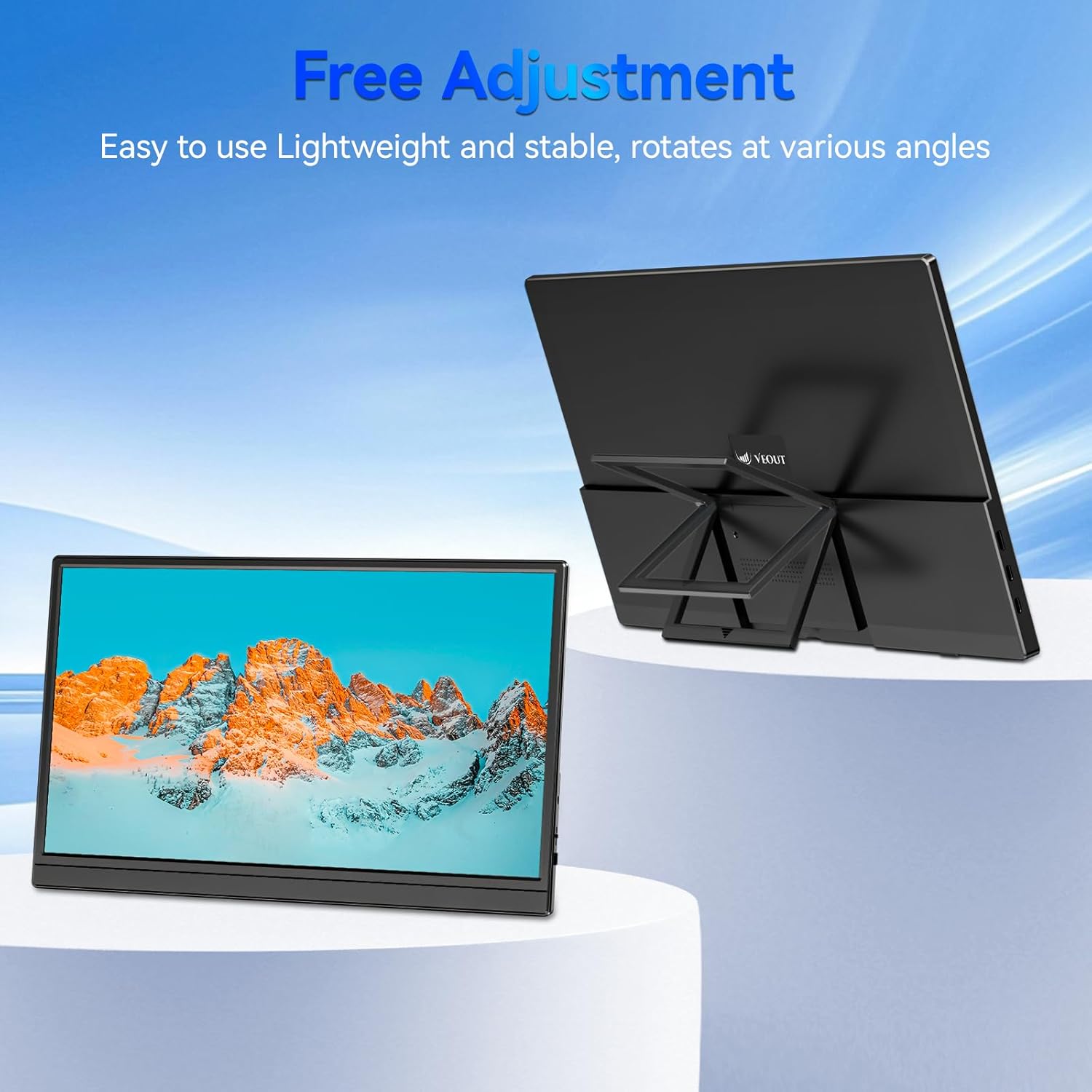
Figure 3.4: Monitor with kickstand for adjustable viewing.
4. Nastavitev
The Veout portable monitor supports plug-and-play functionality, requiring no driver installation for most devices.
4.1. Povezovanje z napravo
- USB-C Connection (Single Cable):
- Connect one end of the USB-C to USB-C cable to a full-function USB-C port on your laptop, smartphone, or other compatible device.
- Connect the other end of the USB-C to USB-C cable to one of the full-function USB-C ports on the portable monitor.
- This connection provides video, audio, and power to the monitor.
- HDMI Connection (Requires Additional Power):
- Connect one end of the Mini-HDMI to HDMI cable to the Mini-HDMI port on the monitor.
- Connect the other end of the Mini-HDMI to HDMI cable to the HDMI port on your device.
- For power, connect the USB-A to USB-C cable or a USB-C to USB-C cable from your device's USB port or a power adapter (not included) to one of the monitor's USB-C ports.
4.2. Positioning the Monitor
Deploy the integrated kickstand to position the monitor on a flat surface. Adjust the angle for optimal viewing. The monitor can be used in both landscape and portrait orientations.

Figure 4.1: Monitor used in portrait mode for document viewing.
5. Navodila za uporabo
5.1. Načini prikaza
Ko je naprava povezana z računalnikom, lahko način prikaza konfigurirate v nastavitvah zaslona operacijskega sistema:
- Copy Mode (Mirror Display): Duplicates your primary screen's content onto the portable monitor. Useful for presentations or sharing content.
- Razširjeni način: Extends your desktop across both screens, providing additional workspace for multitasking.
- Second Screen Only Mode: Displays content only on the portable monitor, with the primary device's screen turned off.
5.2. Prilagajanje nastavitev
The monitor features an intuitive control mechanism for quick adjustments:
- Prilagoditev svetlosti: Scroll the control wheel up or down to instantly adjust screen brightness.
- Prilagoditev glasnosti: Scroll the control wheel up or down to instantly adjust speaker volume.
- OSD meni: Press the control wheel or designated button to access the On-Screen Display menu for advanced settings like color, contrast, and input source selection.
5.3. Tehnologija za nego oči
The monitor incorporates advanced eye-care technology designed to reduce blue light emission and screen flicker, promoting comfortable viewmed daljšo uporabo.
6. Vzdrževanje
To maintain your monitor's performance and appearance, follow these guidelines:
- Čiščenje zaslona: Zaslon nežno obrišite z mehko krpo, ki ne pušča vlaken. Za trdovratne madeže rahlo obrišiteampKrpo sperite z vodo ali raztopino za čiščenje zaslona. Izogibajte se agresivnim kemikalijam ali abrazivnim materialom.
- Čiščenje C-jaasing: Za čiščenje monitorja uporabite mehko, suho krpoasing.
- Shranjevanje: When not in use, store the monitor in a cool, dry place, preferably in its original packaging or a protective sleeve.
- Izogibajte se tekočinam: Do not expose the monitor to excessive moisture or spill liquids directly onto it.
7. Odpravljanje težav
Če imate težave z monitorjem, si oglejte naslednje pogoste težave in rešitve:
| Težava | Možen vzrok | rešitev |
|---|---|---|
| Ni prikaza/sporočilo »Ni signala« | Nepravilna kabelska povezava, nezadostna moč, napačen vhodni vir. | Ensure cables are securely connected. If using HDMI, ensure a separate power source is connected to the monitor's USB-C port. Check your device's display settings to ensure the monitor is detected and enabled. Select the correct input source via the OSD menu. |
| Utripajoči zaslon | Loose cable connection, incompatible resolution/refresh rate, power fluctuations. | Reconnect cables. Adjust display resolution or refresh rate on your connected device. Ensure stable power supply. |
| Iz zvočnikov monitorja ni zvoka | Monitor volume too low, incorrect audio output selected on device. | Increase monitor volume using the control wheel. On your connected device, ensure the portable monitor is selected as the audio output device. |
| Monitor se ne vklopi | No power supply, faulty cable. | Ensure the monitor is receiving power via a USB-C connection from a compatible device or power adapter. Try a different USB-C cable. |
8. Specifikacije
| Funkcija | Podrobnost |
|---|---|
| Številka modela izdelka | Veout-15.6 |
| Velikost zaslona | 15.6 palcev |
| Resolucija | 1920 x 1080 slikovnih pik (FHD 1080p) |
| Razmerje stranic | 16:9 |
| Vrsta plošče | IPS |
| Površina zaslona | Mat |
| Dimenzije izdelka | 1.97 x 13.78 x 11.02 palcev |
| Teža predmeta | 3.08 funtov |
| Vhodna voltage | 5V |
| Nazivni tok | 3A |
| Izhodna moč | 5.5 W |
| Proizvajalec | Guangdong Zhanwei electronic Technology Co., LTD |

Figure 8.1: Product information and certification details.
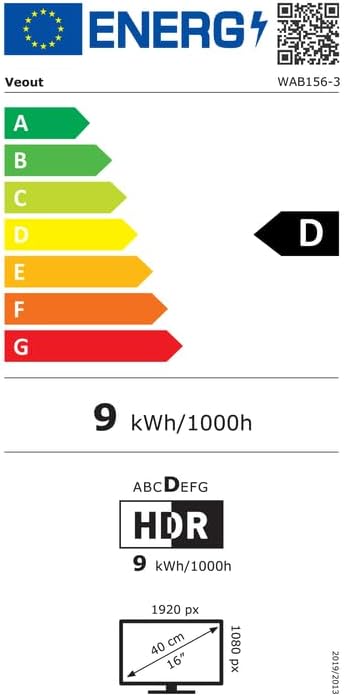
Figure 8.2: EU Energy Label for model WAB156-3. For more details, visit eprel.ec.europa.eu/qr/2209122.
9. Garancija in podpora
Your Veout Portable Monitor is backed by a 12-month warranty from the date of purchase. We are committed to providing customer service and support.
- Garancijska doba: 12 mesecev
- Politika vračila: 30-dnevna garancija vračila denarja
- Storitev za stranke: Available 24 hours

Slika 9.1: Informacije o garanciji in podpori.
For technical assistance or warranty claims, please contact Veout customer support at support@veout.com.
