
SIXTOP 4 Core 4+128G
SIXTOP 4+128G Android 15 Car Radio User Manual
For Renault Clio 3rd Generation (2005-2014)
1. Uvod
Thank you for choosing the SIXTOP 4+128G Android 15 Car Radio. This device is designed to enhance your driving experience with advanced features including Wireless CarPlay, Android Auto, GPS navigation, Bluetooth 5.0, FM/RDS radio, and more. This manual provides essential information for installation, operation, maintenance, and troubleshooting to ensure optimal performance and user satisfaction. Please read this manual thoroughly before installation and use.
2. Vsebina paketa
Prosimo, preverite, ali so v vašem paketu priloženi vsi spodaj navedeni artikli:
- 1 x Car Player Unit
- 2 x napajalni kabli
- 1 x GPS antena
- 1 x vhodni kabel za zadnjo kamero
- 1 x zadnja kamera
- 1 x RCA kabel
- 2 x USB kabli
- 2 x pritrdilni nosilci
- 4 x Vijaki
- 1 x uporabniški priročnik
- 1 x Canbus Box
- 1 x namestitveno orodje
- 1 x Radijska antena
- 1 x Radio Adapter Cable
- 1 x Antenna Adapter
- Dodatni dodatki
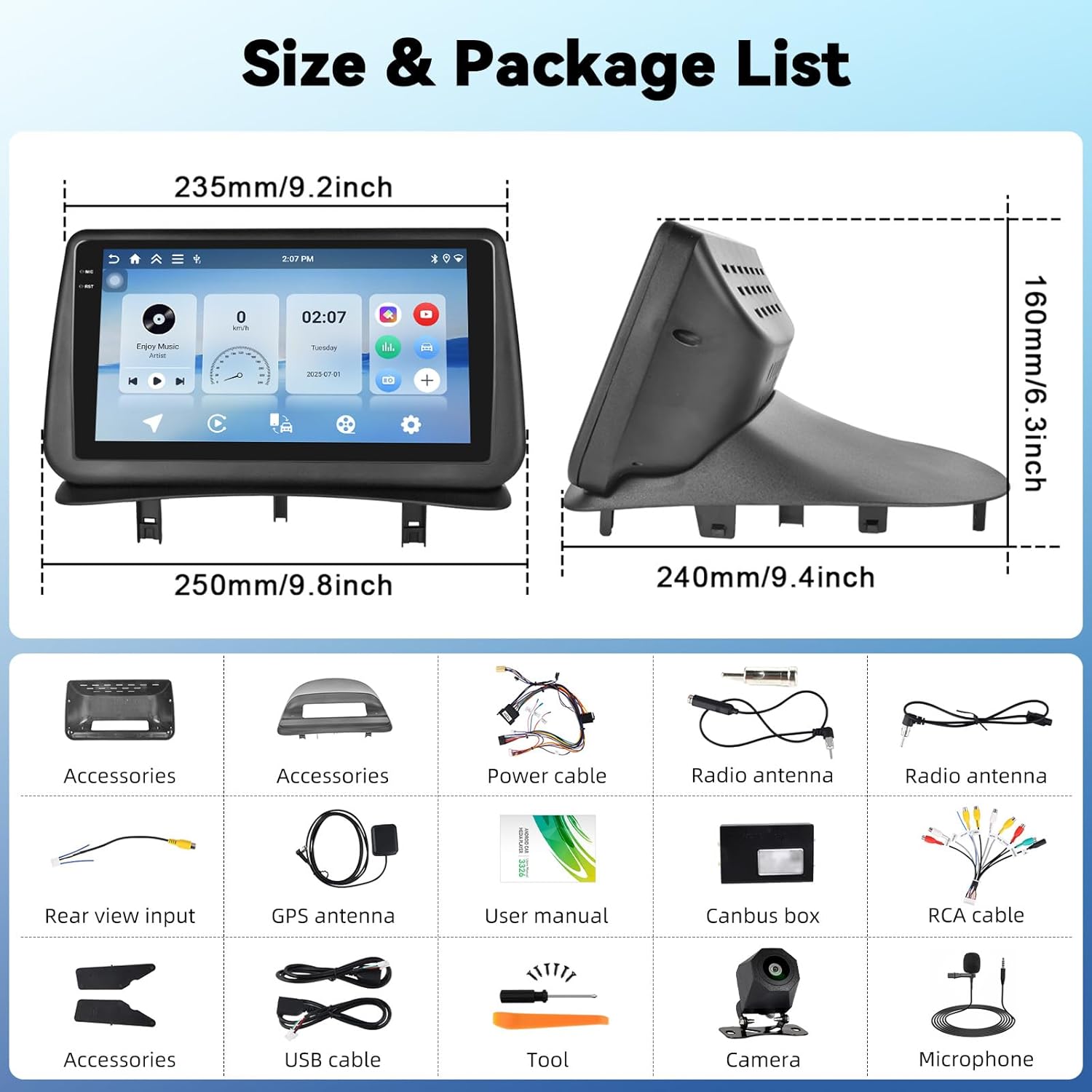
This image displays the dimensions of the car radio unit and a visual representation of all components included in the package.
3. Nastavitev in namestitev
This car radio is specifically designed for Renault Clio 3rd Generation models manufactured between 2005 and 2014. Professional installation is recommended to ensure proper functionality and avoid damage to your vehicle or the unit.
3.1 Združljivost vozil
Ensure your vehicle dashboard matches the compatible models for seamless integration.

This image illustrates the appearance of the SIXTOP car radio installed in a Renault Clio 3 dashboard, contrasting it with the original setup.
3.2 Žične povezave
Carefully connect all cables according to the wiring diagram provided in the separate installation guide. Key connections include:
- Napajalni kabli: Connect to the vehicle's power supply.
- GPS antena: Namestite na mesto z jasnim view neba za optimalen sprejem signala.
- Radijska antena: Connect for FM/RDS reception.
- USB kabli: Za prenos podatkov in polnjenje.
- RCA kabel: For audio/video output to external devices.
- Canbus Box: Integrate with vehicle's CAN-BUS system for steering wheel controls and other functions.
- Vhod za zadnjo kamero: Connect the included rear camera for parking assistance.
4. Navodila za uporabo
4.1 Brezžični CarPlay in Android Auto
Connect your iPhone or Android smartphone wirelessly to access navigation, make calls, listen to music, and send/receive messages directly from the car radio display. This feature ensures a safe and convenient driving experience.

This image demonstrates the wireless CarPlay and Android Auto functionalities, including hands-free calling, music playback, and app integration.
4.2 MirrorLink
MirrorLink allows you to project your smartphone screen onto the car radio display. Connect your smartphone via USB or Wi-Fi to use your favorite apps, such as music and video players, on the larger screen.
4.3 GPS navigacija
The unit features a built-in GPS module supporting both online and offline maps. For offline maps, an internet connection is required initially to download map data. Enjoy real-time traffic updates and voice guidance for accurate navigation.

This image displays the GPS navigation interface with various map applications and illustrates the WiFi connection for browsing and downloading apps.
4.4 Povezava Wi-Fi
With integrated Wi-Fi, you can connect to your phone's hotspot to browse the internet, stream videos (e.g., YouTube), listen to music (e.g., Spotify), and download additional applications directly to the car radio.
4.5 Bluetooth 5.0
The Bluetooth 5.0 function enables clear hands-free calls, phonebook synchronization, and wireless music streaming from your smartphone. This ensures you stay connected while driving.

This image highlights the Bluetooth 5.0 features for hands-free communication and music streaming, as well as the FM/RDS radio interface.
4.6 FM/RDS radio
Enjoy your favorite radio stations with the built-in FM/RDS tuner. It supports automatic channel search and station memory, providing an immersive audio experience.
4.7 Upravljanje na volanu (SWC)
The unit supports the original steering wheel control learning function. This allows you to control volume, change tracks, and manage other functions without taking your hands off the steering wheel, enhancing safety.

This image illustrates the steering wheel control learning function and the AHD rear view camera input with parking guidelines.
4.8 AHD Rear View Vnos kamere
The car radio supports AHD/CVBS rear camera input. When reversing, the rear image automatically displays on the screen, making parking safer and more convenient. A rear camera is included in the package.
4.9 Funkcija razdeljenega zaslona
Utilize the split-screen function to run two applications simultaneously. For example, you can have navigation on one side and music playback on the other, improving multitasking capabilities.

This image shows the split-screen functionality, allowing two applications to run concurrently, and the graphic equalizer interface for sound customization.
4.10 Funkcija EQ
The integrated equalizer (EQ) allows you to adjust sound effects, reduce noise, and enhance audio quality, providing a personalized and immersive listening experience.
5. Vzdrževanje
Za zagotovitev dolge življenjske dobe in optimalnega delovanja vašega avtomobilskega radia upoštevajte ta navodila za vzdrževanje:
- Čiščenje: Za čiščenje zaslona in zunanjosti uporabite mehko, suho krpo. Izogibajte se abrazivnim čistilom ali topilom.
- Posodobitve programske opreme: Redno preverjajte in nameščajte posodobitve programske opreme, da zagotovite učinkovito delovanje sistema in najnovejše funkcije.
- Temperatura: Izogibajte se dolgotrajnemu izpostavljanju enote ekstremnim temperaturam, tako vročim kot mrzlim.
- Ugasniti: Turn off the unit before turning off your vehicle's ignition to prevent potential data corruption.
6. Odpravljanje težav
Če naletite na kakršne koli težave, si oglejte naslednje pogoste težave in rešitve:
| Težava | Možen vzrok | rešitev |
|---|---|---|
| Enota se ne vklopi | Ohlapna napajalna povezava, pregorela varovalka, težave z akumulatorjem vozila. | Check power cables, inspect fuses, verify vehicle battery voltage. |
| Brez zvoka | Volume too low, incorrect audio source, speaker wiring issue. | Povečajte glasnost, izberite pravilen vir zvoka in preverite povezave zvočnikov. |
| GPS ne deluje | GPS antenna not properly connected or positioned, no map data. | Zagotovite, da ima antena GPS jasno nebo view, check connection, download offline maps if needed. |
| Težave s povezavo Bluetooth | Bluetooth ni omogočen, naprave ni mogoče zaznati, motnje. | Ensure Bluetooth is on for both devices, make device discoverable, try re-pairing. |
| Kontrole na volanu se ne odzivajo | Canbus box not connected, SWC learning not completed. | Check Canbus connection, perform SWC learning procedure in settings. |
Če težava po poskusu teh rešitev še vedno obstaja, se obrnite na podporo strankam.
7. Specifikacije
| Funkcija | Podrobnost |
|---|---|
| Sistem | Android 15 |
| Material zaslona | Incell Touch Screen |
| Velikost zaslona | 9 palcev |
| Ločljivost zaslona | 1280*720 |
| RAM + ROM | 4 GB RAM + 128 GB ROM |
| Hitrost procesorja | 1.5 GHz |
| Različica Bluetooth | 5.0 |
| Radijski čip | UMW2652 |
| Radijska skupina | FM/RDS |
| Izhodna moč | 4*45 W (Max 180W) |
| Delovna zvezatage | 9V-16V |
| Delovna temperatura | -20 ℃ do 70 ℃ |
| Vhod za zadnjo kamero | AHD/CVBS |
| USB vmesnik | Dvojna vrata USB |
| Avdio formati | APE/FLAC/WAV/MP3/WMA, etc. |
| Video formati | MKV/RMVB/AVI/MP4/MDV, etc. |
| Formati slik | PNG/JPEG/JPG/GIF/WBMP/BNP, etc. |
| Podprti jeziki | Chinese, English, French, Italian, Korean, Japanese, Arabic, Spanish, Portuguese, Russian, Turkish, Vietnamese, Hebrew, Polish, German |
| Teža | 3.35 kilogramov |
8. Garancija in podpora
8.1 Informacije o garanciji
Your SIXTOP car radio comes with a 2-letna garancija. In case of any manufacturing defects or issues covered under warranty, please contact our customer service.
8.2 Politika vračila
Ponujamo a Politika 30-dnevnega vračila for eligible products. Please refer to the retailer's return policy for detailed terms and conditions.
8.3 Podpora strankam
For technical assistance, troubleshooting, or warranty claims, please contact SIXTOP customer support. We aim to provide a response within 24 hours and offer lifetime technical support.
You can typically find contact information on the retailer's website or within the product packaging. For Amazon purchases, you can click on the seller's name (e.g., "xinshunhangdianpu") and then select "Ask a question" to reach us directly.

This image illustrates the process of contacting seller support through the Amazon platform.
Ask a question about this manual
Ask about setup, troubleshooting, compatibility, parts, safety, or missing instructions. Manuals+ will review the question and use this page’s manual context to help answer it.