
Uvod
Thank you for choosing the T'nB FMCT10 Bluetooth FM Transmitter. This device allows you to stream music from your smartphone, make hands-free calls, and charge your devices directly through your vehicle's audio system. It features Bluetooth 5.0, multiple charging ports (USB-C 30W, USB-A 18W, USB-A 5W), and a noise-cancelling microphone for clear communication. Please read this manual carefully before use to ensure proper operation and to maximize your experience.
Varnostne informacije
- Naprave ne razstavljajte ali spreminjajte.
- Keep away from water, moisture, and extreme temperatures.
- Naprave ne izpostavljajte neposredni sončni svetlobi dalj časa.
- Ne uporabljajte ostrih kemikalij ali abrazivnih čistil.
- Ensure the device is securely plugged into the cigarette lighter socket to prevent dislodgement during driving.
- Vedno dajte prednost varni vožnji. Naprave ne upravljajte na način, ki bi vas odvračal od ceste.
Vsebina paketa
- T'nB FMCT10 Bluetooth FM Transmitter
- Uporabniški priročnik
Konec izdelkaview
The T'nB FMCT10 is designed to enhance your in-car audio experience and connectivity. It integrates several functions into one compact device.
Ključne značilnosti:
- Bluetooth 5.0 for stable wireless connection.
- Hands-free calling with noise-cancelling microphone.
- Multiple charging ports: USB-C (30W PD), USB-A (18W QC3.0), USB-A (5W).
- Music playback via Bluetooth, USB drive (up to 64GB), or AUX input.
- Automatic FM station search (87.6-107.8 MHz).
- Bass Boost function for enhanced audio.

Slika: konecview of the T'nB FMCT10 FM Transmitter, showing the cigarette lighter plug, the central control knob, and the three charging ports (USB-C PD30W, USB QC3.0, and a standard USB port).
Nastavitev
- Vstavite v avtomobilsko vtičnico: Plug the FMCT10 into your vehicle's 12V-24V cigarette lighter socket. The device will power on automatically.
- Nastavite FM frekvenco:
- Nastavite avtoradio na prazno FM frekvenco (frekvenco brez močnega oddajnega signala).
- On the FMCT10, press the "CH" button (or similar frequency adjustment button) and then use the navigation buttons (or rotary knob) to match the frequency displayed on the transmitter to your car radio's frequency. The device also supports automatic station search.

Slika: Illustration showing a smartphone pairing with "FMCT10" via Bluetooth, and a hand adjusting the car radio frequency to match the transmitter's display.
- Seznani Bluetooth:
- Omogočite Bluetooth na pametnem telefonu ali drugi zvočni napravi.
- Iskanje available devices and select "FMCT10" to pair. Once paired, a voice prompt will confirm the connection.
- Namestitev mikrofona: The external magnetic microphone can be attached to a convenient location in your vehicle for optimal voice pickup during calls. Use the adhesive backing to secure it.

Slika: Close-up of the magnetic noise-cancelling microphone, showing its compact design and indicating its noise reduction capability.
Navodila za uporabo
Predvajanje glasbe
The FMCT10 supports three modes for music playback: Bluetooth, USB drive, and AUX input.

Slika: Diagram illustrating the three connection modes: Bluetooth for wireless streaming, USB-A port for music via USB drive, and AUX input for wired audio connection.
- Bluetooth pretakanje: Once paired with your smartphone, music will automatically stream through your car's speakers via the selected FM frequency. Use your phone or the transmitter's buttons to control playback (play/pause, next/previous track).
- Predvajanje z USB pogona: Insert a USB flash drive (up to 64GB) containing MP3/WMA/WAV/FLAC files into the designated USB-A port (often marked with a music note icon). The device will automatically detect and play music from the drive.
- AUX vhod: Connect an audio device (e.g., MP3 player) to the AUX port on the FMCT10 using a 3.5mm audio cable.
Prostoročno telefoniranje
When your phone is connected via Bluetooth, you can manage calls directly through the FMCT10.
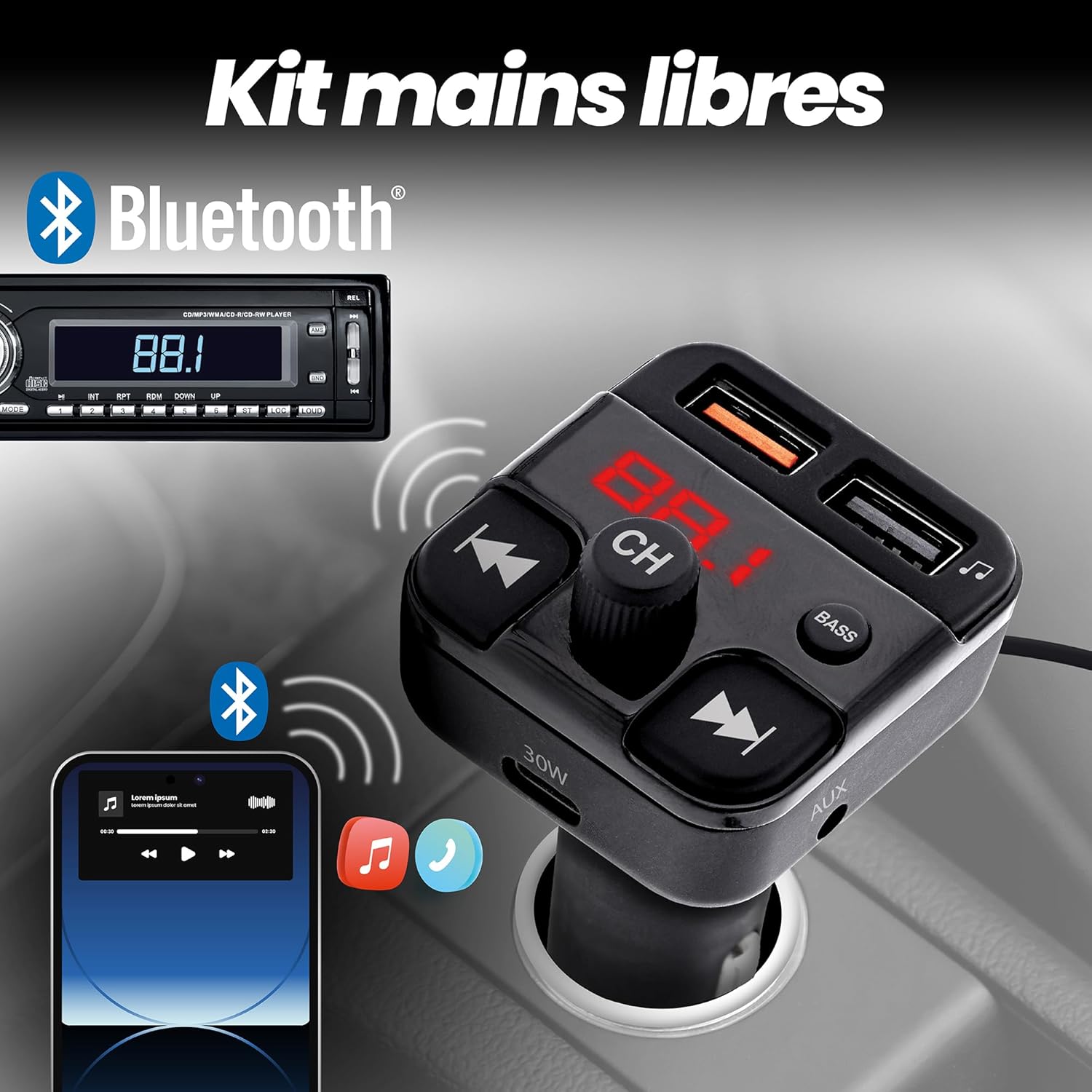
Slika: Depiction of the FMCT10 in a car, showing a smartphone connected via Bluetooth for hands-free calls and music playback through the car's radio.
- Sprejmi/končaj klic: Press the multi-function button (usually the central knob or a dedicated phone button) once to answer an incoming call or end an ongoing call.
- Zavrni klic: Pritisnite in držite večfunkcijski gumb, da zavrnete dohodni klic.
- Ponovno klicanje: Dvakrat pritisnite večfunkcijski gumb, da ponovno pokličete zadnjo številko.
Polnilne naprave
The FMCT10 is equipped with three charging ports to power your devices.
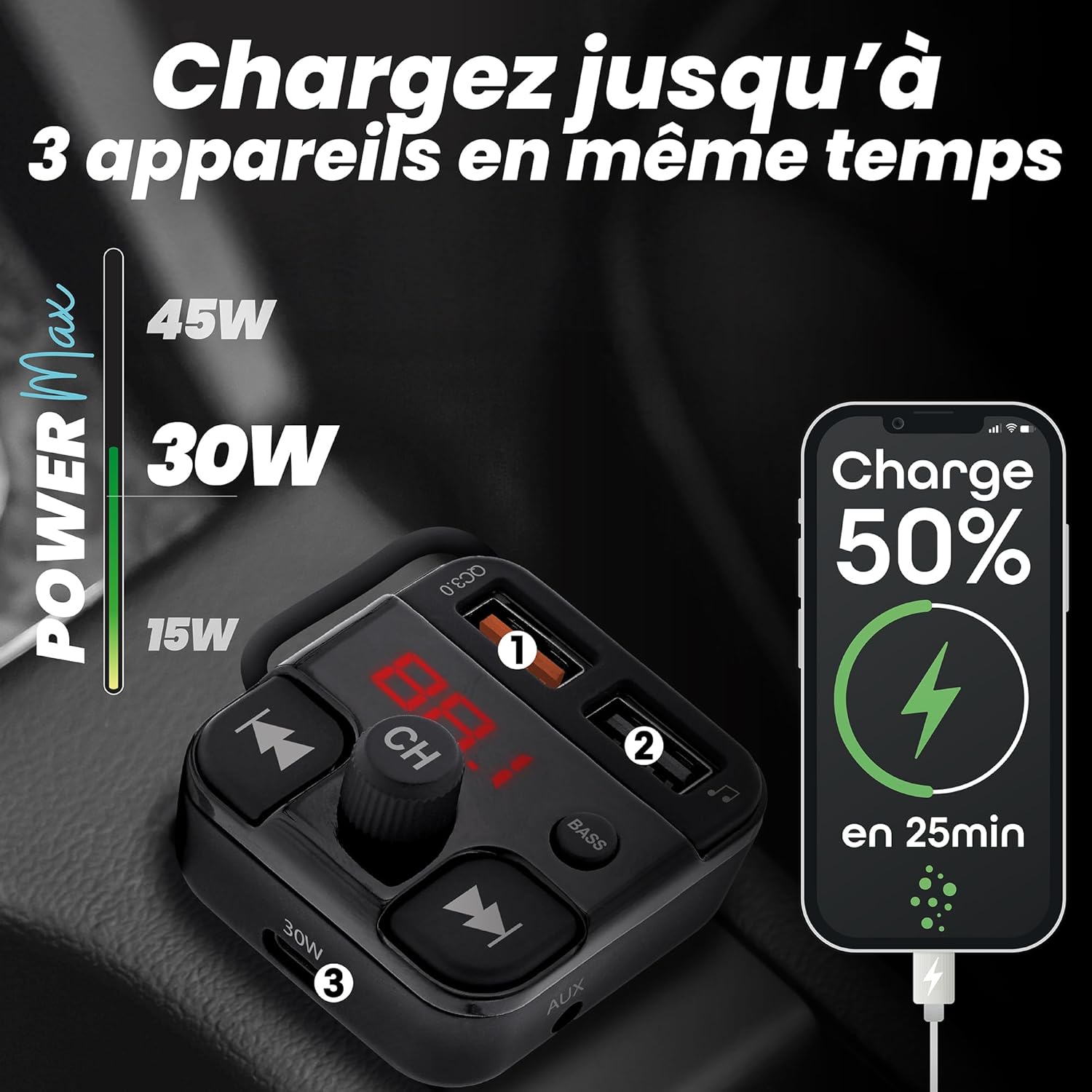
Slika: Visual representation of the FMCT10 charging three devices simultaneously, highlighting the fast charging capabilities (e.g., 50% charge in 25 minutes).
- USB-C PD 30W: Za naprave, ki so združljive s hitrim polnjenjem.
- USB-A QC 18W: For Quick Charge compatible devices.
- USB-A 5 W: Standard charging port.
All functions of the product can be used while charging your phone.
Funkcija za ojačanje nizkih tonov
Press the "BASS" button on the transmitter to activate or deactivate the bass boost feature for a more dynamic listening experience.

Slika: Close-up of the "BASS" button on the FMCT10, with an illustration of sound waves indicating enhanced bass.
Vzdrževanje
- Napravo očistite z mehko in suho krpo.
- Do not use liquid cleaners or sprays.
- Ensure the cigarette lighter socket and USB ports are free of dust and debris.
Odpravljanje težav
| Težava | Možen vzrok | rešitev |
|---|---|---|
| No power to the transmitter. | Loose connection; vehicle's cigarette lighter socket is faulty; vehicle's fuse is blown. | Ensure the transmitter is firmly plugged in. Check if the car's cigarette lighter socket is working with another device. Check the vehicle's fuse box. |
| Slaba kakovost zvoka/statika. | FM frequency interference; volume too low/high; Bluetooth connection issue. | Find a clearer FM frequency on your car radio and transmitter. Adjust volume on both the transmitter and car radio. Re-pair Bluetooth. |
| Povezava Bluetooth se ne vzpostavi. | Bluetooth not enabled on phone; device not in pairing mode; interference. | Ensure Bluetooth is enabled on your phone. Restart the transmitter and your phone. Try pairing again. |
| Polnjenje je počasno ali ne deluje. | Cable issue; device not compatible with fast charging; port malfunction. | Use a different charging cable. Ensure your device supports the fast charging protocols (PD/QC). Try a different charging port. |
Specifikacije
- Ime modela: FMCT10
- Znamka: T'nB
- vir energije: Electric (12V-24V car cigarette lighter socket)
- Različica Bluetooth: 5.0
- FM frekvenčni razpon: 87.6-107.8 MHz
- Izhod USB-C: 30W napajanje (PD)
- USB-A Output 1 (QC3.0): 18W hitro polnjenje
- Izhod USB-A 2: 5W
- Skupna največja moč: 38 W
- USB Drive Support: Do 64 GB
- Povezljivost: Bluetooth, USB Type A, USB Type C, AUX
- Število vrat: 3 (2x USB-A, 1x USB-C)
- Posebne lastnosti: Hands-free kit, Noise-cancelling microphone, Bass Boost, Automatic station search
- Država izvora: Kitajska
Garancija
Ta izdelek je opremljen z 2-letna garancija proizvajalcaProsimo, shranite dokazilo o nakupu za uveljavljanje garancije. Garancija krije napake v materialu in izdelavi pri normalni uporabi. Ne krije škode, ki jo povzroči nepravilna uporaba, nesreče, nepooblaščene spremembe ali običajna obraba.
Podpora
For technical support, troubleshooting assistance, or warranty inquiries, please contact T'nB customer service. You can typically find contact information on the official T'nB webspletnem mestu ali prek vašega prodajalca.
T'nB Official Webspletno mesto: www.tnb.com (Please note: This is a generic placeholder. Refer to your product packaging or official brand channels for the most accurate support contact information.)