
1. Uvod
This manual provides detailed instructions for setting up, operating, maintaining, and troubleshooting your Beelink SER5 MAX Mini PC. Please read this manual thoroughly before using the device to ensure proper functionality and to prevent damage.
2. Vsebina paketa
Preverite, ali so v vašem paketu priloženi vsi spodaj navedeni elementi:
- Beelink SER5 Mini PC ×1
- Napajalnik × 1
- Wall-Mounted bracket ×1
- Uporabniški priročnik ×1
- HDMI Cable (100CM) ×1
3. Izdelek je končanview
3.1 Sprednja in zadnja vrata
The Beelink SER5 MAX Mini PC features a variety of ports for connectivity. The front panel provides easily accessible ports for common peripherals, while the rear panel offers ports for display outputs, network, and power.

Sprednja plošča vključuje:
- 2x USB 3.2 Gen2 ports (10Gbps)
- 1x USB 2.0 priključek
- 1x Type-C port (Data & Video output)
- 1x Headphone Jack
- 1x gumb za vklop
Zadnja plošča vključuje:
- 1x DC vtičnica
- 1x HDMI port (max 4K 60Hz)
- 1x DisplayPort (DP 1.4, max 4K 144Hz)
- 2x USB 3.2 Gen2 ports (10Gbps)
- 1x USB 2.0 priključek
- 1x RJ45 LAN port (1000Mbps)
4. Navodila za namestitev
4.1 Začetna povezava
- Connect your monitor(s) to the HDMI, DisplayPort, or Type-C video outputs on the Mini PC.
- Priključite tipkovnico in miško na razpoložljiva vrata USB.
- Connect the power adapter to the DC Jack on the Mini PC and then plug it into a power outlet.
- Pritisnite gumb za vklop na sprednji plošči, da vklopite Mini PC.
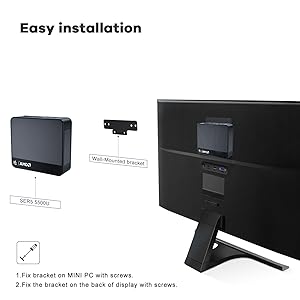
4.2 Namestitev nosilca VESA
The Beelink SER5 MAX Mini PC can be mounted to the back of a compatible monitor using the included VESA mount bracket. This saves desk space and provides a cleaner setup.
- Secure the VESA bracket to the Mini PC using the provided screws.
- Attach the Mini PC with the bracket to the VESA mounting holes on the back of your display using the appropriate screws.

5. Navodila za uporabo
5.1 Vklop/izklop
- Za vklop: Pritisnite gumb za vklop na sprednji strani Mini PC-ja.
- Za izklop: Use the operating system's shutdown function. Alternatively, press and hold the power button for 5-7 seconds for a forced shutdown (use only when necessary).
5.2 Dostop do BIOS-a
To access the BIOS settings or boot options:
- Vnesite nastavitve BIOS-a: Press the "Delete" key repeatedly at the Beelink logo during boot-up.
- Enter Boot Options Menu: Press the "F7" key repeatedly at the Beelink logo during boot-up.
5.3 Nastavitev treh zaslonov
The Beelink SER5 MAX supports connecting up to three displays simultaneously, enhancing productivity for various tasks. Utilize the HDMI, DisplayPort, and Type-C video outputs for this configuration.
5.4 Omrežna povezljivost
The Mini PC offers robust network connectivity options:
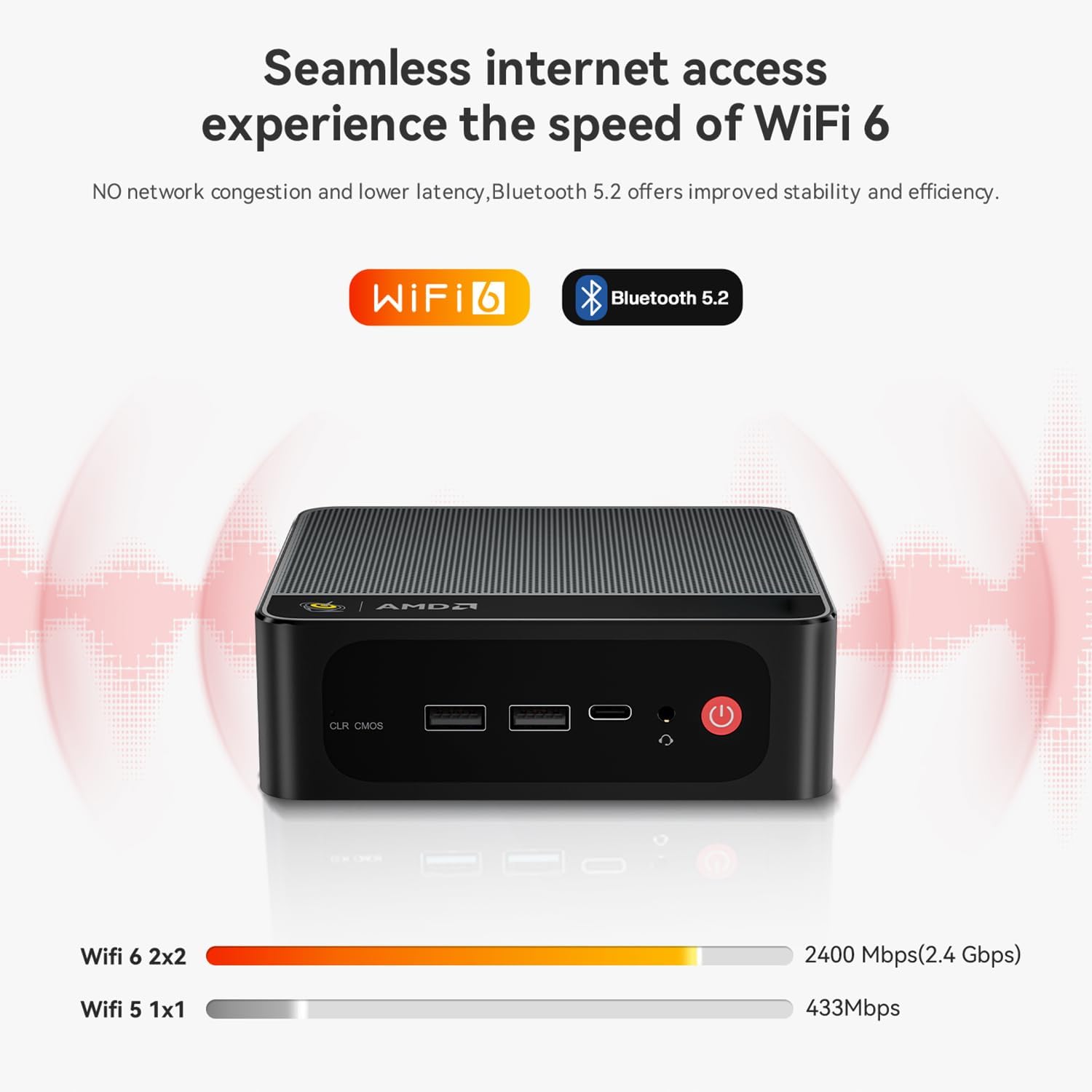
- Wi-Fi 6: Provides faster wireless speeds and lower latency compared to previous Wi-Fi standards.
- Bluetooth 5.2: For stable and efficient connection to various wireless devices such as keyboards, mice, and audio peripherals.
- RJ45 LAN: A Gigabit Ethernet port for a stable wired network connection.

6. Shranjevanje in razširitev pomnilnika
6.1 Razširitev shrambe
The Beelink SER5 MAX Mini PC comes with a 500GB M.2 NVMe 2280 SSD. It supports dual M.2 2280 PCIe 4.0 SSD slots, each supporting up to 4TB of storage. Additionally, there is space for a 2.5-inch SSD/HDD inside the bottom lid for further storage expansion.

7. Hladilni sistem
The SER5 MAX Mini PC is equipped with an efficient MSC2.0 cooling system, featuring a cooling fan, dual heat conduction tubes, and a heat sink to maintain optimal operating temperatures and ensure stable performance.

7.1 CPU Temperature & Noise Test Data
The following table presents typical CPU temperature and noise levels under various workloads. Note that actual performance may vary due to environmental conditions and specific configurations.
| Igra | Temperatura | FPS on AVG | Hrup |
|---|---|---|---|
| Overwatch | 81°C | 47 FPS | 34.6–35.2 dB |
| Forza Horizon 5 | 65°C | 53 FPS | 35–37.1 dB |
| CS:GO | 73°C | 44 FPS | 35.3–37 dB |
| DOTA2 | 73°C | 65 FPS | 34.6–37.2 dB |
| League of Legends | 72°C | 64 FPS | 34–36.5 dB |
| PUBG | 79°C | 41 FPS | 33.7–37.8 dB |
Test Configurations: AMD Ryzen™ 7 6800H Processor, Radeon™ 680M Graphics, 32GB(16GB*2) LPDDR5 RAM, PCIe 1TB SSD, 1080p low quality, 27°C ambient temperature. Test data from Beelink lab, and the actual performance may fluctuate due to environmental and configuration changes.
8. Odpravljanje težav
This section addresses common issues you might encounter with your Beelink SER5 MAX Mini PC.
- Q: What should I do if I find the Mini PC defective?
A: Please contact customer support immediately. They will provide assistance and a satisfactory solution. - Q: What should I do if I need to update the Mini PC?
A: Please contact customer support, and they will provide the necessary tutorial files and guidance for updates. - Q: How do I set up Auto Power On?
A: To enable the Auto Power On feature, please send the barcode located at the bottom of your machine to customer support. They will provide the corresponding tutorial file.
9. Specifikacije
Detailed technical specifications for the Beelink SER5 MAX Mini PC:
| Funkcija | Opis |
|---|---|
| Znamka | Beelink |
| Ime modela | SER5 |
| Operacijski sistem | Operacijski sistem (prednameščen) |
| Model procesorja | AMD Ryzen 7 6800U (8 jeder, 16 niti) |
| Hitrost procesorja | Up to 4.7 GHz (Max Boost Clock) |
| Grafični koprocesor | AMD Radeon Graphics 12core 2200 MHz |
| Nameščen RAM pomnilnik | 32 GB LPDDR5 |
| Hitrost pomnilnika | 5200 MHz |
| Na voljo pomnilniške reže | 2 (LPDDR5 is typically soldered, this might refer to M.2 slots for storage) |
| Zmogljivost pomnilnika | 500 GB M.2 NVMe SSD |
| Opis trdega diska | SSD (M.2 NVMe 2280, expandable up to 8TB; supports 2.5-inch SSD/HDD) |
| Video izhod | HDMI, DisplayPort, Type-C (Supports 4K Triple Display) |
| Največja ločljivost zaslona | 3840 x 2160 (4K) |
| Tehnologija povezljivosti | Bluetooth 5.2, Ethernet (RJ45), HDMI, USB, Wi-Fi 6 |
| Skupno število vrat USB | 4 (2x USB 3.2 Gen2, 2x USB 2.0) + 1x Type-C |
| Teža predmeta | 0.89 kg |
| Proizvajalec | Shenzhen AZW Technology Co., Ltd. |
10. Garancija in podpora
10.1 Informacije o garanciji
The Beelink SER5 MAX Mini PC comes with a 1-letna garancija od datuma nakupa. Ta garancija krije proizvodne napake in okvare strojne opreme pri normalni uporabi. Prosimo, shranite dokazilo o nakupu za uveljavljanje garancije.
10.2 Tehnična podpora
For technical assistance, troubleshooting, or any questions regarding your Beelink SER5 MAX Mini PC, please contact Beelink customer support. You can typically find contact information on the official Beelink webspletnega mesta ali prek vaše nakupovalne platforme.
Beelink provides professional after-sales service and lifetime technical support. If a replacement is needed during the warranty period, it will be provided.