
1. Uvod
Thank you for choosing the roborock Q10 S5 Robot Vacuum and Mop Cleaner. This manual provides essential information for setting up, operating, and maintaining your device to ensure optimal performance and longevity. Please read this manual thoroughly before using the product and keep it for future reference.
2. Varnostne informacije
To reduce the risk of injury, electric shock, fire, or damage, please observe the following safety precautions:
- To napravo lahko uporabljajo otroci, stari 8 let in več, ter osebe z zmanjšanimi fizičnimi, senzoričnimi ali duševnimi sposobnostmi ali s pomanjkanjem izkušenj in znanja, če so pod nadzorom ali so jim poučeni o varni uporabi naprave in razumejo nevarnosti, ki so povezane s tem. .
- Otroke je treba nadzorovati, da se zagotovi, da se ne igrajo z napravo.
- Čiščenja in uporabniškega vzdrževanja ne smejo izvajati otroci brez nadzora.
- Do not use the robot in areas with open flames or fragile objects.
- Prepričajte se, da je polnilna postaja postavljena na ravno površino ob steno.
- Uporabljajte samo originalni napajalnik, ki je priložen napravi.
- Do not expose the robot to direct sunlight or moisture.
- Before cleaning, remove power cords, small objects, and fragile items from the floor.
3. Izdelek je končanview
Familiarize yourself with the components of your roborock Q10 S5 robot vacuum.
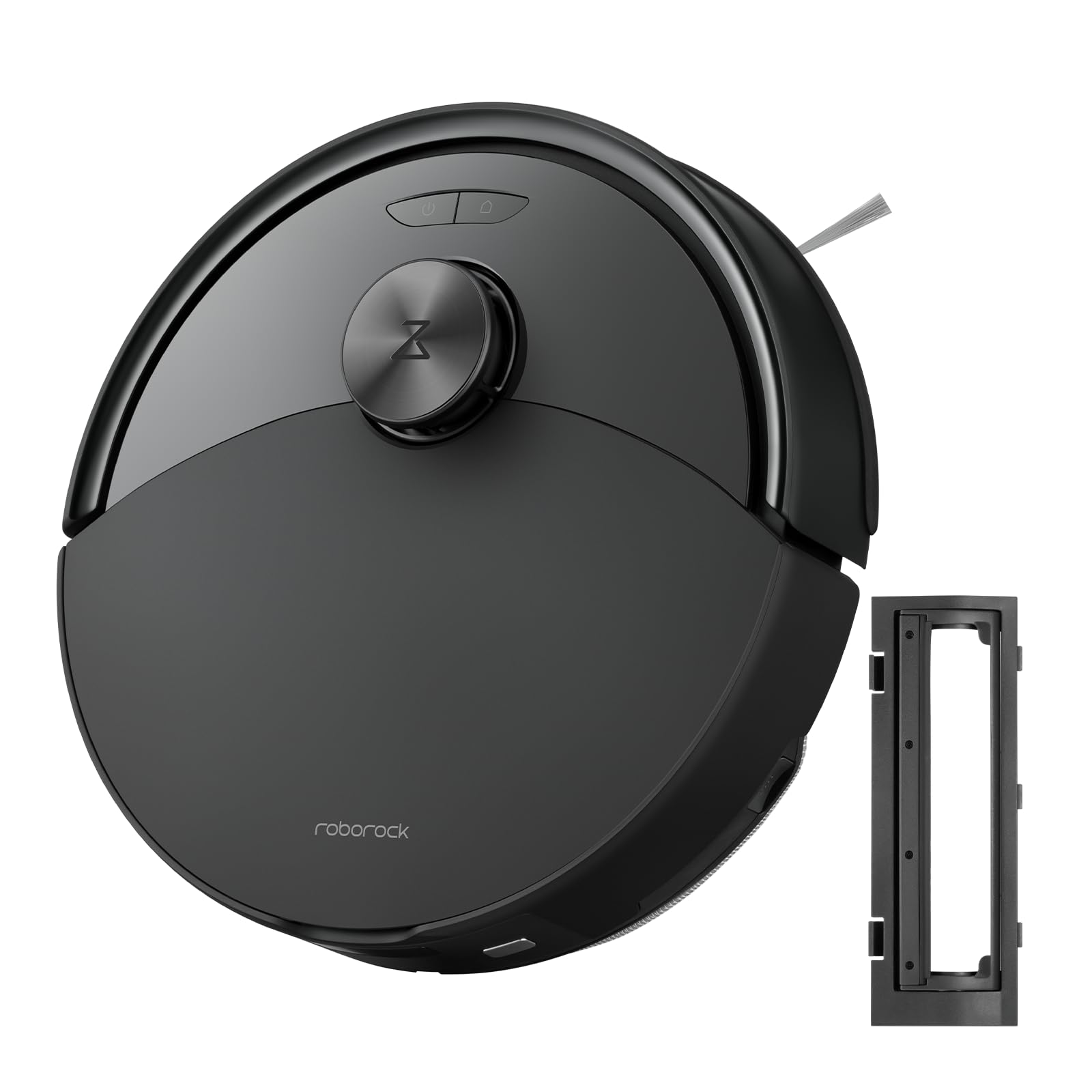
Slika 1: The roborock Q10 S5 Robot Vacuum and Mop Cleaner. This image shows the top view of the robot, highlighting its sleek black design and main control buttons.
Komponente robota:
- Zgornja platnica: Lifts to reveal the dustbin and Wi-Fi indicator.
- Gumb za vklop/čiščenje: Press to start/pause cleaning, hold to turn on/off.
- Dock/Spot Clean Button: Press to send the robot back to the dock, hold for spot cleaning.
- LDS Sensor: Za navigacijo in kartiranje.
- odbijač: Zazna ovire.
- Stranska krtača: Pometa odpadke z robov in vogalov.
- Glavna krtača: Collects dirt and debris from floors. Features a floating design for better contact.
- Vsesmerno kolo: For movement.
- Kontakti za polnjenje: Povezuje se s polnilno postajo.
- Senzorji za prepad: Preprečuje, da bi robot padel po stopnicah.
- Rezervoar za vodo in podloga za krpo: Za funkcionalnost brisanja.
Polnilna postaja:
- Dock Location Beacon: Helps the robot locate the dock.
- Kontakti za polnjenje: Prenaša moč na robota.
- Power Cable Port: Povezuje napajalnik.
4. Nastavitev
- Razpakirajte robota: Carefully remove the robot and all accessories from the packaging. Remove any protective films or shipping materials.
- Install the Side Brush: Press the side brush onto its post until it clicks into place.
- Namestite polnilno postajo:
- Polnilno postajo postavite na trdo, ravno površino ob steno.
- Zagotovite, da je na obeh straneh vsaj 0.5 metra (1.6 čevlja) praznega prostora, pred priklopno postajo pa 1.5 metra (4.9 čevlja).
- Connect the power cable to the charging dock and plug it into a wall outlet.
- Začetni strošek: Place the robot on the charging dock. The robot will automatically turn on and begin charging. For first-time use, fully charge the robot before operation (approximately 4-6 hours). The power indicator light will breathe white during charging and turn solid white when fully charged.
- Prenesite aplikacijo: Iskanje "Roborock" in the App Store or Google Play Store, or scan the QR code on the packaging to download and install the app.
- Povežite se z Wi-Fi:
- Open the Roborock app and follow the on-screen instructions to add your device.
- Prepričajte se, da je vaš telefon povezan z omrežjem Wi-Fi 2.4 GHz.
- Pritisnite in držite Dok in Moč buttons simultaneously for 3 seconds until you hear the "Resetting Wi-Fi" voice alert.
- Follow the app's instructions to complete the connection.
5. Navodila za uporabo
Začetek čiščenja:
- Od Robota: Pritisnite Moč button once. The robot will start cleaning.
- Iz aplikacije: Open the Roborock app and tap the "Clean" button.
Pausing/Resuming/Stopping:
- Premor: Press any button on the robot or tap "Pause" in the app.
- Nadaljevanje: Pritisnite Moč button or tap "Resume" in the app.
- Ustavite: To stop a cleaning cycle, press the Dok button to send the robot back to the charging dock, or tap "Stop" in the app.
Funkcija brisanja:
- Napolni rezervoar za vodo: Open the water tank cover, fill with clean water, and close securely.
- Pritrdite krpo za brisanje: Wet the mop pad and wring it out. Slide it into the mop pad slot until it is securely attached.
- Start Mopping: The robot will automatically detect the mop module and switch to mopping mode. You can adjust water flow levels in the app.
Funkcije aplikacije:
- Upravljanje zemljevidov: Create and save maps, set no-go zones, virtual walls, and invisible barriers.
- Selective Room Cleaning: Izberite določene sobe za čiščenje.
- Čiščenje po urniku: Set cleaning schedules for different times and days.
- Načini čiščenja po meri: Prilagodite sesalno moč in pretok vode.
- Daljinski upravljalnik: Ročno upravljajte gibanje robota.
6. Vzdrževanje
Regular maintenance ensures your roborock Q10 S5 operates efficiently. Always turn off the robot and unplug the charging dock before performing any maintenance.
Dustbin and Filter (Weekly):
- Lift the top cover of the robot.
- Odstranite koš za smeti.
- Odprite pokrov posode za prah in njeno vsebino stresite v koš za smeti.
- Remove the filter. Tap it gently to remove dust. The filter can be rinsed with water; ensure it is completely dry before reinstallation (allow 24 hours).
- Rinse the dustbin with water if necessary and allow it to dry completely.
- Reinstall the dry filter and dustbin.
Main Brush (Weekly):
- Obrnite robota.
- Press the tabs to remove the main brush cover.
- Dvignite glavno krtačo.
- Use the cleaning tool (if provided) or scissors to cut and remove any hair or debris tangled around the brush.
- Reinstall the main brush and cover, ensuring it clicks into place.
Side Brush (Monthly):
- Odvijte stransko krtačo.
- Odstranite morebitne lase ali umazanijo.
- Reattach and tighten the screw.
Sensors and Charging Contacts (Monthly):
- Vse senzorje (senzorje za prepad, senzor za steno, okno senzorja LDS) in polnilne kontakte na robotu in priklopni postaji obrišite z mehko, suho krpo.
Mop Pad (After Each Use):
- Odstranite krpo za brisanje iz rezervoarja za vodo.
- Rinse thoroughly with water and allow it to air dry completely before next use.
7. Odpravljanje težav
If you encounter issues with your robot, please refer to the following table before contacting support.
| Težava | Možen vzrok | rešitev |
|---|---|---|
| Robot se ne vklopi. | Baterija je skoraj prazna ali ni napolnjena. | Robota postavite na polnilno postajo in se prepričajte, da se polni. |
| Robot se ne more povezati z Wi-Fi. | Napačno geslo za Wi-Fi, omrežje 5 GHz ali slab signal. | Ensure correct 2.4GHz Wi-Fi, reset Wi-Fi on robot, move closer to router. |
| Robot se pogosto zatika. | Obstacles, tangled cables, or dirty sensors. | Clear floor, clean sensors, use no-go zones in app. |
| Slaba učinkovitost čiščenja. | Full dustbin, dirty filter, tangled brushes. | Empty dustbin, clean/replace filter, clean main/side brushes. |
| Robot oddaja nenavaden zvok. | Debris in main brush, side brush, or wheels. | Inspect and clean all brushes and wheels for obstructions. |
If the problem persists, please refer to the Roborock app for more detailed error messages or contact customer support.
8. Specifikacije
| Funkcija | Podrobnost |
|---|---|
| Model | Q10 S5 |
| Dimenzije | Približno 353 x 350 x 96.5 mm (13.9 x 13.8 x 3.8 palca) |
| Teža | Pribl. 3.7 kg (8.16 lbs) |
| Baterija | Lithium-Ion (Capacity not specified, typical for robot vacuums) |
| Nazivna moč | Approx. 60W (Typical for robot vacuums) |
| Kapaciteta posode za smeti | Approx. 470 ml (Typical for robot vacuums) |
| Kapaciteta rezervoarja za vodo | Approx. 300 ml (Typical for robot vacuums) |
| Sesalna moč | Up to 10,000 Pa (HyperForce Suction Power from feature bullets) |
| Povezljivost Wi-Fi | 2.4 GHz |
Opomba: Specifikacije se lahko spremenijo brez predhodnega obvestila.
9. Garancija in podpora
roborock products are manufactured to the highest quality standards. For detailed warranty information, please refer to the warranty card included in your product packaging or visit the official roborock website. For technical support, troubleshooting assistance, or to purchase replacement parts, please contact roborock customer service through the app or their official webmesto.
Uradno Webspletno mesto: www.roborock.com


