
1. Uvod
This manual provides detailed instructions for the Loutoc SRC4526 Universal Remote Control, designed for seamless compatibility with Philips Ambilight Smart TVs. Please read this guide thoroughly to ensure optimal use and longevity of your remote control.
1.1 izdelkov konecview
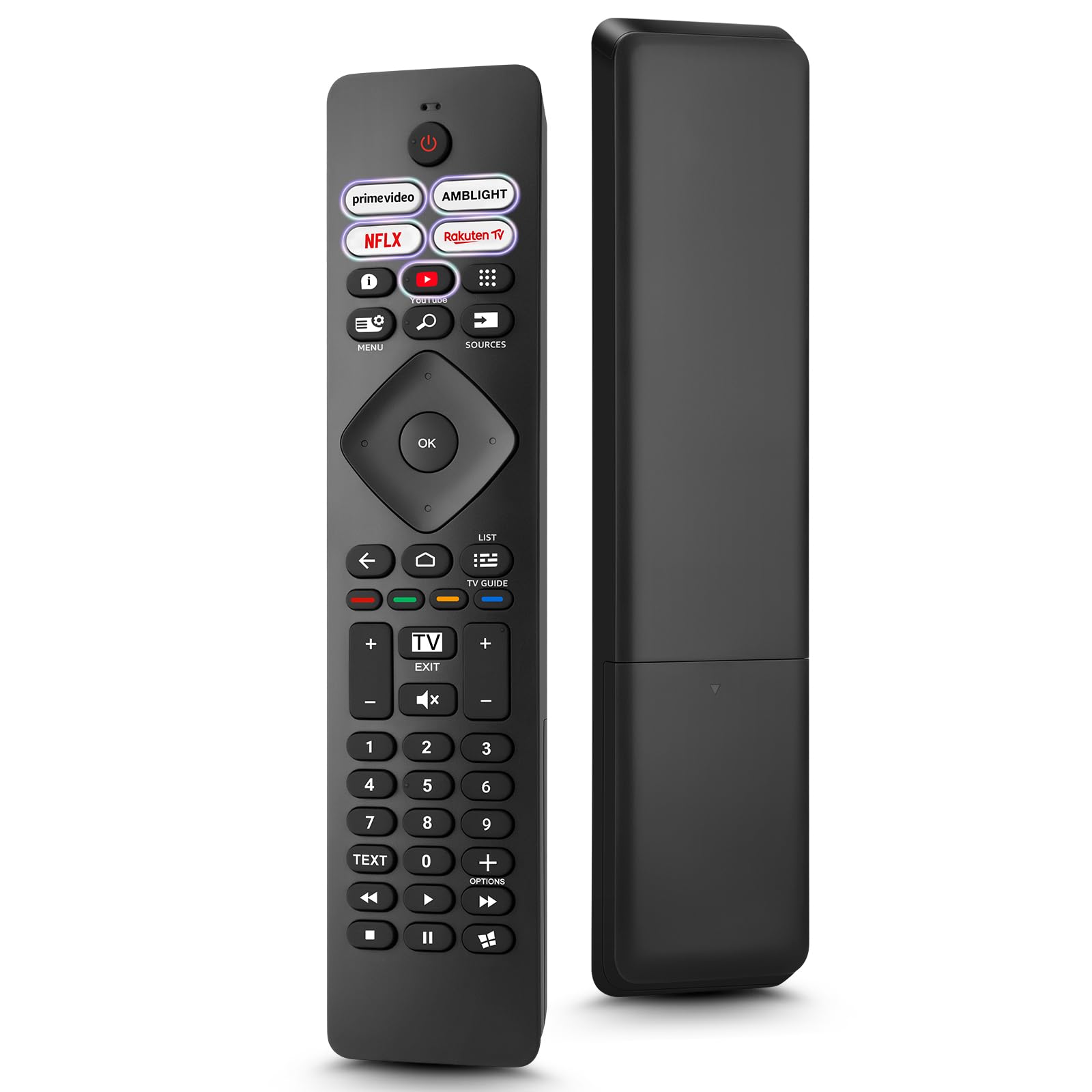
Image: The Loutoc SRC4526 Universal Remote Control, showcasing njegovo ergonomsko obliko in razporeditev gumbov.
1.2 Ključne lastnosti
- Convenient Plug-and-Play: No complex setup or programming required. Simply insert batteries and the remote is ready for use.
- Združljivost s širokim televizorjem: Fully compatible with Philips Ambilight TVs, including 4K Ambilight LED, OLED, FHD, and Full Ultra HD models.
- Dedicated Shortcut Buttons: Features 5 direct access buttons for popular streaming platforms: Ambilight, Video, NFLX (Netflix), Rakuten TV, and YouTube.
- Zanesljivo delovanje: Offers an effective operating range of 8 meters (26 feet) and an ultra-fast response time of 0.2 seconds.
2. Nastavitev
2.1 Namestitev baterije
The Loutoc SRC4526 remote control requires two AAA batteries (not included) for operation.
- Poiščite predal za baterije na zadnji strani daljinskega upravljalnika.
- Odprite pokrov predala za baterije.
- Vstavite dve bateriji AAA in pazite, da se pozitivni (+) in negativni (-) pol pravilno poravnata z indikatorji v predalu.
- Trdno zaprite pokrov prostora za baterije.
2.2 Začetna uporaba
This remote control is designed for immediate use with compatible Philips Ambilight TVs. No programming or pairing is required. Once batteries are installed, point the remote at your TV and begin operation.
3. Navodila za uporabo
3.1 Funkcije gumbovview
Refer to the image below for a visual guide to the remote control's buttons and their corresponding functions.

Image: Detailed diagram of the Loutoc SRC4526 remote control, illustrating each button and its primary function.
| Gumb | funkcija |
|---|---|
| Moč | Switches the TV on or off (Standby mode). |
| Prime Video, Ambilight, Netflix, Rakuten TV | Quickly launches the corresponding application. |
| meni | Opens the Quick Menu with typical TV functions. Hold to show Gaming control bar. |
| Iskalnik | Opens the Search tab on the Home screen. |
| Viri | Opens or closes the TV's input sources menu. |
| OK | Confirms a selection or setting. |
| Arrow/Navigation Keys | Navigates up, down, left, or right through menus and options. |
| Nazaj | Vrne se na prejšnji zaslon ali kanal. |
| domov | Opens the TV's Home menu. |
| TV vodnik | Opens or closes the TV Guide. Long press to open the channel list. |
| Color Keys (Red, Green, Yellow, Blue) | Provides direct selection of on-screen options. The blue key typically opens Help. |
| Glasnost (+/-) | Prilagodi glasnost televizorja. |
| Kanal (+/-) | Switches to the next or previous channel. |
| Izhod | Exits current menu/application or returns to live TV. From standby, goes to last viewed source. |
| Mute | Utiša ali vklopi zvok televizorja. |
| Številske tipke (0-9) | Neposredno izbere TV-kanale. |
| BESEDILO | Opens or closes Text/Teletext. |
| Kontrole predvajanja | Controls media playback: Play, Pause, Stop, Rewind, Fast Forward. |
| Aplikacije | Opens the Apps tab on the Home screen. |
3.2 Ambilight Functionality
For Philips TVs equipped with Ambilight functionality, the dedicated Ambilight button on your remote allows you to control the lighting effects.
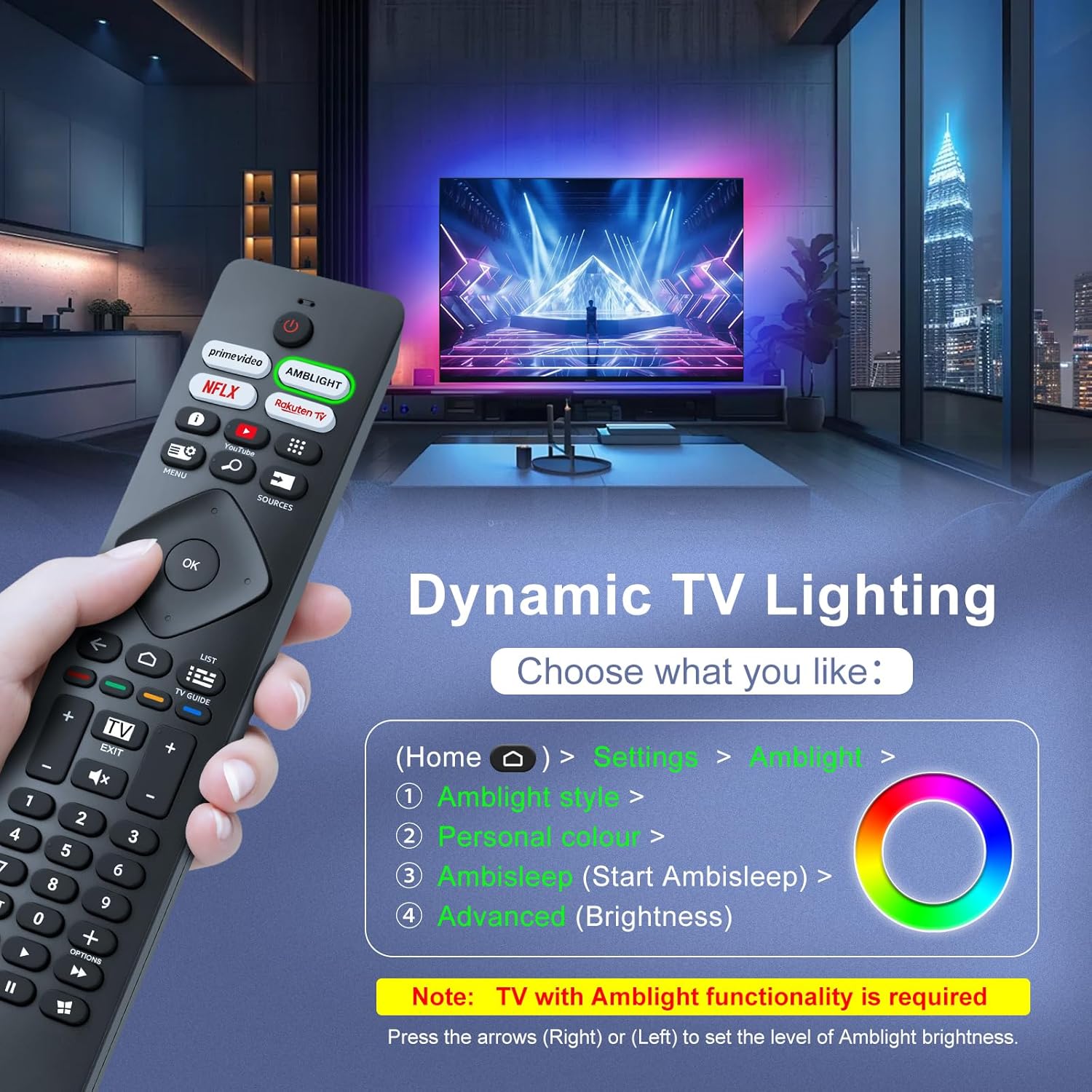
Image: A hand holding the remote control, with an overlay showing Ambilight settings on a TV screen.
After pressing the Ambilight button, you can navigate through the TV's menu to:
- Select different Ambilight display styles.
- Adjust personal color preferences.
- Initiate AmbiSleep mode.
- Adjust Ambilight brightness levels (using the right or left arrow keys).
Note: This feature requires a Philips TV with built-in Ambilight functionality.
4. Vzdrževanje
4.1 Čiščenje
To clean your remote control, gently wipe it with a soft, dry cloth. Avoid using liquid cleaners, aerosols, or harsh chemicals, as these can damage the remote's surface or internal components.
4.2 Shranjevanje
Daljinski upravljalnik shranjujte na hladnem in suhem mestu, stran od neposredne sončne svetlobe in ekstremnih temperatur. Če daljinskega upravljalnika ne boste uporabljali dlje časa, je priporočljivo, da odstranite baterije, da preprečite puščanje.
4.3 Skrb za baterije
- Zamenjajte vse baterije hkrati; ne mešajte starih in novih baterij.
- Ne mešajte različnih vrst baterij (npr. alkalnih in polnilnih).
- Izrabljene baterije zavrzite odgovorno v skladu z lokalnimi predpisi.
5. Odpravljanje težav
5.1 Pogoste težave in rešitve
- Daljinec se ne odziva:
- Preverite, ali so baterije pravilno vstavljene s pravilno polarnostjo.
- Baterije zamenjajte z novimi baterijami AAA.
- Prepričajte se, da med daljinskim upravljalnikom in infrardečim sprejemnikom televizorja ni ovir.
- Prepričajte se, da ste znotraj učinkovitega delovnega dosega (do 8 metrov).
- Določeni gumbi ne delujejo:
- Clean the remote control, especially around the non-functioning buttons, to remove any dirt or debris.
- If only Ambilight functions are not working, ensure your Philips TV model supports Ambilight.
5.2 Kontaktirajte podporo
If you encounter persistent issues that cannot be resolved with the troubleshooting steps above, please contact Loutoc customer support directly. We aim to respond to all inquiries within 12 working hours.
6. Specifikacije
| Funkcija | Podrobnost |
|---|---|
| Znamka | Loutoc |
| Ime modela | SRC4526-FBA |
| Številka modela artikla | SRC4526 |
| barva | Črna |
| Tehnologija povezljivosti | Infrardeči |
| Posebne lastnosti | No programming required, Ergonomic, Lightweight |
| Združljive naprave | Television (Philips Ambilight TVs) |
| Maximum Number of Supported Devices | 1 |
| Vrsta krmilnika | Nadzor gumbov |
| Največji doseg | 8 metrov (26 čevljev) |
| Opis baterije | AAA (potrebna 2, nista priloženi) |
| Proizvajalec | Loutoc |
| Država izvora | Kitajska |
| Datum prve razpoložljivosti na Amazon.com.be | 31. avgust 2025 |
7. Garancija in podpora
7.1 Informacije o garanciji
This Loutoc remote control comes with a manufacturer's warranty of 30 days from the date of purchase. Please retain your proof of purchase for any warranty claims.
7.2 Podpora strankam
For any questions, technical assistance, or warranty inquiries, please contact Loutoc customer support. We are committed to providing timely assistance and will respond to your queries within 12 working hours.