
Uvod
The Kisnt KN104 is a full-size 104-key wireless mechanical gaming keyboard designed for versatile use across multiple operating systems and devices. It features triple-mode connectivity, customizable RGB backlighting, hot-swappable switches, and dedicated media controls for enhanced productivity and gaming experiences.

Image: The Kisnt KN104 Wireless Mechanical Gaming Keyboard in Carbon Black, showcasing its full 104-key layout with RGB backlighting.
Vsebina paketa
Prosimo, preverite, ali so v paketu prisotni vsi elementi:
- 1 x Kisnt KN104 Mechanical Keyboard (104 Keys)
- 1 x Keycap/Switch Puller
- 1 x kabel USB-C na USB-A
- 1 x 2.4G brezžični sprejemnik
- 1 x Uporabniški priročnik (ta dokument)
Lastnosti izdelka
- 104-tipkovna razporeditev polne velikosti: Includes a dedicated number pad for data entry and productivity.
- Trojna povezljivost: Supports wired (USB-C), 2.4GHz wireless, and Bluetooth (up to 3 devices).
- Prilagodljiva RGB osvetlitev ozadja: Features 20 preset dynamic effects with adjustable colors and brightness.
- Tiskana plošča z možnostjo vroče menjave: Allows for easy replacement of 3-pin or 5-pin mechanical switches without soldering.
- Zasnova s tesnilom: Vključuje več plasti zvočne obdelaveampening foam for a creamy typing sound.
- Dedicated Media Keys & Knob: Provides quick access to play/pause, next/previous tracks, and volume/backlight adjustments.
- Dolgotrajna baterija: Equipped with a 4000mAh battery for extended wireless use.
- Združljivost med platformami: Compatible with Windows, Mac, PC, tablets, and smartphones.
Nastavitev
First-Time Use and Charging
The keyboard battery is partially charged for shipping safety. For optimal battery life and performance, fully charge the keyboard before its first use. Connect the provided USB-C cable to the keyboard and a USB-A port on your computer or a power adapter.
Priključitev tipkovnice
The Kisnt KN104 supports three connection modes:
- Žični način (USB-C): Connect the keyboard directly to your device using the provided USB-C to USB-A cable. The keyboard will automatically switch to wired mode and begin charging.
- 2.4 GHz brezžični način:
- Locate the 2.4G wireless receiver (dongle) in the bottom slot of the keyboard.
- Priključite 2.4G sprejemnik v prosta vrata USB na računalniku.
- Switch the keyboard's mode selector to 2.4G (FN+Q). The keyboard should connect automatically.
- Bluetooth Mode (BT):
- Switch the keyboard's mode selector to Bluetooth (FN+W/E/R). The keyboard can store up to three Bluetooth devices.
- V napravi (računalniku, tablici, pametnem telefonu) omogočite Bluetooth in poiščite nove naprave.
- Select "Kisnt KN104" from the list of available devices to pair.

Image: Diagram illustrating the three connectivity modes: Bluetooth 5.0, Wireless 2.4GHz, and Wired USB-C, with compatibility for Windows, Mac/iOS, and Android.
Navodila za uporabo
Nadzor osvetlitve ozadja RGB
The KN104 features customizable RGB backlighting. You can switch between 20 preset dynamic effects and adjust colors and brightness directly on the keyboard or through the dedicated software.
- Preklopni učinki: Use keyboard shortcuts (refer to the keyboard's function layer or software for specific key combinations) or the dedicated knob.
- Adjusting Brightness/Volume: Rotate the dedicated knob to adjust backlight brightness or system volume, depending on the selected mode.
Video: Demonstrates various RGB backlighting effects available on the Kisnt KN104 keyboard, showcasing dynamic color patterns and illumination.

Image: Close-up of the dedicated knob and media keys on the Kisnt KN104 keyboard, showing controls for volume, backlight, and media playback.
Programabilna programska oprema
The KN104 driver software (Windows only, wired/2.4G mode) allows for advanced customization:
- Prerazporedite katero koli tipko na drugo funkcijo.
- Create and edit macros for complex command sequences.
- Further customize RGB lighting effects and patterns.
The software can be downloaded from the official Kisnt webspletno mesto: www.kisnt.cn

Image: Screenshot of the Kisnt KN104 programmable software interface, showing options for lighting modes, brightness, speed, and color palette adjustments.
Stikala z možnostjo vroče zamenjave
The Kisnt KN104 features a hot-swappable PCB, allowing you to easily change mechanical switches without soldering. This provides flexibility to customize your typing feel and sound.
- The keyboard supports both 3-pin and 5-pin switches.
- Use the included keycap/switch puller to carefully remove keycaps and switches.
- Align new switches with the PCB sockets and press firmly until they click into place.
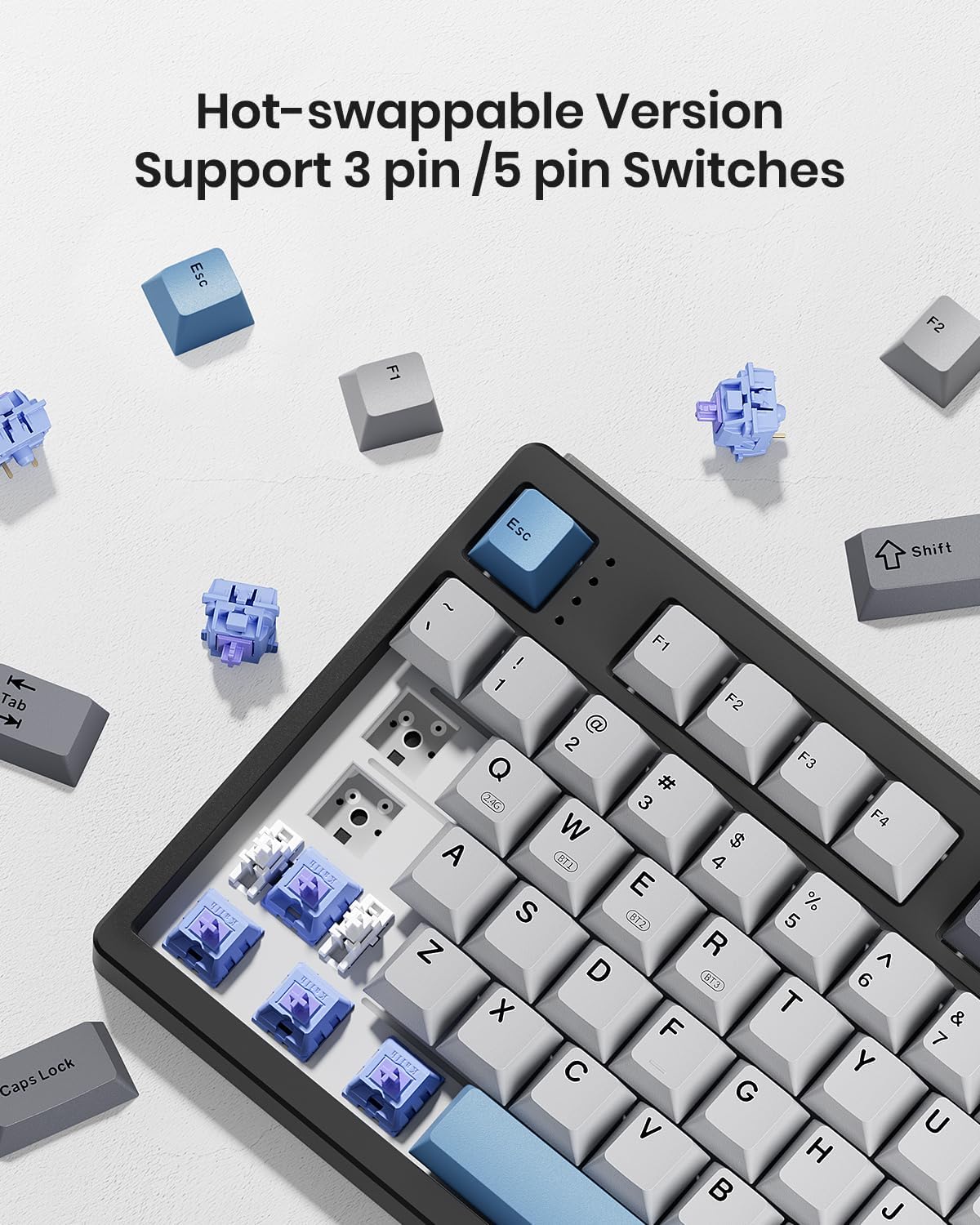
Slika: Bližnji posnetek view of the Kisnt KN104 keyboard with several keycaps and switches removed, demonstrating its hot-swappable feature.
Video: Illustrates the gasket-mounted structure of the Kisnt KN104 keyboard and the resulting creamy sound profile during typing.
Informacije o bateriji
The KN104 is equipped with a 4000mAh rechargeable battery. Battery life varies based on usage and RGB lighting settings.
- Polnjenje: Connect the keyboard via USB-C cable to a power source.
- Indikator baterije: The keyboard may feature an indicator light to show battery status. Refer to the quick start guide for specific details.
- Ocenjena življenjska doba baterije: 1-2 weeks with regular typing, coding, and web browsing. Longer when RGB lighting is dimmed or off.

Image: Graphic illustrating the battery life of the Kisnt KN104 keyboard: 13 hours with brightest light, 7 days in streaming mode, and 30 days with backlight off.
Vzdrževanje
To ensure the longevity and optimal performance of your Kisnt KN104 keyboard, follow these maintenance guidelines:
- Čiščenje: Use a soft, dry cloth to wipe the keyboard surface. For deeper cleaning, remove keycaps using the provided puller and use compressed air to clear debris from between switches.
- Izogibajte se tekočinam: Tipkovnice ne izpostavljajte tekočinam. V primeru razlitja jo takoj odklopite in pustite, da se popolnoma posuši, preden jo ponovno priključite.
- Shranjevanje: Tipkovnico shranjujte na hladnem in suhem mestu, stran od neposredne sončne svetlobe in ekstremnih temperatur.
- Vzdrževanje baterije: Izogibajte se pogostemu popolnemu praznjenju baterije. Redno jo polnite, da ohranite njeno zdravje.
Odpravljanje težav
If you encounter issues with your Kisnt KN104 keyboard, refer to the following common solutions:
| Težava | Možna rešitev |
|---|---|
| Tipkovnica se ne odziva v brezžičnem načinu. | Ensure the keyboard is charged. Verify the 2.4GHz receiver is properly plugged in or Bluetooth is paired correctly. Try switching to wired mode to confirm basic functionality. |
| RGB osvetlitev ne deluje ali se zatika. | Check keyboard shortcuts for RGB control. Ensure the keyboard is not in a low-power mode. If using software, verify it's running and connected. |
| Tipke se ne registrirajo ali pa se tipkajo dvakrat. | Clean around the affected switch. If hot-swappable, try reseating the switch or replacing it with a spare. Ensure the switch is fully inserted. |
| Connectivity issues (lag, disconnections). | Reduce distance between keyboard and receiver/device. Minimize interference from other wireless devices. Ensure drivers are up to date. |
| Software not detecting keyboard. | Ensure the keyboard is connected via wired or 2.4GHz mode (Bluetooth is not supported by the software). Restart the software and keyboard. |
If the problem persists, please contact Kisnt customer support.
Specifikacije
| Funkcija | Podrobnost |
|---|---|
| Številka modela | KN104 |
| Dimenzije izdelka | 17.52"D x 5.55"Š x 1.65"V (445 mm x 141 mm x 42 mm) |
| Teža predmeta | 2.41 funtov (1092 g) |
| Tehnologija povezljivosti | 2.4 GHz brezžično, Bluetooth, USB-C žično |
| Kapaciteta baterije | 4000 mAh (1 baterija tipa C priložena) |
| Razporeditev tipkovnice | Full Sized Mechanical Keyboard with Number Pad (104 Keys) |
| Osvetlitev ozadja | RGB |
| Posebne lastnosti | 100% Layout, Creamy Sound, Hot-Swappable, Knob & Media Keys, Programmable |
| Združljive naprave | Gaming Console, Laptop, Macbook, Smartphone, Tablet |
| Proizvajalec | Kisnt |

Image: Diagram showing the dimensions of the Kisnt KN104 keyboard: 445mm (17.52in) length, 141mm (5.55in) width, 42mm (1.65in) height, and a weight of 1092g (2.41lb).
Garancija in podpora
Kisnt provides a 2-letna poprodajna storitev for quality-related issues. If you experience any problems with your product within this period, a replacement will be provided.
Za vsa vprašanja ali podporo nas kontaktirajte:
- E-pošta: kisnt_vip@163.com
- Uradno Webspletno mesto: http://www.kisnt.cn/
Video: Prekoračitevview video highlighting the key features and functionality of the Kisnt KN104 keyboard, emphasizing its versatility and design.