
1. Uvod
The Kisnt KN104 is a 100% full-size wireless mechanical keyboard designed for versatile use across various operating systems and devices. It features a gasket-mounted structure for a creamy sound profile, hot-swappable switches for customization, and tri-mode connectivity (Bluetooth, 2.4GHz wireless, USB-C wired). This manual provides detailed instructions for setting up, operating, and maintaining your keyboard.
2. Kaj je v škatli
- 1x Kisnt KN104 104-Key Mechanical Keyboard
- 1x Keycap/Switch Puller
- 1x USB-C v USB-A kabel
- 1x 2.4G Wireless Receiver
- 1x uporabniški priročnik
3. Izdelek je končanview
The Kisnt KN104 keyboard offers a full 104-key layout, including a dedicated number pad, function row, and media keys with a multi-function knob. Its design prioritizes typing comfort and acoustic performance.
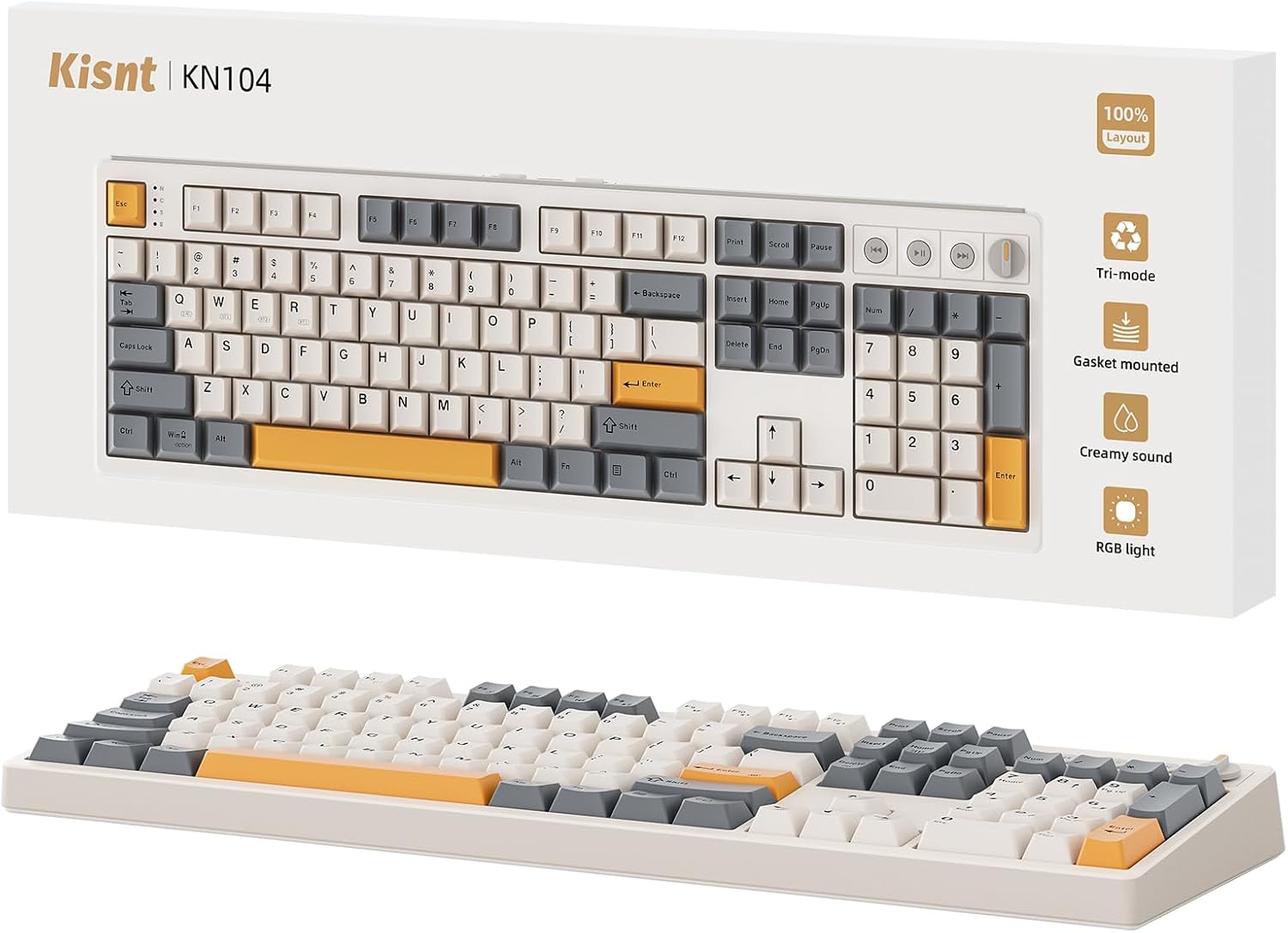
Figure 3.1: Kisnt KN104 Wireless Mechanical Keyboard in Retro Beige.

Figure 3.2: Kisnt KN104 Keyboard showcasing RGB Backlighting.
4. Nastavitev
4.1 Načini povezljivosti
The KN104 supports three connection methods: USB-C wired, 2.4GHz wireless, and Bluetooth. You can switch between these modes using the physical switches located on the back of the keyboard.

Figure 4.1: Keyboard underside showing switches for connectivity and OS selection.
4.1.1 Žična povezava USB-C
- Poiščite vrata USB-C na tipkovnici.
- Connect the provided USB-C to USB-A cable to the keyboard and your computer.
- Ensure the mode switch on the keyboard is set to 'USB'.
- Vaš sistem bo tipkovnico samodejno prepoznal.
4.1.2 Brezžična povezava 2.4 GHz
- Retrieve the 2.4G wireless receiver from its storage slot on the keyboard's underside.
- Sprejemnik priključite v prosta vrata USB-A na računalniku.
- Nastavite stikalo za način na tipkovnici na '2.4G'.
- The keyboard should connect automatically. If not, press Fn+Q to initiate pairing.
4.1.3 Povezava Bluetooth
Tipkovnica podpira povezavo do treh naprav Bluetooth.
- Nastavite stikalo za način na tipkovnici na 'BT'.
- To pair with a new device, press and hold Fn+W, Fn+E, or Fn+R for 3-5 seconds until the corresponding indicator light flashes rapidly.
- On your device (PC, laptop, smartphone, tablet), go to Bluetooth settings and search for 'Kisnt KN104'.
- Izberite tipkovnico za seznanjanje. Ko je povezava vzpostavljena, bo indikatorska lučka začela neprekinjeno svetiti.
- To switch between paired Bluetooth devices, press Fn+W, Fn+E, or Fn+R briefly.
Video 4.1: Konecview of Kisnt KN104 features, including tri-mode connectivity and design elements.
4.2 Združljivost operacijskega sistema
The keyboard includes a switch to toggle between Windows and Mac operating system layouts. Ensure the switch is set to your current operating system for optimal key functionality.
4.3 Polnjenje
The keyboard is equipped with a 4000mAh rechargeable battery. Connect the USB-C cable to the keyboard and a power source (e.g., computer USB port, wall adapter) to charge. The indicator light will show charging status.

Figure 4.2: Battery life estimates for the 4000mAh battery under different usage conditions.
5. Navodila za uporabo
5.1 Media Keys and Knob
The KN104 features dedicated media keys and a multi-function knob for quick access to controls.
- Medijski ključi: Use the three dedicated buttons for previous track, play/pause, and next track.
- Gumb:
- Zasukaj: Adjusts volume by default.
- Pritisnite: Toggles sound on/off (mute).
- Dolg pritisk: Switches between backlight adjustment mode and volume adjustment mode. When in backlight mode, rotating the knob adjusts brightness.
Slika 5.1: Podrobno view of the dedicated media keys and multi-function knob.
5.2 RGB osvetlitev
The keyboard offers 20 RGB lighting effects. You can adjust the brightness and flow rate of these effects. The decorative light bars on both sides also contribute to the visual experience.
Video 5.2: Demonstration of the KN104's various RGB backlit effects.
5.3 Stikala z možnostjo vroče menjave
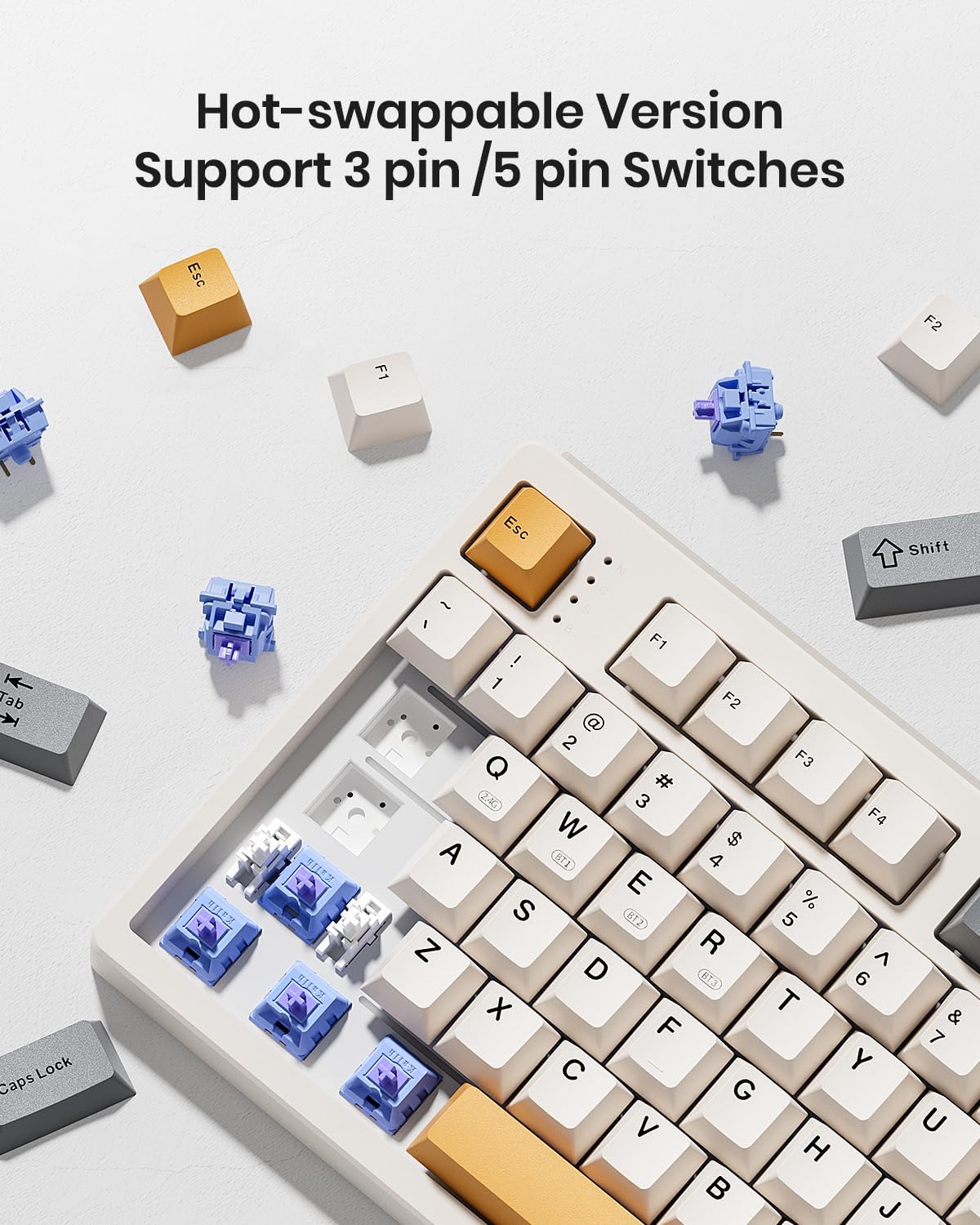
The KN104 features a hot-swappable PCB, allowing you to easily replace 3-pin or 5-pin mechanical switches without soldering. This enables customization of typing feel and sound.
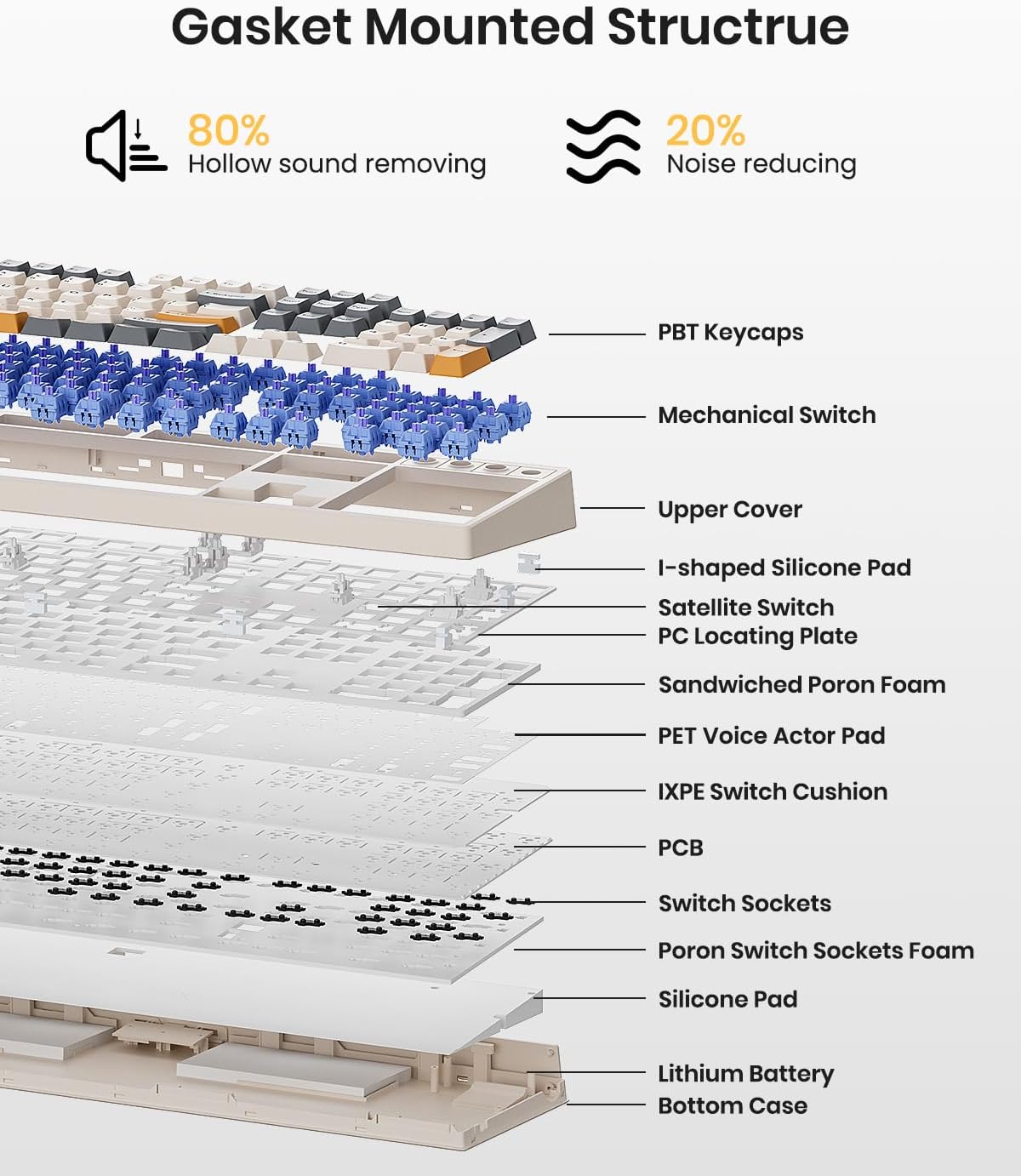
Figure 5.3: Illustration of the hot-swappable switch design, allowing easy replacement of switches.
Video 5.4: Demonstration of the gasket mount structure and the resulting creamy sound profile tipkovnice.
6. Programska oprema in prilagajanje
Kisnt provides dedicated software for the KN104, allowing users to create keyboard shortcuts, macros, and customize RGB LED colors. Please note that the driver currently supports Windows systems only when connected in wired or 2.4G mode.

Figure 6.1: Kisnt software interface for advanced customization.
Prenos gonilnika: www.kisnt.cn
7. Vzdrževanje
To ensure the longevity and optimal performance of your Kisnt KN104 keyboard, follow these maintenance guidelines:
- Čiščenje: Use a soft, dry cloth to wipe the keyboard surface. For deeper cleaning, you may use a keycap puller to remove keycaps and clean dust or debris with compressed air. Avoid using harsh chemicals or abrasive materials.
- Shranjevanje: Tipkovnico shranjujte na hladnem in suhem mestu, stran od neposredne sončne svetlobe in ekstremnih temperatur.
- Izpostavljenost tekočini: Avoid spilling liquids on the keyboard. If a spill occurs, immediately disconnect the keyboard, power it off, and allow it to dry completely before reconnecting.
8. Odpravljanje težav
If you encounter issues with your Kisnt KN104 keyboard, please refer to the following common solutions:
- Tipkovnica se ne odziva: Ensure the keyboard is charged. Check the connection mode (USB, 2.4G, or BT) and ensure it matches your device's connection. For wireless modes, verify the receiver is properly plugged in or Bluetooth is paired.
- Ključi se ne registrirajo: If specific keys are not working, try removing and re-inserting the keycap and switch using the provided puller. Ensure the switch is seated correctly.
- Težave s povezljivostjo: For 2.4G wireless, try plugging the receiver into a different USB port. For Bluetooth, try re-pairing the device. Ensure there are no strong interferences nearby.
- RGB osvetlitev ne deluje: Check if the keyboard is in backlight adjustment mode using the knob. Ensure the brightness is not set to minimum.
- Programska oprema ne zazna tipkovnice: Ensure the keyboard is connected via USB-C or 2.4G wireless, and your computer is running Windows.
Če ti koraki ne odpravijo vaše težave, se obrnite na podporo strankam.
9. Specifikacije
| Funkcija | Podrobnost |
|---|---|
| Številka modela | KN104 |
| Dimenzije izdelka | 17.52 x 5.55 x 1.65 palca (445 mm x 141 mm x 42 mm) |
| Teža predmeta | 2.41 funtov (1092 g) |
| Baterija | 1 C battery required (included), 4000mAh |
| Združljive naprave | Igralna konzola, prenosnik, računalnik, pametni telefon, tablica |
| Tehnologija povezljivosti | 2.4GHz Wireless, Bluetooth, USB-C |
| Opis tipkovnice | Full Sized Mechanical Keyboard with Number Pad |
| Posebne lastnosti | 100% Layout, Creamy Sound, Hot-Swappable, Knob & Media Keys, Programmable |
| Osvetlitev tipkovnice | RGB |
10. Garancija in podpora
Kisnt offers a 2-year after-sales service for quality-related issues. If you experience any problems with your product within this period, a replacement will be provided.
Za vsa vprašanja ali podporo nas kontaktirajte:
- E-pošta: kisnt_vip@163.com
- Uradno Webspletno mesto: http://www.kisnt.cn/