
1. Uvod
This manual provides comprehensive instructions for the installation, operation, maintenance, and troubleshooting of your NEWFAST 1200Mbps Dual Band WiFi Extender, model RE523. Please read this manual carefully before using the device to ensure proper setup and optimal performance.
2. Izdelek je končanview
The NEWFAST RE523 WiFi Extender is designed to expand your existing wireless network coverage and eliminate Wi-Fi dead zones. It supports dual-band operation, offering speeds up to 1200Mbps (300Mbps on 2.4GHz and 867Mbps on 5.8GHz) for a stable and fast internet connection.
2.1 Ključne lastnosti
- High-Speed Dual-Band WiFi: Up to 1200Mbps (300Mbps 2.4GHz + 867Mbps 5.8GHz).
- Razširjena pokritost: Equipped with 4 external 3dBi high-gain antennas, rotatable 180° for optimal signal reception and coverage.
- Pametni LCD-zaslon: Zagotavlja informacije o stanju v realnem času za enostavno spremljanje.
- Več načinov delovanja: Supports Repeater, Bridge, AP, Router, and Client modes.
- Enostavna nastavitev: One-click WPS setup or webkonfiguracija na osnovi.
- Široka združljivost: Compatible with 802.11 ac/a/b/g/n routers.
- Visoka zmogljivost naprave: Can connect up to 35 wireless devices simultaneously.
2.2 Vsebina paketa
- NEWFAST 1200Mbps WiFi Extender (RE523)
- Uporabniški priročnik (ta dokument)
- Ethernet kabel (lahko se razlikuje glede na regijo)
2.3 Fizične komponente
Below is an image of the NEWFAST RE523 WiFi Extender, highlighting its main components.
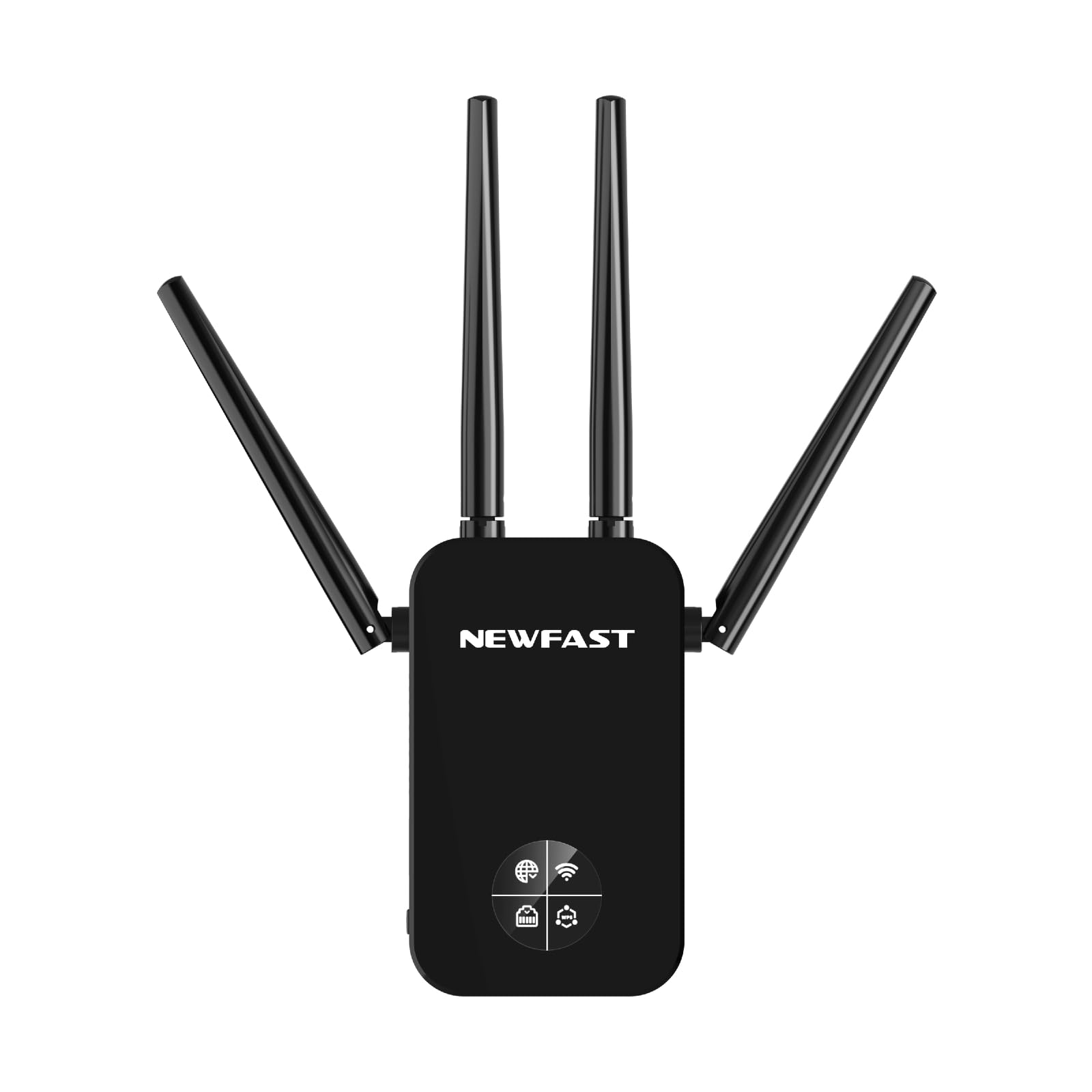
Figure 1: NEWFAST RE523 WiFi Extender. The device features four adjustable external antennas, an LCD screen on the front, and an Ethernet port on the side.
- Antene: Four external antennas for signal transmission and reception.
- LCD zaslon: Shows connection status, signal strength, and operating mode.
- Gumb WPS: For quick and secure connection to a router.
- Ethernet vrata: For wired connections in various operating modes.
- LED za napajanje: Označuje stanje napajanja.
3. Navodila za nastavitev
The NEWFAST RE523 offers two primary methods for setup: WPS (Wi-Fi Protected Setup) and Web uporabniški vmesnik (Web Uporabniški vmesnik).
3.1 Nastavitev WPS (priporočeno za hitro nastavitev)
- Vklop: Plug the RE523 extender into an electrical outlet near your main router. Wait for the Power LED to turn solid.
- Aktivirajte WPS na usmerjevalniku: Press the WPS button on your main Wi-Fi router. Refer to your router's manual for the exact location and timing.
- Aktivirajte WPS na razširjevalniku: Within 2 minutes of pressing the WPS button on your router, press the WPS button on the NEWFAST RE523 extender. The WPS LED on the extender will blink.
- Počakajte na povezavo: The extender will automatically connect to your router. Once connected, the Signal LED on the extender will turn solid, indicating a successful connection.
- Premesti podaljšek: Unplug the extender and move it to a location halfway between your router and the Wi-Fi dead zone. Ensure the Signal LED indicates a good signal strength from your router.
3.2 Web Nastavitev uporabniškega vmesnika
- Vklop: Plug the RE523 extender into an electrical outlet near your main router. Wait for the Power LED to turn solid.
- Povežite se z omrežjem razširitvene naprave: On your computer or mobile device, connect to the Wi-Fi network broadcast by the extender (e.g., "NEWFAST_EXT_2.4G" or "NEWFAST_EXT_5G"). No password is required initially.
- Dostop Web Vmesnik: Odpri a web browser and enter the default IP address or domain name (usually found on a sticker on the device or in a quick start guide, e.g.,
http://192.168.1.254orhttp://newfastwifi.net). - Prijava: Enter the default username and password (e.g., admin/admin).
- Sledite navodilom na zaslonu: The setup wizard will guide you through selecting your main Wi-Fi network, entering its password, and configuring the extender's network name (SSID) and password.
- Popolna namestitev: After configuration, the extender will restart. Once the Signal LED turns solid, the setup is complete.
- Premesti podaljšek: Unplug the extender and move it to a location halfway between your router and the Wi-Fi dead zone. Ensure the Signal LED indicates a good signal strength from your router.
4. Načini delovanja
The NEWFAST RE523 supports five operating modes to suit various network requirements.
- Reater Mode: Extends the existing Wi-Fi coverage of your main router. This is the most common mode for eliminating dead zones.
- Način dostopne točke (AP): Converts a wired network connection into a wireless one. Connect the extender to your router via an Ethernet cable, and it will broadcast a new Wi-Fi network.
- Način usmerjevalnika: Deluje kot primarni usmerjevalnik in ustvarja novo zasebno omrežje. Ta način se običajno uporablja, ko imate modem, vendar nimate usmerjevalnika.
- Mostni način: Connects two separate networks, allowing devices on one network to communicate with devices on another.
- Način odjemalca: Allows wired-only devices (e.g., smart TVs, gaming consoles) to connect to a wireless network. The extender receives Wi-Fi and provides an Ethernet connection to the device.
You can switch between these modes via the web management interface after initial setup.
5. Vzdrževanje
- Čiščenje: Za čiščenje naprave uporabite mehko, suho krpo. Ne uporabljajte tekočih ali aerosolnih čistil.
- Umestitev: Place the extender in a well-ventilated area, away from direct sunlight, heat sources, and moisture. Avoid placing it near large metal objects or electrical appliances that may cause interference.
- Posodobitve vdelane programske opreme: Periodically check the NEWFAST official webspletno mesto za posodobitve vdelane programske opreme za zagotovitev optimalne zmogljivosti in varnosti.
- Ponastaviti: If the device malfunctions or you forget the login credentials, you can perform a factory reset by pressing and holding the reset button (usually a small pinhole button) for about 5-10 seconds while the device is powered on.
6. Odpravljanje težav
- Po nastavitvi ni dostopa do interneta:
- Ensure the extender is receiving a strong signal from your main router (check the Signal LED).
- Preverite, ali ima vaš glavni usmerjevalnik dostop do interneta.
- Re-run the setup process, ensuring you enter the correct Wi-Fi password for your main router.
- Try relocating the extender closer to your main router.
- Slow Speed or Frequent Disconnections:
- Relocate the extender to an optimal position, ideally halfway between your router and the desired coverage area, where it receives a good signal.
- Minimize physical obstructions (walls, large appliances) between the extender, router, and client devices.
- Preverite motnje drugih elektronskih naprav.
- Prepričajte se, da je vdelana programska oprema vašega usmerjevalnika posodobljena.
- Dostop ni mogoč Web Stran za upravljanje:
- Prepričajte se, da je vaša naprava povezana z omrežjem Wi-Fi razširjevalnika signala.
- Preverite, ali je IP-naslov ali ime domene, vneseno v brskalnik, pravilen.
- Poskusite počistiti predpomnilnik brskalnika ali uporabiti drug brskalnik.
- If you've changed the extender's IP address, use the new one. If forgotten, perform a factory reset.
7. Specifikacije
| Znamka | NEWFAST |
| Model | RE523 |
| Standard brezžične komunikacije | 802.11a/b/g/n/ac |
| Hitrost prenosa podatkov | 1200 Megabits per second (Mbps) |
| Razred frekvenčnega pasu | Dvojni pas (2.4 GHz in 5.8 GHz) |
| Antene | 4 External 3dBi Antennas |
| Ethernet vrata | 1x LAN/WAN Port |
| barva | Črna |
8. Garancija in podpora
NEWFAST products come with a standard manufacturer's warranty. For specific warranty terms and conditions, please refer to the warranty card included with your product or visit the official NEWFAST website. For technical support, troubleshooting assistance, or to download the latest drivers and firmware, please visit the NEWFAST support page or contact their customer service directly.
Official NEWFAST Webspletno mesto: NEWFAST Store on Amazon (Please check the product packaging or official documentation for the direct manufacturer webspletno mesto.)


