
1. Uvod
This manual provides detailed instructions for the MCHOSE A5 Ultra V2 Wireless Gaming Mouse. Designed for high-performance gaming, this mouse combines a lightweight, symmetrical design with advanced connectivity and sensor technology. Please read this manual thoroughly to ensure proper setup and optimal use of your device.
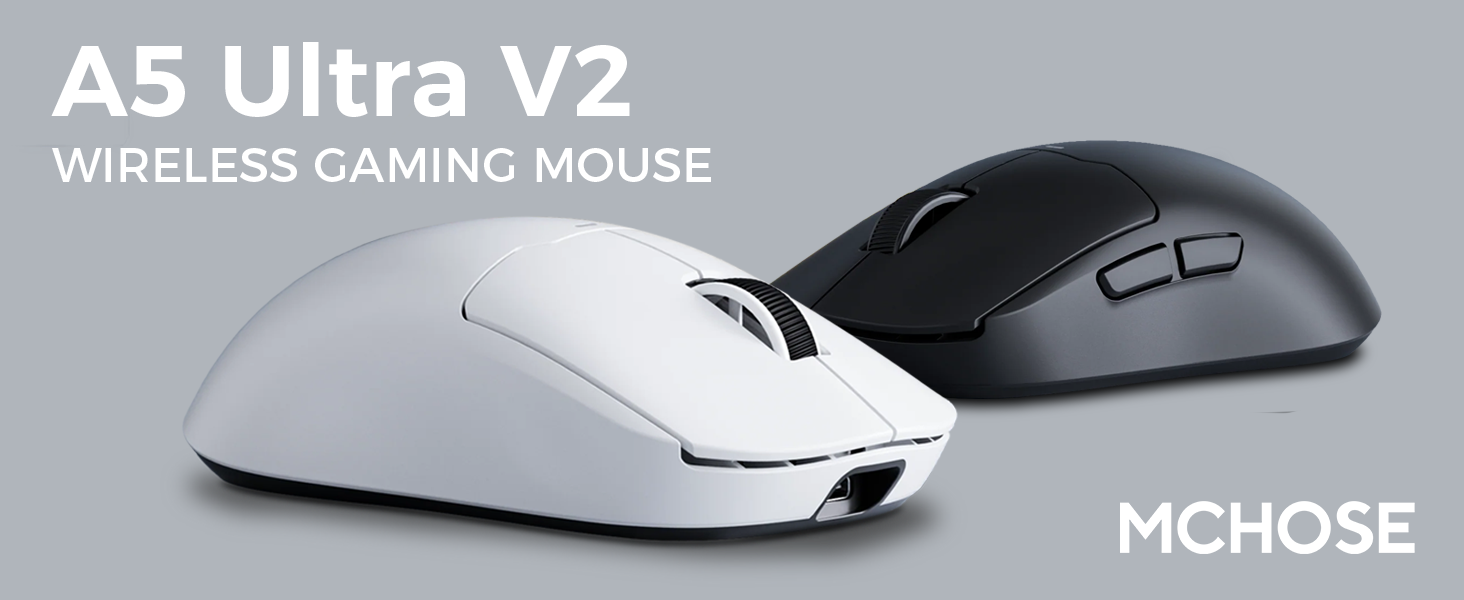
Figure 1: MCHOSE A5 Ultra V2 Wireless Gaming Mouse Overview
2. Ključne značilnosti
- Lahek dizajn: Weighing only 54g, the mouse offers optimal control and comfort for extended gaming sessions.

Figure 2: Lightweight design for enhanced comfort.
- High Precision PAW3395 Optical Sensor: Achieve maximum accuracy with up to 26,000 DPI for precise tracking.

Figure 3: PAW3395 optical sensor for high precision.
- Wired 8K/Wireless 4K Polling Rate: Experience ultra-low-latency and lightning-fast response times with up to 8000Hz wired and 4000Hz wireless polling rates.

Figure 4: Illustrating the 4K wireless polling rate capability.
- Tri-modalna povezava: Connect via ultra-low-latency 2.4GHz wireless, Bluetooth, or wired USB for versatile use across various devices.

Figure 5: Tri-mode connectivity options.
- Custom Software: Utilize the dedicated software to store custom settings for buttons, DPI adjustments, polling rates, and gaming modes directly on the mouse's onboard memory.

Figure 6: Custom software for personalized settings.
- Dolgotrajna baterija: Enjoy up to 130 hours of battery life on a single charge, minimizing interruptions during gameplay.
Slika 7: Podaljšana življenjska doba baterije za daljšo uporabo.
3. Navodila za nastavitev
The MCHOSE A5 Ultra V2 offers three connection modes: 2.4GHz wireless, Bluetooth, and wired USB.
3.1. Brezžična povezava 2.4 GHz
- Locate the 2.4GHz USB receiver (dongle) inside the mouse's bottom compartment.
- USB-sprejemnik priključite v razpoložljiva vrata USB na vašem računalniku.
- Turn on the mouse using the switch located on the bottom. Ensure it is set to the 2.4GHz wireless mode (usually indicated by a specific position or LED color).
- Your computer should automatically detect the mouse. If not, try restarting your computer or replugging the receiver.

Figure 8: USB receiver stored in the mouse compartment.
3.2. Bluetooth povezava
- Turn on the mouse and set the switch on the bottom to Bluetooth mode.
- V računalniku ali napravi pojdite na nastavitve Bluetooth.
- Initiate the pairing process on your device. The mouse should appear as "MCHOSE A5 Ultra V2" or similar.
- Izberite miško za seznanjanje. Sledite morebitnim pozivom na zaslonu.
3.3. Žična USB povezava
- Priloženi kabel USB-C priključite na sprednji vhod miške.
- Drugi konec kabla priključite na razpoložljiva vrata USB na vašem računalniku.
- Miška bo samodejno preklopila v žično delovanje in se začela polniti.
4. Navodila za uporabo
4.1. Osnovne funkcije
- Levi klik: Primarno dejanje.
- Desni klik: Sekundarni akcijski/kontekstni meni.
- Kolesce za pomikanje: Pomikanje gor/dol, klik na srednji gumb miške.
- Stranski gumbi: Typically configured for forward/backward navigation in web brskalniki. Prilagodljivo s programsko opremo.
4.2. Prilagoditev DPI
The mouse features a dedicated DPI button (often located on the bottom or top, near the scroll wheel) to cycle through preset DPI levels. For fine-tuning and custom DPI settings, use the MCHOSE custom software.
4.3. Custom Software Usage
Download the MCHOSE custom software from the official MCHOSE webspletno mesto. Ta programska oprema vam omogoča:
- Remap buttons.
- Adjust DPI levels and create custom profiles.
- Spremenite stopnje anketiranja.
- Configure macros.
- Manage gaming modes.
Settings are stored on the mouse's onboard memory, allowing you to use your custom configurations on any computer without the software installed.
5. Vzdrževanje
- Čiščenje: Za čiščenje površine miške uporabite mehko, suho krpo. Za trdovratno umazanijo rahloamp cloth can be used, ensuring no moisture enters the device. Avoid harsh chemicals or abrasive materials.
- Čiščenje senzorja: Periodically clean the optical sensor on the bottom of the mouse with a cotton swab to ensure optimal tracking performance.
- Vzdrževanje baterije: To prolong battery life, avoid fully discharging the mouse frequently. Charge the mouse when the battery indicator is low.
- Shranjevanje: Ko miške dlje časa ne uporabljate, jo shranite na hladnem in suhem mestu.
6. Odpravljanje težav
| Težava | Možen vzrok | rešitev |
|---|---|---|
| Miška se ne odziva (brezžično) | Low battery; USB receiver disconnected; Incorrect mode selected. | Charge the mouse; Re-plug the USB receiver; Ensure the mouse is in 2.4GHz or Bluetooth mode. |
| Miška se ne odziva (Bluetooth) | Not paired; Bluetooth off on device; Low battery. | Re-pair the mouse; Enable Bluetooth on your device; Charge the mouse. |
| Netočno sledenje | Dirty sensor; Unsuitable surface; Incorrect DPI setting. | Clean the optical sensor; Use a mouse pad or suitable surface; Adjust DPI settings. |
| Gumbi ne delujejo | Konflikt programske opreme; Fizična škoda. | Restart computer; Check custom software settings; Contact support if physical damage is suspected. |
| Kratka življenjska doba baterije | Frequent high polling rate use; Battery degradation. | Reduce polling rate if not critical; Ensure full charges; Contact support if battery life significantly degrades. |
7. Specifikacije izdelka
| Funkcija | Podrobnost |
|---|---|
| Model | A5 Ultra V2 |
| Znamka | MCHOSE |
| Tehnologija povezljivosti | 2.4 GHz brezžično, Bluetooth, USB žično |
| Tehnologija zaznavanja gibanja | Optični (PAW3395) |
| Največji DPI | 26,000 DPI |
| Polling Rate | Žično 8000 Hz, brezžično 4000 Hz |
| Teža predmeta | 54 gramov (2.12 unč) |
| Življenjska doba baterije | Do 130 ur |
| Baterije | 1 litij-ionska baterija (priložena) |
| barva | Črna (kot pri trenutni različici) |
| Dimenzije paketa | 7.36 x 4.53 x 3.31 palcev |
| Združljivost operacijskega sistema | Linux, Windows |
8. Garancija in podpora
This MCHOSE product is covered by a standard manufacturer's warranty. For specific warranty details, please refer to the warranty card included in your product packaging or visit the official MCHOSE webmesto.
For technical support, troubleshooting assistance, or warranty claims, please contact MCHOSE customer service through their official webspletnega mesta ali kontaktnih podatkov, navedenih v dokumentaciji izdelka.
Note: Protection plans may be available for purchase separately through retailers. These plans are not directly provided by MCHOSE.