
MOBAPAD Huben2 H6
MOBAPAD Huben2 Wireless Switch Controller Pro Instruction Manual
Model: Huben2 H6 | Brand: MOBAPAD
1. Uvod
This manual provides detailed instructions for the setup, operation, and maintenance of your MOBAPAD Huben2 Wireless Switch Controller Pro. Please read this manual thoroughly before using the product to ensure optimal performance and longevity.
2. Varnostne informacije
- Krmilnik hranite stran od vode in drugih tekočin.
- Krmilnika ne izpostavljajte ekstremnim temperaturam.
- Izogibajte se padcem ali izpostavljanju krmilnika močnim udarcem.
- Do not attempt to disassemble or repair the controller yourself. Contact customer support for assistance.
- Za polnjenje uporabljajte samo priloženi polnilni kabel ali certificiran kabel USB-C.
3. Vsebina paketa
Preverite, ali so v paketu vsi elementi:
- MOBAPAD Huben2 Wireless Controller Pro
- Polnilni kabel USB-C
- Wireless Dongle (2.4G)
- PU Travel Case
- Replaceable D-pad (Cross/Circle)
- Navodila za uporabo (ta dokument)
4. Razporeditev krmilnika
Familiarize yourself with the buttons and features of your Huben2 controller.

Slika 4.1: Spredaj view of the MOBAPAD Huben2 Wireless Controller Pro. Shows the joysticks, face buttons (A, B, X, Y), D-pad, and central function buttons.
- Leva/desna analogna palica: Capacitive joysticks with 4,096-step precision.
- Gumbi A/B/X/Y: Omron mechanical face buttons.
- D-pad: Replaceable cross or circle D-pad.
- L1/R1 (Gumbi na ramenih): Standard shoulder buttons.
- L2/R2 (sprožilci): Dual-mode triggers (Hall Effect and Microswitch).
- M1/M2/M3/M4 Buttons: Four programmable back buttons.
- Domov gumb: Powers on/off and returns to system home screen.
- Gumb za posnetek zaslona: Zajame posnetke zaslona.
- Plus/Minus Buttons: Standard system menu buttons.
- Turbo gumb: Vklopi/izklopi funkcijo turbo.
- Vrata USB-C: Za polnjenje in žično povezavo.

Slika 4.2: Zadaj view showing the four programmable M1, M2, M3, M4 back buttons.
5. Nastavitev
5.1 Polnjenje krmilnika
Before first use, fully charge the controller. Connect the provided USB-C cable to the controller's USB-C port and the other end to a USB power source (e.g., console, PC, or USB wall adapter). The charging indicator will show the charging status.
- A full charge provides approximately 15 hours of gameplay.

Figure 5.1: The controller features a 1000mAh battery for extended gameplay.
5.2 Načini povezave
The Huben2 controller supports three connection methods:

Figure 5.2: The controller supports 2.4G wireless, Bluetooth, and wired connections across various platforms.
- 2.4G Wireless (via Dongle):
- Compatible with Windows PC, Steam, and Android TV.
- Insert the 2.4G wireless dongle into a USB port on your device.
- Turn on the controller. It should automatically connect to the dongle.
- Brezžična povezava Bluetooth:
- Compatible with Nintendo Switch, Nintendo Switch 2, Android, and iOS devices.
- V napravi se pomaknite do nastavitev Bluetooth in omogočite Bluetooth.
- On the controller, press and hold the Bluetooth pairing button (refer to controller layout for exact location) until the indicator lights flash rapidly.
- Select "MOBAPAD Huben2" from the list of available devices on your system to pair.
- For Nintendo Switch, the controller can wake the console from sleep mode after initial pairing and firmware update via the Mobapad app.
- Žična povezava:
- Compatible with Windows PC and Android TV.
- Connect the controller to your device using the USB-C cable. The controller will be recognized automatically.
6. Navodila za uporabo
6.1 Vklop/izklop
- Vklop: Pritisnite gumb Domov.
- Ugasniti: Press and hold the Home button for 3-5 seconds. The controller will also power off automatically after a period of inactivity.
6.2 Dvojni načini sprožilca
The L2 and R2 triggers feature dual modes for different gaming experiences:

Figure 6.1: Visual representation of the 2mm Microswitch Trigger and 10mm Hall Linear Trigger modes.
- Microswitch Trigger (2mm): Provides a short, tactile click for rapid input, ideal for FPS games.
- Hall Effect Linear Trigger (10mm): Offers analog input with a longer travel distance, suitable for racing or simulation games.
- Preklopni načini: Use the physical switches located near the L2/R2 triggers to toggle between modes.
6.3 Customizable Features (Back Buttons, Macros, App Support)
The Huben2 controller offers extensive customization options:
- Programabilni gumbi za nazaj (M1-M4): Assign single button presses or complex macros to the four back buttons using the dedicated Mobapad PC/mobile application.
- Rapid-Fire Turbo Mode: Activate turbo functionality for any button. Refer to the Mobapad app or controller manual for specific button combinations to enable/disable.
- Mobapad App: Download the official Mobapad application for Windows or mobile devices to:
- Adjust joystick dead zones and response curves.
- Prilagodite intenzivnost vibracij.
- Ustvarjanje in upravljanje makrov.
- Posodobite vdelano programsko opremo krmilnika.
6.4 HD Rumble and ALPS Linear Motors
The controller features dual ALPS linear motors for precise HD Rumble feedback, reacting to in-game sound and motion with 0ms startup time.
6.5 6-Axis Motion Control
The integrated 6-axis motion sensor provides precise motion control for compatible games.

Figure 6.2: The controller's internal 6-axis sensing motors enable precise motion control.
6.6 Replaceable D-pad and Faceplate
The controller allows for customization of the D-pad and faceplate.
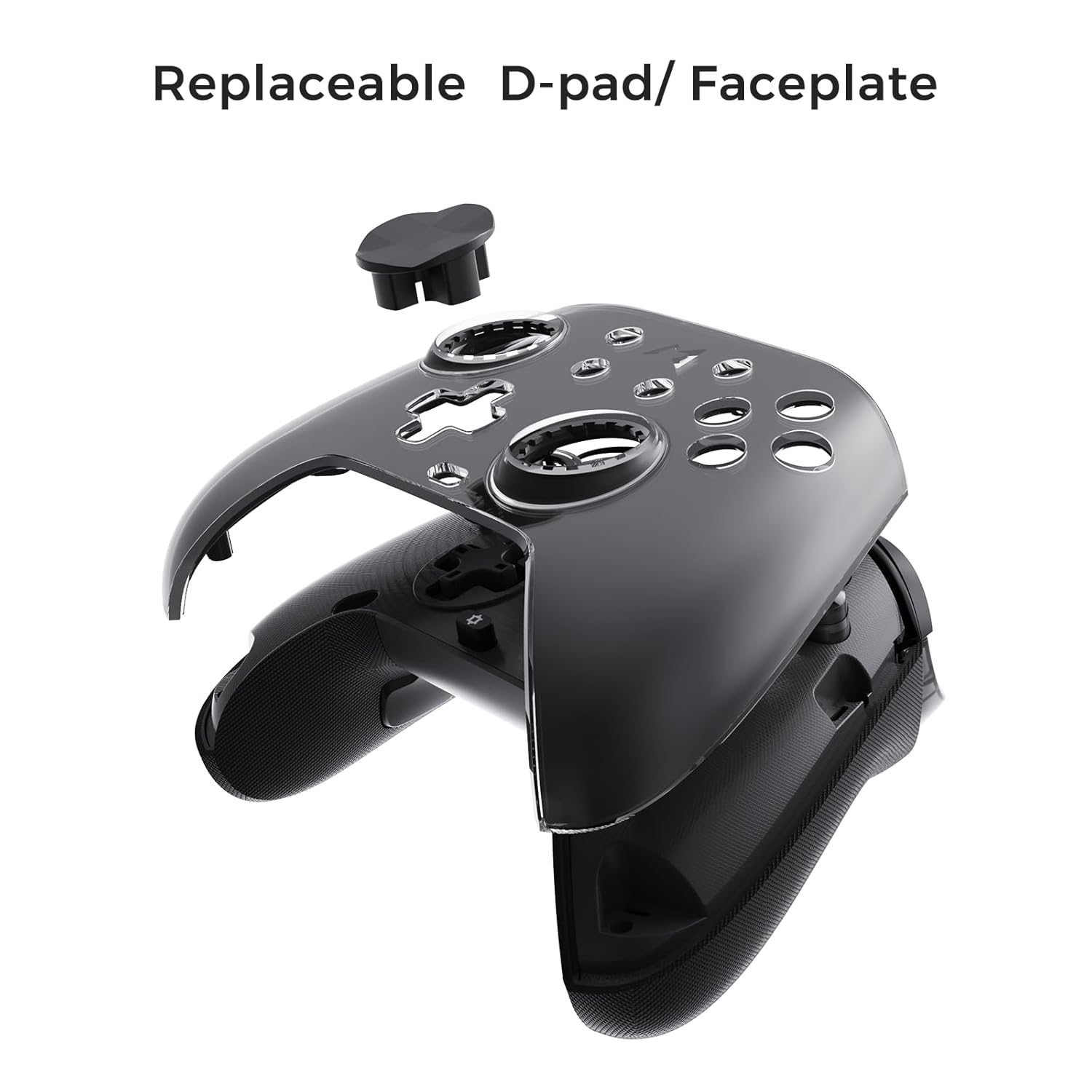
Figure 6.3: The D-pad and faceplate can be replaced for customization or preference.
- To replace the D-pad, gently remove the magnetic faceplate and then lift out the D-pad. Insert the desired D-pad (cross or circle) and reattach the faceplate.
7. Vzdrževanje
- Čiščenje: Za čiščenje krmilnika uporabite mehko, suho krpo. Za trdovratno umazanijo rahlo obrišiteampKrpo sperite z vodo. Ne uporabljajte agresivnih kemikalij ali abrazivnih čistil.
- Shranjevanje: Store the controller in a cool, dry place, away from direct sunlight and extreme temperatures. When not in use for extended periods, store it in the provided PU travel case.
- Vzdrževanje baterije: Za podaljšanje življenjske dobe baterije se izogibajte pogostemu popolnemu praznjenju krmilnika. Redno ga polnite, tudi če ga ne uporabljate nenehno.
8. Odpravljanje težav
| Težava | Možen vzrok | rešitev |
|---|---|---|
| Krmilnik se ne vklopi. | Nizka baterija. | Charge the controller for at least 30 minutes. |
| Krmilnik se ne poveže brezžično. | Not in pairing mode; out of range; interference; incorrect mode selected. | Ensure controller is in pairing mode. Move closer to the device. Check for other wireless devices causing interference. Verify correct connection mode (2.4G or Bluetooth). |
| Input lag or dropped connections. | Wireless interference; low battery; outdated firmware. | Reduce distance to device. Charge controller. Update firmware via Mobapad app. Try wired connection. |
| Gumbi ali igralne palice se ne odzivajo. | Software glitch; physical obstruction; calibration issue. | Restart the controller and the connected device. Check for physical debris. Calibrate joysticks via Mobapad app. |
| HD Rumble not working. | Feature disabled in game/system settings; low battery. | Ensure rumble is enabled in game and system settings. Charge controller. |
If you encounter issues not listed here, please refer to the official MOBAPAD support webspletno mesto ali se obrnite na službo za stranke.
9. Specifikacije
| Funkcija | Podrobnost |
|---|---|
| Številka modela | Mobapad Huben2 H6 |
| Povezljivost | 2.4G brezžično, Bluetooth, žično (USB-C) |
| Združljivost | Nintendo Switch, Nintendo Switch 2, Windows, Steam, Android, iOS |
| Igralne palice | Capacitive, 4,096-step precision, 1000Hz polling rate |
| Sprožilci | Dual Mode: 2mm Omron Microswitch, 10mm Hall Effect Linear |
| Gumbi | Omron Mechanical Face Buttons, Programmable Back Buttons (M1-M4) |
| Vibracije | Dual ALPS Linear Motors (HD Rumble) |
| Nadzor gibanja | 6-osni žiroskop |
| Kapaciteta baterije | 1000 mAh litij-ionski |
| Življenjska doba baterije | Do 15 ur (približno) |
| Dimenzije | 6.3 x 4.13 x 2.76 palcev |
| Teža | 1.87 funtov |
10. Garancija in podpora
MOBAPAD products are designed and manufactured to the highest quality standards. For warranty information, technical support, or customer service inquiries, please visit the official MOBAPAD website or contact their authorized support channels. Please retain your proof of purchase for warranty claims.
Webspletno mesto: Visit the MOBAPAD Store on Amazon
Ask a question about this manual
Ask about setup, troubleshooting, compatibility, parts, safety, or missing instructions. Manuals+ will review the question and use this page’s manual context to help answer it.