
OMPHOBBY M2 V3 PRO
Navodila za uporabo RC helikopterja OMPHOBBY M2 V3 PRO
Model: M2 V3 PRO
1. Uvod
This manual provides essential information for the safe and effective operation, setup, and maintenance of your OMPHOBBY M2 V3 PRO RC Helicopter. Please read this manual thoroughly before operating the helicopter to ensure proper function and to prevent damage or injury.

Figure 1.1: OMPHOBBY M2 V3 PRO RC Helicopter (Green Variant)
2. Varnostne informacije
WARNING: ADULTS ONLY - Not For Kids. This is a professional RC helicopter and not a toy. It requires remote control helicopter experience and is unsuitable for children or beginners. Improper handling can result in serious injury or property damage.
- Always operate in open areas, away from people, animals, buildings, and power lines.
- Ensure all components are securely fastened before each flight.
- Do not operate in adverse weather conditions (e.g., strong winds, rain).
- Keep hands and face clear of rotating blades.
- Always disconnect the battery after use and during transport.
- Follow all local regulations regarding RC aircraft operation.

Figure 2.1: Safety warnings on product packaging.
3. Vsebina paketa
The OMPHOBBY M2 V3 PRO RC Helicopter (PNP version) package typically includes the following items:
- OMPHOBBY M2 V3 PRO RC Helicopter (assembled)
- Rezila glavnega rotorja
- Tail Rotor Blades
- Baterija (1 litij-ionska baterija priložena)
- Navodila za uporabo
- Small parts and tools (e.g., screws, hex wrenches)
Opomba: The PNP (Plug-N-Play) version requires a separate transmitter and a compatible receiver (not included). Compatible systems include Futaba S-FHSS, Spektrum DSMX/DSM2, and FrSky, among others.

Figure 3.1: Typical package contents for the M2 V3 PRO.
4. Specifikacije
| Funkcija | Specifikacija |
|---|---|
| Dimenzije izdelka | 17.5 x 6.3 x 4.3 palcev |
| Teža predmeta | 2 funta (približno 320 g) |
| Starost, ki jo priporoča proizvajalec | 14 leta in več |
| Baterije | Potrebna je 1 litij-ionska baterija (priložena) |
| Sistem letenja | OFS3 Flight Control |
| Vrsta motorja | Brushless Direct Drive |

Figure 4.1: OMPHOBBY M2 V3 PRO dimensions.
5. Nastavitev
5.1. Začetni pregled
Upon unpacking, carefully inspect the helicopter for any signs of damage during shipping. Ensure all parts are present and securely attached. Check the main and tail rotor blades for any cracks or deformities.
5.2. Namestitev in polnjenje baterije
- Ensure the helicopter is powered off before installing or removing the battery.
- Carefully insert the provided Lithium Ion battery into its designated compartment.
- Connect the battery to the helicopter's power connector.
- For charging, use only the charger recommended by OMPHOBBY. Follow the charger's instructions for safe charging practices.

Figure 5.1: Battery installation on the M2 V3 PRO.
5.3. Transmitter and Receiver Setup (PNP Version)
As a PNP version, you will need to provide your own compatible transmitter and receiver. Refer to your transmitter's manual for specific binding procedures. The OFS3 Flight Control system supports various protocols including Futaba S-FHSS, Spektrum DSMX/DSM2, and FrSky.
- Install your chosen receiver into the helicopter's receiver slot.
- Connect the receiver to the OFS3 Flight Control board according to the wiring diagram (refer to the detailed diagram in the full manual or online resources).
- Power on your transmitter, then power on the helicopter.
- Initiate the binding process as per your transmitter and receiver instructions.
- Once bound, verify all control surfaces respond correctly to transmitter inputs.

Figure 5.2: Flight controller and receiver connection points.
6. Navodila za uporabo
6.1. Predletni pregledi
- Prepričajte se, da je baterija popolnoma napolnjena.
- Preverite tesnost vseh vijakov in priključkov.
- Verify main and tail rotor blades are free from damage and rotate smoothly.
- Confirm proper function of all servos and flight controls via your transmitter.
- Check the flight area for obstacles and people.
6.2. Flight Modes (OFS3 Flight Control)
The advanced OFS3 flight controller offers three distinct flight modes:
- Način stabilizacije: Provides enhanced stability, ideal for learning basic flight maneuvers.
- Soft 3D Mode: Offers increased agility for introductory 3D aerobatics.
- Violet 3D Mode: Delivers maximum responsiveness and control for advanced 3D flight.
These modes can be seamlessly switched mid-flight via your transmitter, allowing for versatile performance tailored to your skill level and desired maneuvers.
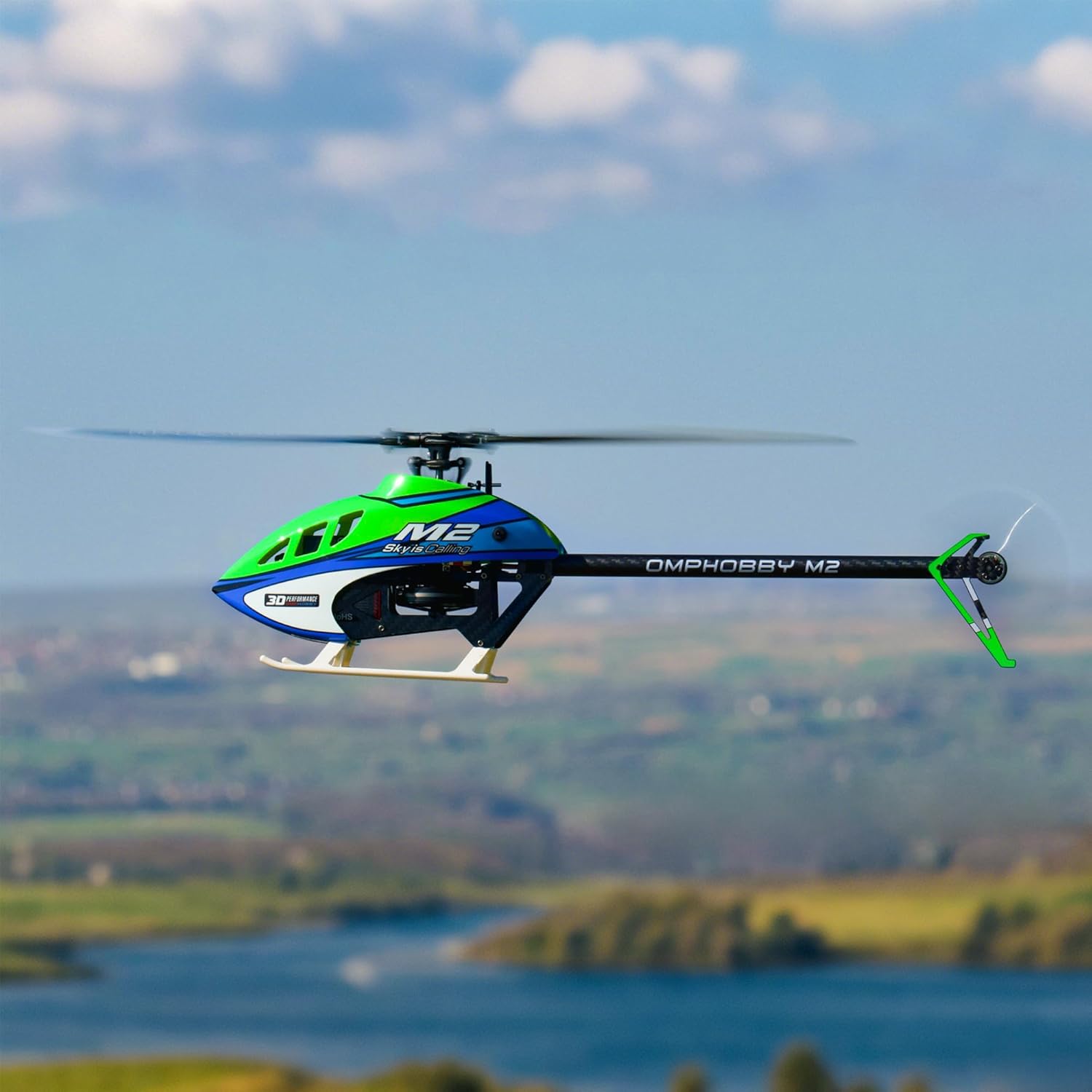
Figure 6.1: M2 V3 PRO in flight.
6.3 Vzlet in pristanek
- Helikopter postavite na ravno, vodoravno površino.
- Slowly increase throttle until the helicopter lifts off smoothly. Maintain a stable hover.
- For landing, gradually reduce throttle while maintaining control, allowing the helicopter to descend gently.
- Once on the ground, fully reduce throttle and disconnect the battery.
7. App Tuning & Telemetry
The OMPHOBBY M2 V3 PRO supports smartphone app tuning and real-time data telemetry, similar to the MK2 model. This feature allows for personalized adjustment of flight parameters and monitoring of critical flight data.
7.1. Povezava z aplikacijo
Download the official OMPHOBBY flight control app from your smartphone's app store. Follow the in-app instructions to connect your smartphone to the helicopter's flight control system via Bluetooth or a dedicated connection module (if required).
7.2. Prilagoditev parametrov
The app provides an interface to adjust various flight parameters, including:
- Gain settings for different axes (roll, pitch, yaw)
- Collective pitch curves
- Flight mode specific settings
- Other advanced tuning options for experienced pilots.

Figure 7.1: App interface for basic flight parameter tuning.

Figure 7.2: App interface for expert flight parameter tuning.
7.3. Telemetrija v realnem času
The app also displays real-time telemetry data, allowing you to monitor key performance indicators during flight. This includes battery voltage, current draw, motor RPM, and temperature, aiding in performance optimization and flight safety.

Slika 7.3: Nprample of real-time telemetry data.
8. Vzdrževanje
Regular maintenance is crucial for the longevity and safe operation of your OMPHOBBY M2 V3 PRO.
- Po vsakem letu: Inspect main and tail blades for damage. Check for loose screws or connections.
- Periodično: Clean the helicopter to remove dust and debris. Check motor and servo functionality. Lubricate moving parts as recommended by OMPHOBBY.
- Zamenjava komponente: Replace any damaged or worn components immediately with genuine OMPHOBBY parts.

Figure 8.1: Main and tail rotor blades.
9. Odpravljanje težav
This section addresses common issues you might encounter. For more detailed troubleshooting, refer to the official OMPHOBBY support resources.
| Težava | Možen vzrok | rešitev |
|---|---|---|
| Helicopter does not power on | Baterija ni napolnjena ali je nepravilno priključena. | Ensure battery is fully charged and correctly connected. Check power switch. |
| Loss of control during flight | Weak transmitter signal, receiver issue, or environmental interference. | Check transmitter battery. Ensure clear line of sight. Avoid areas with strong electromagnetic interference. Re-bind transmitter/receiver. |
| Nestabilen let ali driftanje | Improper flight control settings, damaged blades, or unbalanced helicopter. | Adjust flight parameters via the app. Inspect and replace damaged blades. Ensure helicopter is balanced. |
| Tail rotor not responding | Damaged tail motor or servo, loose connection. | Check tail motor and servo connections. Inspect for physical damage and replace if necessary. |
10. Garancija in podpora
For warranty information, technical support, and spare parts, please refer to the official OMPHOBBY webspletno mesto ali se obrnite neposredno na njihovo službo za stranke. Shranite dokazilo o nakupu za uveljavljanje garancije.
You can visit the OMPHOBBY store for additional products and support: OMPHOBBY Store
Povezani dokumenti - M2 V3 PRO
 |
OMPHOBBY Flight System 3 (OFS3) User Guide Comprehensive user guide for the OMPHOBBY Flight System 3 (OFS3), detailing its features, setup, operation, and advanced functionalities for micro RC helicopters. |
 |
OMPHOBBY M2 V3 Sport Instruction Manual: Assembly Guide & Specifications Comprehensive instruction manual for the OMPHOBBY M2 V3 Sport micro R/C helicopter. Includes detailed assembly steps, specifications, features, warnings, and a parts list. |
 |
OMPHOBBY OFS3 & OFS3+ Flugsteuerungssystem Benutzerhandbuch Umfassendes Benutzerhandbuch für das OMPHOBBY OFS3 und OFS3+ Flugsteuerungssystem, das detaillierte Anleitungen zur Einrichtung, Konfiguration und Bedienung von Mikro-Helikoptern bietet. |
 |
Navodila za uporabo mikro helikopterja OMPHOBBY M2 V3 PRO na daljinsko upravljanje Obsežen priročnik z navodili za uporabo OMPHOBBY M2 V3 PRO, mikro helikopterja na daljinsko upravljanje velikosti 200. Zajema sestavljanje, specifikacije, funkcije, varnostne ukrepe in seznam delov. |
 |
OMPHOBBY OFS3 & OFS3+ User Guide - Flight System 3 Comprehensive user guide for the OMPHOBBY OFS3 and OFS3+ Flight System 3, detailing features, setup, connections, and operation for advanced micro helicopter control. Explore 3D/Attitude modes, Rescue Mode, Bluetooth connectivity, and extensive protocol support. |
 |
OMPHOBBY OFS3 & OFS3+ Benutzerhandbuch Das OMPHOBBY Flight System 3 (OFS3 & OFS3+) Benutzerhandbuch bietet detaillierte Anleitungen zur Einrichtung und Nutzung dieses fortschrittlichen Flugsteuerungssystems für Mikrohelikopter. Erfahren Sie mehr über Funktionen wie integriertes ExpressLRS, Rettungsmodus, Bluetooth-App-Steuerung und umfassende Tuning-Optionen für ein optimales Flugerlebnis. |
Ask a question about this manual
Ask about setup, troubleshooting, compatibility, parts, safety, or missing instructions. Manuals+ will review the question and use this page’s manual context to help answer it.