
Uvod
This manual provides detailed instructions for the setup, operation, maintenance, and troubleshooting of your OnePlus Buds 4 wireless earbuds. Please read this manual thoroughly to ensure proper use and to maximize your listening experience.
Vsebina paketa
Preverite, ali so v embalaži izdelka vsi elementi:
- Slušalke OnePlus Buds 4 (leve in desne)
- etui za polnjenje
- Polnilni kabel USB-C
- Več velikosti ušesnih nastavkov (S, M, L)
- Uporabniški priročnik (ta dokument)
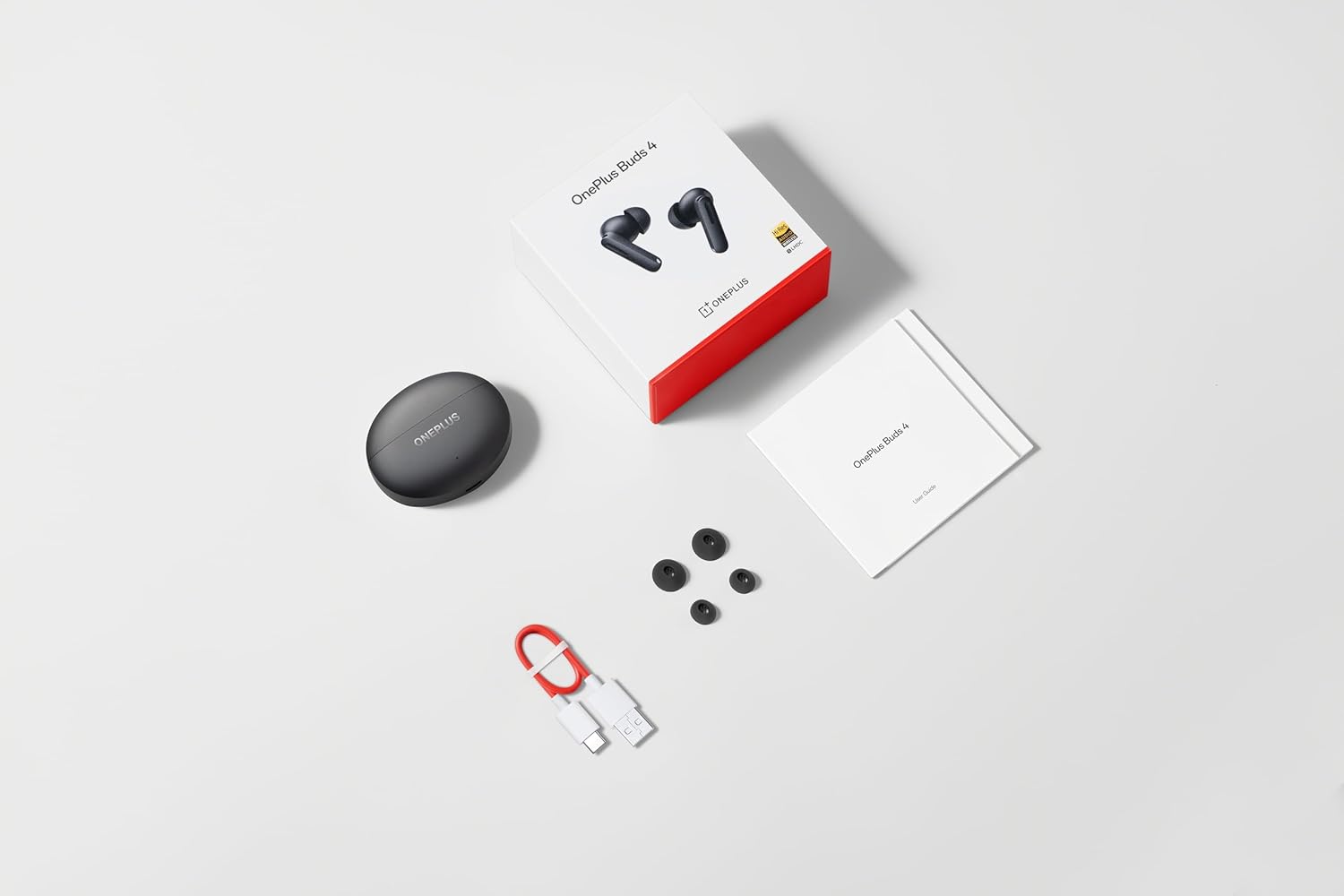
Image: The retail package contents for the OnePlus Buds 4, showing the earbuds, charging case, USB-C cable, and various ear tip sizes.
Konec izdelkaview
The OnePlus Buds 4 are advanced wireless in-ear headphones designed for high-quality audio and active noise cancellation. They feature an ergonomic design for comfort and secure fit, housed in a compact charging case.

Image: The OnePlus Buds 4 earbuds resting inside their open charging case. The earbuds and case are in Storm Gray, with the OnePlus logo visible on the case.

Image: This image shows the front perspective of the OnePlus Buds 4 earbuds and their charging case, highlighting the sleek Storm Gray finish.

Image: The image features the two OnePlus Buds 4 earbuds separated from their charging case, showcasinnjihovo zasnovo.
Nastavitev
Začetno polnjenje
Before first use, place both earbuds into the charging case and connect the case to a power source using the provided USB-C cable. Ensure the indicator light on the case illuminates, signifying charging. A full charge is recommended for optimal battery performance.
Seznanjanje z vašo napravo
- Prepričajte se, da ima polnilna škatlica dovolj moči.
- Open the charging case with the earbuds inside. The indicator light will flash white, indicating pairing mode.
- Na pametnem telefonu ali napravi, ki podpira Bluetooth, se pomaknite do nastavitev Bluetooth.
- Select "OnePlus Buds 4" from the list of available devices.
- Ko je povezava vzpostavljena, se bo indikatorska lučka na ohišju izklopila.
For subsequent connections, the earbuds will automatically connect to the last paired device when the case is opened.
Installing the HeyMelody App
For advanced features, customization, and firmware updates, download and install the HeyMelody app from your device's app store. This app allows you to personalize touch controls, adjust sound profiles, and manage noise cancellation settings.
Selecting the Right Ear Tips
Choosing the correct ear tip size is crucial for sound quality, noise cancellation, and comfort. Experiment with the included small, medium, and large ear tips to find the best fit for your ears. A good seal will enhance bass response and active noise cancellation effectiveness.

Image: This image illustrates the different sizes of silicone ear tips included with the OnePlus Buds 4, essential for a comfortable and secure fit.
Navodila za uporabo
Dotaknite se kontrolnikov
The OnePlus Buds 4 feature intuitive touch controls on the stem of each earbud. These controls can be customized via the HeyMelody app.

Image: A close-up image of a single OnePlus Buds 4 earbud, indicating the specific area for touch controls on the stem.
- Enkratni dotik: Predvajanje/začasna ustavitev glasbe, sprejem/končanje klica.
- Dvojni dotik: Naslednja skladba, Zavrni klic.
- Trojni dotik: Prejšnja skladba.
- Pritisnite in držite: Switch between Active Noise Cancellation, Transparency Mode, and Noise Cancellation Off.
- Swipe Up/Down (on stem): Prilagodite glasnost.
Aktivno odpravljanje šumov (ANC) in način preglednosti
The earbuds offer advanced noise control features:
- Aktivno odpravljanje hrupa (ANC): Zmanjša hrup iz okolice za poglobljeno poslušalsko izkušnjo.
- Način preglednosti: Allows you to hear your surroundings while still enjoying your audio, enhancing situational awareness.
Switch between these modes by pressing and holding the touch area on either earbud, or through the HeyMelody app.

Image: This graphic depicts the concept of Active Noise Cancellation, showing how the OnePlus Buds 4 reduce ambient sound for an immersive listening experience.
Avdio funkcije
The OnePlus Buds 4 are equipped with features to deliver high-fidelity audio:
- Hi-Res Audio and LHDC 5.0: Supports high-resolution audio codecs for detailed and clear sound reproduction.
- Poglobljen 3D prostorski zvok: Provides a multi-directional sound experience, enhancing immersion in music and videos.

Image: An image highlighting the Hi-Res Audio and LHDC 5.0 capabilities of the OnePlus Buds 4, indicating high-fidelity sound reproduction.
Image: This graphic illustrates the immersive 3D Spatial Audio feature, suggesting a multi-directional sound experience provided by the earbuds.
Calls and Gaming
The earbuds feature enhanced voice cancellation for clear calls and low-latency connectivity for an optimized gaming and video watching experience.
Polnjenje slušalk in etuija
To charge the earbuds, place them into the charging case. The earbuds will begin charging automatically. To charge the case, connect the provided USB-C cable to the charging port on the back of the case and to a power adapter (not included).

Image: The rear of the OnePlus Buds 4 charging case, clearly showing the USB-C port for charging.
The charging case provides extended battery life, allowing for over 24 hours of total listening time with multiple recharges of the earbuds.
Vzdrževanje in nega
- Čiščenje: Slušalke in polnilno ohišje redno čistite z mehko, suho krpo, ki ne pušča vlaken. Ne uporabljajte agresivnih kemikalij ali abrazivnih materialov.
- Namigi za ušesa: Remove and clean ear tips with water and mild soap if necessary. Ensure they are completely dry before reattaching.
- Shranjevanje: Ko slušalk ne uporabljate, jih shranite v polnilno škatlico, da jih zaščitite in ohranite napolnjene.
- Vodoodpornost: The earbuds are water-resistant (IP55 rated), meaning they can withstand splashes and sweat. They are not designed for swimming or submersion in water. Ensure the earbuds are dry before placing them back in the charging case.
Odpravljanje težav
If you encounter issues with your OnePlus Buds 4, refer to the table below for common problems and solutions.
| Težava | Možen vzrok | rešitev |
|---|---|---|
| Brez zvoka iz slušalk | Low battery; Not paired; Volume too low. | Charge earbuds; Re-pair with device; Increase device volume. |
| Slušalke se ne seznanijo | Out of range; Pairing mode not active; Interference. | Ensure earbuds are in pairing mode (open case); Move closer to device; Turn off other Bluetooth devices. |
| Aktivno odpravljanje šumov ni učinkovito | Improper ear tip fit; ANC mode not active. | Try different ear tip sizes for a better seal; Ensure ANC is enabled via touch control or app. |
| Polnilna torbica se ne polni | Cable issue; Power source issue. | Check USB-C cable connection; Try a different power adapter or USB port. |
| Ena slušalka nima zvoka | Earbud not connected; Low battery. | Place both earbuds in the case, close, then reopen; Ensure both earbuds are charged. |
Specifikacije
| Funkcija | Podrobnost |
|---|---|
| Ime modela | OnePlus Buds 4 |
| Številka modela | E513A |
| Tehnologija povezljivosti | Bluetooth 5.4 |
| Nadzor hrupa | Aktivno odpravljanje hrupa |
| Velikost zvočnega gonilnika | 11 milimetrov |
| Frekvenčno območje | 40 Hz - 20,000 Hz |
| Občutljivost | 100 dB |
| Impedanca | 18 Ohm |
| Nadzorna metoda | Dotaknite se kontrolnikov |
| Stopnja vodoodpornosti | IP55 (ušesni čepki) |
| Življenjska doba baterije (slušalke + etui) | Več kot 24 ur (s polnilnim ohišjem) |
| Združljive naprave | Smartphones, Laptops, Desktops, Gaming Consoles, Tablets, Televisions |
Varnostne informacije
Please observe the following safety guidelines to prevent damage to your device or personal injury:
- Zaščita sluha: Izogibajte se dolgotrajnemu poslušanju pri visoki glasnosti, da preprečite poškodbe sluha.
- Varnost pri vožnji: Do not use earbuds while driving or cycling in situations where it may distract you or pose a hazard.
- Vzdrževanje baterije: Do not attempt to replace the battery yourself. Do not expose the device to extreme temperatures or direct sunlight.
- Odstranjevanje: Dispose of the device and its batteries according to local regulations. Do not dispose of with household waste.
Garancija in podpora
Your OnePlus Buds 4 are covered by a limited warranty. For detailed warranty terms and conditions, please refer to the warranty card included in your package or visit the official OnePlus support website. For technical assistance or customer service, please contact OnePlus customer support.