
Uvod
Thank you for choosing the Amazon Basics Single Outlet Hose Watering Timer. This device is designed to simplify your garden irrigation by providing flexible and automated watering schedules. Please read this manual carefully before installation and use to ensure proper operation and longevity of your product.
Lastnosti izdelka
- Smart Watering Timer: Program flexible watering schedules from 1 minute to 3 hours 59 minutes for hassle-free garden irrigation.
- Intuitivne kontrole: Activate manual watering with customizable duration when needed. The program can be paused for 24, 48, or 72 hours.
- Angled Screen Design: The 45% adjustable tilted screen ensures optimal visibility from any angle, displaying time, program, and battery status.
- Leak-Free Connection: Rubber gaskets ensure a tight seal and prevent water waste. Standard 1.9cm BSP thread. Operates on 2 AA alkaline batteries (not included).

Slika 1: Spredaj view of the Amazon Basics Single Outlet Hose Watering Timer, showing the digital display and control buttons.
Vsebina paketa
Vaš paket mora vsebovati naslednje elemente:
- 1 x Amazon Basics Single Outlet Hose Watering Timer
- 1 x uporabniški priročnik
- Rubber gaskets (pre-installed or included for leak-free connection)
Note: 2 AA alkaline batteries are required and are NOT included in the package.
Nastavitev
1. Namestitev baterije
- Poiščite predal za baterije na zadnji strani časovnika.
- Odprite pokrov prostora za baterije.
- Vstavite 2 nove alkalne baterije AA in pazite na pravilno polarnost (+/-).
- Za ohranitev vodoodpornosti tesno zaprite pokrov predalčka za baterije.

Figure 2: Top connection of the timer, showing the filter and threaded inlet. Ensure rubber gaskets are in place for a leak-free seal.
2. Connecting to the Faucet
- Prepričajte se, da je pipa čista in brez umazanije.
- Check that the rubber gasket is properly seated inside the timer's inlet connector.
- Screw the timer onto your standard 1.9cm (3/4 inch) outdoor faucet by hand until it is snug. Do not overtighten.
- Connect your garden hose to the outlet of the timer.
- Slowly turn on the faucet. Check for any leaks. If leaks occur, tighten the connections slightly or adjust the rubber gaskets.
Navodila za uporabo
1. Nastavitev trenutnega časa
Refer to the angled screen for clear visibility of settings.
- Press the "SET" button to enter time setting mode.
- Use the "+" and "-" buttons to adjust the hour. Press "SET" to confirm.
- Use the "+" and "-" buttons to adjust the minute. Press "SET" to confirm.
2. Programming a Watering Schedule
The timer allows flexible schedules from 1 minute to 3 hours 59 minutes.
- Press the "PROG" button to enter program setting mode.
- Set the START TIME: Use "+" and "-" to adjust the hour and minute, pressing "PROG" to confirm each.
- Set the WATERING DURATION: Use "+" and "-" to adjust the duration (minutes/hours), pressing "PROG" to confirm.
- Set the WATERING FREQUENCY: Use "+" and "-" to select how often the timer should water (e.g., every 12 hours, every 24 hours, specific days). Press "PROG" to confirm.
- Once all settings are confirmed, the timer will display the next scheduled watering time.
3. Ročno zalivanje
Za ročno zalivanje izven programiranega urnika:
- Pritisnite gumb "ROČNO".
- Use "+" and "-" buttons to set the desired manual watering duration.
- Press "MANUAL" again to start manual watering. The timer will automatically stop after the set duration.
4. Pause Function (Rain Delay)
If it rains or you don't need to water for a few days, you can pause the program:
- Press the "DELAY" button.
- Use "+" and "-" buttons to select the pause duration (24, 48, or 72 hours).
- Press "DELAY" again to confirm. The timer will resume its programmed schedule after the delay period.

Figure 3: Visual representation of the timer's main features, including flexible schedules, manual watering, and secure sealing.
Vzdrževanje
- Zamenjava baterije: Replace batteries when the low battery indicator appears on the screen to ensure continuous operation.
- Čiščenje filtra: Periodically check and clean the filter located in the inlet connector to prevent blockages and maintain water flow.
- Zimska shramba: During freezing temperatures, remove the timer from the faucet, drain any remaining water, and store it indoors to prevent damage.
- Generalno čiščenje: Obrišite časovnik z mehko damp krpo. Ne uporabljajte abrazivnih čistil ali topil.
Odpravljanje težav
| Težava | Možen vzrok | rešitev |
|---|---|---|
| Časovnik ne zaliva. | Low batteries, incorrect program, faucet off, water pressure too low. | Check battery status and replace if needed. Verify program settings. Ensure faucet is fully open. Check water supply. |
| Voda pušča iz priključkov. | Loose connection, damaged gasket, missing gasket. | Tighten connections. Check and replace rubber gaskets if damaged or missing. |
| Zaslon je prazen ali temen. | Prazne ali prazne baterije. | Baterije zamenjajte z novimi alkalnimi baterijami AA. |
Specifikacije
- Številka modela: AMZ622617EU
- Dimenzije: 8.2 cm x 13.7 cm x 18.5 cm (dolžina x širina x višina)
- Teža: 383.4 g
- Vrsta niti: Standard 1.9cm (3/4 inch) BSP
- vir energije: 2 x AA alkalne baterije (niso priložene)
- Trajanje zalivanja: 1 minut do 3 ur 59 minut
- Funkcija premora: 24, 48 ali 72 ur
- barva: Grey, Black, Blue
- Država izvora: Kitajska
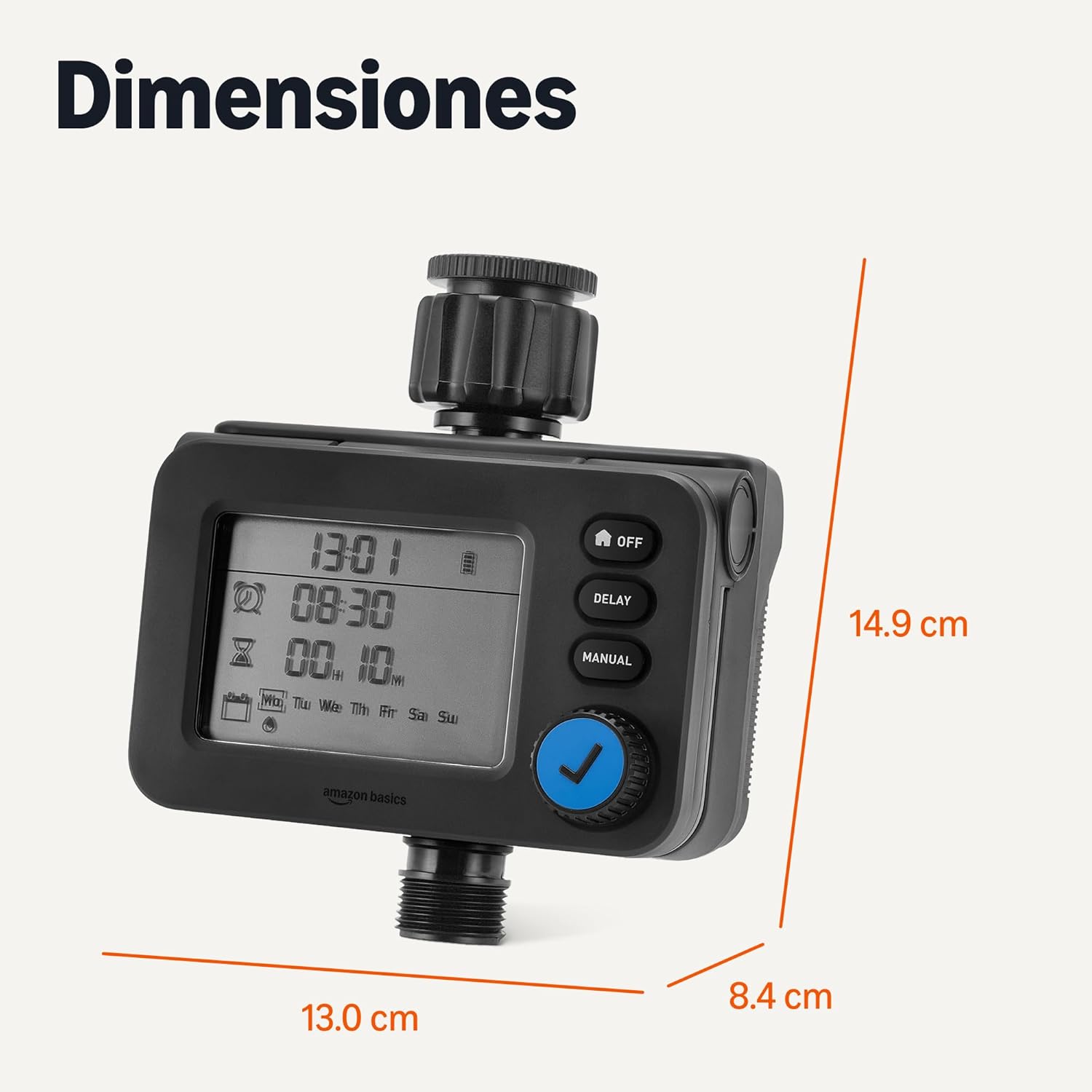
Slika 4: Dimenzije izdelka za načrtovanje namestitve.
Garancija in podpora
For warranty information and customer support, please refer to the documentation included with your purchase or visit the official Amazon Basics webmesto.