
1. Izdelek je končanview
The SEUNKWANG EWEADN GX710S is a full-size wired computer keyboard designed for efficiency and comfort. It features a durable aluminum alloy panel, warm backlighting with adjustable brightness, and quiet membrane keys with translucent pudding keycaps. This keyboard is plug-and-play, requiring no additional software for basic functionality.

Slika 1.1: Konecview of the SEUNKWANG EWEADN GX710S keyboard highlighting its wired connection, membrane keys, pudding keycaps, ergonomics, metal panel, ring light, 26-key anti-ghosting, and ultra-thin body.
2. Navodila za nastavitev
2.1 Vsebina paketa
- SEUNKWANG EWEADN GX710S Wired Backlit Keyboard
- USB kabel (vgrajen)
2.2 Priključitev tipkovnice
- Locate an available USB-A port on your computer (PC, laptop, desktop).
- Insert the USB connector of the keyboard cable into the USB-A port.
- The keyboard is plug-and-play and does not require any additional software or driver installation. Your operating system should automatically recognize the device.
The keyboard is compatible with Windows, Linux, and Chrome OS. Basic typing functionality is supported on Mac OS, though specific shortcut keys may vary.

Image 2.1: Illustration of the keyboard connecting to a device via its USB-A cable, emphasizing the plug-and-play functionality.
3. Navodila za uporabo
3.1 Osnovno tipkanje
The GX710S features a standard full-size 104-key QWERTY layout, including a dedicated number pad for efficient data entry. The membrane switch type provides a quiet typing experience.
3.2 Nadzor osvetlitve ozadja
The keyboard is equipped with a warm backlight. You can adjust its brightness and toggle it on/off using the following key combinations:
- FN + UP Arrow Key: Povečajte svetlost osvetlitve ozadja.
- FN + PD (Page Down) Key: Zmanjšajte svetlost osvetlitve ozadja.
- FN + Menu Key: Toggle backlight ON/OFF.

Image 3.1: Visual guide demonstrating the key combinations (FN + UP, FN + PD, FN + Menu key) for controlling the keyboard's 5 levels of adjustable warm light.

Image 3.2: The keyboard displaying its adjustable warm backlight, designed for visibility in various lighting conditions.
3.3 naprednih funkcij
- Anti-Ghosting: The keyboard supports 26-key anti-ghosting, ensuring that multiple simultaneous key presses are registered accurately.
- Puding tipke: The water-drop pudding keycaps are designed to maximize light transmittance, providing a soft, uniform glow and enhancing key visibility.
- Ergonomsko oblikovanje: The sculpted keycaps and sturdy single-stage kickstand promote a comfortable hand posture for extended use.

Image 3.3: The keyboard showcasing its ergonomic design, including a foldable stand and anti-slip feet for comfortable typing angles.

Image 3.4: The keyboard layout highlighting various shortcut keys designed to enhance office productivity.
4. Vzdrževanje
4.1 Čiščenje tipkovnice
- Pred čiščenjem tipkovnico odklopite iz računalnika.
- Za brisanje površine tipkovnice uporabite mehko, suho krpo.
- Za trdovratno umazanijo rahlo damp Uporabite lahko krpo z blagim milom, pri čemer pazite, da tekočina ne pride v stik s tipkami ali notranjimi komponentami.
- The double-shot ABS keycaps are designed to be fade-resistant, maintaining character clarity over time.
4.2 Značilnosti vzdržljivosti
The GX710S is built with a premium aluminum alloy top panel, offering superior scratch resistance and a robust feel. It also features a water-resistant design to protect against minor spills.
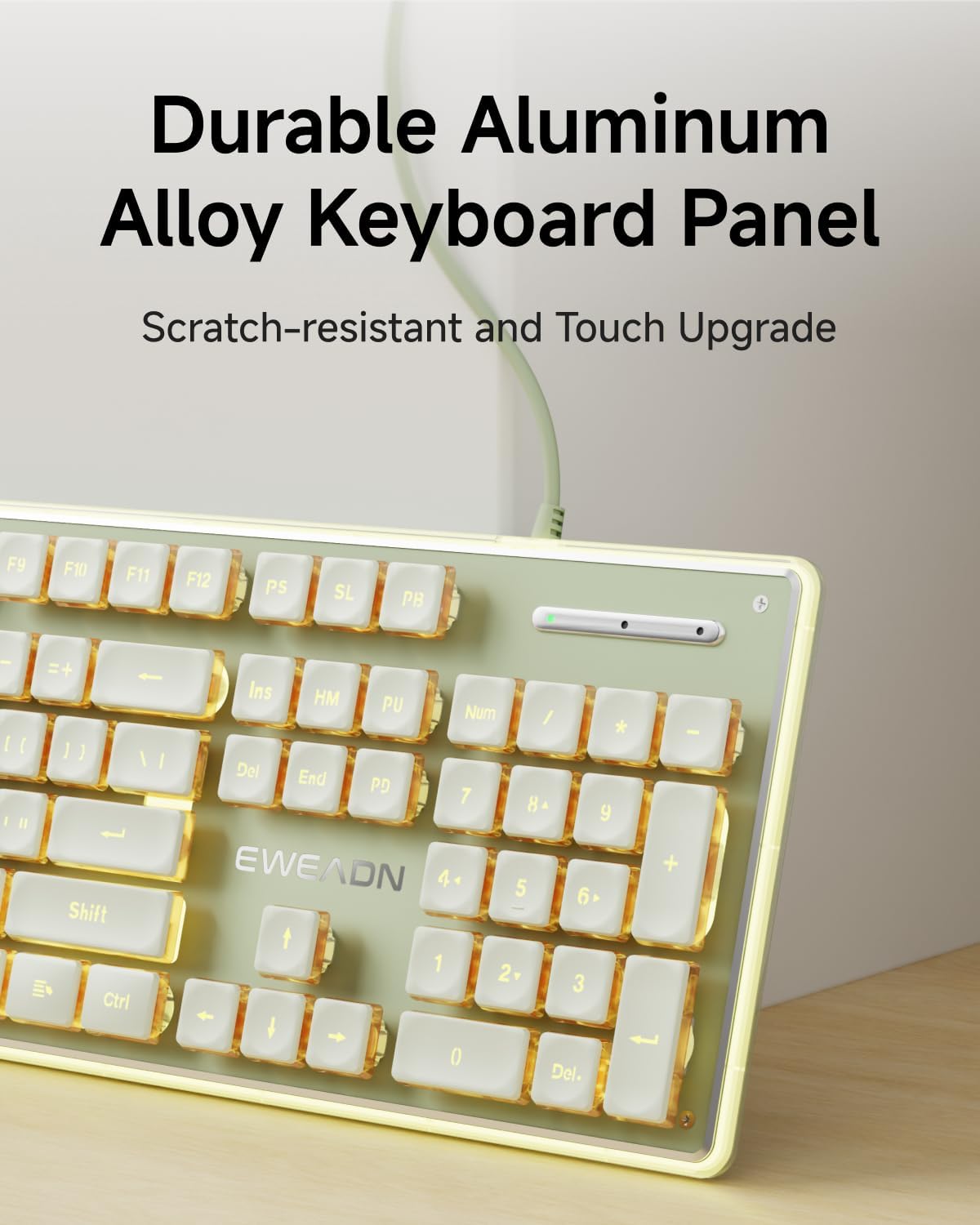
Image 4.1: Close-up of the keyboard's durable aluminum alloy panel, highlighting its scratch-resistant surface.

Image 4.2: Detail of the keyboard's pudding keycaps, engineered with double-shot ABS injection molding for fade resistance.
5. Odpravljanje težav
5.1 Tipkovnica se ne odziva
- Ensure the USB cable is securely connected to both the keyboard and the computer's USB-A port.
- Try connecting the keyboard to a different USB-A port on your computer.
- Preizkusite tipkovnico na drugem računalniku, da ugotovite, ali je težava s tipkovnico ali s prvotnim računalnikom.
- Znova zaženite računalnik.
5.2 Backlight Not Working or Dim
- Prepričajte se, da je osvetlitev ozadja vklopljena z uporabo FN + Menu Key.
- Adjust the brightness using FN + UP Arrow Key.
- Verify the keyboard is receiving sufficient power from the USB port. Try a different port if available.
5.3 Ključi se ne registrirajo pravilno
- Clean around the affected keys to remove any debris that might be obstructing the key mechanism.
- Ensure the keyboard is connected directly to the computer and not through a USB hub, which can sometimes cause input issues.
6. Specifikacije
| Funkcija | Opis |
|---|---|
| Znamka | SEUNKWANG |
| Številka modela | GX710S |
| Tehnologija povezljivosti | Žični USB-A |
| Razporeditev tipkovnice | Full-size 104-key QWERTY |
| Tip stikala | Membrana |
| Osvetlitev ozadja | Warm Backlit, Single Color, Adjustable Brightness |
| Tipkovnice | Pudding Keycaps, Double-shot ABS, Fade-resistant |
| Material plošče | Aluminijeva zlitina |
| Posebne lastnosti | Low-Noise Typing, Floating Keys, 26-key Anti-ghosting, Water Resistant |
| Združljivi operacijski sistemi | Windows, Linux, Chrome OS (Basic Mac OS support) |
| Kaj je v škatli | USB kabel (vgrajen) |
7. Informacije o garanciji
This SEUNKWANG EWEADN GX710S keyboard comes with a 2-letna garancija od datuma nakupa. Ta garancija krije proizvodne napake in okvare pri normalni uporabi. Ne krije škode, ki jo povzroči napačna uporaba, nesreče, nepooblaščene spremembe ali običajna obraba.
Za garancijske zahtevke shranite dokazilo o nakupu.
8. Podpora
For any questions, troubleshooting assistance, or support regarding your SEUNKWANG EWEADN GX710S keyboard, please contact our customer support team.
- Podpora po e-pošti: eweadnkeyboard@outlook.com
Our support team can assist with pre-sales inquiries, troubleshooting, accessory reissues, and returns/exchanges.