
1. Uvod
This manual provides detailed instructions for the safe and efficient assembly, operation, and maintenance of your SpeaKa Professional SP-TVS-600 TV Floor Stand. Please read this manual thoroughly before installation and retain it for future reference.
The SP-TVS-600 is designed to support televisions and monitors ranging from 37 to 86 inches, with a maximum load capacity of 45 kg. It features tool-free tilt adjustment, adjustable height for the screen (900 to 1100 mm), and an integrated cable management system. An additional height-adjustable storage shelf (200 to 910 mm) is included for media devices.
2. Varnostne informacije
OPOZORILO: Failure to read, understand, and follow all instructions can result in serious personal injury, property damage, or voiding of your warranty.
- Ensure the floor stand is placed on a stable, level surface.
- Ne prekoračite največje nosilnosti 45 kg (99 lbs).
- Verify that your TV's VESA mounting pattern is compatible with the stand (100x100 to 600x400 mm).
- Always use two people for lifting and positioning the TV onto the stand.
- Med montažo in delovanjem držite otroke in hišne ljubljenčke stran od stojala.
- Do not hang on the stand or TV.
- Regularly check all screws and connections to ensure they remain secure.
- Embalažni material zavrzite odgovorno.
3. Vsebina paketa
Please check that all components are present and undamaged before beginning assembly. If any parts are missing or damaged, contact your retailer.
- TV Floor Stand (disassembled components)
- Navodila za uporabo (ta dokument)
- Varnostni list
- Hardware Kit (screws, washers, spacers, tools for assembly)

Slika 1: Spredaj view of the SpeaKa Professional SP-TVS-600 TV Floor Stand.
4. Nastavitev in montaža
Follow these steps carefully to assemble your TV floor stand. It is recommended to have a second person assist with assembly, especially when mounting the television.
- Razpakirajte komponente: Previdno vzemite vse dele iz embalaže in jih položite na mehko, čisto površino, da preprečite praske.
- Sestavite osnovo: Attach the main support column to the base plate using the provided screws and tools. Ensure all connections are tight and secure.
- Namestitev nosilcev za TV: Attach the VESA mounting brackets to the back of your television using the appropriate screws, washers, and spacers from the hardware kit. Refer to your TV's manual for specific screw requirements. Ensure the brackets are level and securely fastened.
- Namestitev televizorja: With assistance, carefully lift the television and hook the TV brackets onto the main support column's mounting plate. Secure the TV in place using the safety screws or locking mechanisms provided.
- Pritrdite polico: Install the media shelf onto the main support column at your desired height. Secure it with the designated fasteners.
- Upravljanje kablov: Route all TV and device cables through the integrated cable management system within the stand's column for a tidy appearance.
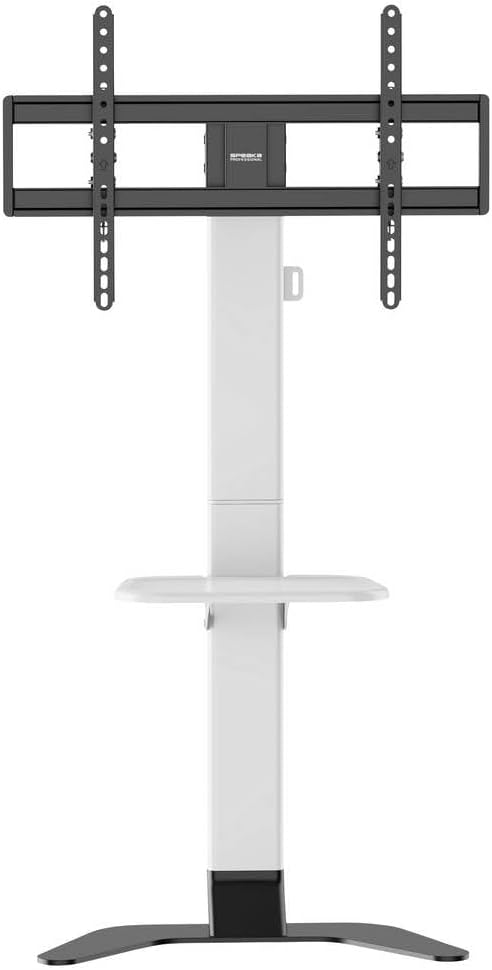
Slika 2: Spredaj view of the stand showing the adjustable shelf.

Slika 3: stran view of the stand, illustrating the profile in stabilnost.
5. Navodila za uporabo
5.1 Nastavitev višine televizorja
The TV mounting plate can be adjusted in height from 900 mm to 1100 mm. To adjust, loosen the height adjustment screws on the main column, carefully slide the TV to the desired height (with assistance), and then securely tighten the screws.
5.2 Adjusting TV Tilt
The stand features tool-free tilt adjustment. Gently push or pull the top or bottom of the TV to achieve your desired viewing angle. The mechanism will hold the TV in place.
5.3 Nastavitev višine police
The media shelf can be adjusted in height from 200 mm to 910 mm. Loosen the shelf adjustment screws, move the shelf to the preferred height, and then re-tighten the screws firmly.
6. Vzdrževanje
- Čiščenje: Za čiščenje stojala uporabite mehko, suho krpo. Za trdovratne madeže rahloamp Uporabite lahko krpo z blagim detergentom, nato pa posušite. Izogibajte se abrazivnim čistilom ali topilom.
- Periodični pregledi: Regularly inspect all screws, bolts, and connections to ensure they are tight and secure. Re-tighten if necessary.
- Poškodbe: Če se kateri koli del stojala poškoduje, ga takoj prenehajte uporabljati in se za nadomestne dele ali nasvet obrnite na podporo strankam.
7. Odpravljanje težav
| Težava | Možen vzrok | rešitev |
|---|---|---|
| Stojalo je majavo ali nestabilno. | Screws are loose; stand is on an uneven surface; weight capacity exceeded. | Ensure all assembly screws are tightened. Move stand to a level surface. Verify TV weight is within 45 kg limit. |
| TV does not tilt smoothly or stays in position. | Tilt mechanism needs adjustment or is obstructed. | Check for any obstructions. Ensure the tilt mechanism is clean. |
| Kabli niso lepo urejeni. | Cables not routed through the designated channels. | Re-route cables through the integrated cable management system in the main column. |
8. Specifikacije
- Model: SP-TVS-600
- Številka dela: SP-13382656
- Znamka: SPEAKA PROFESSIONAL
- Vrsta pritrditve: Talno stojalo
- Vrsta gibanja: Nagibna
- Material: Legirano jeklo
- barva: Bela/črna
- Združljive velikosti televizorjev: 37 - 86 inches (94.0 cm - 218.4 cm)
- Združljivost z VESA: 100x100, 200x100, 200x200, 300x200, 400x200, 300x300, 400x300, 400x400, 600x400 mm
- Največja nosilnost: 45 kg (99 lbs)
- Nastavitev višine televizorja: 900 - 1100 mm
- Shelf Height Adjustment: 200 - 910 mm
- Združljive naprave: Televizija, monitor
- Teža artikla: 12.505 kg (12505 gramov)
- Država izvora: Kitajska
9. Garancija in podpora
9.1 Informacije o garanciji
This SpeaKa Professional product comes with a 2-year manufacturer's warranty. Please refer to the terms and conditions provided with your purchase or visit the official SpeaKa Professional website for full details. Keep your proof of purchase for warranty claims.
9.2 Podpora strankam
For technical assistance, missing parts, or warranty inquiries, please contact your retailer or SpeaKa Professional customer support. Contact information can typically be found on the product packaging or the official brand webmesto.