
1. Uvod
This manual provides essential instructions for setting up, operating, maintaining, and troubleshooting your HONOR 400 5G smartphone. Please read this guide thoroughly to ensure proper use and to maximize the performance of your device.
The HONOR 400 is a powerful 5G smartphone featuring a 6.55-inch AMOLED display, a Qualcomm Snapdragon 7 Gen 3 processor, 12GB of RAM, and 512GB of internal storage. It operates on Android 15 and is equipped with a 5300mAh battery, a 200MP main camera, and dual-SIM capabilities.
2. Kaj je v škatli
Upon unboxing your HONOR 400 smartphone, verify that all items are present:
- Pametni telefon HONOR 400 5G
- USB kabel
- (Other accessories such as a charger, SIM ejector tool, or protective case may vary by region and package contents.)
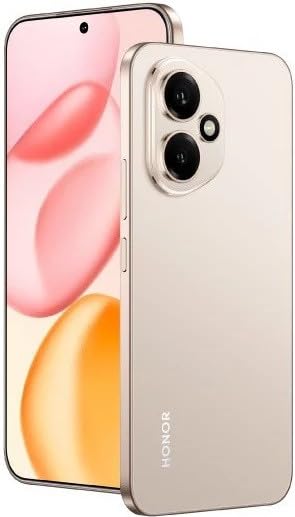
Slika 2.1: The HONOR 400 5G Smartphone. This image displays the device's sleek design and the main screen.
3. Naprava je končanaview
Seznanite se s fizičnimi komponentami pametnega telefona HONOR 400.
3.1 Spredaj View
- Zaslon: 6.55-inch AMOLED screen with 1264 x 2736 pixels resolution.
- Sprednja kamera: 50 MP, f/2.0 (wide) for selfies and video calls.
- Slušalka: Located at the top edge of the display.
An illustration of the front view would typically show the display, front camera, and earpiece.
3.2 zadaj View
- Main Camera System:
- 200 MP, f/1.9 (wide), 1/1.4", PDAF, OIS
- 12 MP, f/2.2, 112° (ultrawide), AF
- Flash: LED bliskavica za fotografiranje pri slabi svetlobi.
- HONOR Logo: Identifikacija blagovne znamke.
An illustration of the rear view would typically highlight the camera module and brand logo.
3.3 Stran Views in vrata
- Gumb za vklop: Typically on the right side, used to power on/off and wake/sleep the device.
- Gumbi za glasnost: Typically on the right side, above the power button, for adjusting volume.
- Vrata USB Type-C: Nahaja se na dnu, uporablja se za polnjenje in prenos podatkov.
- Pladenj za kartico SIM: Location varies, typically on the side or bottom, for inserting Nano-SIM cards.
- Microphones & Speakers: Strategically placed for calls and audio output.
Illustrations of the device's sides would show the placement of buttons, ports, and the SIM tray.
4. Nastavitev
4.1 Vstavljanje SIM kartic
- Poiščite pladenj za kartico SIM v napravi.
- Vstavite orodje za izmet SIM kartice (če je priloženo) v majhno luknjo poleg pladnja in ga nežno potisnite, dokler pladenj ne izskoči.
- Place your Nano-SIM card(s) into the designated slots on the tray. The HONOR 400 supports Dual-SIM (Nano-SIM + ESIM OR Nano-SIM + Nano-SIM). Ensure the gold contacts face downwards.
- Previdno vstavite pladenj nazaj v telefon.
An image demonstrating SIM card insertion would be helpful here.
Pomembno: Pred nakupomasing, verify network compatibility with your service provider. This device supports GSM networks (2G, 3G, 4G LTE, and 5G SA/NSA) but does not support CDMA networks.
4.2 Čarovnik za začetni vklop in nastavitev
- Pritisnite in držite gumb za vklop, dokler se ne prikaže logotip HONOR.
- Follow the on-screen instructions to complete the initial setup, which includes selecting your language, connecting to Wi-Fi, setting up your Google account, and configuring security features.
5. Upravljanje vaše naprave
5.1 Operacijski sistem Android 15
Your HONOR 400 runs on Android 15, offering a user-friendly interface and access to a vast ecosystem of applications via the Google Play Store. Navigate using gestures or on-screen buttons, customize your home screen, and manage notifications.
5.2 Osnovne funkcije
- Klicanje: Tapnite ikono telefona, vnesite številko in tapnite gumb za klic.
- Pošiljanje sporočil: Use the Messaging app to send SMS/MMS.
- Brskanje po internetu: Odpri a web browser (e.g., Chrome) to access the internet via Wi-Fi or mobile data.
- Upravljanje aplikacije: Download, install, and uninstall apps from the Google Play Store.
5.3 Uporaba kamere
The HONOR 400 features a versatile camera system:
- Zadnja kamera: Utilize the 200 MP main sensor for high-resolution photos and the 12 MP ultrawide lens for expansive shots. Features include PDAF and Optical Image Stabilization (OIS).
- Sprednja kamera: The 50 MP wide-angle front camera is ideal for selfies and video conferencing.
- Snemanje videa: Capture videos in up to 4K resolution at various frame rates (30, 60, 120 fps).
A diagram of the camera interface or tips for photography modes could be included here.
5.4 Povezljivost
Vaša naprava podpira več možnosti povezljivosti:
- 5G/4G LTE: High-speed mobile data connectivity.
- Wi-Fi: Za dostop do interneta se povežite z brezžičnimi omrežji.
- Bluetooth: Združite z brezžičnimi slušalkami, zvočniki in drugimi napravami.
- USB Type-C: Za polnjenje in povezavo z računalnikom za prenos podatkov.
6. Vzdrževanje
6.1 Skrb za baterije
- The HONOR 400 is equipped with a 5300mAh non-removable battery.
- Za podaljšanje življenjske dobe baterije se izogibajte ekstremnim temperaturam in pogostemu popolnemu praznjenju baterije.
- Use the provided USB cable and a compatible charger for optimal charging.
6.2 Posodobitve programske opreme
Regularly check for and install software updates to ensure your device has the latest features, security patches, and performance improvements. You can usually find this option in your phone's Settings menu under "System & updates" or "About phone."
6.3 Čiščenje naprave
Za čiščenje zaslona in ohišja telefona uporabljajte mehko krpo, ki ne pušča vlaken. Izogibajte se uporabi agresivnih kemikalij ali abrazivnih materialov.
7. Odpravljanje težav
This section addresses common issues you might encounter with your HONOR 400 smartphone.
7.1 Naprava se ne vklopi
- Prepričajte se, da je baterija napolnjena. Preden telefon ponovno vklopite, ga priključite na polnilnik vsaj 15 minut.
- Try a forced restart by holding the Power button for an extended period (e.g., 10-15 seconds).
7.2 Težave z omrežno povezljivostjo
- Preverite, ali je vaša SIM-kartica pravilno vstavljena.
- Preverite, ali so mobilni podatki omogočeni v nastavitvah telefona.
- Znova zaženite napravo.
- Confirm with your service provider that your plan is active and there are no network outagna vašem območju.
- Ensure your device is compatible with your network's frequencies (GSM only, no CDMA).
7.3 Zrušitve ali zamrznitev aplikacij
- Zaprite in znova odprite aplikacijo.
- Počistite predpomnilnik in podatke aplikacije v Nastavitvah > Aplikacije.
- Prepričajte se, da je aplikacija posodobljena na najnovejšo različico.
- Ponovno zaženite telefon.
7.4 Počasno delovanje
- Zaprite nepotrebne aplikacije v ozadju.
- Počisti predpomnilnik in začasno files.
- Ensure you have sufficient free storage space (512GB internal storage).
- Redno znova zaženite napravo.
8. Specifikacije
| Funkcija | Podrobnost |
|---|---|
| Ime modela | Čast 400 |
| Operacijski sistem | Android 15.0 |
| Procesor | Qualcomm SM7550-AB Snapdragon 7 Gen 3 (4 nm), osem jeder (1x 2.63 GHz Cortex-A715 in 3x 2.4 GHz Cortex-A715 in 4x 1.8 GHz Cortex-A510) |
| RAM | 12 GB |
| Notranji pomnilnik | 512 GB (nerazširljiv) |
| Zaslon | 6.55 Inches AMOLED, 1B colors, 1264 x 2736 pixels |
| Zadnja kamera | 200 MP (wide, OIS) + 12 MP (ultrawide) |
| Sprednja kamera | 50 MP (širokokotni) |
| Ločljivost zajema videa | 4K (30, 60, 120 fps) |
| Kapaciteta baterije | 5300 milliamp Hours (non-removable) |
| Kartica SIM | Dual-SIM (Nano-SIM + ESIM OR Nano-SIM + Nano-SIM) |
| Povezljivost | 5G, GSM, LTE, Wi-Fi, Bluetooth, USB Type-C |
| Dimenzije | 156.5 x 74.6 x 7.3 mm (6.16 x 2.94 x 0.29 in) |
| Teža | 202 gramov (6.49 oz) |
| barva | Desert Gold (as per product listing, actual color may vary by variant) |
9. Garancija in podpora
9.1 Garancija proizvajalca
The HONOR 400 smartphone comes with a 1-letna garancija proizvajalcaTa garancija krije napake v materialu in izdelavi pri normalni uporabi. Za uveljavljanje garancije shranite dokazilo o nakupu.
For specific terms and conditions of the warranty, please refer to the warranty card included with your product or visit the official HONOR support webmesto.
9.2 Podpora strankam
For further assistance, technical support, or service inquiries, please contact HONOR customer support through their official webspletnega mesta ali kontaktnih podatkov, navedenih na embalaži izdelka.
You can typically find support resources, FAQs, and contact details on the official HONOR webspletno mesto: www.hihonor.com


