
1. Uvod
This manual provides detailed instructions for the Tenlamp G9 Podcast Equipment Audio Mixer. Please read this manual thoroughly before using the device to ensure proper operation and to maximize its features. The G9 mixer is designed for podcasting, live streaming, short video recording, and other audio content creation, offering a range of audio control and enhancement functions.
2. Izdelek je končanview
The Tenlamp G9 is a versatile audio mixer featuring a 4.5-inch HD screen for real-time audio adjustments. It includes a 3-band EQ, dual reverb, voice changer, and noise reduction capabilities. The device is designed for plug-and-play compatibility with PCs, Macs, and mobile devices.
2.1 Ključne lastnosti
- Plug and Play: Quick connection to PC, Mac, or mobile devices without complex setup.
- Visual Audio Mixing: 4.5-inch HD screen displays audio adjustments in real-time.
- Zmanjšanje hrupa: Ensures clear voice output for recordings and live broadcasts.
- Celovit nadzor: Individual controls for microphone, music, headphone, main output, 3-band EQ, dual reverb, and pitch.
- Glasovna prilagoditev: Includes voice changer and auto-tune functions.
2.2 Vsebina paketa
- 1x Tenlamp G9 Audio Mixer
- 1x USB A-C Cable
- 1x 3.5mm TRRS Audio Cable
- 1x USB-C OTG Cable
- 1x Uporabniški priročnik (ta dokument)
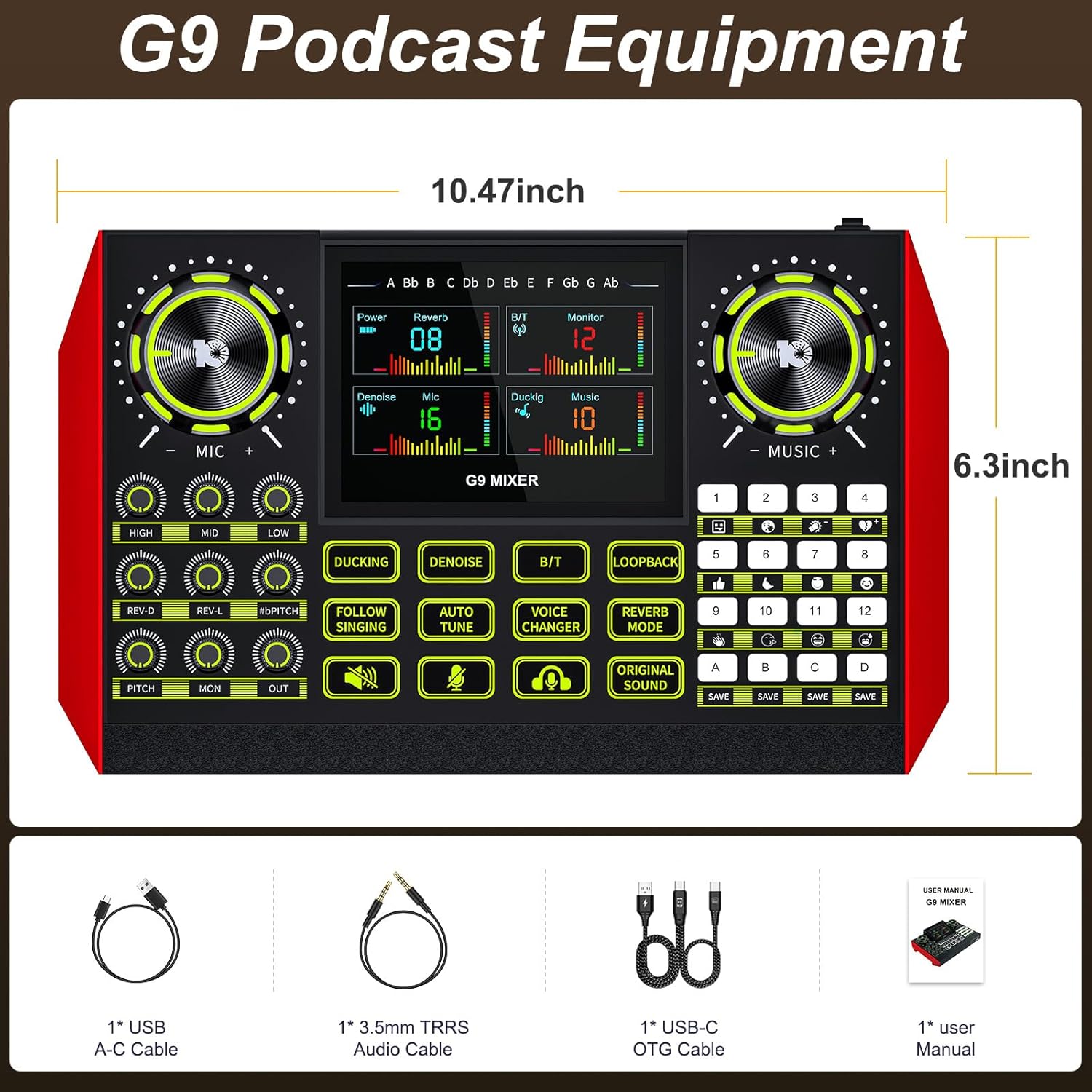
The G9 mixer measures approximately 10.47 inches in width and 6.3 inches in height.
3. Nastavitev
The Tenlamp G9 mixer is designed for straightforward setup. Follow these steps to connect your device.
3.1 Priključitev na napajanje
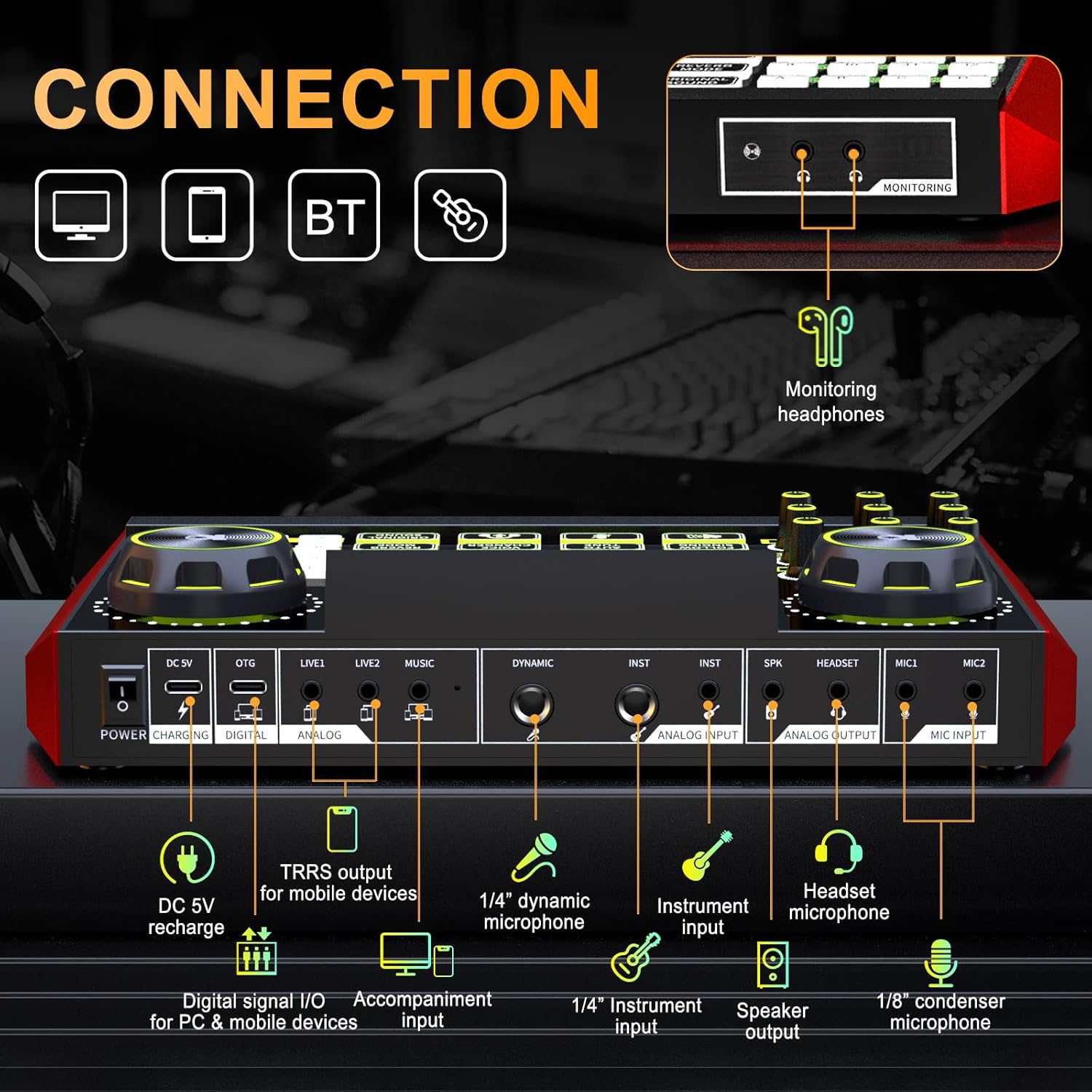
Connect the provided USB A-C cable to the DC 5V port on the mixer and to a power source (e.g., computer USB port, USB wall adapter). The mixer also features a built-in battery for portable use.
3.2 Priklop mikrofonov in instrumentov
- Microphone Input (MIC1, MIC2): Use 1/8" (3.5mm) condenser microphones.
- Dynamic Microphone Input (DYNAMIC): Use a 1/4" dynamic microphone.
- Instrument Input (INST): Connect instruments via a 1/4" jack.
- Mikrofon slušalk: Connect a headset with a microphone to the dedicated headset port.
3.3 Connecting to Devices (PC, Mac, Mobile)
- Digital Signal I/O (DIGITAL): Use the USB-C OTG cable to connect to a PC, Mac, or compatible mobile device for digital audio input and output.
- Analog Input/Output (LIVE1, LIVE2, MUSIC): Use 3.5mm TRRS audio cables for analog connections to mobile devices or other audio sources.
- Bluetooth (BT): Activate Bluetooth on the mixer and your device to pair wirelessly for music input.
3.4 Monitoring Headphones and Speaker Output
- Monitoring Headphones (MONITORING): Connect headphones to the 3.5mm monitoring jack to hear your mix in real-time.
- Speaker Output (SPK): Connect external speakers for audio playback.
4. Delovanje
The G9 mixer provides intuitive controls for managing your audio. The 4.5-inch HD screen displays current settings and levels, allowing for precise adjustments.
4.1 Vklop/izklop
Press and hold the Power button to turn the mixer on or off. The screen will illuminate upon activation.
4.2 Adjusting Microphone Settings
Use the dedicated knobs for VISOKA, MID, in NIZKA to adjust the 3-band equalizer for your microphone. The REV-D in REV-L knobs control the dual reverb depth and length. The PITCH knob adjusts the microphone's pitch.

4.3 Music and Output Volume
The GLASBA knob controls the input volume of background music. The PON knob adjusts the monitoring volume for your headphones, and the VEN knob controls the main output volume.
4.4 Posebne funkcije
- DUCKING: Automatically lowers background music volume when you speak.
- DENOISE: Activates the noise reduction feature for clearer vocals.
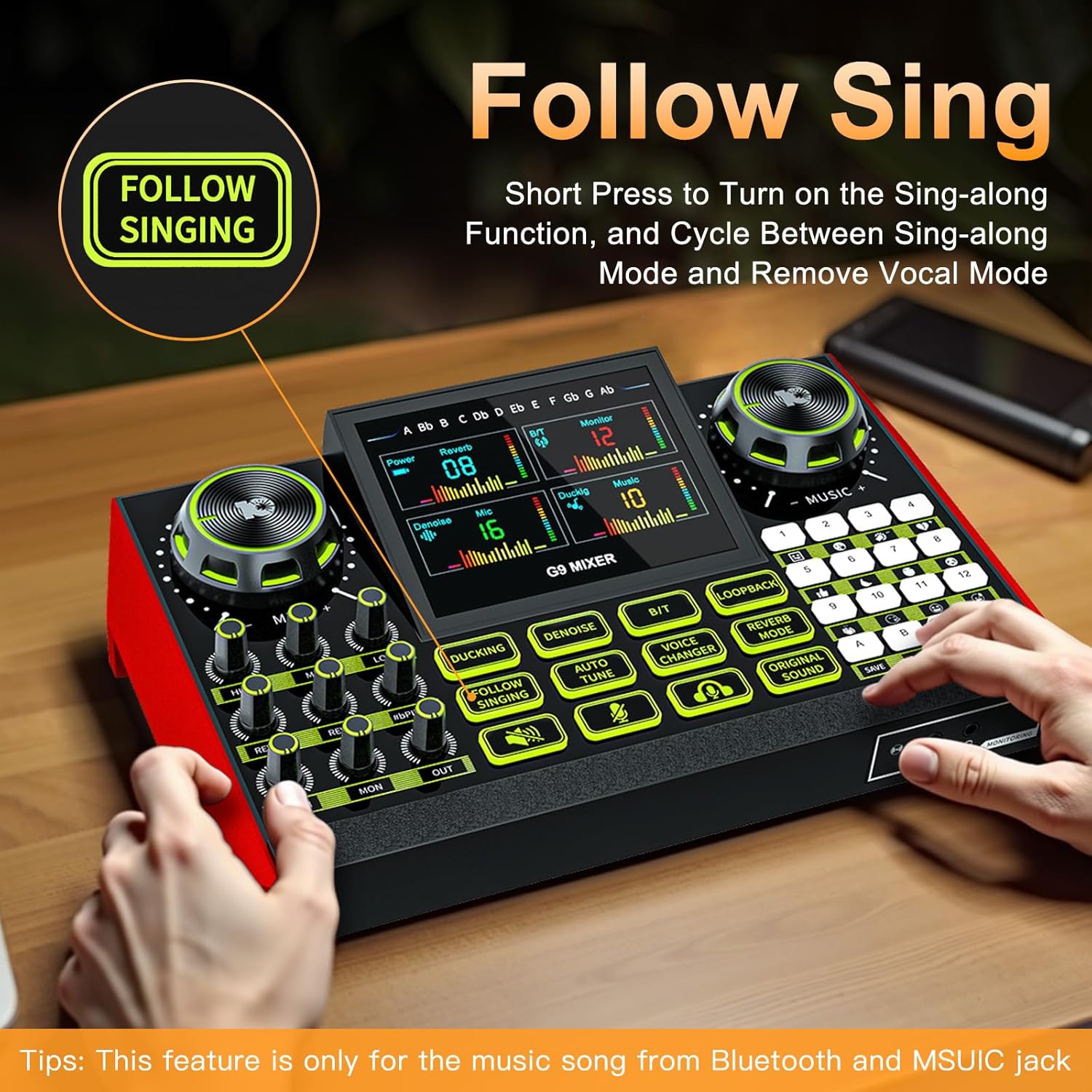
- FOLLOW SINGING: Short press to turn on the sing-along function, which cycles between sing-along mode and vocal removal mode. Note: This feature is primarily for music from Bluetooth and the MUSIC jack.
- SAMODEJNI NASTAVITEV: Engages the auto-tune effect for vocals.
- VOICE CHANGER: Cycles through four different voice changing modes (female voice, uncle voice, baby voice, magic voice).
- ZANKA: Enables or disables the loopback function, which sends the output audio back to the input for recording or streaming.
- REVERB NAČIN: Prilagodi učinek odmeva.
- ORIGINAL SOUND: Restores the original sound without effects.

4.5 Customizable Sound Pads
The G9 mixer features four customizable sound pads (A, B, C, D). You can save your favorite voice modes, including current microphone volume, EQ, reverb, pitch, and auto-tune settings, to these pads for quick recall.

5. Vzdrževanje
To ensure the longevity and optimal performance of your Tenlamp G9 Audio Mixer, follow these maintenance guidelines:
- Čiščenje: Use a soft, dry cloth to clean the surface of the mixer. Avoid using abrasive cleaners, solvents, or harsh chemicals.
- Shranjevanje: Mešalnik shranjujte na hladnem in suhem mestu, stran od neposredne sončne svetlobe in ekstremnih temperatur.
- Ravnanje: Z napravo ravnajte previdno. Pazite, da vam ne pade ali da je ne izpostavljate močnim udarcem.
- Izpostavljenost tekočini: Keep the mixer away from liquids. Moisture can damage internal components.
6. Odpravljanje težav
If you encounter issues with your Tenlamp G9 Audio Mixer, refer to the following common problems and solutions:
6.1 Brez zvočnega izhoda
- Preverite povezave: Ensure all audio cables (microphone, headphones, speakers, device connections) are securely plugged into the correct ports.
- Stopnje glasnosti: Preverite, ali je MIC, GLASBA, PON, in VEN volume knobs are not set to minimum or muted.
- Nastavitve naprave: On your connected PC, Mac, or mobile device, ensure the G9 mixer is selected as the default audio input and output device.
- moč: Confirm the mixer is powered on and has sufficient battery charge or is connected to a power source.
6.2 Slaba kakovost zvoka / šum
- Zmanjšanje hrupa: Aktivirajte ODŠUMITEV function to reduce background noise.
- Namestitev mikrofona: Prepričajte se, da je mikrofon pravilno nameščen in da ni predaleč od vira zvoka.
- Kakovost kabla: Use high-quality, shielded audio cables to minimize interference.
- Stopnje pridobitve: Adjust microphone gain to prevent clipping or distortion.
6.3 Voice Changer / Effects Not Working
- Aktivacija funkcije: Ensure the specific effect button (e.g., MENJALNIK GLASOV, SAMODEJNI NASTAVITEV) is pressed and active.
- Vhod za mikrofon: Confirm that your microphone is properly connected and receiving input.
6.4 Difficulty with Initial Setup
While the G9 is plug-and-play, some users may find initial setup challenging. Double-check all physical connections and ensure the mixer is recognized by your operating system. Refer to the
Ask a question about this manual
Ask about setup, troubleshooting, compatibility, parts, safety, or missing instructions. Manuals+ will review the question and use this page’s manual context to help answer it.