
1. Uvod
This manual provides detailed instructions for the Deeyaple Computer Speakers (Model: G4C). This 40W wireless soundbar is designed for desktop PCs, offering Bluetooth 5.3 and USB audio connectivity, dynamic RGB lighting, and custom EQ software. It is compatible with various devices including laptops, gaming consoles, and smartphones.

Slika: spredaj view of the Deeyaple Computer Speakers, showcasing its sleek design and dynamic RGB lighting.

Image: The Deeyaple Computer Speakers integrated into a compact desktop setup, highlighting its stylish and space-saving design.
2. Vsebina paketa
Prosimo, preverite, ali so v paketu prisotni vsi elementi:
- Deeyaple Computer Speaker (Model: G4C)
- Napajalni kabel
- Type-C to USB Audio Cable
- Vodnik za hiter začetek
3. Nastavitev
3.1 Napajalni priključek
- Connect the provided power cable to the DC IN port on the back of the speaker.
- Drugi konec napajalnega kabla priključite v standardno stensko vtičnico.
- The speaker will power on automatically or can be turned on using the power button.
3.2 Možnosti avdio povezave
The Deeyaple Computer Speakers support both Bluetooth 5.3 wireless and USB wired audio connections.
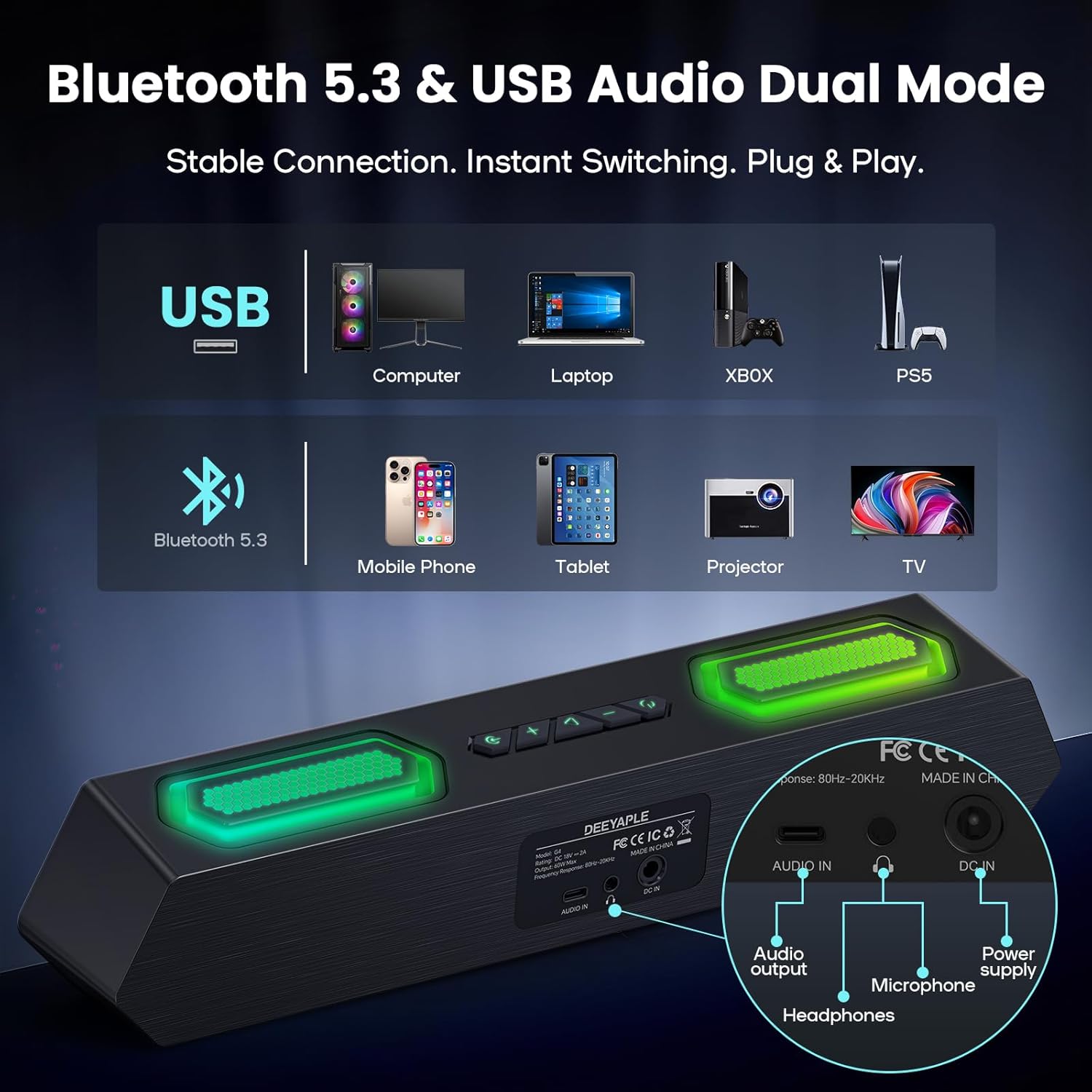
Slika: Zadaj view of the speaker showing USB, Audio In, DC In ports, and compatible devices for Bluetooth and USB connections.
3.2.1 Povezava Bluetooth
- Prepričajte se, da je zvočnik vklopljen.
- Press the Bluetooth button on the speaker to enter pairing mode (indicator light will flash).
- On your device (PC, laptop, smartphone, tablet), navigate to Bluetooth settings and search for "Deeyaple G4C".
- Select the speaker to pair. Once connected, the indicator light will become solid.
3.2.2 Zvočna povezava USB
- Connect one end of the provided Type-C to USB Audio Cable to the USB port on the speaker.
- Drugi konec kabla priključite na prosta vrata USB na računalniku ali združljivi napravi.
- The speaker will automatically switch to USB audio mode. You may need to select "Deeyaple G4C" as the audio output device in your computer's sound settings.
4. Delovanje
4.1 Osnovne kontrole
The speaker features full-button control for various functions:
- Gumb za vklop: Press and hold to turn on/off. Double-click to turn RGB lights completely off.
- Gumbi za povečanje / zmanjšanje glasnosti: Adjust the audio volume. The volume level will be indicated by the bottom RGB bar.
- Gumb za način: Switch between Bluetooth and USB audio input modes.
- RGB Lighting Button: Preklapljajte različne učinke RGB svetlobe.
4.2 Predvajanje zvoka
Once connected via Bluetooth or USB, audio from your device will play through the Deeyaple speakers. Use your device's media controls for play/pause and track skipping.

Image: Diagram illustrating the internal components of the speaker, including full-range drivers and bass diaphragms, highlighting 40W Hi-Fi Stereo Sound capabilities.

Image: A user engaged with a computer setup, experiencing immersive sound and dynamic RGB lighting from the Deeyaple Computer Speakers.
5. Software Control (Custom EQ & RGB Lighting)
For advanced customization of sound and lighting, download and install the dedicated PC software (often referred to as "Eduplight" or similar, check the Quick Start Guide for the exact name and download link).
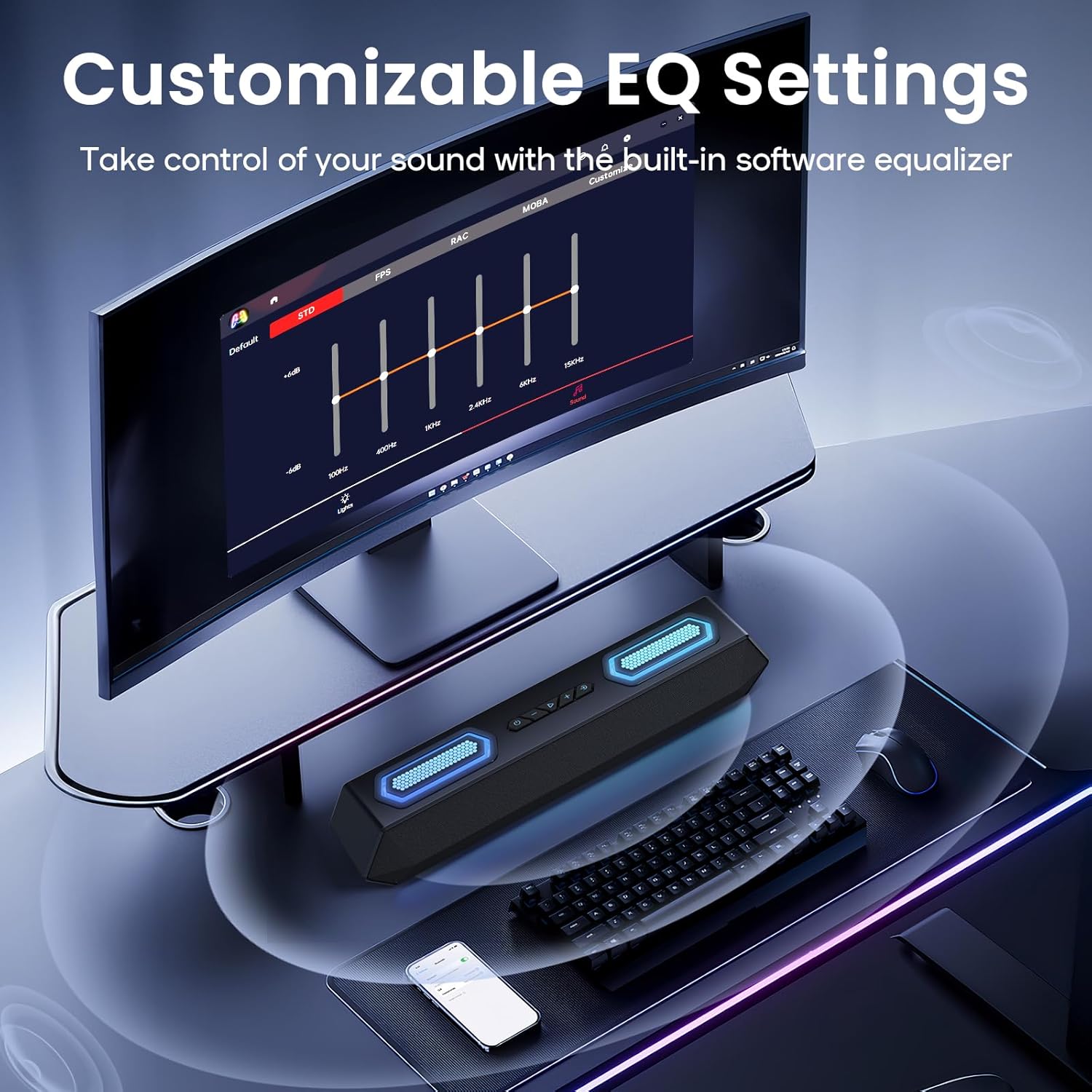
Image: Screenshot of the software interface for customizable EQ settings, showing sliders for bass, treble, and midrange adjustments.
5.1 Customizable EQ Settings
- The software allows you to adjust bass, treble, and midrange frequencies to create your preferred sound profile.
- Pre-set EQ modes may be available for different content types (e.g., gaming, music, movies).
5.2 načinov osvetlitve RGB

Image: The Deeyaple Computer Speakers displaying various vibrant RGB lighting effects, including 12 presets and transitions controlled via PC software.
- Access 12 dynamic RGB effects through the software.
- Customize colors, brightness, and lighting patterns.
- Features include Screen Color Sync, which matches on-screen colors, and Music Reactive Lighting, which pulses with your audio.
Note: Some users have reported that the software may require an online account or login. If you prefer not to use the software, basic lighting modes can be cycled via the physical button, and volume can be controlled via your connected device.
6. Specifikacije
| Funkcija | Podrobnost |
|---|---|
| Ime modela | G4C |
| Vrsta zvočnika | Prenosni zvočnik |
| Največja izhodna moč zvočnika | 40 vatov |
| Tehnologija povezljivosti | Bluetooth 5.3, USB Audio |
| Posebne lastnosti | Bass Boost, LED Light (RGB), Software Custom EQ, Screen Color Sync, Music Reactive Lighting |
| Združljive naprave | PC, Laptop, Smartphone, Tablet, Gaming Console (Xbox, PS4) |
| barva | Črna |
| Dimenzije izdelka | 13.5"D x 2.5"Š x 3.34"V |
| Teža predmeta | 2.27 funtov |
| Napajalnik | Zunanji napajalnik |
| UPC | 850060113321 |
7. Odpravljanje težav
| Težava | Možna rešitev |
|---|---|
| Ni zvoka iz zvočnikov. |
|
| Bluetooth seznanjanje ne uspe. |
|
| RGB lights are not working or stuck. |
|
| Sound quality issues (e.g., distortion, weak bass). |
|
| Software requires login/account. |
|
8. Vzdrževanje
- Čiščenje: Za čiščenje površine zvočnika uporabite mehko, suho krpo. Ne uporabljajte tekočih čistil ali abrazivnih materialov.
- Shranjevanje: Zvočnik shranjujte na hladnem in suhem mestu, stran od neposredne sončne svetlobe in ekstremnih temperatur.
- Ravnanje: Pazite, da vam zvočnik ne pade ali da ga ne izpostavljate močnim udarcem.
- Izpostavljenost vodi: Ta izdelek ni vodoodporen. Hranite ga stran od vode in visoke vlažnosti.
9. Garancija in podpora
For warranty information and technical support, please refer to the warranty card included with your product or visit the official Deeyaple webmesto. Shranite račun za garancijske zahtevke.
For further assistance, you may contact Deeyaple customer service through their official channels.