
1. Uvod
Thank you for choosing the Klarus E5 Plus Ultra-Slim Dual Switch Triple-Light EDC Flashlight. This manual provides detailed instructions for the safe and efficient operation, maintenance, and troubleshooting of your new device. Please read this manual thoroughly before use and retain it for future reference.
2. Izdelek je končanview
The Klarus E5 Plus is a compact and versatile everyday carry (EDC) flashlight featuring three distinct light sources and a dual-switch design for intuitive control. Its ultra-slim profile, magnetic base, and pocket clip offer multiple hands-free lighting options.

Figure 1: Klarus E5 Plus Flashlight with key features highlighted.
3. Vsebina paketa
- Klarus E5 Plus Flashlight
- Polnilni kabel USB-C
- Uporabniški priročnik (ta dokument)

Figure 2: Contents included in the Klarus E5 Plus package.
4. Specifikacije
| Funkcija | Podrobnost |
|---|---|
| Model | E5 PLUS |
| Največji izhod | 650 Lumens (Side COB) |
| Viri svetlobe | Front (White), Side (Warm White, Red) |
| Dimenzije | 4.45"D x 0.98"Š x 0.31"V (113 mm x 25 mm x 8 mm) |
| Teža | 1.26 oz (39g) |
| Baterija | Vgrajen 500mAh litij-ionski |
| Vrata za polnjenje | USB-C |
| Čas polnjenja | Pribl. 1.5 ur |
| Največji čas delovanja | Do 12.5 ur (nizek način) |
| Vodoodpornost | IPX4 (zaščita pred brizganjem vode) |
| Material | Aluminijeva zlitina (6061) |
| Posebne lastnosti | Dual Switch, Magnetic Base, Pocket Clip, Flicker-Free Dimming |

Figure 3: Physical dimensions and weight comparison.
5. Setup: Charging the Battery
The Klarus E5 Plus features a built-in rechargeable lithium-ion battery. Before first use, fully charge the device.
- Locate the USB-C charging port on the side of the flashlight, protected by a silicone cover.
- Gently lift the silicone cover to expose the USB-C port.
- Connect the provided USB-C cable to the flashlight and plug the other end into a compatible USB power source (e.g., computer, wall adapter).
- During charging, the indicator light on the flashlight will illuminate red.
- Once fully charged (approximately 1.5 hours), the indicator light will turn blue.
- Disconnect the charging cable and securely close the silicone cover to maintain IPX4 water resistance.

Figure 4: Charging the Klarus E5 Plus via USB-C.
6. Navodila za uporabo
The E5 Plus features two distinct switches for controlling its multiple light sources.
6.1. Head Light (Front White Light) Operation
- Vklop/izklop: Pritisnite in držite Stikalo za glavno luč (upper button) for 0.5 seconds.
- Spremeni svetlost: With the head light on, single-click the Stikalo za glavno luč to cycle through brightness modes (Low, High).
- Pomnilnik načina: The head light will remember the last used brightness mode when turned off and on again.
6.2. Side Light (Warm White & Red Light) Operation
- Vklop/izklop: Pritisnite in držite Side Light Switch (lower button) for 0.5 seconds.
- Change Brightness (Warm White): With the warm white side light on, single-click the Side Light Switch to cycle through brightness modes (Low, Medium, High, Turbo).
- Toggle Red Light: With the warm white side light on, double-click the Side Light Switch to switch to Red Constant-On mode. Double-click again to return to warm white.
- Rdeči stroboskop: From Red Constant-On mode, single-click the Side Light Switch to activate Red Strobe mode. Single-click again to return to Red Constant-On.
- Pomnilnik načina: The warm white side light will remember the last used brightness mode. Red light modes do not have memory and will default to Red Constant-On when reactivated.

Figure 5: Dual switch operation for the Klarus E5 Plus.
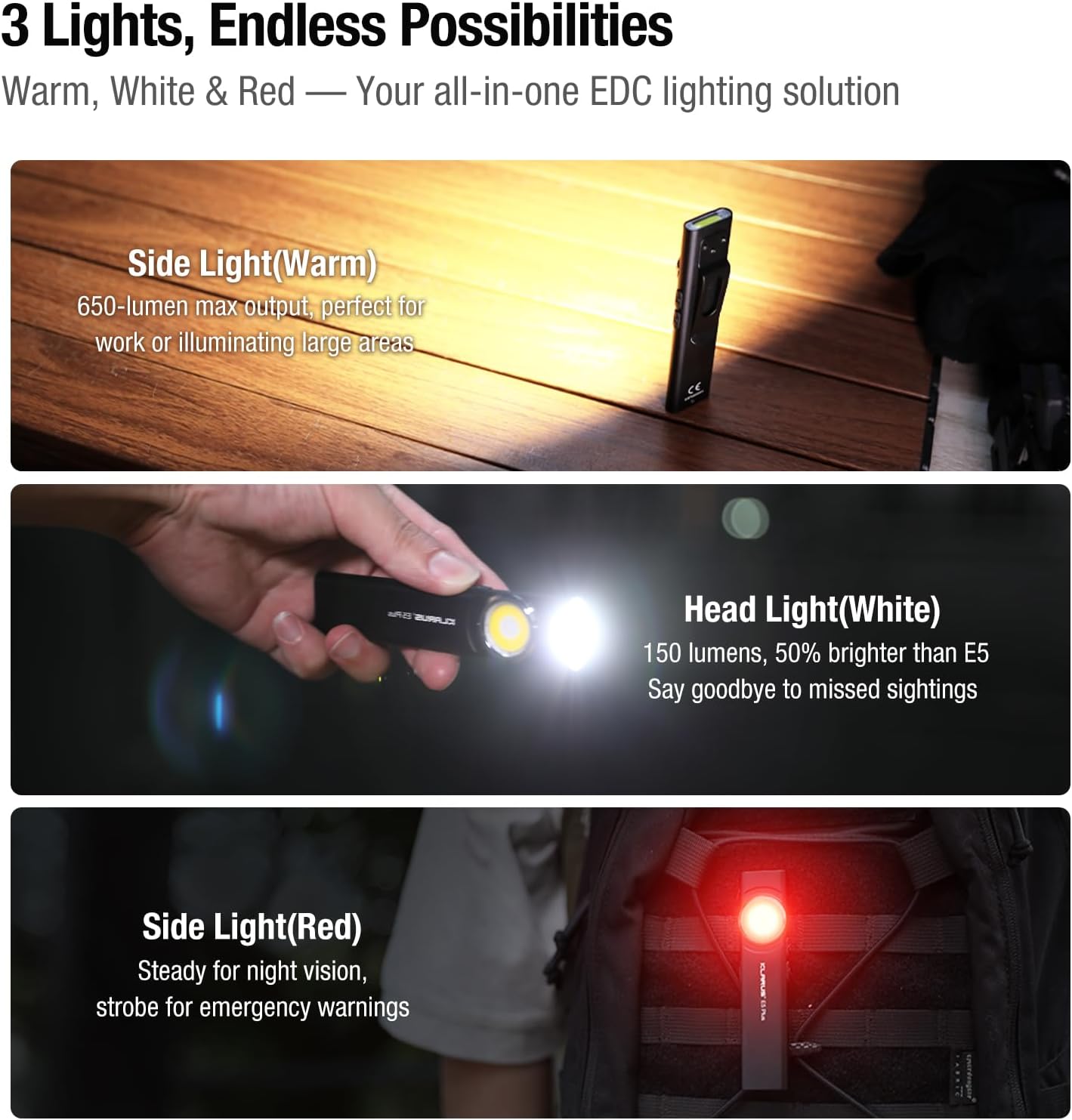
Figure 6: Three light sources and their applications.

Figure 7: Hands-free usage with magnetic base and clip.
7. Vzdrževanje
- Čiščenje: Ohišje svetilke obrišite z mehko krpoamp krpo. Izogibajte se abrazivnim čistilom ali topilom.
- Polnjenje: Recharge the battery regularly to maintain optimal performance, especially if stored for extended periods.
- Shranjevanje: Svetilko hranite na hladnem in suhem mestu, stran od neposredne sončne svetlobe in ekstremnih temperatur.
- Vodoodpornost: Ensure the USB-C port's silicone cover is securely closed to maintain IPX4 water resistance.
8. Odpravljanje težav
| Težava | Možen vzrok | rešitev |
|---|---|---|
| Svetilka se ne prižge. | Prazna baterija ali aktiviran način zaklepanja. | Charge the battery. Ensure no buttons are accidentally pressed during storage. |
| Svetlobna moč je šibka. | Low battery or incorrect mode selected. | Charge the battery. Cycle through brightness modes to select a higher setting. |
| Indikator polnjenja ne deluje. | Loose connection or faulty cable/charger. | Ensure USB-C cable is securely connected. Try a different USB-C cable or power source. |
9. Uradni videoposnetki izdelkov
The following videos provide additional visual guidance and demonstrations of the Klarus E5 Plus flashlight's features and operation.
Klarus E5 Plus - Ultra-Slim Dual Switch Triple-Light EDC Flashlight
Video 1: Overview of the Klarus E5 Plus, highlighting its ultra-slim design, dual switch, and triple-light functionality. This video demonstrates the product's key features and versatility.
10. Garancija in podpora
Klarus products are manufactured to high-quality standards. For warranty information, technical support, or service inquiries, please refer to the official Klarus webali se obrnite na pooblaščenega prodajalca. Za uveljavljanje garancije shranite dokazilo o nakupu.
Proizvajalec: KLARUS