
Pomembna varnostna navodila
Pred uporabo tega izdelka preberite in razumite vsa varnostna navodila. Ta priročnik shranite za poznejšo uporabo.
- Prezračevanje: Zagotovite zadostno prezračevanje. Ne blokirajte prezračevalnih odprtin.
- Voda in vlaga: Naprave ne izpostavljajte dežju ali vlagi. Na napravo ne postavljajte predmetov, napolnjenih s tekočinami, kot so vaze.
- Viri toplote: Ne nameščajte v bližini virov toplote, kot so radiatorji, grelniki, peči ali druge naprave (vključno z amplifiers), ki proizvajajo toploto.
- Viri napajanja: Use only power supplies specified by the manufacturer. Ensure the power cord is protected from being walked on or pinched.
- Čiščenje: Čistite samo s suho krpo.
- Servisiranje: Tega izdelka ne poskušajte servisirati sami. Vsa servisna dela prepustite usposobljenemu servisnemu osebju.
Vsebina paketa
Preverite, ali so v vašem paketu priloženi vsi spodaj navedeni elementi:
- Kuephom CD-X2A Boombox
- AC napajalni kabel
- Uporabniški priročnik (ta dokument)
- Daljinski upravljalnik
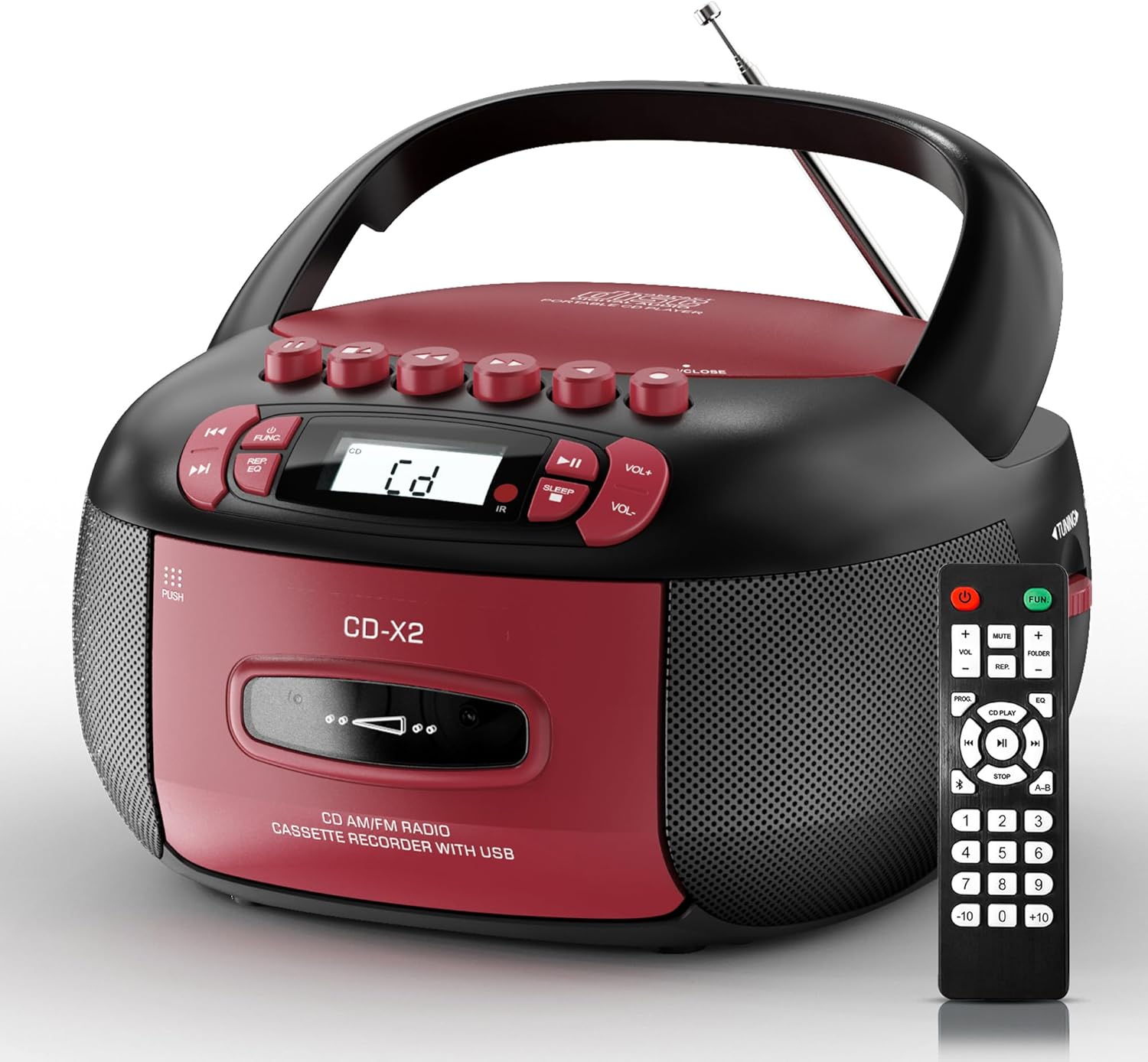
Image: The Kuephom CD-X2A Boombox with its included remote control, showcasing its compact design and red/black color scheme.
Konec izdelkaview
Familiarize yourself with the various components and controls of your Kuephom CD-X2A Boombox.
Nadzor sprednje plošče
- Gumb za vklop/funkcijo: Press and hold to power on/off. Press to cycle through modes (CD, USB, Bluetooth, Radio, AUX, Tape).
- Gumbi za glasnost +/-: Prilagodite glasnost predvajanja.
- Gumb za predvajanje/pavzo: Start or pause playback for CD, USB, Bluetooth, or Tape.
- Gumb za ustavitev: Ustavite predvajanje.
- Gumbi za preskok/iskanje: Navigate between tracks on CD/USB or fast forward/rewind on tape.
- Gumb EQ: Izberite prednastavitve izenačevalnika.
- Gumb časovnika za izklop: Nastavite časovnik za spanje.
Kontrolniki na stranski plošči
- Gumb za nastavitev: Manually tune AM/FM radio stations.
- Priključek za slušalke: Priključite slušalke za zasebno poslušanje.
- Vhod AUX: Priključite zunanje zvočne naprave.
- Vrata USB: Insert USB drives for MP3/WMA playback.
Lastnosti zgornje plošče
- Predal za CD-je: Top-loading compartment for CDs.
- Predal za kaseto: Front-loading compartment for cassette tapes.
- Teleskopska antena: Raztegnite za boljši sprejem radia.

Image: The boombox highlighting its multiple functions including CD/MP3, Bluetooth, Type I/II tape, USB, FM/AM Radios, Sleep timer, Remote, Phone jack, AUX, and Tape recording.

Slika: Bližnji posnetek views of the boombox's phone jack, top-loading CD player, telescopic antenna, and tape play/record buttons.
Nastavitev
Powering the Boombox
AC napajanje
- Connect the supplied AC power cord to the AC IN jack on the back of the boombox.
- Plug the other end of the power cord into a standard AC wall outlet (120V~60Hz).
Napajanje baterije
- Open the battery compartment cover located on the bottom of the boombox.
- Insert 6 x 'C' size batteries (not included), ensuring correct polarity (+/-).
- Trdno zaprite pokrov prostora za baterije.
- When operating on battery power, disconnect the AC power cord.

Image: The boombox demonstrating both AC power connection and the use of 6 C-size batteries for portable operation.
Daljinski upravljalnik
- Insert 2 x 'AAA' batteries (not included) into the remote control, observing polarity.
- Point the remote control towards the boombox's IR sensor for optimal operation.

Image: An individual comfortably operating the boombox using the remote control from a distance.
Navodila za uporabo
Splošno delovanje
- Vklop/izklop: Press and hold the Power/Function button to turn the unit on or off.
- Izbira funkcije: Press the Power/Function button repeatedly to switch between CD, USB, Bluetooth, Radio (AM/FM), AUX, and Tape modes.
Predvajanje CD-ja
- Odprite pokrov predala za CD-je.
- Place a CD (CD, CD-R, MP3, WMA compatible) onto the spindle with the label side facing up.
- Zaprite pokrov predala za CD.
- Press the Power/Function button to select 'CD' mode.
- Za začetek predvajanja pritisnite gumb Predvajaj/Premor.
- Za navigacijo po skladbah uporabite gumba Preskoči/Išči.
- Press the Repeat button to repeat a single track, folder, or all tracks.
- Press the Program button to program a custom playback sequence.

Image: The boombox's display showing 'CD' mode, with icons indicating compatibility with CD, CD-R, CD-RW, WMA, and MP3 formats, along with single cycle, repeat folder, repeat all, random play, and play in order options.
Cassette Playback and Recording
- Press the 'OPEN/CLOSE' button on the cassette compartment to open it.
- Vstavite kaseto.
- Zaprite predal za kasete.
- Press the Power/Function button to select 'TAPE' mode.
- Za začetek predvajanja pritisnite gumb Predvajaj.
- Use the Fast Forward/Rewind buttons to navigate the tape.
- snemanje: In TAPE mode, select the desired source (CD, Bluetooth, USB, or AM/FM radio). Press the Record button to begin recording onto the cassette. The unit features an auto-stop function when the tape reaches its end.

Image: A hand inserting a cassette tape into the boombox's front-loading compartment, with controls for tape operation visible.
AM/FM radio
- Press the Power/Function button to select 'RADIO' mode. Press again to switch between AM and FM bands.
- Extend the telescopic antenna for better FM reception. For AM, rotate the unit for best reception.
- Use the Tuning knob on the side to manually tune to your desired station. The frequency will be displayed on the screen.

Image: A man relaxing on a couch with the boombox, which displays various FM/AM radio frequencies, indicating good reception.
Bluetooth povezljivost
- Press the Power/Function button to select 'BT' (Bluetooth) mode. The display will show 'BT' and flash, indicating it's in pairing mode.
- On your mobile device, enable Bluetooth and search for 'CD-X2A'.
- Select 'CD-X2A' to pair. Once paired, the 'BT' indicator will stop flashing.
- Zdaj lahko brezžično pretakate zvok iz svoje naprave v boombox.

Image: A woman in a living room wirelessly streaming audio from her smartphone to the boombox via Bluetooth 5.1, indicating a stable connection.
USB predvajanje
- Insert a USB flash drive into the USB port on the side of the boombox.
- Press the Power/Function button to select 'USB' mode.
- The boombox will automatically detect and play compatible MP3/WMA files.
- Za upravljanje predvajanja uporabite gumbe Predvajaj/Pavza, Ustavi in Preskoči/Išči.
AUX vhod
- Connect an external audio device (e.g., smartphone, MP3 player) to the AUX-in port using a 3.5mm audio cable (not included).
- Press the Power/Function button to select 'AUX' mode.
- Predvajanje lahko upravljate neposredno s priključene zunanje naprave.
Časovnik za izklop
- While the unit is playing, press the Sleep Timer button.
- Repeatedly press the button to cycle through available sleep timer durations (e.g., 15, 30, 60, 90 minutes).
- Enota se bo po izbranem času samodejno izklopila.

Image: A man sleeping in bed with the boombox on his nightstand, illustrating the sleep timer feature which allows the device to turn off automatically.
Vzdrževanje
- Čiščenje: Za čiščenje zunanjosti boomboxa uporabite mehko, suho krpo. Ne uporabljajte abrazivnih čistil ali topil.
- Skrb za CD: CD-je prijemajte za robove. Umazane CD-je očistite z mehko krpo, ki ne pušča vlaken, in jih obrišite od sredine navzven.
- Nega kasete: Keep cassette tapes away from direct sunlight and heat. Periodically clean the tape heads with a specialized cassette head cleaner.
- Shranjevanje: When not in use for extended periods, disconnect the power cord and remove batteries. Store the unit in a cool, dry place.
Odpravljanje težav
Če naletite na težave, si oglejte spodnjo tabelo za pogoste težave in rešitve.
| Težava | Možen vzrok | rešitev |
|---|---|---|
| Brez moči | Napajalni kabel ni priključen; Baterije so prazne ali nepravilno vstavljene. | Check AC connection; Replace or correctly insert batteries. |
| Brez zvoka | Volume too low; Incorrect function mode selected; Headphones connected. | Increase volume; Select correct mode; Disconnect headphones. |
| CD skips or doesn't play | CD dirty or scratched; CD inserted incorrectly; Incompatible CD format. | Clean or replace CD; Insert CD correctly; Ensure CD is compatible (CD, CD-R, MP3, WMA). |
| Statični/slab sprejem radia | Antena ni iztegnjena/pozicionirana; Slab signal. | Extend and adjust telescopic antenna; Try repositioning the unit. |
| Bluetooth se ne seznani | Boombox ni v načinu seznanjanja; Bluetooth naprave izklopljen; Naprava je predaleč. | Ensure boombox is in 'BT' mode and flashing; Enable Bluetooth on device; Move device closer. |
| Kaseta se ne predvaja/snema | Tape inserted incorrectly; Tape heads dirty; Auto-stop engaged. | Insert tape correctly; Clean tape heads; Check tape end. |
Specifikacije
| Funkcija | Podrobnost |
|---|---|
| Številka modela | CD-X2A |
| Mere izdelka (D x Š x V) | 8.39 x 4.8 x 8.54 palcev |
| Teža predmeta | 3.45 funtov |
| Vir napajanja | AC 120V~60Hz or 6 x 'C' size batteries |
| Tehnologija povezljivosti | Pomožni, Bluetooth, USB |
| Vrsta zvočnika | Stereo (2W+2W output) |
| Podprti formati diskov | CD, CD-R, MP3, WMA |
| Supported Tape Types | Type I/II Cassette |
| Radijski pasovi | AM/FM |
| Posebne lastnosti | Tape Recording, Sleep Timer, Earphone Jack, Remote Control |
Garancija in podpora
Kuephom products are designed for reliability and performance. This product comes with a standard manufacturer's warranty against defects in materials and workmanship under normal use.
For warranty claims, technical assistance, or any questions regarding your Kuephom CD-X2A Boombox, please contact Kuephom customer support. Refer to the contact information provided with your purchase documentation or visit the official Kuephom webstran za podrobnosti o podpori.
We are committed to providing lifetime service support and 7/24 customer assistance for our products.