
1. Uvod
The Jauarta MY8236B is a compact and reliable digital multimeter designed for accurate electrical measurements. It features a clear 4000-count display and a new generation layout for enhanced usability. This instrument is suitable for various applications including power electronic circuit measurement, new energy equipment testing, power system strength testing, automotive circuit maintenance, and educational purposes.
Pomembna varnostna opomba: Always keep the inside of the meter clean and dry to prevent electric shock or damage to the meter. Read all safety warnings and operating instructions before using this instrument.
2. Značilnosti izdelka
- Jasen zaslon: Features a new display and function layout for improved readability.
- 4000 Counts Reading: Provides industrial-grade readings up to 4000 counts for precise measurements.
- Široka uporaba: Versatile for power electronics, new energy, automotive, and educational testing.
- Natančno in zanesljivo: Designed for high reliability in electronic parameter detection.
- Vzdržljiva konstrukcija: Made from excellent ABS material, offering impact and scratch resistance.
3. Vsebina paketa
Prosimo, preverite vsebino paketa ob prejemu:
- 1 x Jauarta MY8236B Digital Multimeter
- 2 x Multimeter Test Leads (Red and Black)
- 1 x uporabniški priročnik
4. Nastavitev
4.1 Namestitev baterije
The Jauarta MY8236B multimeter requires two 1.5V AAA batteries (not included) for operation.
- Poiščite pokrovček predalčka za baterije na zadnji strani multimetra.
- Z izvijačem odvijte vijak(e), s katerim je pritrjen pokrov baterije.
- Remove the cover and insert two 1.5V AAA batteries, observing the correct polarity (+ and -) as indicated inside the compartment.
- Namestite pokrov baterije in privijte vijak(e).
4.2 Priključitev merilnih vodnikov
Pravilna priključitev merilnih vodnikov je ključnega pomena za natančne in varne meritve.

Image: Close-up of the multimeter's input jacks. The black COM jack, the red VΩmA jack, and the red 10A jack are visible.
- Črni testni kabel vstavite v COM (Navadni) priključek.
- Za večino volumnatage, resistance, and small current measurements (up to 400mA), insert the red test lead into the VΩmA jack.
- Za meritve visokega toka (do 10 A) vstavite rdečo merilno vez v 10A jack. Ensure the rotary switch is set to the appropriate 10A range.

Image: The Jauarta MY8236B Digital Multimeter shown with its red and black test leads properly connected to the input jacks.
5. Navodila za uporabo
5.1 Vklop/izklop in izbira funkcij
To power on the multimeter, rotate the central rotary switch from the 'OFF' position to the desired measurement function. To power off, rotate the switch back to 'OFF'.
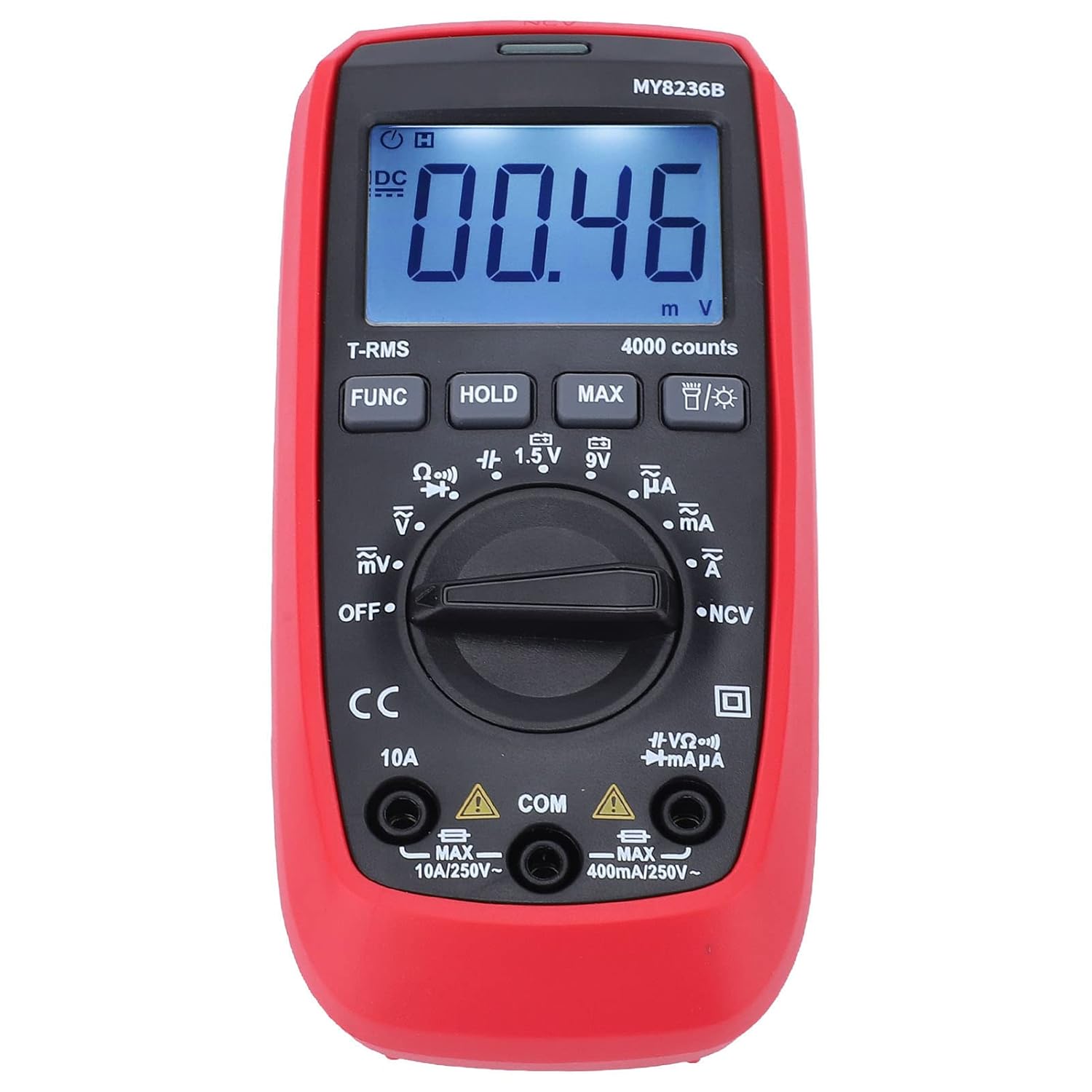
Slika: spredaj view of the Jauarta MY8236B Digital Multimeter, highlighting the central rotary switch for function selection and the digital display.
5.2 Merjenje DC Voltage (V–)
- Set the rotary switch to the 'V–' range. Select an appropriate range (e.g., 4V, 40V, 400V) higher than the expected voltage. Če voltagČe je e neznano, začnite z najvišjim razponom in ga po potrebi zmanjšajte.
- Rdečo merilno vez priključite na pozitivno (+) stran vezja, črno merilno vez pa na negativno (-) stran.
- Preberite zvtage vrednost na zaslonu.
5.3 Merjenje AC Voltage (V∼)
- Set the rotary switch to the 'V∼' range. Select an appropriate range higher than the expected voltage.
- Priključite merilne kable na izmenični tok (AC volt)tage vir.
- Preberite zvtage vrednost na zaslonu.
5.4 Measuring DC Current (A–)
Pozor: Never connect the multimeter in parallel with a voltage source when measuring current. Always connect it in series with the load. Ensure the correct input jack (VΩmA or 10A) is used.
- Izklopite napajanje vezja.
- Prekinite tokokrog na mestu, kjer želite izmeriti tok.
- Set the rotary switch to the 'A–' range (e.g., µA, mA, or 10A).
- Connect the red test lead to the appropriate current input jack (VΩmA for up to 400mA, 10A for up to 10A).
- Multimeter priključite zaporedno na vezje.
- Ponovno vklopite napajanje v tokokrog in odčitajte trenutno vrednost.
5.5 Measuring AC Current (A∼)
Follow the same safety precautions and connection method as for DC current, but set the rotary switch to the 'A∼' range.
5.6 Measuring Resistance (Ω)
Pozor: Ensure the circuit is de-energized before measuring resistance. Do not measure resistance on a live circuit.
- Turn off power to the circuit or component.
- Set the rotary switch to the 'Ω' range.
- Merilne kable priključite na komponento ali vezje, ki ga želite izmeriti.
- Na zaslonu preberite vrednost upora.
5.7 Posebne funkcije
- Gumb FUNC: Used to switch between different functions within a single rotary switch position (e.g., AC/DC, Diode/Continuity).
- Gumb HOLD: Zamrzne trenutno odčitavanje na zaslonu. Za sprostitev pritisnite znova.
- Gumb MAX: Displays the maximum measured value.
- Gumb za osvetlitev ozadja: Activates or deactivates the display backlight for better visibility in low-light conditions.
6. Vzdrževanje
6.1 Čiščenje
To maintain accuracy and prevent damage, keep the multimeter clean and dry. Wipe the case with a damp cloth and mild detergent. Do not use abrasives or solvents. Ensure no moisture enters the meter.
6.2 Zamenjava baterije
When the battery indicator appears on the display, replace the batteries promptly to ensure accurate readings. Refer to Section 4.1 for battery installation instructions.
6.3 Shranjevanje
If the multimeter is not used for an extended period, remove the batteries to prevent leakage and damage. Store the instrument in a cool, dry place away from direct sunlight and extreme temperatures.
7. Odpravljanje težav
- Brez zaslona: Check if the batteries are correctly installed and have sufficient charge. Replace batteries if necessary. Ensure the rotary switch is not in the 'OFF' position.
- Nepravilni odčitki: Verify that the test leads are properly connected to the correct input jacks and that the rotary switch is set to the appropriate function and range. Ensure the circuit is de-energized for resistance measurements.
- No Reading for Current: Check if the fuse is blown. If measuring high current, ensure the red lead is in the 10A jack.
- Display Shows 'OL' (Overload): The measured value exceeds the selected range. Switch to a higher range or ensure the input is within the meter's maximum specifications.
8. Specifikacije
| Parameter | Razpon |
|---|---|
| DC Voltage | 400mV, 4V, 40V, 400V, 600V |
| AC Voltage | 400mV, 4V, 40V, 400V, 600V |
| enosmerni tok | 400µA, 4000µA, 40mA, 400mA, 10A |
| Izmenični tok | 400µA, 4000µA, 40mA, 400mA, 10A |
| Odpornost | 400Ω, 4kΩ, 40kΩ, 400kΩ, 4MΩ, 40MΩ |
| Število prikazov | 4000 šteje |
| Vrsta baterije | 2 x 1.5V AAA baterija |
| Material | ABS |
| Teža predmeta | 323 g |
| Dimenzije paketa | 16 x 11 x 5 cm |
9. Varnostne informacije
- Always inspect the multimeter and test leads for any damage before use. Do not use if damaged.
- Ne uporabljajte voltage or current that exceeds the maximum rated input for any range.
- Bodite previdni pri delu z voltagnad 30 V AC RMS, 42 V vrhom ali 60 V DC. Te vol.tagpredstavljajo nevarnost električnega udara.
- Preden spremenite funkcije ali merilna območja, vedno odklopite merilne kable iz vezja.
- Merilnika ne uporabljajte v eksplozivnem plinastem, parnem ali prašnem okolju.
- Ensure your hands are dry when operating the meter.
10. Garancija in podpora
For warranty information or technical support, please refer to the documentation provided with your purchase or contact Jauarta customer service through your retailer. Keep your purchase receipt as proof of purchase.