
1. Izdelek je končanview
The LongPlus 4K PoE Security Camera System, Model LP8MC84B2, provides advanced surveillance capabilities for both home and business environments. This system includes 4K (8MP) cameras, a Network Video Recorder (NVR) with a pre-installed 2TB Hard Disk Drive (HDD), and utilizes H.265+ video compression for efficient storage. Key features include 24/7 recording, spotlight color night vision, and clear video streaming. The Power over Ethernet (PoE) design simplifies installation by providing both power and data through a single Ethernet cable.

Image: LongPlus 4K PoE Security Camera System with NVR and four bullet cameras.
2. Kaj je v škatli
Prosimo, preverite, ali so v vašem paketu priloženi vsi spodaj navedeni artikli:
- 1 x 8CH NVR with 48/1.875V Adaptor
- 4 x 4K PoE Cameras
- 1 x USB miška
- 1 x 1M kabel Cat5
- 1 x 1M HDMI kabel
- 4 x 18M kablov Cat5
- 2 x Extra Connectors
- 4 x paketov vijakov in drugih dodatkov
- 1 x vodnik za hiter začetek
3. Navodila za nastavitev
Follow these steps to set up your LongPlus 4K PoE Security Camera System:
- Povežite NVR z monitorjem: Use the provided HDMI or VGA cable to connect the NVR to a compatible monitor.
- Power On the NVR: Connect the NVR to a power source using the provided power adapter and turn on the NVR power switch.
- Povežite se z omrežjem: Connect an Ethernet cable from the NVR's LAN port to your router's LAN port for internet access.
- Povežite kamere: Connect each PoE camera to any available PoE camera port on the NVR using the provided Ethernet cables. The cameras will receive both power and data through these cables.
- Priključite miško USB: Plug the USB mouse into a USB port on the NVR for system navigation.
- Začetna konfiguracija: Follow the on-screen prompts on your monitor to complete the initial setup, including setting a password and configuring network settings.
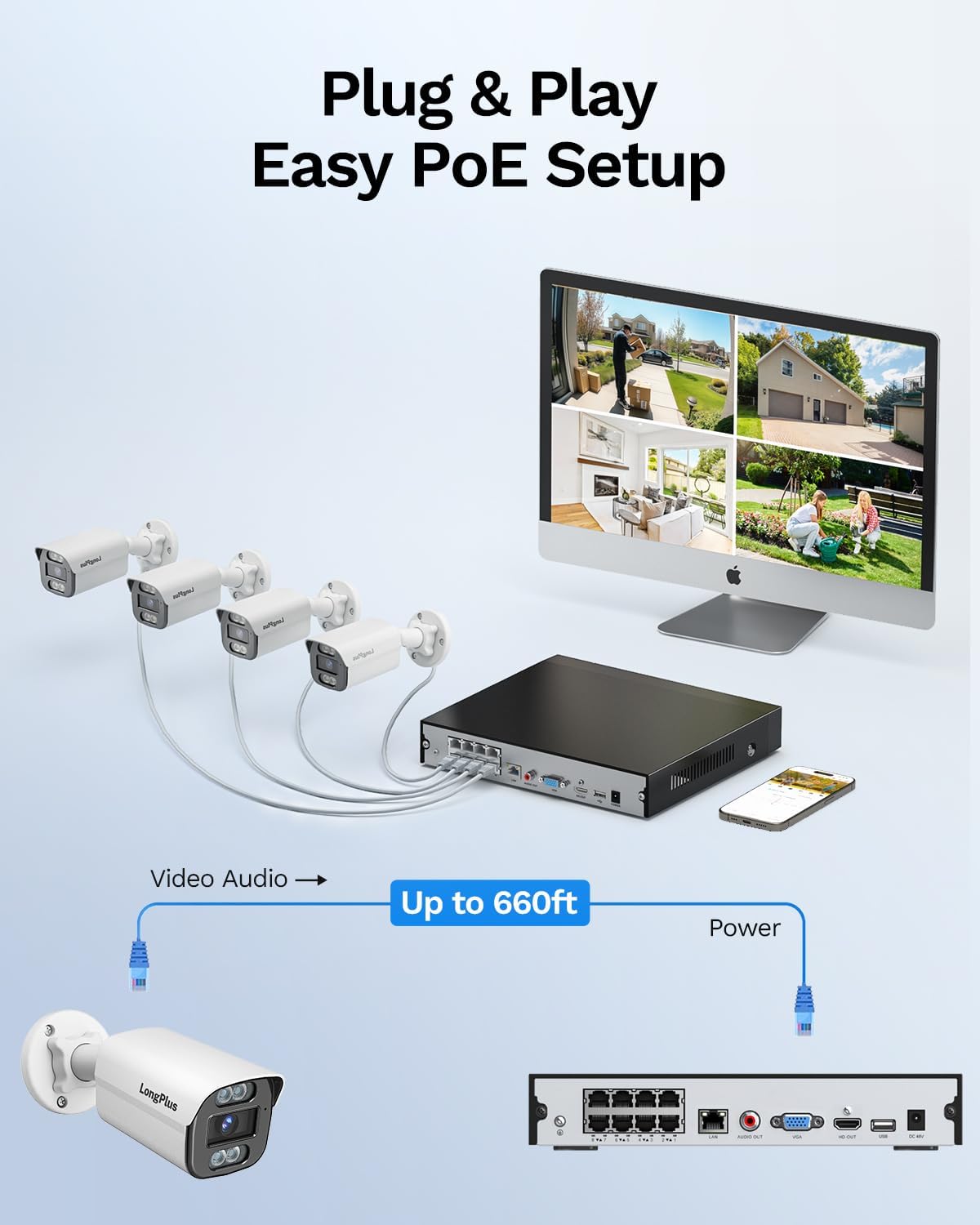
Image: Simplified PoE setup showing NVR, cameras, and monitor connections.
Video: LongPlus 8MP 16CH NVR Security System Unboxing & Setup Guide. This video demonstrates the unboxing process and step-by-step setup of the NVR and cameras.
4. Navodila za uporabo
4.1. 4K UHD and Wide View Kot
The system captures video in crystal-clear 4K (3840x2160) resolution, providing enhanced detail and clarity. The cameras feature a 132° wide view angle, offering broader coverage and minimizing blind spots in your surveillance area.

Image: Demonstration of 4K UHD video quality, highlighting clear details day and night.

Image: Comparison illustrating the 132° wide view angle of LongPlus cameras.
4.2. AI Motion Detection and Activity Zones
The smart PoE cameras utilize AI object detection to accurately identify humans and vehicles, reducing false alarms. You can define specific activity zones within the camera's field of view to focus detection on critical areas and ignore motion in irrelevant regions. Privacy masks can also be set to exclude certain areas from recording.

Image: Smart AI detection identifying persons and vehicles, triggering alerts.
4.3. Triple Night Vision Modes
The system offers three night vision modes to suit various lighting conditions:
- IR Night Vision: Standard black and white infrared vision.
- Barvni nočni vid: Zagotavlja polnobarvno hranotage in low-light conditions, allowing for better identification of details up to 100ft/30m.
- Pametni nočni vid: Automatically switches between IR and color modes based on detected activity.
4.4. Audio and Strobe Light Alarm / Two-way Audio
When motion is detected, the cameras can automatically trigger an audio alarm and red & blue strobe lights to deter intruders. The built-in two-way audio feature allows for real-time communication through the camera, enabling you to speak to visitors or warn off unwanted individuals.

Image: Two-way audio functionality with integrated strobe light alarm.
4.5. Flexible Storage and Playback
The NVR includes a 2TB HDD for 24/7 continuous recording, expandable up to 10TB. H.265+ compression technology significantly reduces file sizes, saving storage space without compromising video quality. Bank-level encrypted cloud storage is also available as an option. The Longvision APP/Client allows for easy playback of recorded footage, with events highlighted on the timeline for quick review.

Image: Interface demonstrating 24/7 recording and smart playback features.

Image: Explanation of H.265+ compression for efficient storage.
4.6. Oddaljeni dostop in skupna raba
Dostop v živo footage and recorded videos remotely via the Longvision app, compatible with iOS, Mac, Windows, and Android devices. The system supports up to 32 users, allowing you to share access with family members or colleagues.

Image: Remote access to live camera feeds via the Longvision app.
Video: LongPlus 4Channel PoE Security Camera System Overview. This video showcases the system's features including PoE setup, app monitoring, 4K UHD, night vision, motion detection, and alarm functions.
5. Vzdrževanje
To ensure optimal performance and longevity of your security system, regular maintenance is recommended:
- Čiste leče fotoaparata: Občasno očistite objektive fotoaparata z mehko krpoamp krpo, da odstranite prah in madeže, ki lahko vplivajo na jasnost slike.
- Preverite povezave: Ensure all cable connections (power, Ethernet, video) are secure and free from damage.
- Posodobitve vdelane programske opreme: Regularly check for and install firmware updates for the NVR and cameras to benefit from new features and security enhancements.
- Review posnetki: Občasno ponovnoview posnet footage to ensure the system is capturing events as expected.
- Namestitev snemalnika: Zagotovite, da je NVR nameščen v dobro prezračevanem prostoru, da preprečite pregrevanje.
6. Odpravljanje težav
If you encounter issues with your LongPlus security system, consider the following common troubleshooting steps:
- Brez video prikaza:
- Preverite, ali so vsi napajalni in video kabli varno priključeni.
- Prepričajte se, da je monitor nastavljen na pravilen vhodni vir (HDMI/VGA).
- Ponovno zaženite snemalnik.
- Zaznavanje gibanja ne deluje:
- Check motion detection settings in the NVR interface or app.
- Ensure activity zones are correctly configured and not excluding desired areas.
- Prilagodite nastavitve občutljivosti.
- Težave z oddaljenim dostopom:
- Preverite, ali je NVR povezan z internetom.
- Check network settings on the NVR and your router.
- Ensure the Longvision app is updated to the latest version.
- Slaba kakovost slike:
- Očistite lečo fotoaparata.
- Preverite, ali so v vidnem polju kamere ovire view.
- Za optimalno delovanje nočnega vida zagotovite zadostno osvetlitev.
7. Specifikacije
| Funkcija | Podrobnost |
|---|---|
| Znamka | LongPlus |
| Tehnologija povezljivosti | Žično |
| Ločljivost zajema videa | 3840x2160, 4K |
| Posebne lastnosti | High Efficiency Video Coding, Red & Blue Flashing Lights, Easy to Install, Waterproof, Vehicle Detection, Adjustable, Motion Sensor, Siren Alarm/Flexible Storage (Local Storage/Cloud Storage), Smart Playback, Vehicle/Person/Animal Detection |
| Število kanalov | 8 |
| Zmogljivost pomnilnika | 2 TB (expandable up to 10TB) |
| barva | Bela |
| Vir napajanja | Električni na kabel |
| Dimenzije artikla D x Š x V | 13.29 x 10.23 x 9.4 palcev |
| Združljivost operacijskega sistema | Android, Mac OS, Windows, iOS |
| Priporočene uporabe | Indoor, Outdoor, Surveillance |
| Združljive naprave | Cameras, Laptops, Personal Computers, Smartphones |
| Druge funkcije fotoaparata | Spredaj, zadaj |
| Tehnologija slabe svetlobe | Nočni vid |
| Območje nočnega vida | 100 čevljev |
| Hitrost sličic | 30 |
| Način snemanja | Snemanje ob gibanju (privzeto); snemanje po urniku, snemanje 24/7 |
| Skupno število vrat USB | 2 |
| Strojni vmesnik | Ethernet, HDMI, USB, VGA |
| Vrsta objektiva | Širok kot |
| Video vhod | VGA, USB, Ethernet, HDMI |
| Viewkota | 132 stopinj |
| Proizvajalec | LongPlus Direct |
| Teža predmeta | 13.26 funtov |
| Prvič na voljo | 12. junij 2025 |
8. Garancija in podpora
LongPlus provides a 2-letna garancija for this product, ensuring coverage against manufacturing defects. Additionally, lifetime technical support is available to assist with any inquiries or operational issues you may encounter. For support, please contact LongPlus customer service.