
Uvod
Thank you for choosing the INFINMIND K618 Wireless Bluetooth TouchPad Keyboard. This manual provides essential information for the proper setup, operation, and maintenance of your new device. Please read it thoroughly before use to ensure optimal performance and longevity.

Image: The INFINMIND K618 Wireless TouchPad Keyboard, showcasing its sleek design and wireless capabilities.

Image: The INFINMIND K618 keyboard being used in various scenarios including home, office, travel, and meetings, highlighting its portability and versatility.
Vsebina paketa
- INFINMIND K618 Wireless Bluetooth TouchPad Keyboard
- 2.4G USB sprejemnik
- Uporabniški priročnik
- (Batteries not included, requires 2x AAA batteries)
Konec izdelkaview
Familiarize yourself with the key components of your INFINMIND K618 keyboard.

Slika: Od zgoraj navzdol view of the INFINMIND K618 keyboard, highlighting the integrated touchpad and the included 2.4G USB receiver.
- Postavitev tipkovnice: Standard QWERTY layout with function keys.
- Vgrajena sledilna ploščica: Located on the right side for navigation.
- Connection Mode Indicators: Lights for 2.4G, Bluetooth 1 (BT1), and Bluetooth 2 (BT2).
- Stikalo za vklop: On/Off switch (usually on the back or side).
- Predal za baterije: For AAA batteries (on the back).
- Shranjevanje USB sprejemnika: Compartment for the 2.4G USB receiver (on the back).
Nastavitev
1. Vklop/izklop
- Insert 2x AAA batteries into the battery compartment on the back of the keyboard, ensuring correct polarity.
- Slide the power switch to the "ON" position. The keyboard will power on.
- Za izklop potisnite stikalo za vklop v položaj "IZKLOP".
2. 2.4G brezžična povezava
- Locate the 2.4G USB receiver in the battery compartment or a dedicated slot on the keyboard.
- Plug the USB receiver into an available USB port on your computer, laptop, or smart TV.
- Pritisnite 2.4G connection button on the keyboard (often labeled with a USB icon or 'A'). The indicator light for 2.4G will illuminate.
- The device should automatically recognize the keyboard. No additional drivers are typically required.
3. Bluetooth Connection (BT1 & BT2)
The K618 supports two independent Bluetooth connections, allowing you to switch between two Bluetooth-enabled devices.

Image: Diagram illustrating the multi-device connection capability of the INFINMIND K618 keyboard, showing connections to a laptop, monitor (via 2.4G), and tablet (via Bluetooth).
- Omogočite Bluetooth v svoji napravi: Ensure Bluetooth is turned on for your laptop, tablet, smartphone, or smart TV.
- Select a Bluetooth channel: Pritisnite in držite tipko BT1 or BT2 connection button on the keyboard for 3-5 seconds until the corresponding indicator light starts blinking rapidly. This indicates pairing mode.
- Seznani z vašo napravo: On your device, search for Bluetooth devices. You should see "INFINMIND K618" or a similar name appear in the list. Select it to pair.
- Potrdi povezavo: Once paired, the indicator light on the keyboard will stop blinking and remain solid for a few seconds, then turn off to save power. Your keyboard is now connected.
- Repeat these steps for the second Bluetooth channel (BT2) if you wish to connect another device.
Navodila za uporabo
1. Preklapljanje med več napravami
Za preklapljanje med povezanimi napravami:
- Pritisnite 2.4G button to switch to the device connected via the USB receiver.
- Pritisnite BT1 button to switch to the device connected via Bluetooth channel 1.
- Pritisnite BT2 button to switch to the device connected via Bluetooth channel 2.

Image: Visual representation of the INFINMIND K618 keyboard's ability to switch between three devices (2.4G, BT1, BT2) with a single click.
2. Touchpad Gestures
The integrated touchpad supports multi-touch gestures for enhanced navigation:
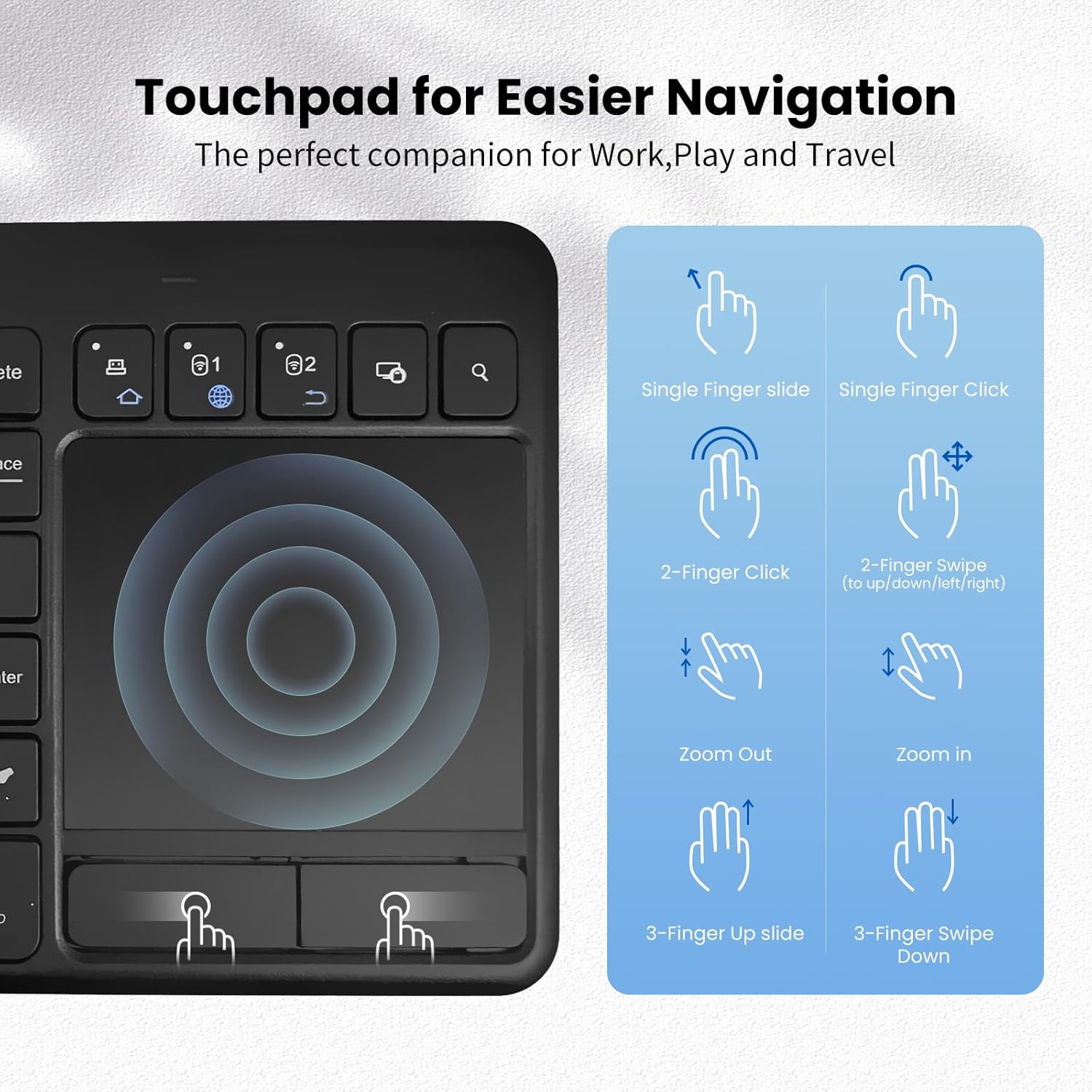
Image: A guide illustrating various touchpad gestures supported by the INFINMIND K618, including single-finger slide/click, two-finger click/swipe, zoom in/out, and three-finger slide/swipe.
- Single Finger Slide: Premakni kazalec.
- Single Finger Click: Levi klik.
- Two-Finger Click: Desni klik.
- Two-Finger Swipe (Up/Down/Left/Right): Scroll content or navigate.
- Ščipanje/raztezanje: Zoom in or out (if supported by the operating system/application).
- Three-Finger Slide Up: (Specific OS function, e.g., Task View v sistemu Windows).
- Three-Finger Slide Down: (Specific OS function, e.g., Show Desktop on Windows).
Note: Specific gesture functionality may vary depending on the operating system and application.
3. Funkcijske tipke
The keyboard includes dedicated function keys (F1-F12) and multimedia shortcuts. Use the Fn key in combination with other keys to access secondary functions, if applicable.
Združljivost
The INFINMIND K618 keyboard is designed for broad compatibility across various operating systems and devices.

Image: Chart detailing the wide compatibility of the INFINMIND K618 keyboard with various devices (smartphones, laptops, tablets, PCs, Smart TVs) and operating systems (Mac OS, Windows 7/8/10, iOS, Android).
- Operacijski sistemi: Windows (7/8/10/11), Android, Chrome OS, iOS, Mac OS.
- Združljive naprave: Laptops, Desktop PCs, Tablets (iPad, Android tablets), Smartphones (iPhone, Android phones), Smart TVs.
Note: Full functionality, especially for advanced touchpad gestures, may depend on the specific operating system version and device support.
Vzdrževanje
- Čiščenje: Za čiščenje površine tipkovnice uporabite mehko, suho krpo. Za trdovratno umazanijo rahloamp Uporabite lahko krpo z blagim milom, pri čemer pazite, da v napravo ne pride tekočina.
- Zamenjava baterije: Replace AAA batteries when the low battery indicator (if present) illuminates or when performance degrades.
- Shranjevanje: When not in use for extended periods, turn off the keyboard and remove the batteries to prevent leakage. Store in a cool, dry place.
- Izogibajte se skrajnostim: Do not expose the keyboard to extreme temperatures, direct sunlight, or excessive moisture.
Odpravljanje težav
| Težava | Možna rešitev |
|---|---|
| Tipkovnica se ne odziva |
|
| Sledilna ploščica ne deluje pravilno |
|
| Difficulty switching between devices |
|
Specifikacije
| Funkcija | Podrobnost |
|---|---|
| Model | K618 |
| Povezljivost | 2.4G brezžično, Bluetooth (BT1, BT2) |
| Območje delovanja | Do 33 čevljev (10 metrov) |
| Vir napajanja | 2 x AAA baterije |
| Združljiv OS | Windows, Android, Chrome OS, iOS, Mac OS |
| Dimenzije | 13.39 x 5.12 x 1.18 palcev (približno) |
| Teža | 12.6 unč (približno) |
Garancija in podpora
INFINMIND products are designed for reliability and performance. For warranty information and technical support, please refer to the warranty card included in your package or visit the official INFINMIND webmesto.
If you encounter any issues not covered in this manual, please contact INFINMIND customer support for assistance.


