
1. Uvod
This manual provides detailed instructions for the installation, operation, and maintenance of your Potegrap Outdoor Security Camera (Model T-CQ1052-W20V). Please read this manual thoroughly before using the product to ensure proper function and safety. Keep this manual for future reference.
The Potegrap T-CQ1052-W20V is a high-definition outdoor security camera designed for comprehensive home surveillance. It features 2K resolution, dual-band 2.4GHz and 5GHz WiFi connectivity, 360-degree pan and tilt functionality, advanced motion detection with tracking, color night vision, two-way audio, and optional AI-powered features with cloud storage.
2. Varnostne informacije
- Prepričajte se, da je napajalnik primeren za vašo lokalno električno omrežje in da je pravilno ozemljen.
- Do not expose the camera to extreme temperatures outside its operating range (-4°F to 122°F / -20°C to 50°C).
- Izogibajte se postavljanju kamere v bližino močnih elektromagnetnih polj.
- Ne poskušajte razstavljati ali spreminjati fotoaparata. S tem boste razveljavili garancijo.
- Fotoaparat in njegovo dodatno opremo hranite izven dosega otrok.
- Clean the camera lens with a soft, dry cloth only.
3. Vsebina paketa
Prosimo, preverite paket za naslednje artikle:
- Potegrap Outdoor Security Camera (Model T-CQ1052-W20V) - 2 units
- Napajalniki
- Montažni vijaki in sidra
- Predloga za pritrditev
- Uporabniški priročnik (ta dokument)

Slika 3.1: Two Potegrap T-CQ1052-W20V outdoor security cameras, highlighting their 2K resolution, 5G WiFi capability, and US-based cloud storage option. A smartphone screen displays a live view iz fotoaparata.
4. Izdelek je končanview
4.1 Ključne lastnosti
- Ločljivost 2K HD: Zagotavlja jasne in podrobne videoposnetketage (2560x1440).
- Dvopasovni WiFi: Supports both 2.4GHz and 5GHz networks for flexible and stable connectivity.
- 360° pokritost: Ima 355° vodoravni zasuk in 90° navpični nagib za celovito spremljanje območja.
- Advanced Motion Detection & Tracking: Automatically detects and follows moving objects.
- Barvni nočni vid: Provides full-color video even in low-light conditions.
- Dvosmerni zvok: Vgrajen mikrofon in zvočnik za komunikacijo v realnem času.
- Način zasebnosti: Physically rotates the camera lens for enhanced privacy when needed.
- Prilagodljivo shranjevanje: Supports local TF (Micro SD) card storage (up to 128GB, not included) and optional US-based cloud storage.
- AI Features (Subscription Required): Includes person, vehicle, and animal detection, along with a 911 emergency alarm integration.
- Odporen na vremenske vplive: Designed to operate in various outdoor conditions, from -4°F to 122°F (-20°C to 50°C).

Slika 4.1: A banner image promoting the Potegrap AI-Powered WiFi Camera, emphasizing its smart and safe features including 911 Emergency Alarm, US-Based Cloud storage, and integrated AI capabilities.

Slika 4.2: This image explains the camera's dual-band WiFi support, indicating that it can connect to both 2.4GHz (longer transmission distance) and 5GHz (superior network performance) networks.
5. Nastavitev
5.1 Namestitev aplikacije in ustvarjanje računa
- Download the official Potegrap security camera application from your smartphone's app store (available for iOS and Android).
- Odprite aplikacijo in sledite navodilom na zaslonu, da ustvarite nov račun ali se prijavite, če ga že imate.
5.2 Fizična namestitev
The camera is designed for both indoor and outdoor use. Choose a location that provides the desired viewkota in ima dostop do električne vtičnice.
- Use the provided mounting template to mark the drill holes on your chosen surface (wall or ceiling).
- Drill holes and insert the wall anchors if mounting on drywall or masonry.
- Secure the camera's mounting bracket using the provided screws.
- Pritrdite kamero na nosilec.
- Priključite napajalnik na kamero in ga vključite v električno vtičnico.

Slika 5.1: This banner emphasizes the camera's easy installation for both indoor and outdoor environments, showing a person installing it outdoors and examples of its placement inside a home and outside.
5.3 Povezovanje z Wi-Fi
- Ensure your smartphone is connected to the same Wi-Fi network (2.4GHz or 5GHz) you intend to connect the camera to.
- V aplikaciji tapnite »Dodaj napravo« ali ikono »+«.
- Select your camera model and follow the in-app instructions, which typically involve scanning a QR code displayed on your phone with the camera or entering Wi-Fi credentials.
- Wait for the camera to connect to the network. A voice prompt or LED indicator will confirm successful connection.
5.4 Namestitev SD kartice (izbirno)
For local storage, insert a TF (Micro SD) card (up to 128GB, not included) into the designated slot on the camera. Ensure the camera is powered off before inserting or removing the card. Format the SD card via the app after installation for optimal performance.
6. Upravljanje kamere
6.1 V živo View in nadzor vrtenja/nagiba
Open the Potegrap app and select your camera to access the live viewZ zaslonskimi kontrolniki lahko objektiv kamere premikate (vodoravno vrtite za 355°) in nagibate (navpično vrtite za 90°), da ga prilagodite. viewvhodni kot.
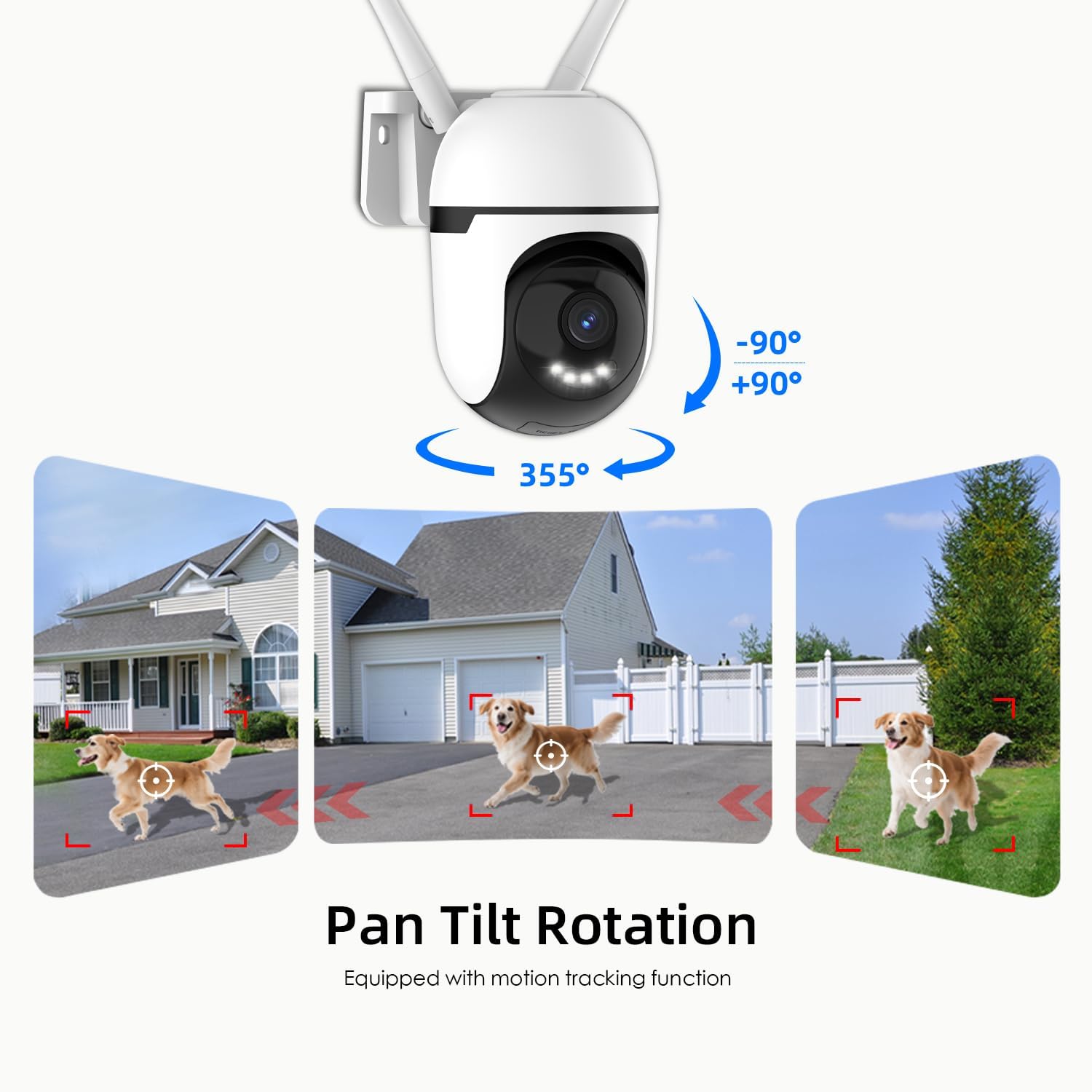
Slika 6.1: This graphic demonstrates the camera's pan and tilt functionality, allowing for a 360-degree horizontal view (355°) and vertical adjustment (90°), illustrated by different perspectives of a dog in a yard.

Slika 6.2: This image highlights the camera's 360-degree coverage (355° pan, 90° tilt) and motion tracking, showing its ability to monitor a wide area including children playing and a dog.
6.2 Zaznavanje in sledenje gibanja
The camera can detect motion and automatically track moving objects within its field of view. You will receive real-time alerts on your smartphone when motion is detected.
- Omogoči/onemogoči: Access camera settings in the app to turn motion detection on or off.
- Občutljivost: Prilagodite občutljivost zaznavanja gibanja, da zmanjšate število lažnih alarmov.
- Območja zaznavanja: Nastavite določena območja znotraj kamere view for motion detection to focus on, ignoring irrelevant areas.

Slika 6.3: This image illustrates the camera's auto-tracking motion detection, showing the camera following a moving subject (a child) within its field of view.

Slika 6.4: An illustration of how to set up custom detection zones to reduce unnecessary alerts, showing a dog within a defined zone and a corresponding motion detection notification.
6.3 Dvosmerni pogovor
Za komunikacijo z osebami v bližini kamere uporabite dvosmerno zvočno funkcijo. V načinu v živo tapnite ikono mikrofona. view to speak, and listen through the camera's speaker.

Slika 6.5: This image illustrates the two-way talk feature, enabling real-time audio communication between a person near the camera outdoors and another person using the mobile app indoors.
6.4 Nočni vid
The camera offers multiple night vision modes:
- Classic IR Night Vision: Standard black and white infrared view.
- Barvni nočni vid: Utilizes built-in lights to provide full-color video in low-light conditions.
- Inteligentni nočni vid: Stays in IR mode and switches to color night vision upon detection of motion.
Adjust night vision settings in the app to suit your preferences.

Slika 6.6: This image compares the camera's night vision capabilities: classic infrared (black and white), full-color night vision, and intelligent night vision that activates color upon detection.
6.5 Način zasebnosti
Activate Privacy Mode via the app to physically rotate the camera lens downwards, ensuring your privacy when the camera is not needed for surveillance.

Slika 6.7: The camera's privacy mode is shown, where the lens physically rotates to obscure the view, and the mobile application confirms the mode is active.
6.6 Snemanje in shranjevanje
The camera supports 24/7 continuous recording and event-triggered recording. Footage se lahko shrani na dva načina:
- Lokalno shranjevanje TF kartice: Insert a Micro SD card (up to 128GB) for local storage without a subscription. Ensure the card is formatted through the app.
- US-Based Cloud Storage: An optional subscription service provides cloud storage, often including advanced AI analysis features.
Dostop do posnetega footage through the playback section of the Potegrap app.

Slika 6.8: This image details the storage options: US-based cloud storage (subscription needed for AI functions) and local TF card storage (up to 128GB, not included) for secure data.
6.7 AI Features (Subscription Required)
Enhance your security with AI-powered features, available with a cloud storage subscription:
- Odkrivanje oseb: Differentiates human shapes from other moving objects.
- Zaznavanje vozil: Identifies vehicles, reducing irrelevant alerts.
- Zaznavanje živali: Recognizes animals, useful for pet monitoring or filtering wildlife alerts.
- 911 Emergency Alarm: Integrates with emergency services for rapid response during critical events.

Slika 6.9: The camera's intelligent alarm feature is depicted, showing a detected person and an option within the mobile application to initiate a 911 emergency call.
7. Vzdrževanje
- Čiščenje: Redno brišite objektiv in ohišje fotoaparata z mehko, suho krpo, da odstranite prah in umazanijo. Ne uporabljajte agresivnih kemikalij ali abrazivnih čistil.
- Posodobitve vdelane programske opreme: Check the app periodically for firmware updates. Keeping your camera's firmware updated ensures optimal performance and security.
- Cikel moči: Če ima kamera težave, jo poskusite za 10 sekund izklopiti iz vira napajanja in jo nato ponovno priključiti.
8. Odpravljanje težav
| Težava | Možen vzrok | rešitev |
|---|---|---|
| Kamera se ne more povezati z omrežjem Wi-Fi. | Incorrect Wi-Fi password; camera too far from router; router settings (e.g., firewall). | Verify Wi-Fi password. Move camera closer to router. Ensure router supports 2.4GHz or 5GHz. Temporarily disable firewall for setup. Reset camera and try again. |
| Slaba kakovost videa ali zamegljena slika. | Umazana leča; nezadostna osvetlitev; težave s pasovno širino omrežja. | Clean the camera lens. Ensure adequate lighting for optimal color night vision. Check your internet speed. |
| Opozorila o zaznavanju gibanja so prepogosta ali ne delujejo. | Sensitivity set too high/low; detection zone not configured correctly. | Adjust motion detection sensitivity in the app. Configure specific detection zones to focus on relevant areas. |
| Ne morem view posnet footage from SD card. | SD card not formatted; SD card full or corrupted; app issue. | Ensure the SD card is correctly inserted and formatted via the app. Check if the SD card is full. Some advanced playback features or continuous recording may require a cloud subscription. |
| AI features (person/vehicle detection, 911 alarm) are not active. | Subscription required for AI features. | These advanced AI features typically require an active cloud storage subscription. Check your subscription status in the app. |
| Kamera se ne odziva. | Power issue; software glitch. | Check power connection. Perform a power cycle (unplug and replug). If issues persist, perform a factory reset (refer to app for instructions). |
9. Specifikacije
| Funkcija | Podrobnost |
|---|---|
| Številka modela | T-CQ1052-W20V |
| Znamka | Potegrap |
| Resolucija | 2K HD (2560x1440), 3 MP |
| Povezljivost | Dual-band 2.4GHz & 5GHz WiFi |
| Vir napajanja | Električni na kabel |
| Območje vrtenja/nagiba | 355° vodoravno, 90° navpično |
| Nočni vid | Color Night Vision, IR Night Vision, Intelligent Night Vision |
| Možnosti shranjevanja | TF (Micro SD) Card (up to 128GB, not included), US-Based Cloud Storage (subscription required) |
| Avdio | Two-Way Talk (Built-in microphone and speaker) |
| Delovna temperatura | -4°F do 122°F (-20°C do 50°C) |
| Dimenzije (D x Š x V) | 3.9 x 3.1 x 4.3 palcev |
| Teža predmeta | 1.57 funtov (0.71 kilograma) |
| Združljive naprave | Pametni telefon (iOS, Android) |
10. Garancija in podpora
For warranty information, please refer to the documentation included with your purchase or contact Potegrap customer support. Protection plans may be available for extended coverage.
If you encounter any issues or have questions regarding your Potegrap security camera, please contact our customer support team through the official Potegrap webspletnega mesta ali kontaktnih podatkov, navedenih v aplikaciji.