
1. Uvod
This manual provides detailed instructions for the setup, operation, and maintenance of your Transformers GK01 Wireless Mechanical Keyboard. The GK01 is a versatile keyboard featuring tri-mode connectivity (Bluetooth 5.0, 2.4GHz wireless, and USB-C wired), a 101-key layout, RGB backlighting, and hot-swappable switches for a customizable typing experience.

Figure 1.1: Transformers GK01 Wireless Mechanical Keyboard.
2. Vsebina paketa
Prosimo, preverite, ali so v vašem paketu priloženi vsi spodaj navedeni artikli:
- Transformers GK01 Wireless Mechanical Keyboard
- Kabel USB-C v USB-A
- 2.4 GHz brezžični USB ključek
- 2-v-1 ključavnica in snemalec stikala
- Uporabniški priročnik (ta dokument)
- Rezervna stikala (2 kosi)
- Ovitek za tipkovnico
3. Nastavitev in povezava
3.1. Tri-Mode Connection Overview
The GK01 keyboard supports three connection modes: USB-C wired, 2.4GHz wireless, and Bluetooth 5.0. You can connect to up to five devices simultaneously and switch between them seamlessly.

Figure 3.1: Tri-Mode Connection Capabilities.
3.2. Žična povezava USB-C
- Poiščite vrata USB-C na tipkovnici.
- En konec priloženega kabla USB-C priključite na tipkovnico.
- Connect the other end of the USB-C cable to an available USB-A port on your computer.
- Tipkovnica bo samodejno prepoznana in pripravljena za uporabo.
3.3. Brezžična povezava 2.4 GHz
- Locate the 2.4GHz wireless USB dongle.
- Plug the dongle into an available USB-A port on your computer.
- On the keyboard, ensure the mode switch (usually on the side or back) is set to 2.4GHz mode.
- Tipkovnica bi se morala povezati samodejno. Če se ne, pritisnite Fn + R za začetek seznanjanja.

Figure 3.2: USB-C Port and 2.4GHz Dongle Location.
3.4 Povezava Bluetooth 5.0
Tipkovnica podpira povezavo z do tremi napravami Bluetooth (BT1, BT2, BT3).
- On the keyboard, set the mode switch to Bluetooth mode.
- Za vstop v način seznanjanja za določen kanal Bluetooth pritisnite in držite Fn + Q (za BT1), Fn + W (za BT2) ali Fn + E (for BT3) for 3-5 seconds until the indicator light flashes rapidly.
- On your device (PC, tablet, smartphone), open Bluetooth settings and search for new devices.
- Select "Transformers GK01" from the list of available devices.
- Ko je povezava vzpostavljena, bo indikatorska lučka na tipkovnici prenehala utripati.
- Za preklapljanje med seznanjenimi napravami Bluetooth preprosto pritisnite Fn + Q, Fn + W, oz Fn + E.
4. Osnovno delovanje
4.1. Keyboard Layout and Anti-Ghosting
The GK01 features a 101-key layout, providing a full set of keys including a numeric keypad. All keys are equipped with anti-ghosting technology, ensuring that every keystroke is registered accurately, even when multiple keys are pressed simultaneously.
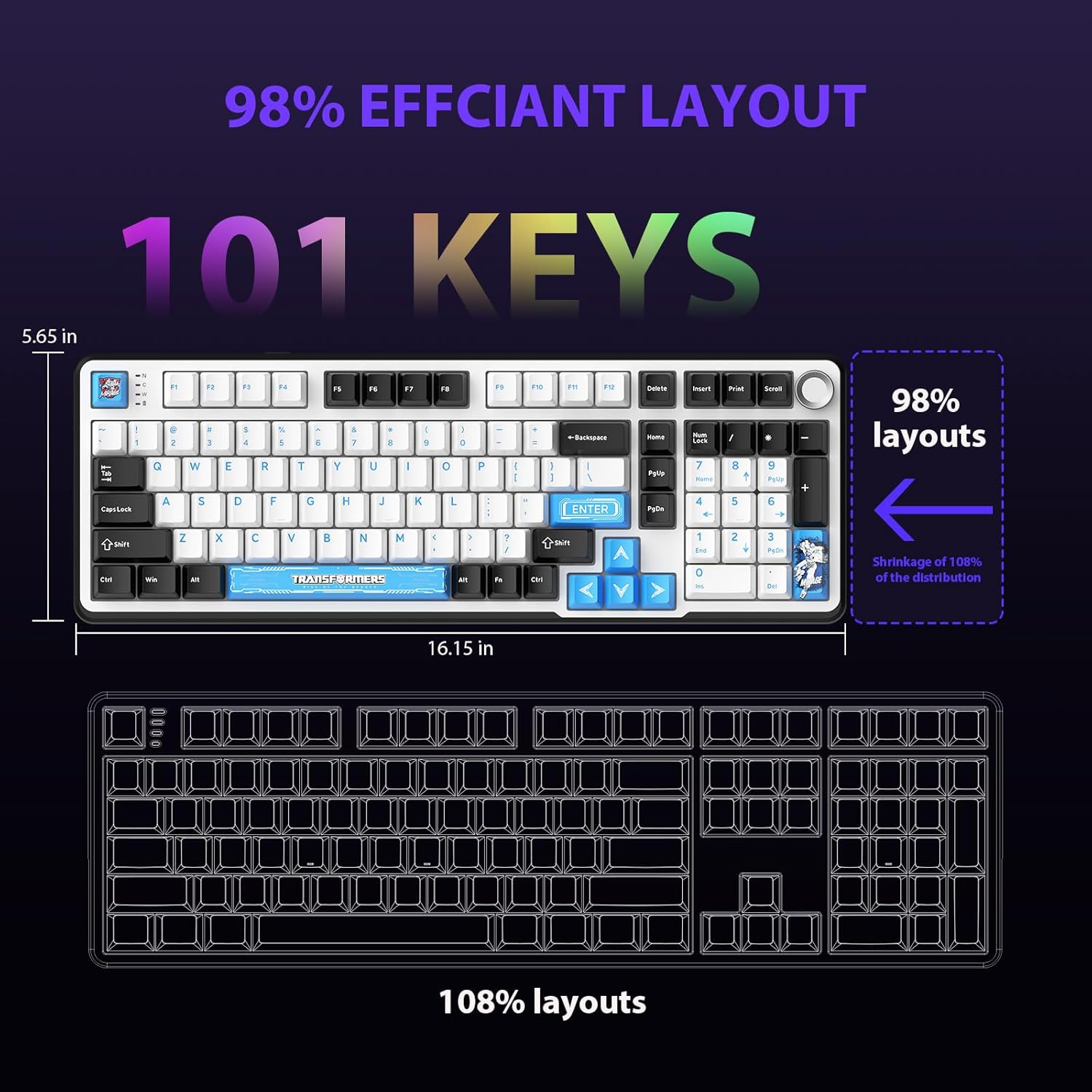
Figure 4.1: 101-Key Layout.
4.2. Gumb za upravljanje multimedije
The dedicated knob located on the top right of the keyboard provides convenient multimedia control:
- Zasukaj v smeri urinega kazalca: Povečaj glasnost.
- Zavrtite v nasprotni smeri urinega kazalca: Zmanjšajte glasnost.
- Pritisni: Vklop/izklop zvoka.
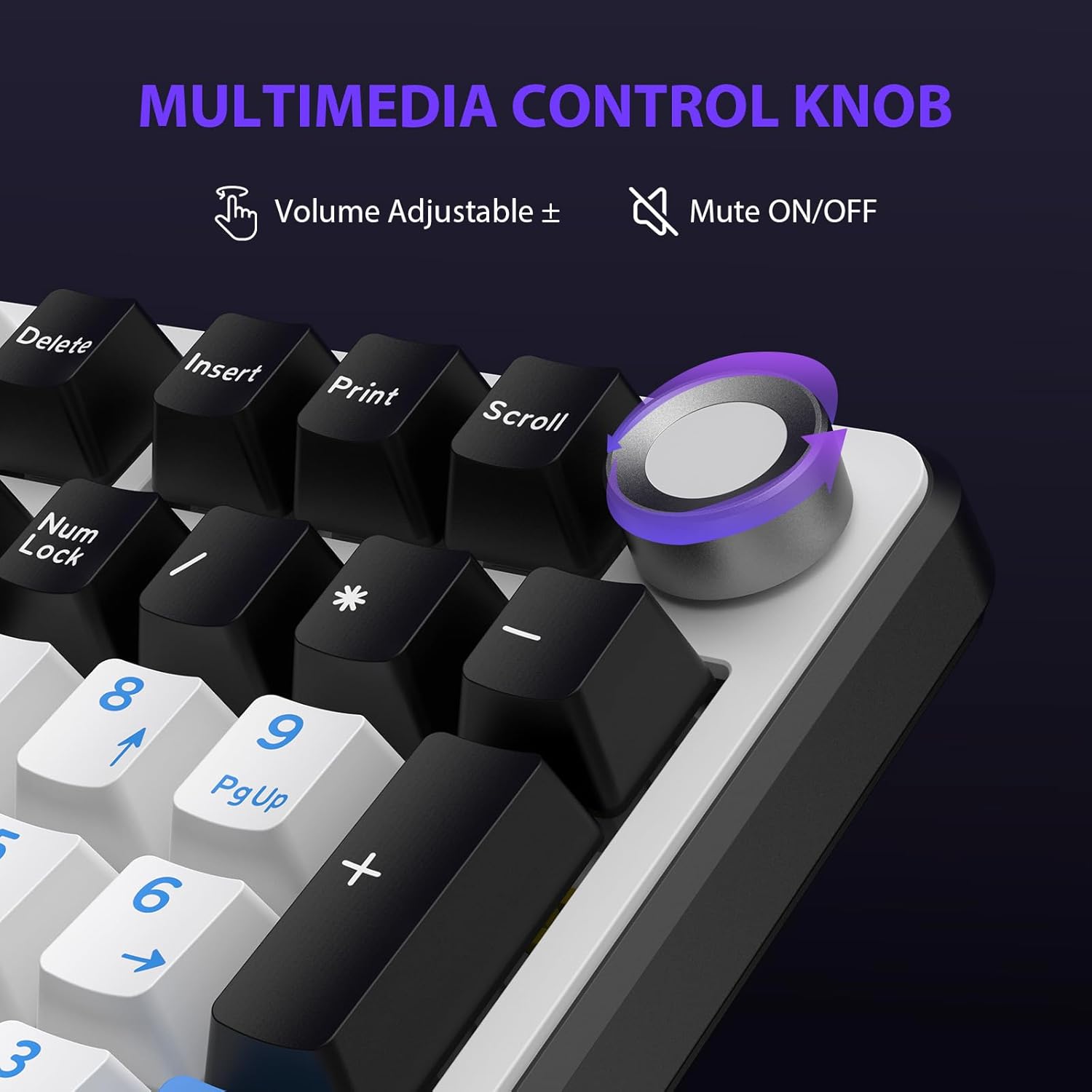
Figure 4.2: Multimedia Control Knob.
4.3. Nadzor osvetlitve ozadja RGB
The GK01 keyboard features 16.8 million color RGB backlighting with various effects.
- Fn + [Right Arrow]: Adjust 5 brightness levels.
- Fn + [Left Arrow]: Adjust 5 speed levels for dynamic effects.
- Fn + [Vstavi]: Preklapljajte med 20 različnimi načini osvetlitve ozadja.
- Fn + [Enter]: Switch color order within certain modes.
- Fn + [X]: Turn off light / activate power-saving mode.
- Fn + [vračalka]: Switch color order within certain modes.

Figure 4.3: RGB Backlight Controls.
5. Napredne funkcije
5.1 Stikala z možnostjo vroče menjave
The GK01 keyboard is equipped with pre-lubricated Cybertron linear switches and supports solder-free hot-swapping. This allows you to easily replace switches with compatible 3-pin or 5-pin mechanical switches without soldering.
Za zamenjavo stikala:
- Using the provided 2-in-1 keycap and switch puller, gently remove the keycap from the desired switch.
- Vstavite izvlečni mehanizem stikala na stikalo in se prepričajte, da prime zgornjo in spodnjo sponko stikala.
- Nežno povlecite stikalo naravnost navzgor, da ga odstranite s tiskanega vezja.
- Poravnajte nožice novega stikala z luknjami na tiskanem vezju. Prepričajte se, da so nožice ravne, da se ne upognejo.
- Novo stikalo trdno pritisnite na svoje mesto, dokler ne klikne.
- Ponovno namestite pokrovček tipke.

Figure 5.1: Hot-Swappable Switch Replacement.
5.2. Programabilna programska oprema
The GK01 supports custom software for advanced customization, including key remapping, macro creation, and detailed RGB lighting effects.
- The software is compatible only with the Windows operating system.
- The keyboard must be connected via USB-C wired mode to use the software.
- For driver download, please visit the official Transformers Keyboard website or refer to the link provided in the product packaging.
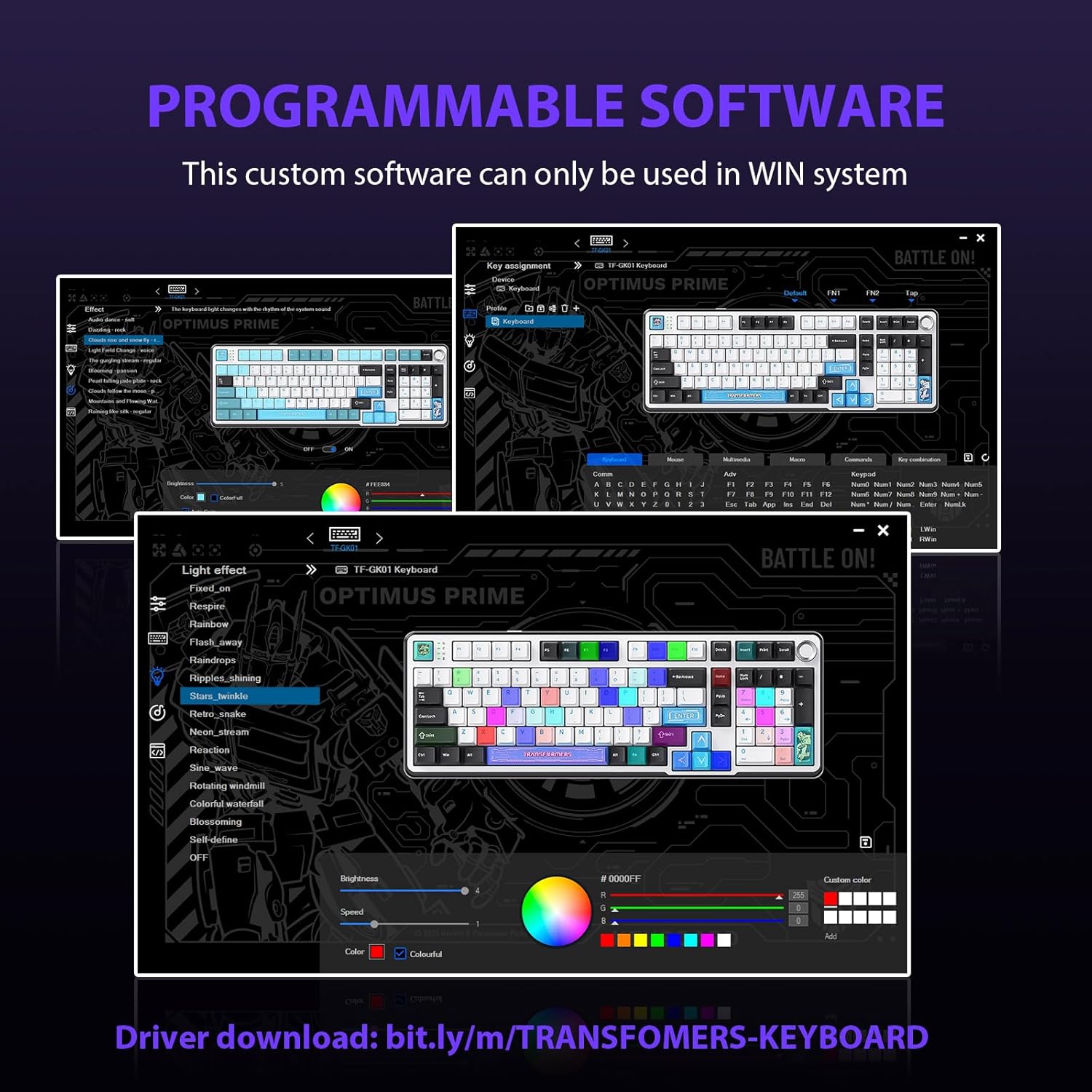
Figure 5.2: Programmable Software Interface.
5.3. Gasket Mounted Structure
The keyboard features a five-layer sound-absorbing and shock-absorbing gasket mounted structure. This design effectively reduces hollow noise and provides a softer, more consistent typing feel by isolating the plate from the case.
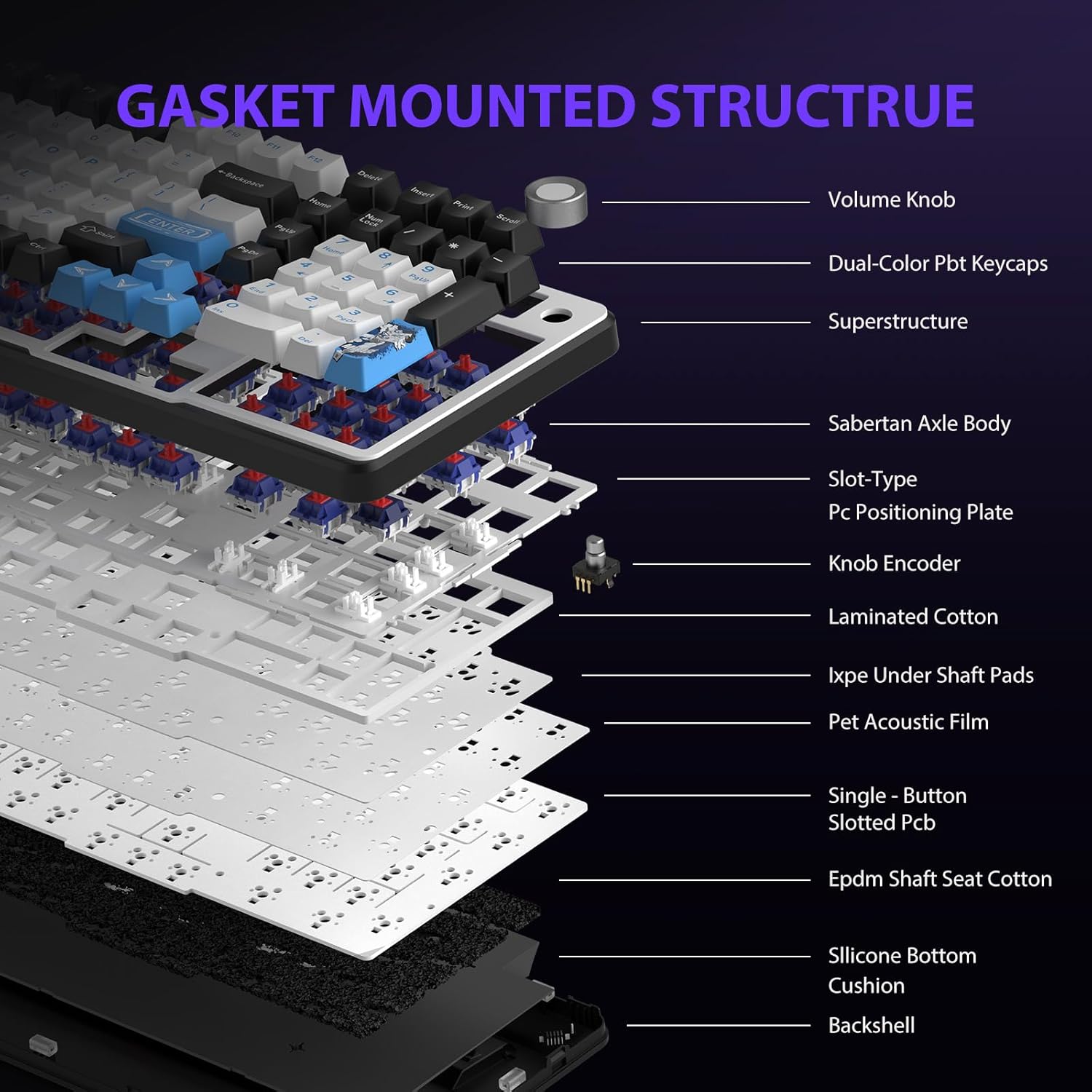
Figure 5.3: Gasket Mounted Structure Components.
6. Upravljanje baterije
The GK01 keyboard is equipped with a 4000mAh rechargeable battery.
- Polnjenje: Connect the keyboard to a USB power source using the provided USB-C cable. The indicator light will show charging status.
- Življenjska doba baterije: A fully charged battery provides extended usage time. Actual battery life may vary based on usage patterns and RGB lighting intensity.
- Varčevanje z energijo: The keyboard will enter a power-saving sleep mode after a period of inactivity to conserve battery. Press any key to wake it up.
7. Vzdrževanje
7.1. Čiščenje tipkovnice
- Pred čiščenjem tipkovnico izključite iz vseh virov napajanja.
- Uporabite mehko krpo, ki ne pušča vlaken, dampz vodo ali blago čistilno raztopino obrišite tipke in ohišje.
- Za prah in umazanijo med tipkami uporabite stisnjen zrak ali majhno krtačo.
- Izogibajte se uporabi močnih kemikalij ali abrazivnih materialov.
7.2. Nega tipk in stikal
- The PBT keycaps are designed for durability and fade resistance.
- Refer to Section 5.1 for instructions on safely removing and replacing keycaps and switches.
- Ensure the keyboard feet are clean and free of debris for stable placement.

Figure 7.1: Adjustable Keyboard Feet.
8. Odpravljanje težav
| Težava | Možen vzrok | rešitev |
|---|---|---|
| Tipkovnica se ne odziva v brezžičnem načinu. | Low battery, incorrect mode selected, dongle not connected, Bluetooth not paired. | Charge the keyboard. Ensure the mode switch is set correctly (2.4GHz or BT). Re-insert the 2.4GHz dongle. Re-pair Bluetooth connection. Try wired mode to confirm keyboard functionality. |
| Tipke se ne registrirajo ali pa se tipkajo dvakrat. | Loose switch, software issue, debris under keycap. | Ensure switches are fully seated. Clean under keycaps. If using programmable software, ensure it's updated or try resetting keyboard settings. |
| RGB osvetlitev ozadja ne deluje ali se zatakne. | Backlight turned off, software conflict. | Pritisnite Fn + X to toggle backlight. Check programmable software settings. |
| Povezave ni mogoče vzpostaviti prek Bluetootha. | Tipkovnica ni v načinu seznanjanja, Bluetooth naprave je izklopljen, obstajajo motnje. | Ensure keyboard is in Bluetooth pairing mode (Fn + Q/W/E long press). Ensure device Bluetooth is on and discoverable. Move closer to the device. |
9. Specifikacije
| Funkcija | Podrobnost |
|---|---|
| Številka modela | TF-GK01 |
| Povezljivost | Bluetooth 5.0, 2.4 GHz brezžično, USB-C žično |
| Vrsta tipkovnice | Mehanski |
| Postavitev | 101 Keys (Full-size) |
| Stikala | Pre-lubed Cybertron Linear Switches, Hot-Swappable (3-pin/5-pin compatible) |
| Tipkovnice | Heat-sublimated PBT |
| Osvetlitev ozadja | RGB (16.8 Million Colors, 20 modes, music rhythm effects via driver) |
| Kapaciteta baterije | 4000 mAh |
| Dimenzije izdelka | 16.15 x 5.65 x 1.63 palcev (41.02 x 14.35 x 4.14 cm) |
| Teža predmeta | 2.24 funtov (1.02 kg) |
| Združljive naprave | Prenosnik, računalnik, pametni telefon, tablica |
| Posebne lastnosti | Anti-Ghosting (all keys), Multimedia Control Knob, Programmable Keys (via software), Rechargeable |
10. Garancija in podpora
For information regarding warranty coverage, technical support, or service inquiries, please refer to the warranty card included with your product or visit the official Transformers Keyboard webmesto.
Proizvajalec: Transformatorji