
Uvod
Welcome to the user manual for your new OnePlus 13s smartphone. This guide provides essential information on setting up, operating, maintaining, and troubleshooting your device. The OnePlus 13s combines powerful performance with advanced AI features and a compact design.
- Elitna zmogljivost: Powered by the Snapdragon 8 Elite processor, the OnePlus 13s delivers high performance for demanding tasks, supported by a Cryo-Velocity cooling system.
- Smarter Everyday: Experience OxygenOS 15 with integrated OnePlus AI features like AI Plus Mind, Intelligent Search, and Google Gemini for enhanced productivity and organization.
- Podaljšana življenjska doba baterije: Equipped with a 5850mAh battery and 80W SUPERVOOC Fast Charge, ensuring long-lasting power and quick recharging.
- Kompaktna zasnova: Features a 16.05cm (6.32-inch) ProXDR display in an ergonomic form factor, offering a comfortable viewing and handling experience.
- Napredni sistem kamer: Capture clear images with a 32MP autofocus front camera and dual 50MP rear cameras, including features like Clear Burst.
- Izboljšana povezljivost: Includes an independent G1 Wi-Fi chipset, 5.5G support, and a 360-degree antenna system for reliable network connections.
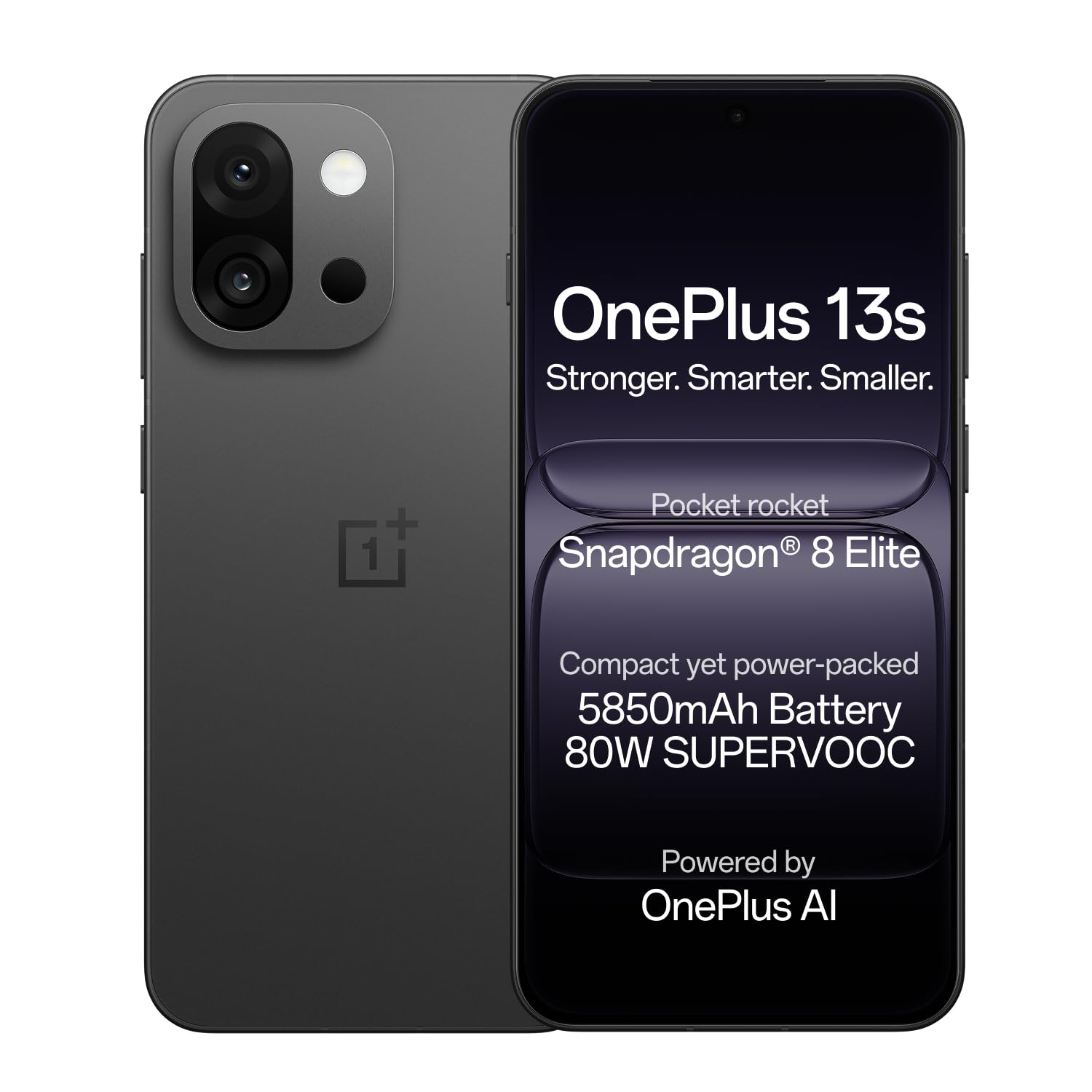
Image: OnePlus 13s smartphone in Black Velvet.
Vodnik za namestitev
1. Razpakiranje in prvi pregled
Carefully unbox your OnePlus 13s. Verify that all components are present and undamaged.
Vsebina škatle:
- Pametni telefon OnePlus 13s
- Napajalni adapter
- USB kabel
- Izmetalo pladnja SIM
- Ovitek za telefon
- Zaščitna folija za zaslon (vnaprej nameščena ali v škatli)
2. Vstavljanje SIM kartice
- Poiščite pladenj za kartico SIM na strani naprave.
- Vstavite orodje za izmet pladnja za SIM kartico v majhno luknjo poleg pladnja in nežno pritisnite, da pladenj izskoči.
- Place your Nano SIM card(s) into the tray with the gold contacts facing down. The OnePlus 13s supports Dual SIM.
- Previdno vstavite pladenj za SIM kartico nazaj v telefon, dokler se ne zaskoči.

Slika: Stran view of the OnePlus 13s, indicating the SIM tray location.
3 Začetni vklop in nastavitev
- Press and hold the Power button (usually on the right side) until the OnePlus logo appears.
- Sledite navodilom na zaslonu, da izberete jezik, se povežete z omrežjem Wi-Fi in nastavite svoj Google Račun.
- Configure security features such as fingerprint recognition and a screen lock (PIN, pattern, or password).
4. Polnjenje naprave
Before first use, it is recommended to fully charge your OnePlus 13s. Use the provided 80W SUPERVOOC Power Adapter and USB Cable for optimal charging speed.
- Connect the USB cable to the power adapter and then to the USB Type-C port on your phone.
- Priključite napajalnik v stensko vtičnico.
- Naprava bo na zaslonu prikazala stanje polnjenja. Popolno polnjenje traja približno 63 minut.

Slika: Notranja view of the OnePlus 13s highlighting the 5850mAh battery and SUPERVOOC charging.
Navodila za uporabo
1. Osnovna navigacija
- Zaslon na dotik: Interact with the device using taps, swipes, pinches, and long presses on the 120Hz ProXDR AMOLED display.
- Prepoznavanje prstnih odtisov: Unlock your device quickly and securely using the in-display fingerprint sensor.
- Gumb za vklop: Press to lock/unlock the screen. Press and hold to power off or restart the device.
- Gumbi za glasnost: Prilagodite glasnost medijev, glasnost klicev in glasnost obvestil.
2. OxygenOS 15 and AI Features
Your OnePlus 13s runs on OxygenOS 15, which includes several AI-powered enhancements:
- Umetna inteligenca in um: Organize schedules, events, and information efficiently.
- Inteligentno iskanje: Power your search using natural, conversational prompts.
- Glasovno pisanje z umetno inteligenco: Record, translate, and summarize VoIP and video calls across applications.
- Google Gemini: Utilize Google's personal AI assistant for various tasks, including writing, planning, and learning.

Image: OxygenOS 15 interface demonstrating the AI Plus Mind feature.

Image: OxygenOS 15 interface demonstrating the AI Search feature.
3. Uporaba kamere
The OnePlus 13s features a versatile camera system for capturing photos and videos.
- Zadnji fotoaparati: Dual 50MP sensors for high-resolution photos and 20x digital zoom.
- Sprednja kamera: 32MP with autofocus for clear selfies and video calls.
- Clear Burst: Utilize this feature to capture fast-moving subjects without missing key moments.
- AI Unblur: Automatically unblur photos of people or pets.
- AI Detail Boost: Enhance sharp details, even when zooming in on images.

Slika: Podrobna view of the OnePlus 13s camera module, showing 50MP AF Wide, 50MP AF Telephoto, and 32MP AF Front cameras.

Image: Demonstration of the AI Unblur feature, showing a blurred and unblurred photo of a cat.
4. Povezljivost
The OnePlus 13s supports various connectivity options:
- Cellular: 5G network support for fast mobile data.
- Wi-Fi: Independent G1 Wi-Fi chipset for enhanced wireless performance.
- Bluetooth: Za priklop brezžične dodatne opreme.
- NFC: Za brezstična plačila in hitro seznanjanje.
- USB Type-C: Za polnjenje in prenos podatkov.

Slika: Notranja view of the OnePlus 13s, emphasizing the independent Wi-Fi chipset for next-gen connectivity.
Vzdrževanje
1. Skrb za baterijo
- To prolong battery lifespan, avoid extreme temperatures.
- Use only the official OnePlus 80W SUPERVOOC charger and cable.
- Izogibajte se pogostemu popolnemu praznjenju baterije.
2. Posodobitve programske opreme
Regularly check for and install software updates to ensure optimal performance, security, and access to new features. Updates are delivered via OxygenOS 15.
- Pojdi na nastavitve > O napravi > OxygenOS.
- Tapnite Preverite posodobitve in sledite navodilom na zaslonu.
3. Čiščenje naprave
- Za čiščenje zaslona in ohišja uporabite mehko krpo, ki ne pušča vlaken.
- Izogibajte se agresivnim kemikalijam ali abrazivnim materialom.
- The device is water resistant; however, avoid intentional submersion.
Odpravljanje težav
If you encounter issues with your OnePlus 13s, try the following common troubleshooting steps:
- Naprava se ne odziva: Pritisnite in držite gumb za vklop približno 10-15 sekund, da prisilite ponovni zagon.
- Težave s polnjenjem: Prepričajte se, da sta polnilnik in kabel varno priključena in nepoškodovana. Poskusite z drugo vtičnico.
- Zrušitve aplikacije: Clear the cache and data for the problematic app (Settings > Apps > [App Name] > Storage > Clear cache/Clear data). If the issue persists, reinstall the app.
- Omrežna povezljivost: Toggle Airplane Mode on and off. Restart your device. Check your SIM card insertion. For Wi-Fi, forget the network and reconnect.
- Počasno delovanje: Close unnecessary background apps. Clear system cache (refer to online guides for your specific OxygenOS version). Consider a factory reset as a last resort (back up your data first).
For persistent issues, refer to the Support section for contact information.
Specifikacije
| Funkcija | Podrobnost |
|---|---|
| Znamka | OnePlus |
| Model | 13s |
| Operacijski sistem | Android 15, OxygenOS |
| Model procesorja | Snapdragon 8 Elite (4.32 GHz) |
| RAM pomnilnik | 12 GB |
| Zmogljivost shranjevanja | 256 GB |
| Velikost zaslona | 6.32 palcev |
| Vrsta zaslona | AMOLED, 120Hz ProXDR |
| Resolucija | 2640×1216 Pixels (460 PPI) |
| Zadnja kamera | Dual 50 MP (Optical Sensor Resolution) |
| Sprednja kamera | 32 MP (samodejno ostrenje) |
| Kapaciteta baterije | 5850 mAh (litij-ionska) |
| Polnjenje | 80W SUPERVOOC Fast Charge (63 mins for full charge) |
| Povezljivost | 5G, Wi-Fi (Independent G1 chipset), Bluetooth, NFC, USB Type C |
| Biometrična varnost | Prepoznavanje prstnih odtisov |
| Vodoodpornost | Vodoodporen |
| Dimenzije | 15.1 x 7.2 x 0.8 centimetrov |
| Teža | 185 gramov |
| Modelno leto | 2025 |
Informacije o garanciji
Your OnePlus 13s comes with the following warranty coverage:
- Garancija proizvajalca: 1 year manufacturer warranty for the device from the date of purchase.
- Garancija za dodatke: 1 year manufacturer warranty for in-box accessories, including batteries, from the date of purchase.
- Doživljenjska garancija za zaslon: OnePlus provides a lifetime display warranty for industry-wide greenline issues.
Please retain your proof of purchase for warranty claims. For detailed terms and conditions, refer to the official OnePlus webspletno mesto ali se obrnite na podporo strankam.

Image: Information regarding the OnePlus Lifetime Display Warranty.
Podpora
For further assistance or inquiries, please contact OnePlus Customer Service:
- Kontaktna številka za pomoč strankam: 1800 102 8411
- Podpora WhatsApp: +91-9289606888
- Naslov proizvajalca: OPPO Mobiles India Private Limited, PLOT-NO.1, SECTOR ECOTECH-VII, GREATER, NOIDA, UTTAR PRADESH, India-201306
- Visit the Official OnePlus Support Webmesto