
1. Uvod
The BOSEAN BH-W01 is a portable 3-in-1 Electromagnetic Field (EMF) meter designed for detecting Electric Field (EF), Magnetic Field (MF), and Radio Frequency (RF) radiation. This device features an integrated sensor for accurate signal capture and a 2.4-inch TFT color display for intuitive data visualization. It is suitable for use in various environments, including homes, offices, computer rooms, and communication base stations, to identify and manage radiation sources.

Slika 1: Spredaj view of the BOSEAN BH-W01 Portable 3-in-1 EMF Meter, showing its display and control buttons.
2. Značilnosti izdelka
- 3-in-1 EMF Detection: Measures Electric Field (EF), Magnetic Field (MF), and Radio Frequency (RF) with high precision.
- Intuitivni zaslon: Features a 2.4-inch TFT color screen for real-time, maximum, and average value display, along with dynamic line graphs for trend visualization.
- Več načinov alarma: Supports audible, LED light, vibration, and on-screen alarms. Numeric values and curves change color when thresholds are exceeded.
- Široka uporaba: Suitable for measuring radiation levels from electronic devices like mobile phones, routers, microwaves, and identifying excessive radiation sources in various environments.
- Akumulatorska baterija: Equipped with an 1800mAh Lithium-ion battery, rechargeable via Type-C port.
- Samodejni izklop: Configurable auto-shutdown timer (e.g., 15 minutes) to conserve battery.

Slika 2: Illustration of the BOSEAN BH-W01's 3-in-1 measurement capabilities for Electric Field (EF), Magnetic Field (MF), and Radio Frequency (RF).
3. Nastavitev in polnjenje
3.1 Začetno polnjenje
Pred prvo uporabo napravo popolnoma napolnite.
- Locate the Type-C charging port on the side or bottom of the device.
- Connect the provided Type-C USB cable to the device and the other end to a standard USB power adapter (not included) or a computer USB port.
- The charging indicator on the display will show the charging status. Allow the device to charge until the battery icon indicates a full charge.

Slika 3: The BOSEAN BH-W01 features a Type-C charging port and an 1800mAh rechargeable battery.
3.2 Vklop/izklop
- Za vklop pritisnite in držite Hold/Power gumb, dokler se zaslon ne prižge.
- Za izklop pritisnite in držite tipko Hold/Power gumb, dokler se zaslon ne izklopi.
4. Delovanje
4.1 Razumevanje zaslona
The 2.4-inch TFT color display provides comprehensive information about the measured fields. Refer to the diagram below for an explanation of each indicator and function.

Slika 4: Detailed diagram of the BOSEAN BH-W01 display interface and button functions.
| št. | funkcija | št. | funkcija |
|---|---|---|---|
| 1 | Sound Alarm Icon (Mute icon appears if alarm is off) | 9 | Real-Time Magnetic Field (MF) Measurement |
| 2 | Alarm Light Icon | 10 | Real-Time Radio Frequency (RF) Measurement |
| 3 | Vibration Alarm Icon | 11 | Alarm Status Indicators: Low, Medium, High |
| 4 | Auto Shutdown Timer Icon | 12 | Graph Display Icon |
| 5 | Hold (Data Hold) | 13 | Real-Time Measurement Value |
| 6 | Raven baterije | 14 | Average Measurement Value |
| 7 | Indikator polnjenja | 15 | Maximum Measurement Value |
| 8 | Real-Time Electric Field (EF) Measurement | 16 | Real-Time Curve Chart |
4.2 Načini merjenja
The device automatically measures EF, MF, and RF simultaneously.
- Electric Field (EF): Measures in V/m (Volts per meter). Range: 1 ~ 1999 V/m.
- Magnetic Field (MF): Measures in mG (milligauss) or µT (microtesla). Range: 0.1 ~ 1999.9 mG / 0.01 ~ 99.99 µT.
- Radijska frekvenca (RF): Measures in mW/m² (milliwatts per square meter). Range: 0.1 ~ 999.9 mW/m².

Slika 5: Common sources of Electric Field (EF), Magnetic Field (MF), and Radio Frequency (RF) radiation.
4.3 Funkcije gumbov
- Gumb enote: Press to cycle through measurement units for Magnetic Field (mG/µT) or to adjust other unit-related settings if available.
- Hold/Power Button:
- Short press: Activates/deactivates Data Hold function, freezing the current readings on the display.
- Dolg pritisk: Vklopi ali izklopi napravo.
- Gumb za način: Press to cycle through display modes (e.g., real-time values, graph display) or to adjust alarm settings.
4.4 Interpretacija odčitkov in alarmov
The device displays real-time, average, and maximum values. The color of the numeric values and curves will change to indicate different radiation levels (e.g., green for low, yellow for medium, red for high).
- Mejne vrednosti alarma: The device has pre-set thresholds for low, medium, and high radiation levels. When a measured value exceeds a threshold, the corresponding alarm (audible, LED, vibration, screen color change) will activate.
- Alarm za preobremenitev: If the electromagnetic radiation exceeds the measurable range, an overload alarm will be triggered.
- Opozorilo o bateriji: The device continuously monitors battery status and provides alerts for low power.
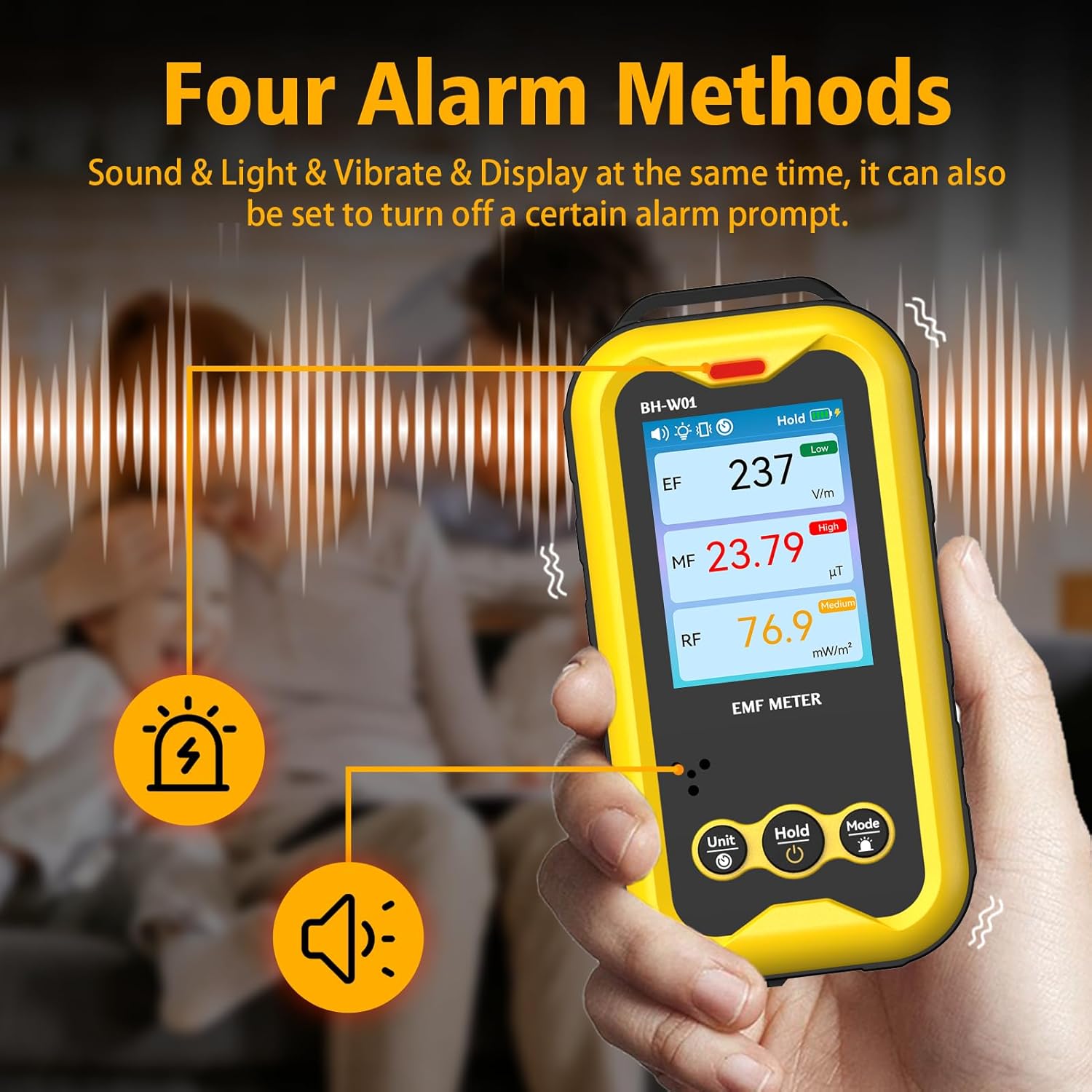
Slika 6: The BOSEAN BH-W01 offers four distinct alarm methods: sound, light, vibration, and display changes.
4.5 Real-Time Curve Chart
The device can display a real-time curve chart (Figure 4, item 16) to visualize the dynamic changes in magnetic field strength over time. This feature helps in observing trends and identifying intermittent radiation sources.
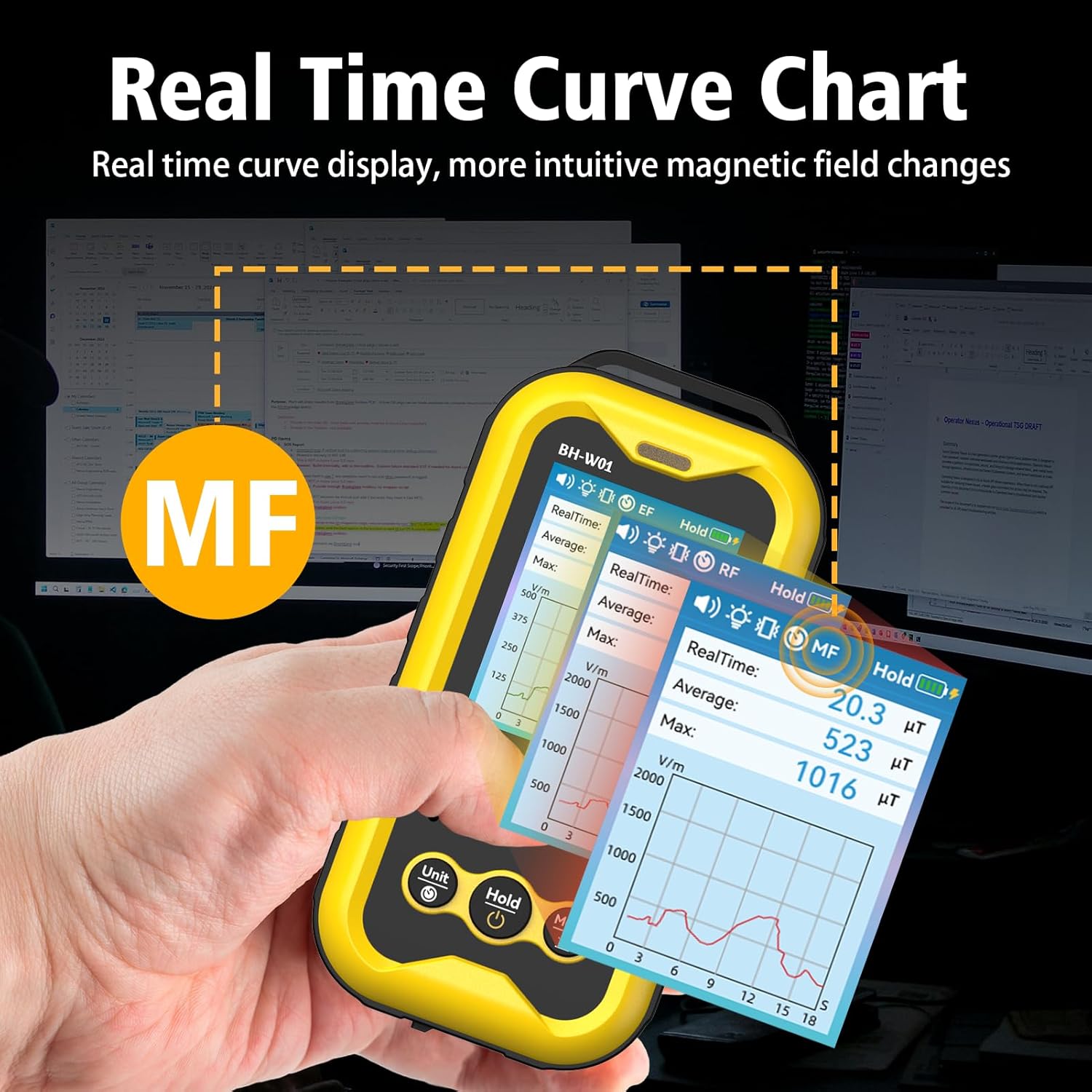
Slika 7: The real-time curve chart provides a visual representation of magnetic field changes over time.
5. Vzdrževanje
- Čiščenje: Za čiščenje naprave uporabite mehko, suho krpo. Ne uporabljajte abrazivnih čistil ali topil.
- Shranjevanje: Napravo shranjujte na hladnem in suhem mestu, stran od neposredne sončne svetlobe in ekstremnih temperatur.
- Vzdrževanje baterije: To prolong battery life, avoid fully discharging the battery frequently. If storing for an extended period, charge the device to approximately 50% and recharge every few months.
- Izogibajte se udarcem: Napravo zaščitite pred padci in močnimi udarci, ki lahko poškodujejo notranje komponente.
6. Odpravljanje težav
- Naprava se ne vklopi:
- Prepričajte se, da je baterija napolnjena. Napravo priključite na vir napajanja s kablom tipa C.
- Press and hold the Power button for several seconds.
- Netočne meritve:
- Ensure the device is held steadily during measurement. Rapid movements can affect accuracy.
- Keep the device away from strong magnetic fields or other electronic devices that might interfere with readings, unless those are the intended measurement targets.
- The device's calibration is based on manual operation; hold it by hand for best results.
- Alarms not working:
- Check the alarm settings using the Mode button to ensure they are enabled.
- Verify that the measured values exceed the set thresholds.
- Display is blank or frozen:
- Poskusite znova zagnati napravo tako, da držite gumb za vklop.
- Če težave ne odpravite, se obrnite na podporo strankam.
7. Specifikacije
| Parameter | Vrednost |
|---|---|
| Številka modela | BH-W01 |
| Znamka | BOSEAN (Manufacturer) / GLXY (Sub-brand/Distributor) |
| Dimenzije (D x Š x V) | 6.5 x 2.7 x 12.7 cm |
| Teža | 240 gramov |
| Electric Field (EF) Range | 1 V/m do 1999 V/m |
| Magnetic Field (MF) Range | 0.1 mG to 1999.9 mG (0.01 µT to 99.99 µT) |
| Radio Frequency (RF) Range | 0.1 mW/m² to 999.9 mW/m² |
| Zaslon | 2.4-palčni barvni zaslon TFT |
| Vir napajanja | 1 litij-ionska baterija (priložena) |
| Kapaciteta baterije | 1800 mAh |
| Vrata za polnjenje | Tip-C USB |
| Samodejni izklop | Configurable (e.g., 15 minutes) |
8. Varnostne informacije
- Do not attempt to open or modify the device. This may void the warranty and pose safety risks.
- Napravo hranite ločeno od vode in drugih tekočin.
- Naprave ne izpostavljajte ekstremnim temperaturam ali visoki vlažnosti.
- Baterijo in napravo zavrzite v skladu z lokalnimi predpisi. Ne odvrzite med gospodinjske odpadke.
- This device is for informational measurement purposes only and should not be used as a substitute for professional safety assessments or medical advice.
9. Garancija in podpora
Specific warranty details are typically provided with the product packaging or by the retailer at the time of purchase. For technical support, warranty claims, or further assistance, please refer to the contact information provided by your seller or the manufacturer, BOSEAN.
Manufacturer: BOSEAN
Model: BH-W01