
Uvod
This manual provides comprehensive instructions for the OMAIC EN2Q36H replacement remote control, designed for Hisense Smart TVs. It covers essential information regarding setup, operation, and maintenance to ensure optimal performance and user experience. This remote offers a direct replacement solution without the need for complex programming.
Nastavitev
The OMAIC EN2Q36H remote control is designed for immediate use with compatible Hisense Smart TVs. No programming or pairing is required.
Namestitev baterije
- Poiščite predal za baterije na zadnji strani daljinskega upravljalnika.
- Pokrov baterije potisnite navzdol ali v smeri puščice, da ga odprete.
- Insert two AAA alkaline batteries (not included), ensuring the positive (+) and negative (-) terminals align correctly with the markings inside the compartment.
- Pokrov baterije namestite nazaj tako, da ga potisnete nazaj na svoje mesto, dokler se ne zaskoči.
Once batteries are installed, the remote is ready to operate your Hisense Smart TV.

Navodila za uporabo
This remote control utilizes infrared (IR) technology for communication with your Hisense Smart TV. Ensure a clear line of sight between the remote and the TV's IR receiver for optimal performance.
Ključne značilnosti
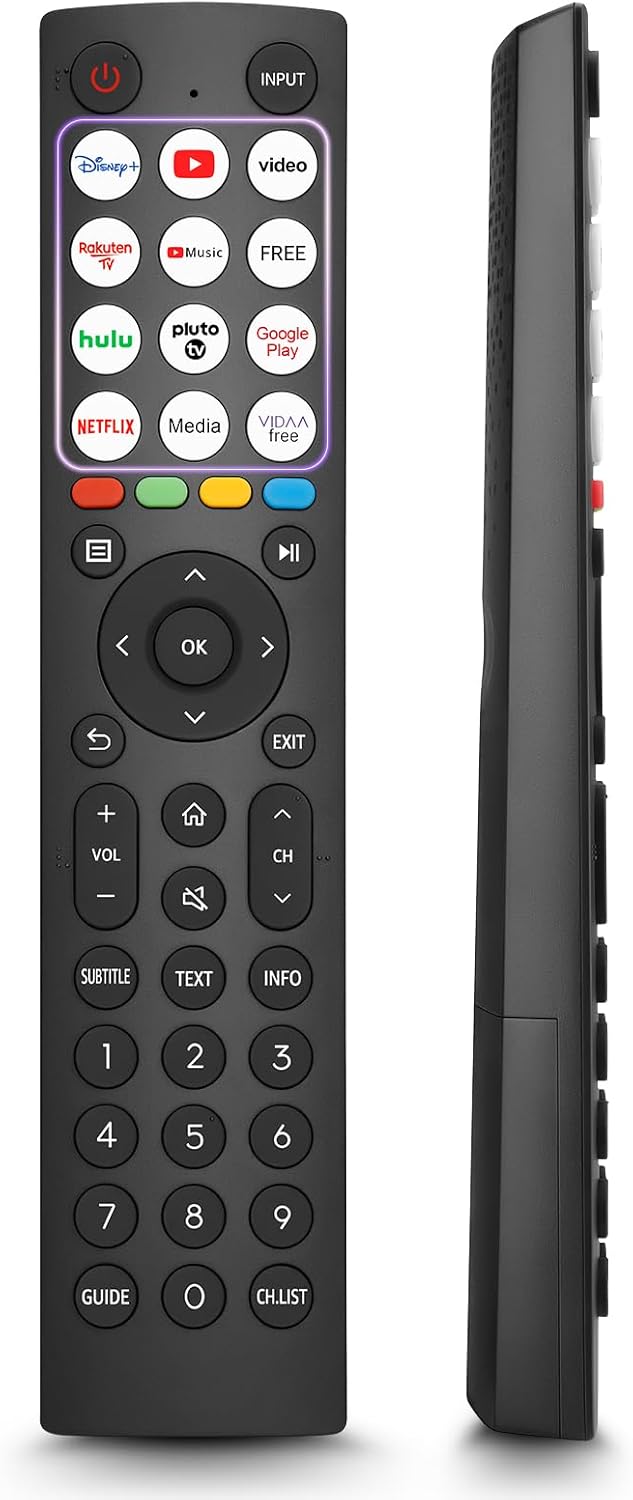
- 12 Shortcut Buttons: Quickly access popular streaming services and applications with dedicated buttons.
- Strong IR Signal: Provides a longer transmission distance and quick response without noticeable delay.
- Vzdržljiva konstrukcija: Made from high-quality ABS and silicone materials for extended lifespan.

Funkcije gumbov
Familiarize yourself with the functions of each button on your OMAIC EN2Q36H remote control:
| Gumb | funkcija |
|---|---|
| MOČ | Switches the TV on or into standby mode. |
| VNOS | Izbere vhodne vire (HDMI, AV itd.). |
| APP Buttons | Quick access buttons for specific applications (e.g., Disney+, Netflix, YouTube). |
| MENI | Displays the Quick Setup menu. |
| Nadzor MEDIJA | Buttons for Play, Pause, Stop, Fast Forward, Rewind. |
| Navigacija (gor/dol/levo/desno) | Navigates on-screen menus and adjusts system settings. |
| OK | Confirms selection in on-screen menus. |
| NAZAJ | Vrne se v prejšnji meni. |
| EXIT | Zapusti trenutni meni. |
| GLASNOST +/- | Prilagodi raven glasnosti. |
| DOMOV | Enters the Home screen. |
| MUTE | Izklopi ali obnovi zvok televizorja. |
| CH ^/v | Switches channels. |
| SUBTITLE | Activates or deactivates subtitle mode. |
| BESEDILO | Turns teletext function on and off. |
| INFO | Prikaže informacije o trenutnem programu. |
| NUMBER Buttons (0-9) | Direct channel selection or number input. |
| VODNIK | Displays the Electronic Programme Guide (DTV input). |
| SEZNAM CH | Displays the Channel List on the screen. |

Compatible Hisense TV Models
The OMAIC EN2Q36H replacement remote control is compatible with the following Hisense VIDAA 4K HDTV Smart TV series:
- 32A4K, 40A4K, 43A4K
- 32A5KQ, 40A5KQ
- 43A6K, 50A6K, 55A6K, 58A6K, 65A6K, 70A6K, 75A6K, 85A6K
- 55U6KQ, 65U6KQ
- 43A7KQ, 50A7KQ, 55A7KQ, 65A7KQ, 75A7KQ
- 43E7KQ, 50E7KQ, 55E7KQ, 65E7KQ, 75E7KQ
Vzdrževanje
Za zagotovitev dolge življenjske dobe in pravilnega delovanja daljinskega upravljalnika upoštevajte naslednja navodila za vzdrževanje:
- Čiščenje: Use a soft, dry cloth to clean the remote. Avoid using liquid cleaners or abrasive materials, as they may damage the surface or internal components.
- Zamenjava baterije: Replace batteries when the remote's response becomes sluggish or stops working. Always replace both batteries at the same time with new ones of the same type (AAA alkaline).
- Shranjevanje: Daljinski upravljalnik shranjujte na hladnem in suhem mestu, stran od neposredne sončne svetlobe, ekstremnih temperatur in visoke vlažnosti.
- Izogibajte se kapljicam: Daljinski upravljalnik zaščitite pred fizičnimi udarci, saj lahko padci poškodujejo notranje vezje.
Odpravljanje težav
If you encounter issues with your remote control, refer to the following troubleshooting steps:
| Težava | Možen vzrok | rešitev |
|---|---|---|
| Daljinski upravljalnik se ne odziva | Prazne ali nepravilno vstavljene baterije. | Baterije zamenjajte z novimi alkalnimi baterijami AAA in pri tem pazite na pravilno polarnost. |
| Daljinski upravljalnik se ne odziva | Ovira med daljinskim upravljalnikom in televizorjem. | Ensure a clear line of sight to the TV's IR receiver. Remove any objects blocking the path. |
| Daljinski upravljalnik se ne odziva | Daljinski upravljalnik je preveč oddaljen od televizorja. | Move closer to the TV. The remote has an extended range, but extreme distances may affect performance. |
| Gumbi so lepljivi ali se ne odzivajo | Umazanija ali ostanki pod gumbi. | Nežno očistite okolico gumbov z mehko, suho krpo. Izogibajte se tekočinam. |
| Specific functions not working | TV model incompatibility (rare). | Verify your Hisense TV model is listed in the 'Compatible Hisense TV Models' section. |
Specifikacije
| Funkcija | Podrobnost |
|---|---|
| Ime modela | EN2Q36H |
| Znamka | OMAIC |
| Združljive naprave | Hisense Smart TVs |
| Tehnologija povezljivosti | Infrardeči (IR) |
| Število gumbov | 48 |
| Vrsta nadzora | Nadzor gumbov |
| Posebne lastnosti | Universal, Comfortable |
| barva | Črna |
| Opis baterije | AAA (Alkaline) |
| Supported Devices (Max) | 1 |
| Dimenzije izdelka (približno) | 34.7 x 24.7 x 2.2 cm |
| Teža izdelka (pribl.) | 80 gramov |

Garancija in podpora
OMAIC is committed to the quality and compatibility of its replacement remote controls. We provide professional after-sales support to ensure customer satisfaction.
If you have any questions or concerns regarding your OMAIC EN2Q36H remote control or your order, please contact us directly. Our support team aims to respond to inquiries within 12 working hours.