
1. Uvod
Hvala za nakupasing the JVC XS-N1154B Bluetooth Speaker. This manual provides essential information for the safe and efficient operation of your device. Please read it thoroughly before use and retain it for future reference.
2. Varnostne informacije
- Zvočnika ne izpostavljajte ekstremnim temperaturam, neposredni sončni svetlobi ali visoki vlažnosti.
- Izogibajte se padcem ali izpostavljanju zvočnika močnim udarcem.
- Zvočnika ne poskušajte razstavljati ali spreminjati. S tem boste razveljavili garancijo.
- Keep the speaker away from water and liquids, despite its waterproof rating, to prevent damage to internal components.
- Uporabljajte samo predpisani polnilni kabel in napajalnik.
- Zvočnik očistite z mehko, suho krpo. Ne uporabljajte abrazivnih čistil ali topil.
3. Vsebina paketa
Prepričajte se, da so v paketu prisotni vsi elementi:
- JVC XS-N1154B Bluetooth Speaker
- Polnilni kabel
- Uporabniški priročnik
- Daljinski upravljalnik (če je priložen)
4. Izdelek je končanview
Seznanite se s komponentami in upravljalnimi elementi zvočnika.
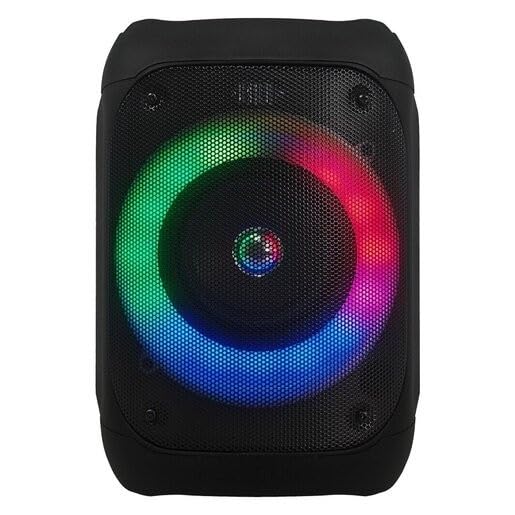
Slika 1: Spredaj view of the JVC XS-N1154B Bluetooth Speaker, showcasing the speaker grille and integrated music-activated LED lights.
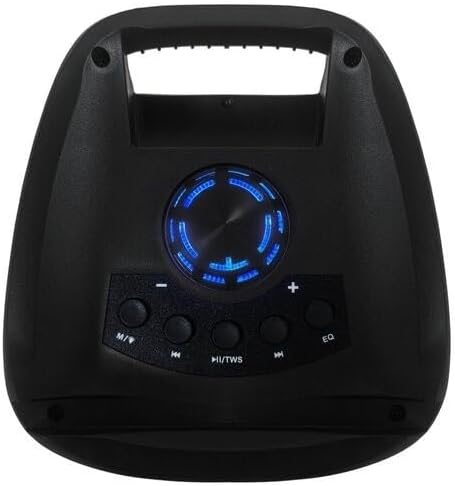
Slika 2: Vrh view of the JVC XS-N1154B Bluetooth Speaker, displaying the control panel with various buttons and the volume knob.
Funkcije nadzorne plošče:
- Gumb za vklop: Vklopi ali izklopi zvočnik.
- Gumb za način (M): Switches between Bluetooth, USB, SD Card, and FM Radio modes.
- Play/Pause (►||) / TWS Button: Plays or pauses audio. Long press for TWS (True Wireless Stereo) pairing.
- Previous Track (◀◀) Button: Skips to the previous track or tunes down in FM mode.
- Next Track (►►) Button: Skips to the next track or tunes up in FM mode.
- Gumb EQ: Preklaplja prednastavitve izenačevalnika.
- Gumb za glasnost: Rotates to adjust the volume level.
5. Nastavitev
5.1 Polnjenje zvočnika
- Polnilni kabel priključite na polnilno vtičnico zvočnika.
- Plug the other end of the cable into a suitable USB power adapter (not included) or a powered USB port.
- Med polnjenjem bo indikatorska lučka polnjenja svetila, običajno rdeče.
- Once fully charged, the indicator light may change color (e.g., turn off or turn blue/green). Disconnect the speaker from the power source.
5.2 Vklop/izklop
- Za vklop: Press and hold the Power button until the speaker powers on and you hear an audible prompt.
- Za izklop: Press and hold the Power button again until the speaker powers off.
6. Navodila za uporabo
6.1 Bluetooth seznanjanje
- Ensure the speaker is powered on and in Bluetooth mode. If not, press the Mode (M) button to switch to Bluetooth mode. The speaker will indicate it is ready for pairing (e.g., a blinking LED or audible prompt).
- Na mobilni napravi (pametnem telefonu, tablici, prenosniku) omogočite Bluetooth in poiščite razpoložljive naprave.
- Select "JVC XS-N1154B" from the list of devices.
- Ko je zvočnik seznanjen, bo oddal zvočno potrditev, indikatorska lučka Bluetooth pa bo začela neprekinjeno svetiti.
- Zdaj lahko predvajate zvok iz naprave prek zvočnika.
6.2 Predvajanje z USB-ja/SD-kartic
- Insert a USB flash drive or an SD card (with supported audio files) v ustrezno odprtino na zvočniku.
- The speaker will automatically switch to USB or SD card mode and begin playing audio. If not, press the Mode (M) button to select the correct input.
- Use the Previous Track (◀◀), Next Track (►►), and Play/Pause (►||) buttons to control playback.
6.3 Delovanje FM-radia
- Press the Mode (M) button to switch to FM Radio mode.
- To auto-scan and save available stations, press and hold the Play/Pause (►||) button. The speaker will scan and store stations automatically.
- Use the Previous Track (◀◀) and Next Track (►►) buttons to navigate between saved FM stations.
6.4 načini LED luči
The speaker features music-activated LED lights. These lights typically synchronize with the audio playback. There may be an additional button or a combination of buttons to cycle through different light modes or to turn them off. Refer to the remote control section for specific controls if available.
6.5 Nadzor glasnosti
Rotate the Volume Knob on the top panel clockwise to increase volume and counter-clockwise to decrease volume.
6.6 Uporaba daljinskega upravljalnika
If your package includes a remote control, it provides convenient access to various functions:
- moč: Vklop/izklop
- način: Switch input sources (Bluetooth, USB, SD, FM)
- Glasnost +/-: Prilagodite glasnost
- Predvajanje/pavza: Nadzor predvajanja
- Prejšnji/Naslednji: Skip tracks/stations
- EQ: Change equalizer presets
- LED: Control LED light modes (if applicable)
7. Vzdrževanje
7.1 Čiščenje
Wipe the speaker's exterior with a soft, dry, lint-free cloth. Do not use liquid cleaners, sprays, or solvents, as these may damage the finish or internal components. Ensure all ports are dry before use, especially given its waterproof nature.
7.2 Shranjevanje
When not in use for extended periods, store the speaker in a cool, dry place, away from direct sunlight and extreme temperatures. It is recommended to charge the battery periodically to maintain its lifespan.
8. Odpravljanje težav
| Težava | Možen vzrok | rešitev |
|---|---|---|
| Zvočnik se ne vklopi. | Baterija je prazna. | Zvočnik popolnoma napolnite. |
| Brez zvoka. | Volume is too low or muted. Device not paired correctly. | Increase volume. Re-pair Bluetooth device. Check audio source. |
| Bluetooth seznanjanje ne uspe. | Zvočnik ni v načinu seznanjanja. Naprava je predaleč. Motnje. | Prepričajte se, da je zvočnik v načinu seznanjanja Bluetooth. Napravo premaknite bližje. Izklopite druge naprave Bluetooth. |
| USB/SD kartica se ne predvaja. | Nepravilno file format. Kartica/pogon ni pravilno vstavljen. | Zagotovite zvok files are in a supported format. Reinsert the USB drive/SD card. Press Mode button to select correct input. |
| Sprejem FM radia je slab. | Šibek signal. | Zvočnik premaknite na mesto z boljšim sprejemom. |
9. Specifikacije
- Model: XS-N1154B
- Znamka: JVC
- Povezljivost: Bluetooth, USB, SD kartica
- Radio: Digitalni FM radio
- Izhodna moč: 4 vatov
- Način avdio izhoda: Stereo
- Nadzorna metoda: Daljinsko
- Material: Plastika
- Vodoodporen: ja
- vir energije: Napajanje na baterije
- Dimenzije: Approximately 18.6D x 18.9W x 25.5H cm
- Teža: Približno 1.2 kg
- Združljive naprave: Prenosni računalnik, pametni telefon
10. Garancija in podpora
10.1 Informacije o garanciji
This JVC XS-N1154B Bluetooth Speaker comes with a 1 leta garancije od datuma nakupa. Ta garancija krije proizvodne napake in napake v izdelavi pri normalni uporabi. Ne krije škode, ki jo povzroči nepravilna uporaba, nesreče, nepooblaščene spremembe ali običajna obraba.
10.2 Podpora strankam
For technical assistance, warranty claims, or further inquiries, please contact JVC customer support through their official website or the retailer where the product was purchased. Please have your product model number (XS-N1154B) and proof of purchase ready when contacting support.