
Uvod
The AIWA IC-320DAB is a 1 DIN car multimedia player designed for versatility, powerful sound, and modern connectivity. This device features a detachable front panel for enhanced security, offering multiple playback options through its high-quality AM/FM and DAB+ tuner. Its LCD screen with dimmer function ensures optimal visibility in various lighting conditions. It also incorporates Bluetooth 5.1 technology for wireless music streaming and hands-free calls, along with an auxiliary input for connecting external devices. With 30 preset stations, a USB output for charging, and compatibility with steering wheel controls (SWC) in some vehicles, this player is an ideal choice for upgrading any car audio system.
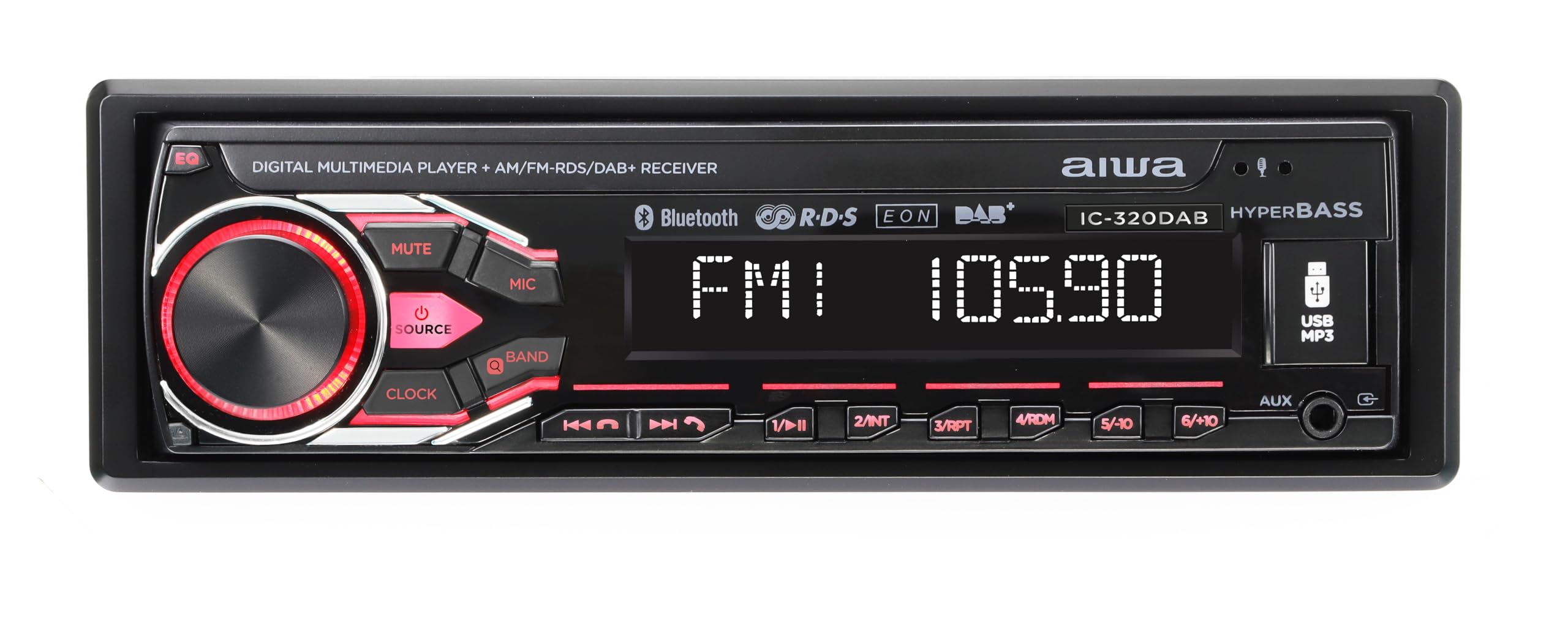
Image: AIWA IC-320DAB Car Multimedia Player. This image shows the front panel of the car multimedia player, highlighting its LCD screen and control buttons.
Kaj je v škatli
- Plastično ohišje
- Fixing and extraction tools
- Zunanji mikrofon
Lastnosti izdelka
- Izhodna moč: 4 channels of 40W each, ensuring powerful and clear audio.
- Snemljiva plošča: Enhanced security by allowing removal of the front panel to deter theft.
- Možnosti nastavitve: AM/FM tuner with 30 preset stations. DAB+ for clearer and more stable digital reception.
- LCD zaslon: Optimal readability, with a dimmer function to adjust to light conditions.
- Prilagodljiva osvetlitev: 7 colors to match the driver's preference or vehicle interior.
- Povezljivost Bluetooth 5.1: Ideal for streaming music from smartphones and making hands-free calls.
- Več vhodov in izhodov: USB for charging and playback, Aux In for external devices, L/R audio output, and subwoofer output.
- SWC (Steering Wheel Control) Support: Allows control of the player from the steering wheel in compatible vehicles.
- Equalization Options: Bass and Treble adjustments to customize the sound experience.
- External Microphone Included: For optimal hands-free calls with high voice quality.
Nastavitev in namestitev
Pravilna namestitev je ključnega pomena za optimalno delovanje in varnost. Priporočljivo je, da namestitev izvede usposobljen strokovnjak.
- Priprava: Disconnect the vehicle's negative battery terminal before starting any electrical work. Ensure you have all necessary tools and the included fixing/extraction tools.
- Montaža: Insert the metal mounting sleeve into the vehicle's dashboard opening. Bend the tabs to secure it. Slide the AIWA IC-320DAB unit into the sleeve until it clicks into place.
- Ožičenje:
- Connect the main power harness: Yellow wire to constant 12V, Red wire to accessory 12V (switched), Black wire to ground.
- Connect speaker wires: Ensure correct polarity for each speaker (front left, front right, rear left, rear right).
- Connect the antenna cable (AM/FM/DAB+).
- Connect the external microphone to the designated input for hands-free calling.
- If using, connect RCA outputs for external amplifierji ali subwooferji.
- If your vehicle supports Steering Wheel Controls (SWC), connect the SWC wires according to your vehicle's wiring diagram and the player's instructions.
- Končna preverjanja: Reconnect the vehicle's negative battery terminal. Turn on the ignition and test the unit's basic functions (power, radio, volume).
- Pritrdite sprednjo ploščo: Carefully attach the detachable front panel to the main unit. Ensure it is securely latched.
Navodila za uporabo
Osnovno delovanje
- Vklop/izklop: Pritisnite MOČ button (usually the volume knob) to turn the unit on or off.
- Nadzor glasnosti: Zavrtite GLASNOST knob to adjust the sound level.
- Izbira vira: Pritisnite SRC or NAČIN button to cycle through available sources (FM, AM, DAB+, Bluetooth, USB, AUX).
- Detaching Front Panel: Pritisnite SPROSTITEV button and carefully pull the front panel off. Store it safely to prevent theft.
Radio (AM/FM/DAB+)
- Izbira pasu: V radijskem načinu pritisnite BAND button to switch between FM1, FM2, FM3, AM1, AM2, and DAB+ (if available).
- Samodejno uglaševanje: Pritisnite in držite ISKANJE or TUNE gumbe za samodejno iskanje naslednje postaje z močnim signalom.
- Ročna nastavitev: Na kratko pritisnite ISKANJE or TUNE gumbe za ročno prilagajanje frekvence korak za korakom.
- Prednastavljene postaje: To save a station, tune to the desired frequency, then press and hold one of the numeric preset buttons (1-6) until you hear a beep. To recall a preset, briefly press the corresponding numeric button.
Bluetooth delovanje
- Seznanjanje:
- Izberite Bluetooth kot vir.
- V mobilni napravi omogočite Bluetooth in poiščite razpoložljive naprave.
- Select "AIWA IC-320DAB" from the list. If prompted for a PIN, enter "0000".
- Once paired, the unit will display "Connected".
- Pretakanje zvoka: Play music on your paired device, and it will stream through the car's speakers. Use the player's PREDVAJAJ/PAVZA, NASLEDNJI, in PREJŠNJA gumbi za nadzor predvajanja.
- Prostoročno telefoniranje:
- Sprejmi klic: Pritisnite POKLIČITE or ODGOVOR gumb, ko zazvoni dohodni klic.
- Končaj klic: Pritisnite KONČAJ KLIC gumb.
- Klicanje: Use your phone to dial, and the audio will route through the player.
Vhod USB in AUX
- USB predvajanje: Insert a USB drive into the USB port. The unit will automatically switch to USB mode and begin playing compatible audio files. Uporaba PREDVAJAJ/PAVZA, NASLEDNJI, in PREJŠNJA buttons for control. The USB port also provides charging for devices.
- AUX vhod: Connect an external audio device (e.g., MP3 player) to the 3.5mm AUX input using an audio cable. Select POMOŽ as the source. Control playback from the external device.
Nastavitve zvoka
- EQ (izenačevalnik): Pritisnite EQ za preklapljanje med prednastavljenimi načini izenačevalnika (npr. pop, rock, klasika) ali za dostop do prilagojenih nastavitev nizkih/visokih tonov.
- Nizki/Visoki toni: Use the menu or dedicated buttons to adjust bass and treble levels for personalized sound.
- dimmer: Access the system settings to adjust the display brightness (dimmer function) for comfortable viewdan ali noč.
- Illumination Color: Navigate to the illumination settings to choose from 7 available colors for the button backlighting.
Vzdrževanje
- Čiščenje enote: Za brisanje površine enote uporabite mehko, suho krpo. Za trdovratno umazanijo dampen the cloth lightly with water. Avoid using abrasive cleaners, solvents, or alcohol, as these can damage the finish.
- Čiščenje sprednje plošče: The detachable front panel should be handled with care. Clean it gently with a soft, dry cloth. Do not apply excessive pressure to the LCD screen.
- Vrata USB: Vrata USB naj bodo čista od prahu in umazanije. Izogibajte se vstavljanju tujkov.
- Storage of Detachable Panel: When removed, store the front panel in its protective case (if provided) or a soft pouch to prevent scratches and damage.
- Temperatura: Izogibajte se izpostavljanju enote ekstremnim temperaturam, neposredni sončni svetlobi dlje časa ali visoki vlažnosti.
Odpravljanje težav
| Težava | Možen vzrok | rešitev |
|---|---|---|
| Brez moči |
|
|
| Brez zvoka |
|
|
| Bluetooth se ne povezuje |
|
|
| Slab radijski sprejem |
|
|
| USB se ne predvaja |
|
|
Specifikacije
| Funkcija | Podrobnost |
|---|---|
| Vrsta izdelka | 1 DIN Car Multimedia Player with LCD Screen, AM/FM and DAB+ |
| Znamka | št |
| Številka modela | B0F4DZWWBJ (Internal ASIN, product model is IC-320DAB) |
| Izhodna moč | 4 x 40 Watts (RMS) / 160 Watts (Peak) |
| Tehnologija povezljivosti | Bluetooth 5.1 |
| Vrsta sprejemnika | AM/FM, DAB+ |
| Zaslon | LCD with Dimmer Function |
| Osvetlitev | Multi-color (7 options) |
| Vložki | USB (for playback and charging), Aux In (3.5mm) |
| Izhodi | L/R Audio Output, Subwoofer Output |
| Posebne lastnosti | Detachable Front Panel, External Microphone, SWC Support, Bass/Treble EQ |
| Dimenzije (paket) | 24.3 x 22.9 x 8.1 cm |
| Teža (paket) | 1.27 kg |
| Država izvora | Kitajska |
Garancija in podpora
This AIWA IC-320DAB Car Multimedia Player comes with a manufacturer's warranty.
- Garancijska doba: Dve leti od datuma nakupa.
- Pokritost: The warranty covers defects in materials and workmanship under normal use. It does not cover damage caused by misuse, accident, unauthorized modification, or improper installation.
- Uveljavljanje garancije: In case of a defect, please contact your retailer or the official Aiwa customer support with your proof of purchase.
- Podpora strankam: For technical assistance, troubleshooting, or warranty inquiries, please refer to the contact information provided with your purchase or visit the official Aiwa webmesto.