
1. Izdelek je končanview
The ORIA Visual Timer KA144W is a versatile time management tool designed for various applications, from focused work and study to cooking and exercise. It features an intuitive visual countdown display, a clear LED screen with adjustable brightness, and multiple alert modes. This rechargeable timer supports both countdown and count-up functions, making it suitable for both adults and children.
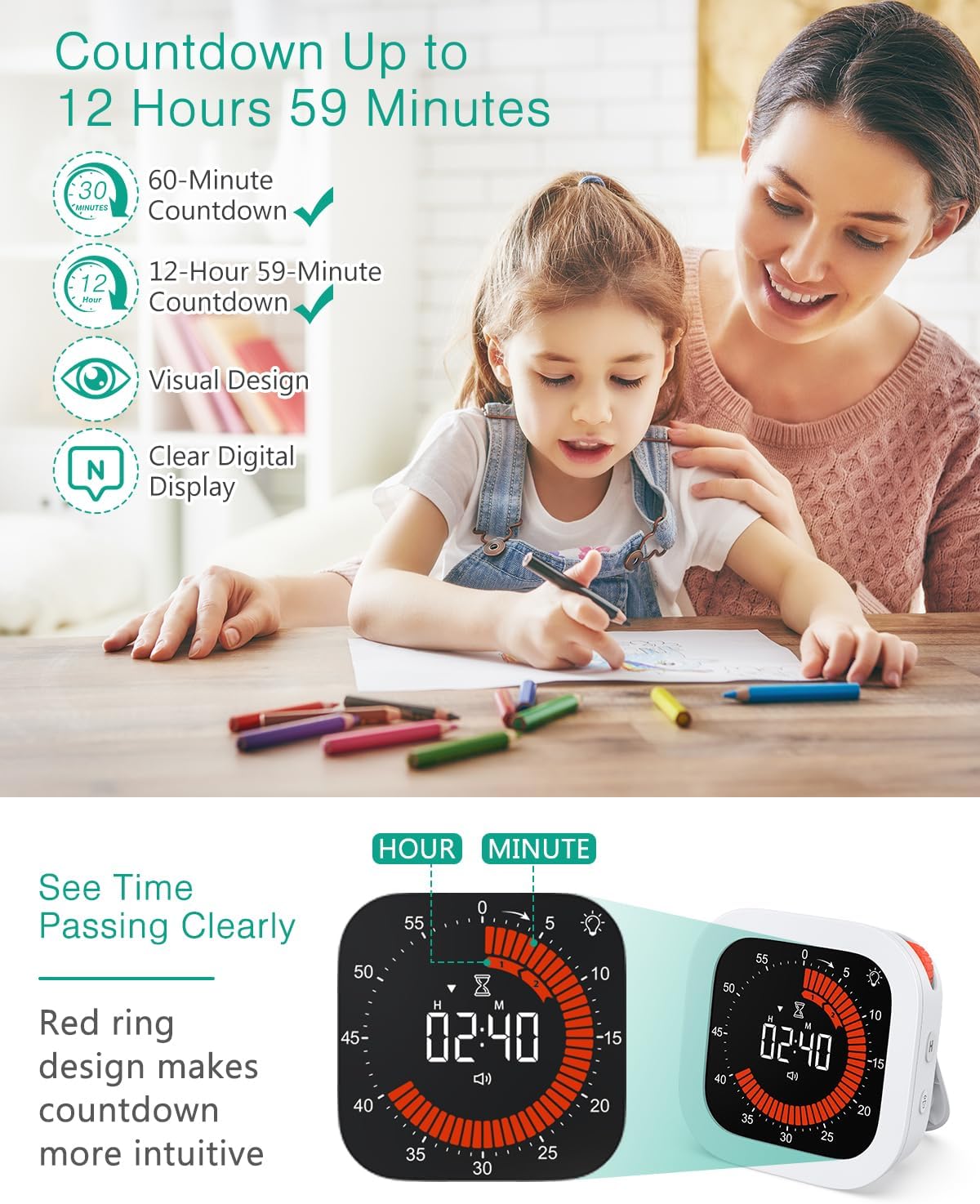
Image: The ORIA Visual Timer in use by a child, demonstrating its application for study and time management. The display shows a countdown with a red visual indicator.
Ključne značilnosti:
- Vizualno odštevanje: Red ring design with synchronized numeric display for intuitive time tracking.
- Extended Timing: Supports countdowns up to 12 hours and count-ups up to 3 hours.
- Jasen LED zaslon: Features 2 adjustable brightness levels for optimal visibility.
- Več načinov opozarjanja: Mute, Vibration, Low, and Loud (85–95 dB) options.
- Rotacijski nadzor: Simple knob for setting time.
- USB-C za polnjenje: Convenient charging, with automatic screen off after 15 seconds of inactivity to save power.
- Vsestranska postavitev: Built-in kickstand and magnetic back for flexible positioning.
2. Nastavitev
2.1 Charging the Timer
Before first use, fully charge the ORIA Visual Timer using the provided USB-C cable. Connect the cable to the Type-C port on the device and a compatible USB power adapter (not included). The charging indicator will show the charging status.

Image: The ORIA Visual Timer connected to a USB-C charging cable, illustrating the charging process. Indicators for 'Charging' and 'Fully charged' are visible.
- Čas polnjenja: Približno 2-4 ure za polno polnjenje.
- Varčevanje z energijo: The screen automatically turns off after 15 seconds of inactivity to conserve battery.
2.2 Možnosti namestitve
The timer offers multiple placement options for convenience:
- Zložljivo stojalo: Use the integrated stand for upright placement on any flat surface.
- Magnetna adsorpcija: The strong magnetic back allows attachment to metal surfaces like refrigerators, microwaves, or whiteboards.

Image: Demonstrates the three ways to place the ORIA Visual Timer: magnetically attached to a range hood, standing upright on a counter, and using its foldable stand.
3. Navodila za uporabo
3.1 Nastavitev odštevalnika časa
The timer supports countdowns from 1 minute up to 12 hours and 59 minutes.
- Nastavite ure: Press the 'H' button to adjust the hour setting. Each press cycles through available hours.
- Nastavite minute: Rotate the control knob clockwise to increase minutes and counter-clockwise to decrease minutes.
- Zagon / premor: Once the desired time is set, press the control knob to start the countdown. Press again to pause.
- Ponastaviti: To reset the timer, press and hold the control knob for a few seconds.

Slika: Podrobna view of the ORIA Visual Timer's controls, including the 'H' button for hour setting, the rotary knob for minutes, and the volume adjustment button.
3.2 Using the Count-Up Timer
The timer can also function as a stopwatch, counting up to 3 hours.
- Activate Count-Up: Ensure the timer is at 00:00. Press the control knob to start the count-up.
- Premor/nadaljevanje: Press the control knob to pause or resume the count-up.
- Ponastaviti: To reset the count-up timer, press and hold the control knob for a few seconds while paused.

Image: A hand holding the ORIA Visual Timer, which displays a count-up time, illustrating its use for tracking activities up to 3 hours.
3.3 Prilagajanje ravni svetlosti
The LED display has two brightness levels to suit different environments.
- Preklopi svetlost: Locate the brightness button (often indicated by a sun icon) and press it to switch between high and low brightness modes.
3.4 Selecting Alert Modes
Choose from four reminder modes:
- Mute: No sound or vibration.
- Vibracije: Silent vibration alert.
- Nizka glasnost: A soft audible alert.
- Visoka glasnost: An 85-95 dB audible alert.
Press the volume adjustment button (often indicated by a speaker icon) to cycle through these modes.

Image: A woman relaxing in an office setting with the ORIA Visual Timer, highlighting the different alert modes: Mute, Vibration, Low Volume, and High Volume.
4. Vzdrževanje
To ensure the longevity and optimal performance of your ORIA Visual Timer, follow these maintenance guidelines:
- Čiščenje: Wipe the timer with a soft, dry cloth. Do not use abrasive cleaners or solvents, as these can damage the display or casing.
- Shranjevanje: Časovnik shranjujte na hladnem in suhem mestu, stran od neposredne sončne svetlobe in ekstremnih temperatur.
- Izpostavljenost vodi: This device is not waterproof. Avoid exposing it to water or high humidity.
- Ravnanje: Handle the timer with care to prevent drops or impacts that could damage internal components.
5. Odpravljanje težav
If you encounter issues with your ORIA Visual Timer, please refer to the following common solutions:
| Težava | Možen vzrok | rešitev |
|---|---|---|
| Timer does not turn on or respond. | Prazna baterija ali nič polnjenja. | Connect the timer to a USB-C charger and allow it to charge for at least 30 minutes before attempting to turn it on. |
| Zaslon je zatemnjen ali ni viden. | Brightness setting is too low or screen is in power-saving mode. | Press the brightness button to cycle through brightness levels. If the screen is off, press any button to wake it up. |
| Alarm sound is too low or absent. | Timer is set to Mute or Vibration mode. | Press the volume adjustment button to cycle through Low Volume or Loud Volume modes. |
| Timer freezes or behaves erratically. | Začasna programska napaka. | Perform a soft reset by pressing and holding the control knob for 10 seconds. If the issue persists, allow the battery to fully discharge and then recharge it. |
6. Specifikacije
Detailed technical specifications for the ORIA Visual Timer KA144W:
- Številka modela: KA144W
- barva: Bela
- Material: ABS+LED
- Dimenzije izdelka: 9.8 D x 9.8 Š x 4 V centimetrov
- Teža artikla: 100 gramov
- Velikost zaslona: 62 milimetrov
- Obseg odštevanja: Do 12 ur 59 minut
- Count-Up Range: Do 3 ur
- Stopnje svetlosti: 2
- Načini opozoril: Mute, Vibration, Low, Loud (85-95 dB)
- Vrata za polnjenje: USB-C
- Država izvora: Kitajska
7. Garancija in podpora
ORIA is committed to providing high-quality products and customer satisfaction. Your ORIA Visual Timer KA144W comes with the following:
- 1-letna garancija: Krije proizvodne napake in okvare pri normalni uporabi.
- 90-Day Free Replacements: For any product issues within the first 90 days of purchase.
- 30-dnevno brezplačno vračilo: Brezskrbna vračila v 30 dneh od nakupa.
- 24/7 podpora strankam: Dedicated support team available around the clock to assist you.
- Doživljenjska tehnična podpora: Stalna tehnična pomoč za celotno življenjsko dobo vašega izdelka.
For further assistance, please contact ORIA customer support through the retailer's platform or visit the official ORIA webmesto.