
JESIMAIK R18Lite
JESIMAIK R18Lite Motorcycle Intercom User Manual
Your guide to seamless communication and entertainment on the road.
1. Uvod
Welcome to the JESIMAIK R18Lite Motorcycle Intercom. This device is designed to enhance your riding experience by providing clear communication, music playback, and FM radio functionality. Please read this manual carefully to ensure proper installation, operation, and maintenance of your intercom.
Ključne značilnosti
- 2-Person Simultaneous Communication & 6-Unit Connection: Enables simultaneous communication between two riders and connection with up to six units for group rides.
- Qualcomm Bluetooth 5.1 Chip: Ensures high signal transmission, significantly reduced latency, and stable connectivity. Ideal communication distance up to 1500m in open environments.
- 5-Level Noise Cancellation: Features ENC2.0, DSP, and CVC8.0 noise suppression technologies, along with a high-density microphone sponge, to eliminate over 90% of environmental noise, wind noise, and engine sounds for crystal-clear audio.
- Podaljšana življenjska doba baterije: Built-in 800mAh battery provides up to 25 hours of continuous talk time, perfect for long rides.
- Deljenje glasbe in FM radio: Share music with another rider or enjoy FM radio (76-108MHz) for news, traffic, and sports updates.
- 4 Music Sound Effects: Choose from Default, Bass, Rock, and Pop sound effects to customize your audio experience.
- Comfortable & High-Fidelity Speakers: Equipped with 7mm ultra-slim speakers to reduce ear pressure and 40mm dynamic drivers for balanced, high-quality HIFI stereo sound.
- IP67 vodotesen in odporen na prah: Designed with special insert molded rubber for superior protection against rain and dust, ensuring reliable performance in various weather conditions.
- Uporaba z rokavicami: Large, tactile buttons allow for easy and quick operation even while wearing gloves.
- Podpora za glasovnega pomočnika: Double-click the power button to activate Siri or other smartphone voice assistants.
- Universal Intercom Connection: Compatible with other brands of intercoms using universal Bluetooth protocol.
- Japanese Voice Guidance & Battery Level Detection: Provides voice prompts in Japanese and announces battery level upon power-on. Battery status can also be checked on Android smartphones.
- Hitro polnjenje: USB Type-C charging port allows for a full charge in just 1.5 hours (using a standard 5V1A adapter).
2. Vsebina paketa
Po odprtju preverite vsebino paketa, da se prepričate, da so vsi predmeti prisotni in v dobrem stanju.

Image: All components included in the JESIMAIK R18Lite package.
| Postavka | Količina |
|---|---|
| Main Intercom Unit | 1 |
| Jet Helmet Microphone | 1 |
| Full-face Helmet Microphone | 1 |
| Clip-type Mount | 1 |
| Adhesive-type Mount | 1 |
| Speakers (pair) | 1 |
| Speaker Adhesive Pads | 2 |
| Jet Helmet Mic Adhesive Pad | 1 |
| Full-face Helmet Mic Adhesive Pad | 1 |
| Navodila za uporabo | 1 |
| USB polnilni kabel tipa C | 1 |
| Vodnik za hiter začetek | 1 |
3. Izdelek je končanview
Postavitev naprave

Image: JESIMAIK R18Lite Intercom Unit Layout and Dimensions.
- Glasnost + gumb: Poveča glasnost.
- Power / Call Button: Powers the device on/off, answers/ends calls.
- Gumb za glasnost: Zmanjša glasnost.
- Gumb interkoma: Initiates or ends intercom communication.
- Charging Port / Earphone Port: USB Type-C port for charging and connecting speakers/microphone.
Mere in teža
| Specifikacija | Vrednost |
|---|---|
| Intercom Unit Dimensions (approx.) | 9.5 cm (D) x 4.2 cm (Š) x 2.8 cm (V) |
| Intercom Unit Weight (approx.) | 51 g |
| Speaker Thickness | 7 mm |
| Premer zvočnika | 40 mm |
4. Nastavitev
Polnjenje naprave
Before first use, fully charge the intercom unit.

Image: Charging the JESIMAIK R18Lite Intercom.
- Connect the supplied USB Type-C cable to the charging port on the intercom unit and to a 5V1A USB power adapter (not supplied).
- The indicator light will be rdeča med polnjenjem.
- Once fully charged (approximately 1.5 hours), the indicator light will turn modra.
Namestitev zvočnika in mikrofona
Install the speakers and microphone inside your helmet. Ensure correct and secure connection for optimal audio quality and waterproof integrity.

Image: JESIMAIK R18Lite 7mm Ultra-Slim Speakers.
- Attach the speakers to the inside of your helmet using the provided adhesive pads. Position them directly over your ears for the best sound.
- Choose the appropriate microphone (jet helmet or full-face helmet) and attach it to the helmet using its adhesive pad. Position the microphone close to your mouth.
- Connect the speaker and microphone cable to the intercom unit's earphone port. Ensure the connector is fully inserted to maintain the waterproof seal.

Image: Correct Speaker Connection Method.
Montaža domofonske enote
Choose between the clip-type or adhesive-type mount to attach the intercom unit to your helmet.
- Clip-type Mount: Slide the clip between the helmet shell and the inner padding. Secure it firmly.
- Adhesive-type Mount: Clean the desired mounting surface on your helmet. Peel off the protective film from the adhesive pad and firmly press the mount onto the helmet for at least 30 seconds. Allow the adhesive to cure for 24 hours before use.
- Once the mount is secured, slide the intercom unit onto the mount until it clicks into place.

Image: Detaching the Intercom Unit from its Mount.
5. Navodila za uporabo
Vklop/izklop
- Vklop: Press and hold the Power / Call button for 3 seconds until you hear a voice prompt.
- Ugasniti: Press and hold the Power / Call button for 3 seconds until you hear a voice prompt.
Bluetooth Pairing (Phone/GPS)
To connect your smartphone or GPS device:
- With the intercom powered off, press and hold the Power / Call button for 5 seconds until the indicator light flashes red and blue, indicating pairing mode.
- On your phone/GPS, enable Bluetooth and search for "JESIMAIK R18Lite".
- Izberite napravo, ki jo želite seznaniti. Ko je povezava vzpostavljena, bo indikatorska lučka počasi utripala modro.

Image: Universal Connection and Battery Life.
Intercom Pairing and Communication
The R18Lite supports 2-person simultaneous communication and connection with up to 6 units.
- 2-Person Intercom: Power on both R18Lite units. Press the Intercom button on one unit. It will automatically search and connect to the other unit.
- Multi-Unit Intercom: Follow the instructions in the Quick Start Guide for detailed pairing steps for multiple units.
- To end intercom communication, press the Intercom button again.

Image: 1500m Communication Range.
Music Playback and Sharing
Enjoy music from your paired device and share it with another rider.
- Predvajanje/pavza: Short press the Power / Call button.
- Naslednja skladba: Na kratko pritisnite gumb za povečanje glasnosti.
- Prejšnja skladba: Na kratko pritisnite gumb za glasnost -.
- Deljenje glasbe: While music is playing, press and hold the Intercom button for 2 seconds to initiate music sharing with a paired intercom unit.

Image: Music Sharing and FM Radio.
Glasbeni zvočni učinki
Customize your music experience with 4 different sound effects.

Image: 4 Music Sound Effects.
- While music is playing, simultaneously press and hold the Volume + and Power / Call buttons for 2 seconds to cycle through the sound effects: Default, Bass, Rock, Pop.
FM radio
Listen to FM radio stations on the go.
- Vklop/izklop FM radia: Double-click the Intercom button.
- Skenirne postaje: While FM radio is on, short press the Power / Call button to automatically scan and save available stations.
- Naslednja postaja: Na kratko pritisnite gumb za povečanje glasnosti.
- Prejšnja postaja: Na kratko pritisnite gumb za glasnost -.
Glasovni asistent (Siri/Google Assistant)
Activate your smartphone's voice assistant directly from the intercom.

Image: Voice Assistant and Automatic Call Connection.
- Double-click the Power / Call button to activate your smartphone's voice assistant (e.g., Siri, Google Assistant).
Odpravljanje hrupa
The R18Lite features advanced noise cancellation for clear audio.

Image: 5-Level Noise Reduction Technology.
- The combination of ENC2.0, DSP, and CVC8.0 technologies actively suppresses ambient noise, ensuring your voice is transmitted clearly to others and incoming audio is crisp.
6. Vzdrževanje
Vodoodporne in protiprašne lastnosti
The JESIMAIK R18Lite is rated IP67 for water and dust resistance.
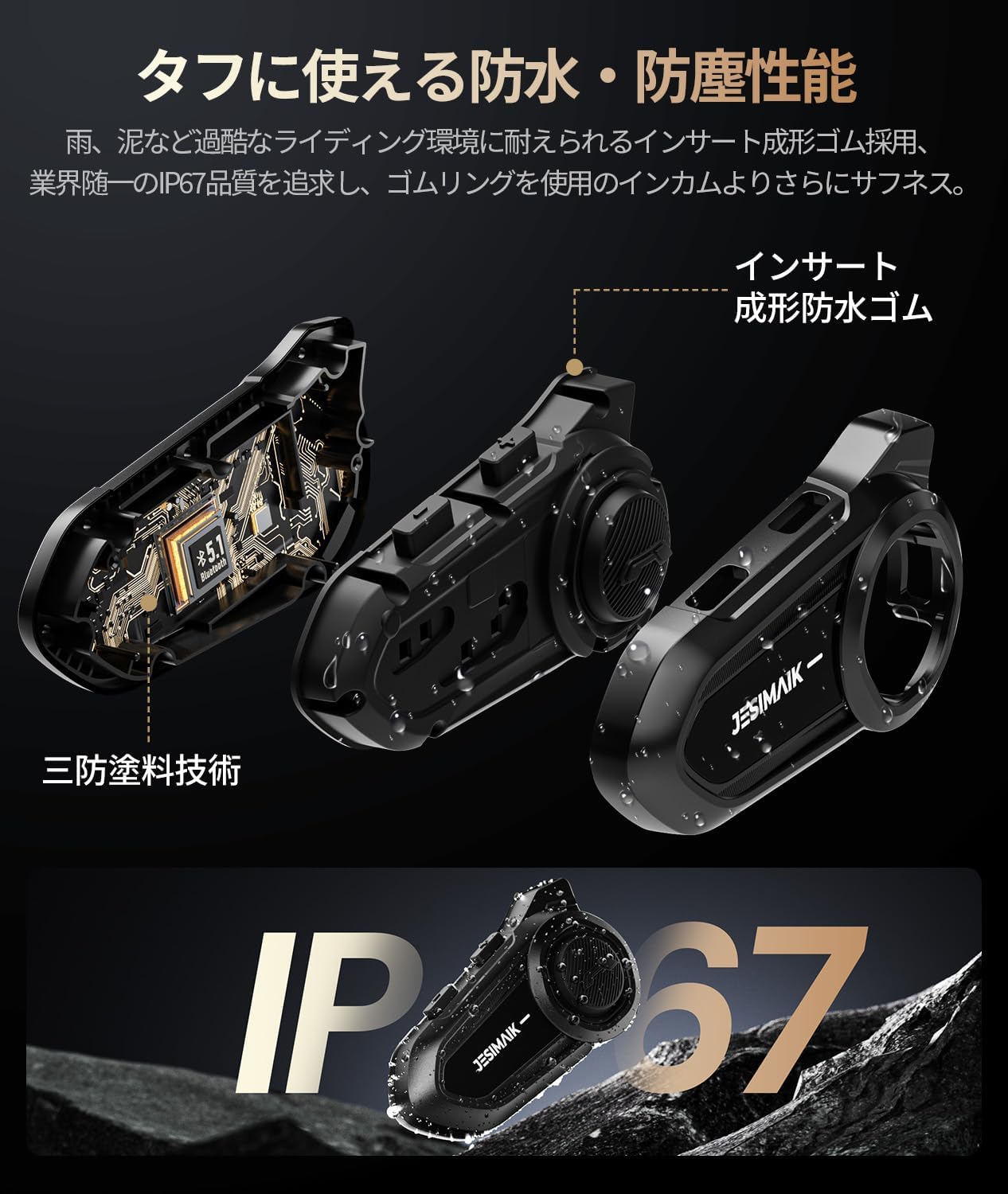
Image: IP67 Waterproof and Dustproof Design.
- While designed to withstand rain and dust, avoid prolonged exposure to heavy downpours or submersion in water.
- Ensure all ports are securely closed when not in use to maintain water resistance.
Čiščenje
- Wipe the intercom unit with a soft, damp krpo. Ne uporabljajte močnih kemikalij ali abrazivnih čistil.
- For the microphone sponge, gently clean with a soft brush if necessary.
Skrb za baterijo
- Napravo redno polnite, tudi če je ne uporabljate pogosto, da ohranite zdravje baterije.
- Avoid storing the device in extreme temperatures (hot or cold) as this can degrade battery performance.
7. Odpravljanje težav
If you encounter any issues with your JESIMAIK R18Lite, please refer to the following common problems and solutions:
| Težava | Možna rešitev |
|---|---|
| Iz zvočnikov ni zvoka | Ensure the speaker connector is fully and correctly inserted into the intercom unit's port. Check volume levels. |
| Domofon se ne povezuje | Ensure both units are powered on and within range. Re-initiate pairing process. Check if other devices are interfering. |
| Slaba kakovost zvoka / Prekomerni hrup | Check microphone placement (ensure it's close to your mouth). Verify speaker connection. Ensure the microphone sponge is not damaged. |
| Naprava se ne vklopi | Baterijo popolnoma napolnite. Če težava ne izgine, se obrnite na podporo strankam. |
| Bluetooth povezovanje ni uspelo | Ensure the intercom is in pairing mode (flashing red and blue). Turn off and on Bluetooth on your phone/GPS. Try pairing again. |
8. Tehnične specifikacije
| Specifikacija | Vrednost |
|---|---|
| Model | R18Lite |
| Znamka | JESIMAIK |
| Različica Bluetooth | 5.1 |
| Obseg komunikacije | Up to 1500m (ideal conditions) |
| Kapaciteta baterije | 800 mAh |
| Čas pogovora | Do 25 ur |
| Čas predvajanja glasbe | Do 30 ur |
| Čas pripravljenosti | Do 400 ur |
| Čas polnjenja | Pribl. 1.5 ur |
| Vrata za polnjenje | USB Type-C |
| Ocena vodoodpornosti/odpornosti na prah | IP67 |
| Premer zvočnika | 40 mm |
| Speaker Thickness | 7 mm |
| FM radijska frekvenca | 76-108MHz |
| Odpravljanje hrupa | ENC2.0, DSP, CVC8.0 |
| Teža izdelka | 330 g (package weight) |
9. Garancija in podpora
JESIMAIK is committed to providing high-quality products and excellent customer service.
- Standardna garancija: This product comes with a standard 1-year warranty from the date of purchase.
- Podaljšana garancija: Register your product on the official JESIMAIK website to extend your warranty by an additional 1 year, for a total of 2 years.
- During the warranty period, if the product is found to be defective, we will provide free repair or replacement.
Obrnite se na podporo
If you have any questions, concerns, or require assistance with your product, please do not hesitate to contact us:
- Prek Amazona: Go to "Your Account" → "Your Orders" → "Contact Seller".
- Uradni e-poštni naslov podpore: support@jesimaik.com
- Official Support Phone: +81 045-550-7406
Ask a question about this manual
Ask about setup, troubleshooting, compatibility, parts, safety, or missing instructions. Manuals+ will review the question and use this page’s manual context to help answer it.