
Infinity DM 56
Infiniity DM56 Sport Smartwatch User Manual
Model: DM 56
1. Uvod
Thank you for choosing the Infiniity DM56 Sport Smartwatch. This device is designed to enhance your active lifestyle with advanced fitness tracking, health monitoring, and smart connectivity features. Equipped with a vibrant 1.43-inch AMOLED display, built-in GPS, and comprehensive health sensors, the DM56 is your reliable companion for both daily wear and intense workouts.
This manual provides detailed instructions on how to set up, operate, maintain, and troubleshoot your smartwatch to ensure optimal performance and longevity.

Slika 1.1: Spredaj view of the Infiniity DM56 Sport Smartwatch, showcasinnjegov okrogel AMOLED zaslon in robustna zasnova.
2. Kaj je v škatli
Upon opening your Infiniity DM56 Sport Smartwatch package, please ensure all the following items are present:
- Infiniity DM56 Sport Smartwatch
- Polnilni kabel
- Uporabniški priročnik (ta dokument)
3. Nastavitev
3.1 Polnjenje pametne ure
Before first use, fully charge your DM56 smartwatch. A full charge typically takes approximately 2 hours.
- Magnetni polnilni kabel priključite na polnilne kontakte na zadnji strani pametne ure. Prepričajte se, da so kontakti pravilno poravnani.
- Plug the USB end of the charging cable into a standard USB power adapter (5V/1A recommended) or a computer's USB port.
- The watch display will show a charging indicator. Once fully charged, the indicator will change or disappear.
3.2 Seznanjanje s pametnim telefonom
To unlock the full potential of your DM56 smartwatch, you need to pair it with your smartphone via Bluetooth using the dedicated companion application. The DM56 is compatible with Android 5.0+ and iOS 11 and above.
- Prenesite aplikacijo: Iskanje the official Infiniity companion app (refer to the packaging or quick start guide for the exact app name) on the Google Play Store (for Android) or Apple App Store (for iOS) and install it.
- Omogoči Bluetooth: Prepričajte se, da je Bluetooth na vašem pametnem telefonu omogočen.
- Odprite aplikacijo: Launch the companion app on your smartphone and follow the on-screen instructions to create an account or log in.
- Dodaj napravo: Within the app, navigate to the 'Add Device' or 'Pair Device' section. The app will search for available smartwatches.
- Select DM56: Select 'DM56' from the list of found devices. A pairing request may appear on both your phone and the watch. Confirm the pairing on both devices.
- Popolna namestitev: Once paired, the app will guide you through initial settings, such as profile information, notification permissions, and data synchronization.
4. Upravljanje pametne ure
4.1 Osnovna navigacija
The DM56 features a responsive touchscreen and physical buttons for intuitive control.
- Zaslon na dotik: Za navigacijo po menijih in obvestilih povlecite navzgor, navzdol, levo ali desno. Dotaknite se za izbiro elementov.
- Fizični gumbi: The watch has multiple buttons, typically labeled 'SPORT', 'SEL', 'BACK', and a dedicated 'GPS' button. Their functions may vary depending on the current screen or mode.
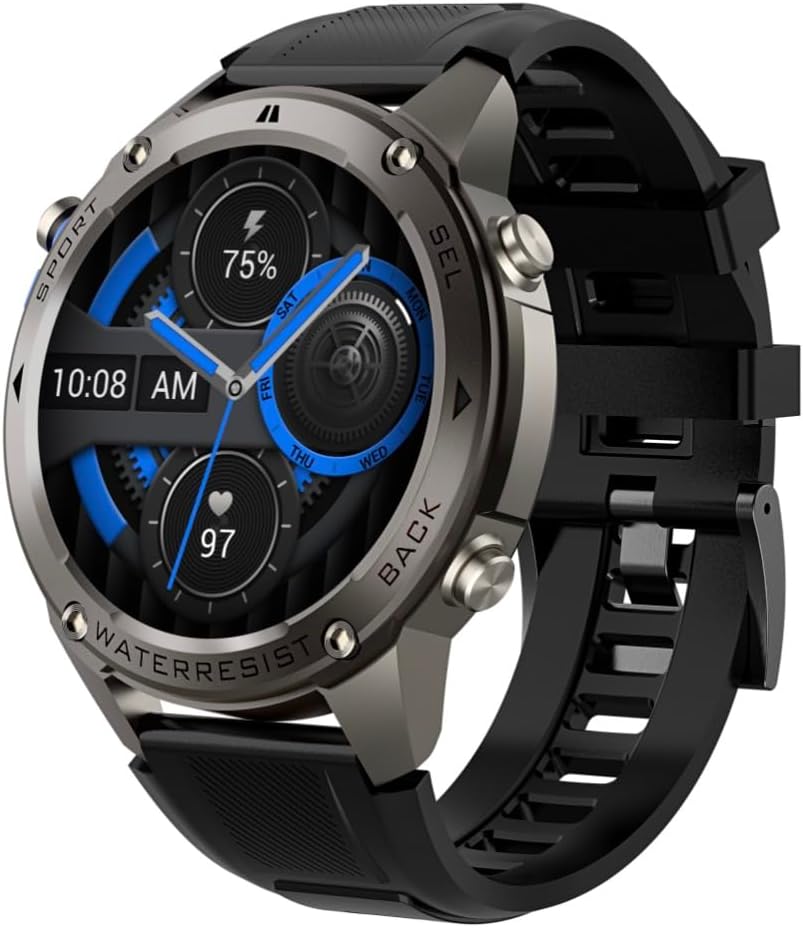
Slika 4.1: Stran view of the Infiniity DM56 Sport Smartwatch, highlighting the physical control buttons.
4.2 Funkcije zaslona
The 1.43-inch AMOLED display offers vibrant colors and deep blacks with a resolution of 466x466 pixels.
- Vedno vklopljen zaslon: The DM56 supports Always-On Display functionality, allowing you to see the time and essential information at a glance without needing to raise your wrist or press a button. This feature can be configured in the watch settings.

Image 4.2: The Infiniity DM56 Sport Smartwatch display, showcasing a typical watch face with various data points.
4.3 Built-in GPS & Compass
The DM56 features dual-frequency GPS (L1+L5) and supports multiple satellite systems (GPS, GLONASS, BDS, Galileo, NAVIC, QZSS) for precise outdoor tracking. A built-in compass further aids navigation.
- GPS sledenje: When starting an outdoor activity (e.g., running, cycling), the watch will automatically attempt to acquire a GPS signal. Ensure you are in an open area for faster signal acquisition. Your route, distance, and pace will be recorded.
- Kompas: Access the compass feature from the watch's menu to get real-time directional information.

Image 4.3: The Infiniity DM56 Sport Smartwatch from an angle, highlighting the dedicated GPS button on the side.

Slika 4.4: Bližnji posnetek view of the GPS button on the Infiniity DM56 Sport Smartwatch, indicating its function.
4.4 Celodnevno spremljanje zdravja
The DM56 is equipped with the VC30F sensor for continuous health monitoring.
- Spremljanje srčnega utripa: Track your heart rate in real-time throughout the day. View your current heart rate on the watch face or in the dedicated heart rate app.
- Spremljanje kisika v krvi (SpO2): Izmerite raven nasičenosti krvi s kisikom.
- Sledenje spanju: Ura samodejno spremlja vaše vzorce spanja, vključno z globokim spanjem, lahkim spanjem in časom budnosti. View detailed sleep analysis in the companion app.
- Sledenje stresu: Spremljajte svojo raven stresa čez dan.
- Pedometer: Counts your daily steps, distance, and estimated calories burned.
Note: The Infiniity DM56 Smartwatch is NOT A MEDICAL DEVICE. All health monitoring data is for reference only and should not be used for medical diagnosis or treatment.
4.5 športnih načinov
The DM56 offers over 170 customizable sports modes, with 14 built-in modes such as outdoor running, cycling, and swimming. You can add up to 10 additional modes manually via the companion app.
- Začetek dejavnosti: Navigate to the 'Workout' or 'Sports' menu on the watch, select your desired activity, and tap to start.
- Med aktivnostjo: The watch will display real-time metrics such as duration, distance, heart rate, and calories burned.
- Ending Activity: Swipe or press the designated button to pause or end the activity. Your workout data will be saved and synchronized with the app.
4.6 Pametna obvestila in klici
Once paired with your smartphone, the DM56 can receive notifications and handle calls directly on your wrist.
- Obvestila: Receive alerts for incoming calls, SMS messages, and app notifications (e.g., social media, email). Configure which app notifications you want to receive in the companion app.
- Make/Answer Call: The DM56 allows you to make and answer calls directly from the watch, utilizing its built-in microphone and speaker. Ensure the watch is connected to your phone via Bluetooth.
5. Vzdrževanje
5.1 Vodoodpornost
The DM56 has a 5ATM waterproof rating, meaning it can withstand water pressures equivalent to a depth of 50 meters. This makes it suitable for swimming, showering, and other water-based activities. However, it is not recommended for diving or high-pressure water activities.
- Avoid exposing the watch to hot water, steam, or strong detergents.
- Po izpostavitvi slani vodi uro sperite s sladko vodo in jo temeljito posušite.
5.2 Čiščenje in nega
Za ohranitev videza in funkcionalnosti pametne ure:
- Redno čistite ohišje in pašček ure z mehko krpoamp krpo.
- Pred polnjenjem se prepričajte, da so polnilni kontakti na zadnji strani ure čisti in suhi.
- Izogibajte se uporabi abrazivnih čistil ali topil.
5.3 Optimizacija življenjske dobe baterije
The DM56 is powered by a 500mAh high-voltage battery, offering extended usage. To maximize battery life:
- Prilagodite svetlost zaslona na nižjo raven.
- Limit the use of Always-On Display if not essential.
- Izklopite nepotrebna obvestila.
- Onemogočite neprekinjeno spremljanje srčnega utripa, če ga ne potrebujete 24 ur na dan, 7 dni v tednu.
6. Odpravljanje težav
If you encounter issues with your Infiniity DM56 smartwatch, try the following common solutions:
- Ura se ne vklopi: Prepričajte se, da je ura popolnoma napolnjena. Priključite jo na polnilnik in počakajte nekaj minut, preden jo poskusite ponovno vklopiti.
- Seznanitev s telefonom ni mogoča:
- Prepričajte se, da je Bluetooth omogočen na telefonu in uri.
- Prepričajte se, da je ura v dosegu Bluetooth povezave vašega telefona.
- Znova zaženite uro in telefon.
- Počistite predpomnilnik Bluetooth v telefonu (Android) ali pozabite napravo in jo znova seznanite.
- Prepričajte se, da je spremljevalna aplikacija posodobljena na najnovejšo različico.
- Netočni zdravstveni podatki:
- Prepričajte se, da je ura tesno prilegana zapestju, ne pretesna ali preohlapna.
- Očistite senzor na zadnji strani ure.
- Note that environmental factors and individual physiology can affect readings. Remember, it is not a medical device.
- Obvestila niso bila prejeta:
- Preverite nastavitve obvestil v spremljevalni aplikaciji.
- Ensure the app has necessary permissions on your phone (e.g., notification access).
- Preverite, ali je ura povezana s telefonom.
- Kratka življenjska doba baterije: Za nasvete za optimizacijo baterije glejte poglavje 5.3.
Če težava po poskusu teh korakov še vedno obstaja, se za dodatno pomoč obrnite na podporo strankam.
7. Specifikacije
| Funkcija | Specifikacija |
|---|---|
| Številka modela | DM 56 |
| Zaslon | 1.43-palčni AMOLED, 466 x 466 slikovnih pik |
| Senzorji | Heart Rate (VC30F), Accelerometer (STK8321), Magnetometer (Compass), Barometer+Altitude (SPL07-03) |
| Povezljivost | Bluetooth 5.3 |
| Kapaciteta baterije | 500 mAh |
| Vodoodporna raven | 5ATM |
| Združljivost | Android 5.0+ and iOS 11 and above |
| Teža predmeta | 3 unč |
| Dimenzije paketa | 4.25 x 4.25 x 2.8 palcev |
| Operacijski sistem | Android Wear 2.7 (Note: This refers to the underlying OS, not necessarily full Android Wear functionality) |
| GPS | Built-in GPS (L1+L5 dual-frequency) |
| oblika | Okrogla |
| Vrsta baterije | Nonstandard Battery, Lithium Ion |
8. Garancija in podpora
The Infiniity DM56 Sport Smartwatch comes with a standard manufacturer's warranty. Please refer to the warranty card included in your product packaging for specific terms and conditions, including warranty duration and coverage details.
For technical support, troubleshooting assistance beyond what is covered in this manual, or warranty claims, please contact Infiniity customer service through the contact information provided on the product packaging or the official Infiniity webmesto.
Prosimo, shranite dokazilo o nakupu za namene garancije.
Ask a question about this manual
Ask about setup, troubleshooting, compatibility, parts, safety, or missing instructions. Manuals+ will review the question and use this page’s manual context to help answer it.