
Uvod
This manual provides detailed instructions for the Tatybo Wireless Gaming Headset (Model WT01). Designed for an immersive gaming experience, this headset features 7.1 surround sound, a 360° adjustable microphone, and versatile connectivity options including 2.4GHz USB, Type-C, Bluetooth 5.3, and a 3.5mm audio jack. It is compatible with a wide range of devices such as PS5, PS4, PC, Switch, laptops, Mac, and mobile phones.
Konec izdelkaview
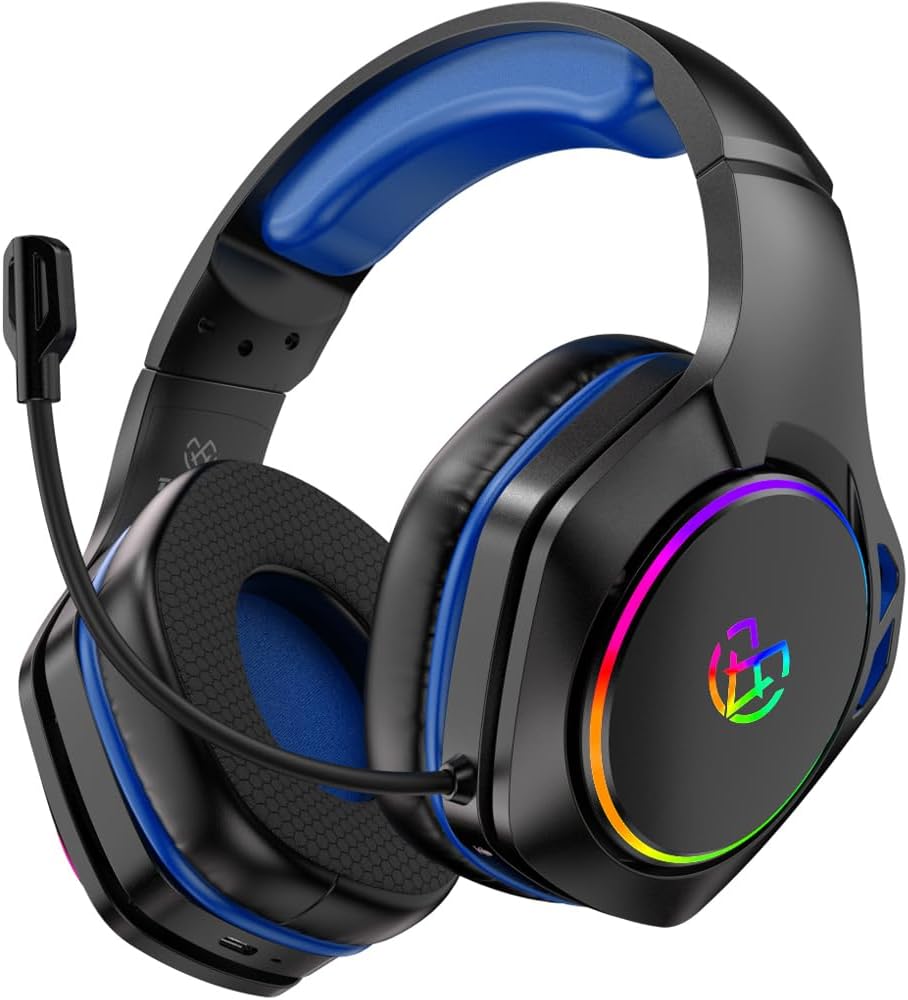
Image: The Tatybo Wireless Gaming Headset, featuring a blue headband and earcups, black exterior, an adjustable boom microphone, and colorful RGB lighting on the outer side of the earcups.
Vsebina paketa:
- Tatybo Wireless Gaming Headset (WT01)
- 2.4GHz USB/Type-C Wireless Dongle
- USB polnilni kabel
- 3.5 mm avdio kabel
- Uporabniški priročnik (ta dokument)
Komponente slušalk:
- Nastavljiv naglavni trak: Za udobno prileganje.
- Slušalke: Over-ear design with breathable mesh cushions.
- Mikrofon: 360° adjustable, noise-canceling boom microphone.
- Gumb za vklop: Located on one earcup.
- Nadzor glasnosti: Wheel or buttons for audio adjustment.
- Gumb za izklop mikrofona: For quick muting.
- Vrata za polnjenje: Vrata USB-C za polnjenje.
- 3.5 mm avdio priključek: Za žično povezavo.
- LED indikatorji: For power, charging, and connection status.
- RGB osvetlitev: Customizable lighting on earcups.
Nastavitev
1. Polnjenje slušalk
- Connect the provided USB charging cable to the headset's USB-C charging port.
- Drugi konec kabla priključite na vir napajanja USB (npr. vrata USB računalnika, stenski adapter).
- The LED indicator will show charging status. A full charge typically takes approximately 3 hours, providing over 40 hours of playtime.
2. Connecting via 2.4GHz Wireless (USB/Type-C Dongle)
This mode offers ultra-low latency for optimal gaming performance on compatible devices.
- Insert the 2.4GHz USB or Type-C wireless dongle into an available port on your device (PC, PS5, PS4, Nintendo Switch in docked mode).
- Power on the headset by pressing and holding the Power button until the LED indicator lights up.
- The headset should automatically pair with the dongle. The LED indicator will show a stable light once connected.
- On your device, ensure the Tatybo headset is selected as the default audio input and output device in the sound settings.
3. Povezovanje prek Bluetootha 5.3
Ideal for mobile devices, laptops, Mac, and Nintendo Switch in handheld mode.
- Ensure the headset is powered off. Press and hold the Power button for approximately 5-7 seconds until the LED indicator flashes rapidly, indicating pairing mode.
- V svoji napravi omogočite Bluetooth in poiščite razpoložljive naprave.
- Select "Tatybo WT01" (or similar name) from the list of found devices to pair.
- Once connected, the LED indicator on the headset will show a stable light.
4. Connecting via 3.5mm Audio Jack (Wired Mode)
For universal compatibility with any device featuring a 3.5mm audio port, or when battery is depleted.
- En konec 3.5 mm avdio kabla priključite na 3.5 mm avdio priključek na slušalkah.
- Connect the other end of the cable to the 3.5mm audio port on your device (e.g., controller, PC, mobile phone).
- The headset will function in passive wired mode. The microphone may or may not be active depending on the device's 3.5mm port configuration.
Navodila za uporabo
Vklop/izklop
- Vklop: Pritisnite in držite gumb za vklop 2-3 sekundi.
- Ugasniti: Pritisnite in držite gumb za vklop 3-5 sekundi.
Nadzor glasnosti
Use the volume wheel or dedicated buttons on the earcup to adjust the audio output level.
Uporaba mikrofona
- Pozicioniranje: Adjust the flexible boom microphone to a comfortable position near your mouth for optimal voice pickup.
- Izklop/vklop zvoka: Pritisnite namenski gumb za izklop mikrofona na slušalki, da vklopite ali izklopite mikrofon.
7.1 prostorski zvok
The headset features 7.1 surround sound for an immersive audio experience. This feature is typically active when connected via 2.4GHz wireless or USB, providing enhanced directional audio cues in compatible games.
Nadzor LED osvetlitve
The headset features RGB lighting on the earcups. To conserve battery life, you can typically turn off the LED lights by double-pressing the action button (often the power button or a dedicated LED control button).
Vzdrževanje
- Čiščenje: Za čiščenje slušalk uporabite mehko, suho krpo. Izogibajte se uporabi agresivnih kemikalij ali abrazivnih materialov. Ušesne blazinice nežno obrišite zamp krpo in pustite, da se popolnoma posuši na zraku.
- Shranjevanje: Slušalke shranjujte na hladnem in suhem mestu, stran od neposredne sončne svetlobe in ekstremnih temperatur.
- Vzdrževanje baterije: Da podaljšate življenjsko dobo baterije, se izogibajte pogostemu popolnemu praznjenju slušalk. Redno jih polnite, tudi če jih dalj časa ne uporabljate.
Odpravljanje težav
- Ni zvoka:
- Prepričajte se, da so slušalke vklopljene in napolnjene.
- Preverite glasnost tako na slušalkah kot na povezani napravi.
- Preverite, ali je v nastavitvah zvoka vaše naprave izbrana pravilna izhodna zvočna naprava.
- If using 2.4GHz wireless, ensure the dongle is securely inserted and paired. Try re-pairing if necessary.
- If using Bluetooth, ensure the headset is paired and connected. Try unpairing and re-pairing.
- If using 3.5mm wired, ensure the cable is fully inserted into both the headset and the device.
- Mikrofon ne deluje:
- Ensure the microphone is not muted (check the mute button on the headset).
- Preverite, ali je v nastavitvah zvoka vaše naprave izbrana pravilna vhodna zvočna naprava.
- Preverite nastavitve zasebnosti mikrofona v operacijskem sistemu.
- Prepričajte se, da je nosilec mikrofona pravilno nameščen.
- Connection Issues (2.4GHz Wireless):
- Ensure the dongle is within range (typically up to 10 meters) and not obstructed by physical barriers or other wireless devices causing interference.
- Try plugging the dongle into a different USB/Type-C port.
- Reboot your device and the headset.
- Kratka življenjska doba baterije:
- Pred uporabo se prepričajte, da so slušalke povsem napolnjene.
- Turn off RGB lighting if not needed, as it consumes battery power.
- Reduce volume levels, as higher volumes can drain the battery faster.
Specifikacije
| Funkcija | Podrobnost |
|---|---|
| Ime modela | WT01 |
| Znamka | Tatybo |
| Tehnologija povezljivosti | Wireless (2.4GHz USB/Type-C, Bluetooth 5.3), Wired (3.5mm Audio Jack) |
| Združljive naprave | Gaming Consoles (PS5, PS4, Switch), PCs, Laptops, Mac, Mobile Phones |
| Vrsta zvočnega gonilnika | Dinamični gonilnik |
| Zvočne lastnosti | 7.1 prostorski zvok |
| Mikrofon | 360° Adjustable, Noise-Canceling |
| Življenjska doba baterije | 40+ hours (after 3-hour charge) |
| Frekvenčno območje | 20 Hz - 20,000 Hz |
| Oblika slušalke | Nad ušesi |
| Teža predmeta | 1.19 funtov |
| barva | Modra |
Garancija in podpora
Tatybo products are designed for reliability and performance. For warranty information, technical support, or any inquiries regarding your WT01 Wireless Gaming Headset, please refer to the contact information provided on the product packaging or visit the official Tatybo webspletnega mesta. Shranite dokazilo o nakupu za uveljavljanje garancije.