
1. Uvod
Hvala za nakupasing the Sofirn HS21 and D25S headlamps. These headlamps are designed for various outdoor activities, offering reliable illumination and convenient features. This manual provides detailed instructions for the safe and effective use, setup, operation, and maintenance of your new headlamps. Please read this manual thoroughly before use and retain it for future reference.
2. Varnostna navodila
- Ne svetite neposredno v oči. Močan žarek lahko povzroči začasno okvaro vida ali trajno poškodbo oči.
- Hraniti izven dosega otrok.
- Ne razstavljajte glaveamp. This may damage the device and void the warranty.
- Use only the recommended battery types. Improper battery use can lead to fire, explosion, or leakage.
- Izogibajte se izpostavljanju glaveamp ekstremnim temperaturam ali neposredni sončni svetlobi za daljša obdobja.
- Ko ne polnite naprave, se prepričajte, da je pokrovček polnilnega priključka USB-C varno zaprt, da ohranite vodoodpornost.
3. Vsebina paketa
- 1 x Sofirn HS21 Headlamp
- 1 x Sofirn D25S Headlamp
- 2 x naglavni trakovi
- 2 x polnilna kabla USB-C
- 2 x Rechargeable Batteries (pre-installed or separate)
- 1 x uporabniški priročnik
4. Izdelek je končanview
4.1 Sofirn HS21 Headlamp
The Sofirn HS21 is a versatile headlamp featuring a combination of spotlight, floodlight, and red light. It is equipped with a convenient rotary switch for easy mode selection and offers a wide 130° rotation adjustment for optimal illumination angle.

Image 1: Sofirn HS21 Headlamp showing its various light modes including red light, spotlight, and floodlight.

Image 2: The Sofirn HS21 headlamp demonstrating its 130-degree rotation capability for adjustable light direction.
4.2 Sofirn D25S Headlamp
The Sofirn D25S is a compact and powerful headlamp utilizing an SST40 LED, offering multiple brightness levels. It features a hidden USB-C charging port for convenient recharging and a simple user interface with memory mode.

Image 3: Sofirn D25S Headlamp highlighting its comfortable switch and simple user interface.
5. Nastavitev
5.1 Namestitev baterije
Both HS21 and D25S headlamps typically come with batteries pre-installed. If not, or if replacing batteries:
- Odvijte zadnji pokrovček glaveamp telo.
- Insert the rechargeable battery with the positive (+) terminal facing towards the head of the lamp.
- Za zagotovitev ustreznega stika in vodoodpornosti tesno privijte zadnji pokrovček nazaj.
5.2 Polnjenje
Oba headlamps feature a built-in USB-C charging port.
For HS21:
- Poiščite polnilni priključek USB-C na strani glaveamp telo.
- Gently lift the protective rubber cover to expose the port.
- Priloženi kabel USB-C priključite na slušalkoamp in na vir napajanja USB (npr. stenski adapter, prenosna baterija, računalnik).
- Indikatorska lučka bo med polnjenjem svetila rdeče, ko bo naprava popolnoma napolnjena, pa bo zasvetila zeleno.
- Once charging is complete, securely close the rubber cover to protect the port from dust and water.
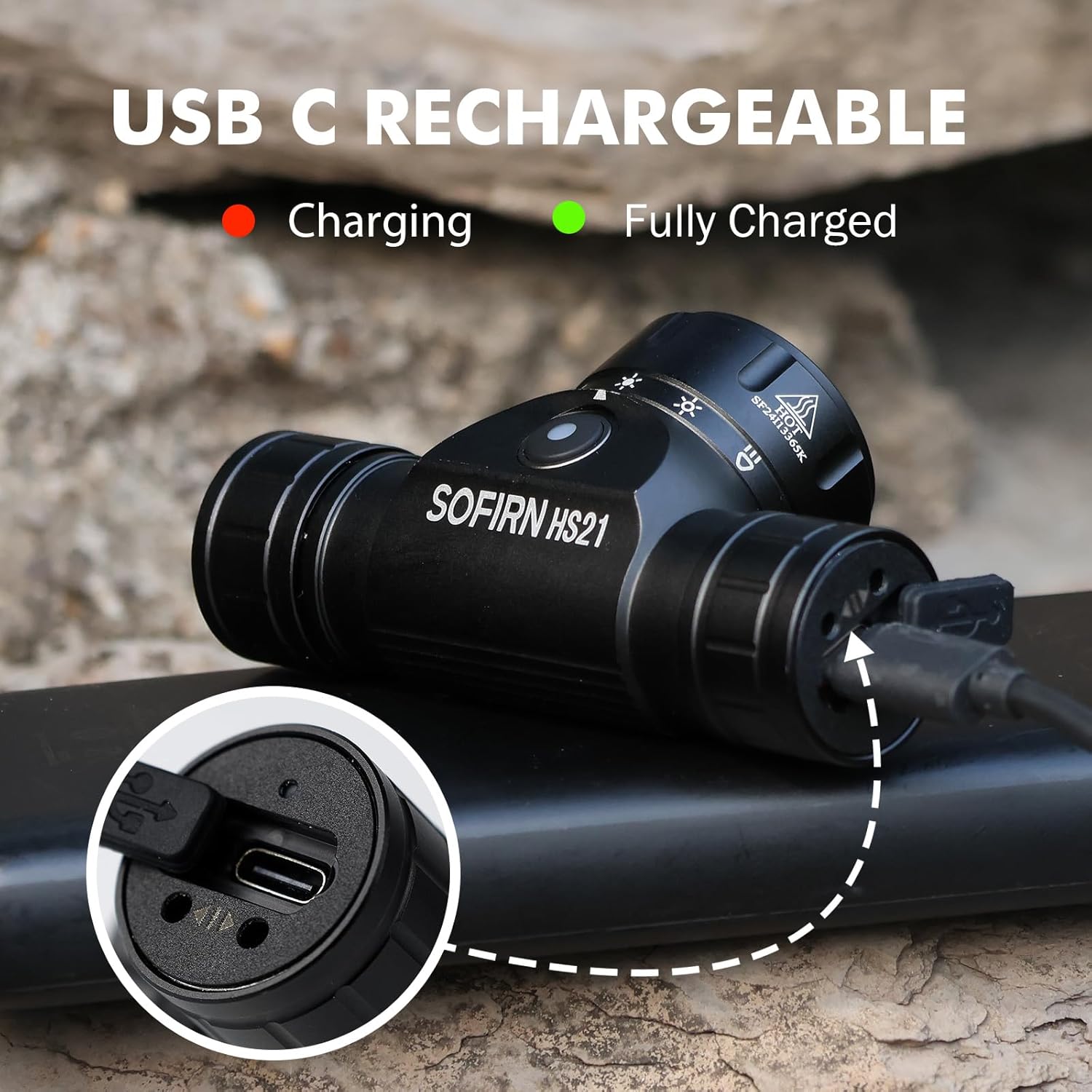
Image 4: Sofirn HS21 Headlamp connected to a USB-C charging cable, showing the charging indicator light.
For D25S:
- Unscrew the head of the D25S headlamp da razkrijete skrito polnilno vrata USB-C.
- Priloženi kabel USB-C priključite na slušalkoamp and to a USB power source.
- Indikatorska lučka bo med polnjenjem svetila rdeče, ko bo naprava popolnoma napolnjena, pa bo zasvetila zeleno.
- After charging, screw the head back on tightly to ensure water resistance.

Image 5: Sofirn D25S Headlamp with its head unscrewed, revealing the built-in USB-C charging port.
6. Navodila za uporabo
6.1 Sofirn HS21 Headlamp Delovanje
The HS21 features a rotary switch for easy mode selection and a separate power button.
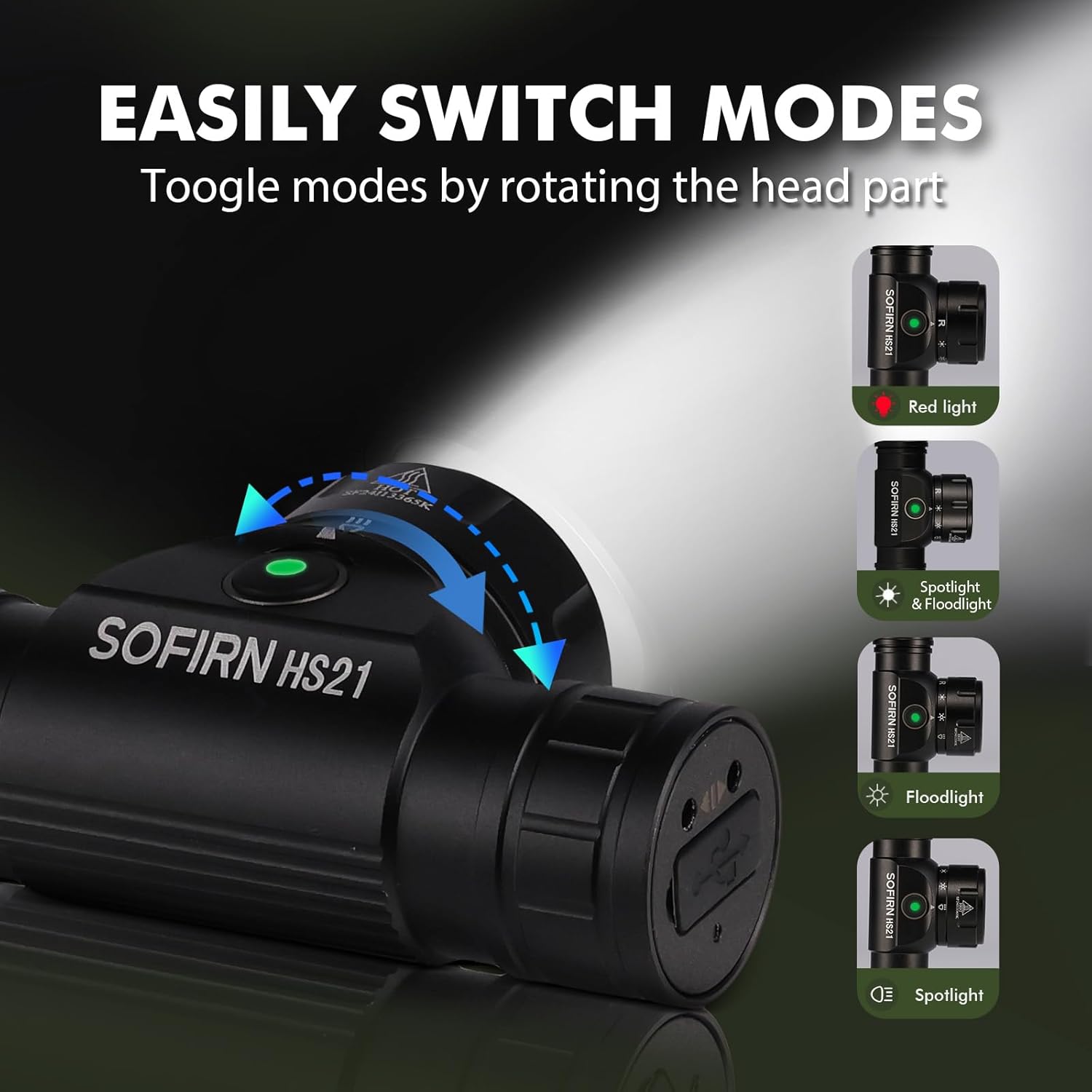
Image 6: Illustration of the Sofirn HS21's rotary switch mechanism for changing light modes.
- Vklop/izklop: Enkrat pritisnite gumb za vklop, da obrnete glavoamp vklop ali izklop.
- Izbira načina: Rotate the head part of the headlamp to cycle through the main light modes: Red Light, Spotlight, Floodlight, and Spotlight + Floodlight (combined).
- Prilagoditev svetlosti: While a mode is active, press and hold the power button to cycle through brightness levels (Low, Medium, High). Release the button at your desired brightness.
- Red Light Activation: Rotate to the red light setting. Press and hold the power button for additional red light modes (e.g., red strobe, red beacon).
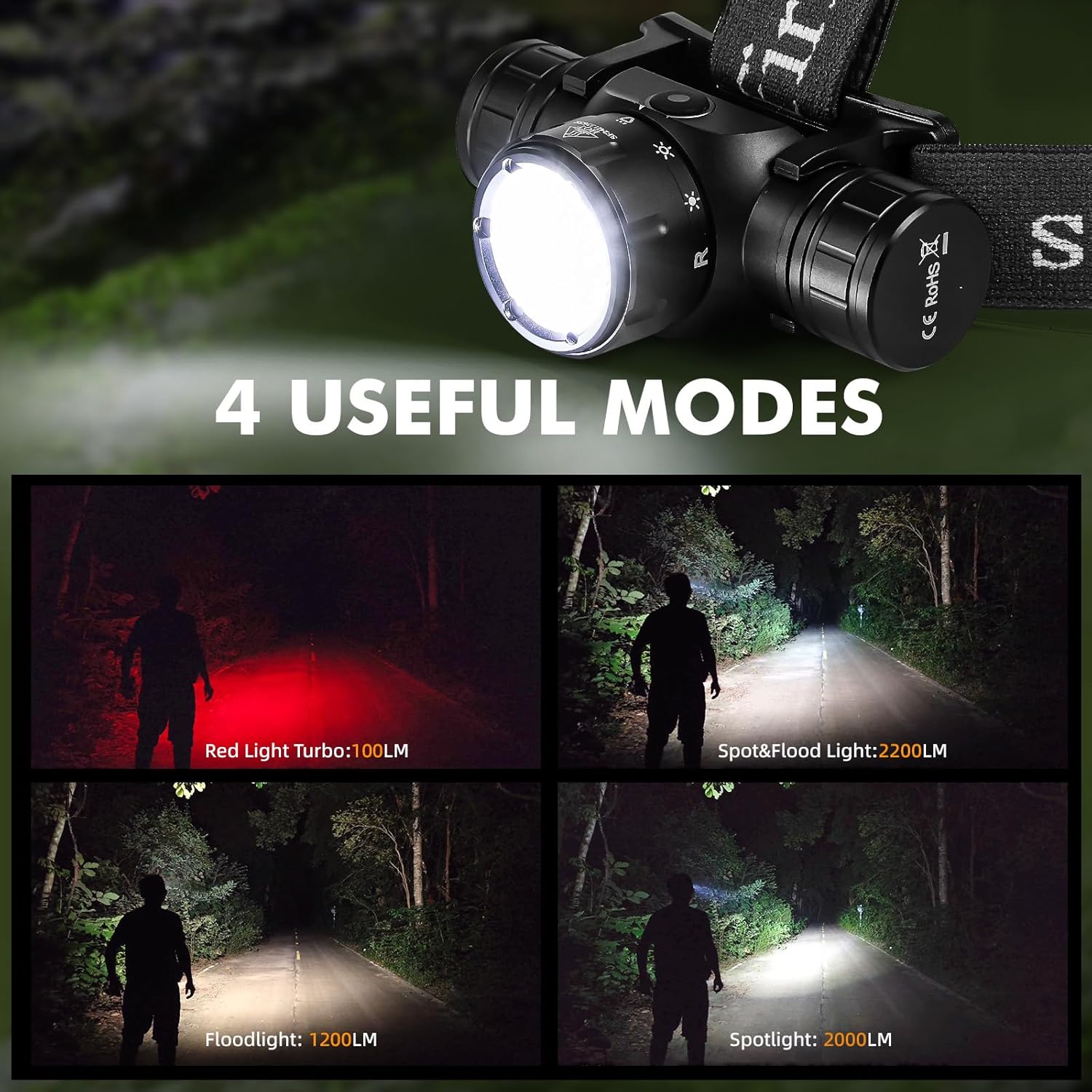
Image 7: The Sofirn HS21 headlamp displaying its four primary light modes: Red Light, Spot & Flood, Floodlight, and Spotlight.
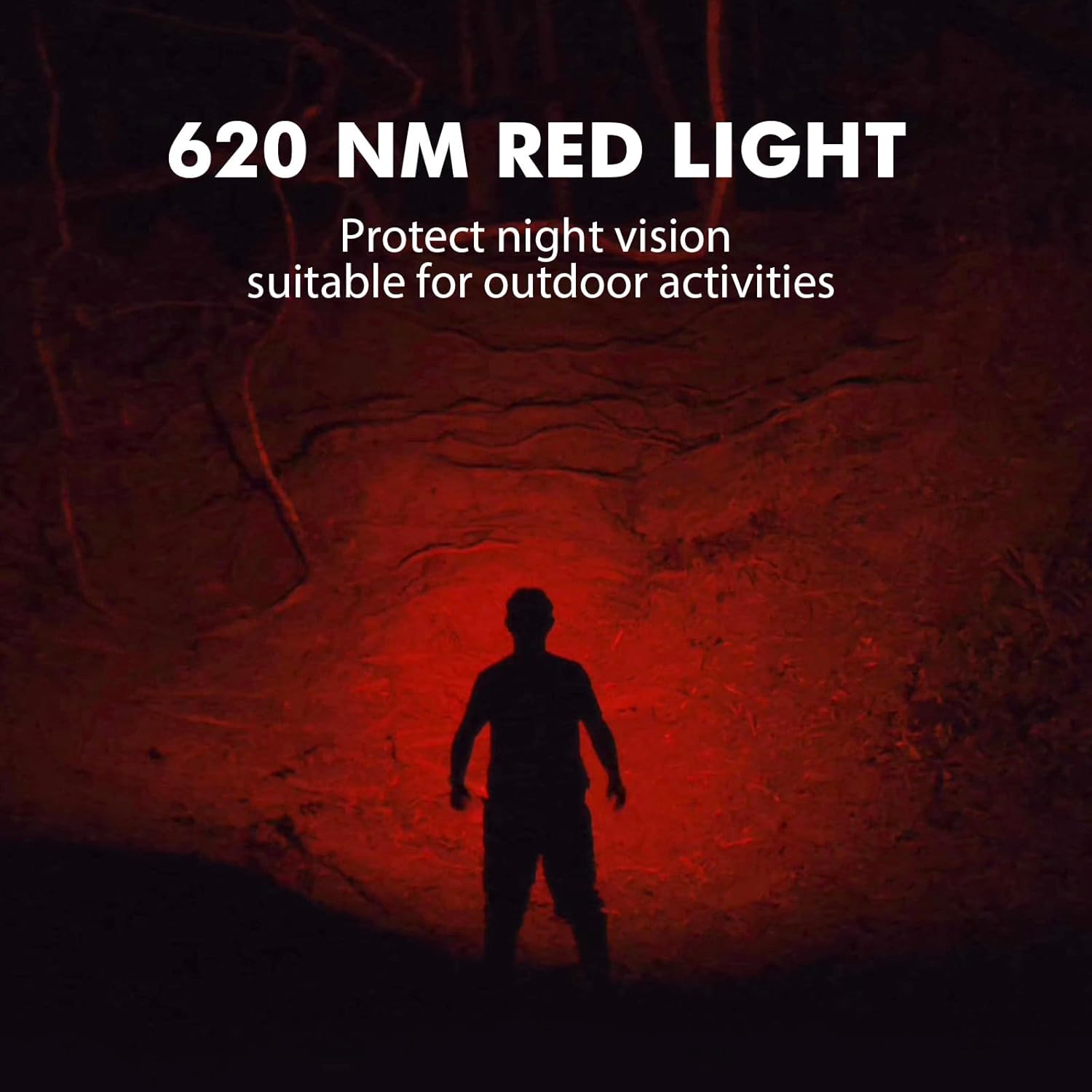
Image 8: The Sofirn HS21 headlamp emitting a 620 NM red light, suitable for preserving night vision.
6.2 Sofirn D25S Headlamp Delovanje
The D25S operates with a single button interface.
- Vklop/izklop: Press the button once to turn the headlamp vklop ali izklop.
- Kolesarjenje načinov: Medtem ko je glavaamp is on, press and hold the button to cycle through brightness modes: Low → Medium 1 → Medium 2 → High. Release the button at your desired mode.
- Turbo način: From any mode, double-click the button to activate Turbo mode. Double-click again to return to the previous mode.
- Funkcija pomnilnika: The D25S will remember the last used brightness level (excluding Turbo) and turn on in that mode.
7. Vzdrževanje
- Čiščenje: Obrišite glavoamp z mehko, damp krpo. Ne uporabljajte abrazivnih čistil ali topil.
- O-obročki: Periodically check and lubricate the O-rings with silicone grease to maintain water resistance. Replace damaged O-rings.
- Vzdrževanje baterije: Če je glavaamp will not be used for an extended period, remove the battery to prevent leakage. Recharge batteries regularly to prolong their lifespan.
- Shranjevanje: Shranite glavoamp na hladnem in suhem mestu, stran od neposredne sončne svetlobe.
8. Odpravljanje težav
| Težava | Možen vzrok | rešitev |
|---|---|---|
| Headlamp se ne vklopi | Low battery; Battery incorrectly installed; Loose tail cap; Faulty battery. | Charge battery; Reinstall battery with correct polarity; Tighten tail cap; Replace battery. |
| Svetlobna moč je šibka | Prazna baterija; objektiv je umazan. | Charge battery; Clean the lens. |
| Polnjenje ne deluje | Cable not connected properly; Faulty cable or power source; Charging port obstructed. | Ensure secure connection; Try a different cable/power source; Clean charging port. |
| Vdor vode | O-rings damaged or missing; Tail cap/charging port cover not sealed properly. | Check and replace O-rings; Ensure all caps are tightly sealed. |
9. Specifikacije
9.1 Sofirn HS21 Headlamp
| Funkcija | Podrobnost |
|---|---|
| Vir svetlobe | LED (žaromet, reflektor, rdeča luč) |
| Največji izhod | 2200 Lumens (Spotlight + Floodlight) |
| Valovna dolžina rdeče svetlobe | 620 Nm |
| Tip stikala | Rotary Switch + Push Button |
| Polnjenje | USB-C za polnjenje |
| Vrtenje | 130° nastavljiv |
| Dimenzije | 3.4 x 1.8 x 1.4 palcev |
| Teža | 0.3 lbs (vključno z baterijo) |
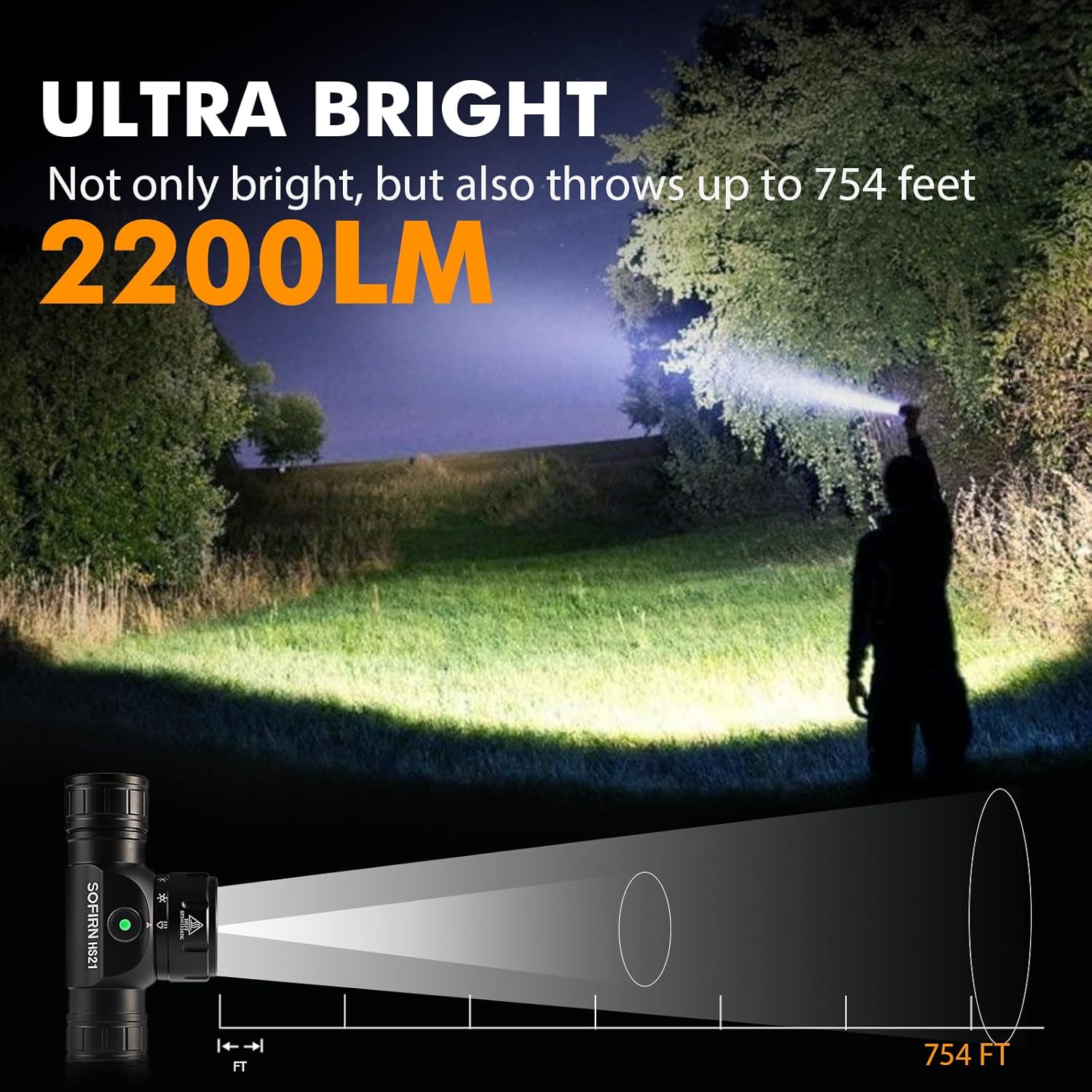
Image 9: The Sofirn HS21 headlamp demonstrating its ultra-bright output and beam distance of up to 754 feet.
9.2 Sofirn D25S Headlamp
| Funkcija | Podrobnost |
|---|---|
| Vir svetlobe | LED iz nerjavečega jekla40 |
| Največji izhod | 1200 lumnov |
| Načini | Low, Medium 1, Medium 2, High, Turbo |
| Polnjenje | Hidden USB-C Rechargeable |
| Posebne lastnosti | Način pomnilnika |
10. Garancija in podpora
Sofirn products are covered by a limited warranty. For specific warranty details, please refer to the warranty card included with your product or visit the official Sofirn website. For technical support, troubleshooting assistance, or warranty claims, please contact Sofirn customer service through the retailer where you purchased the product or via the contact information provided on the official Sofirn webmesto.