Uvod
This manual provides detailed instructions for the setup, operation, and maintenance of your Lotus Smartwatch 50050/4. Please read this manual thoroughly before using your device to ensure proper functionality and to maximize its features.
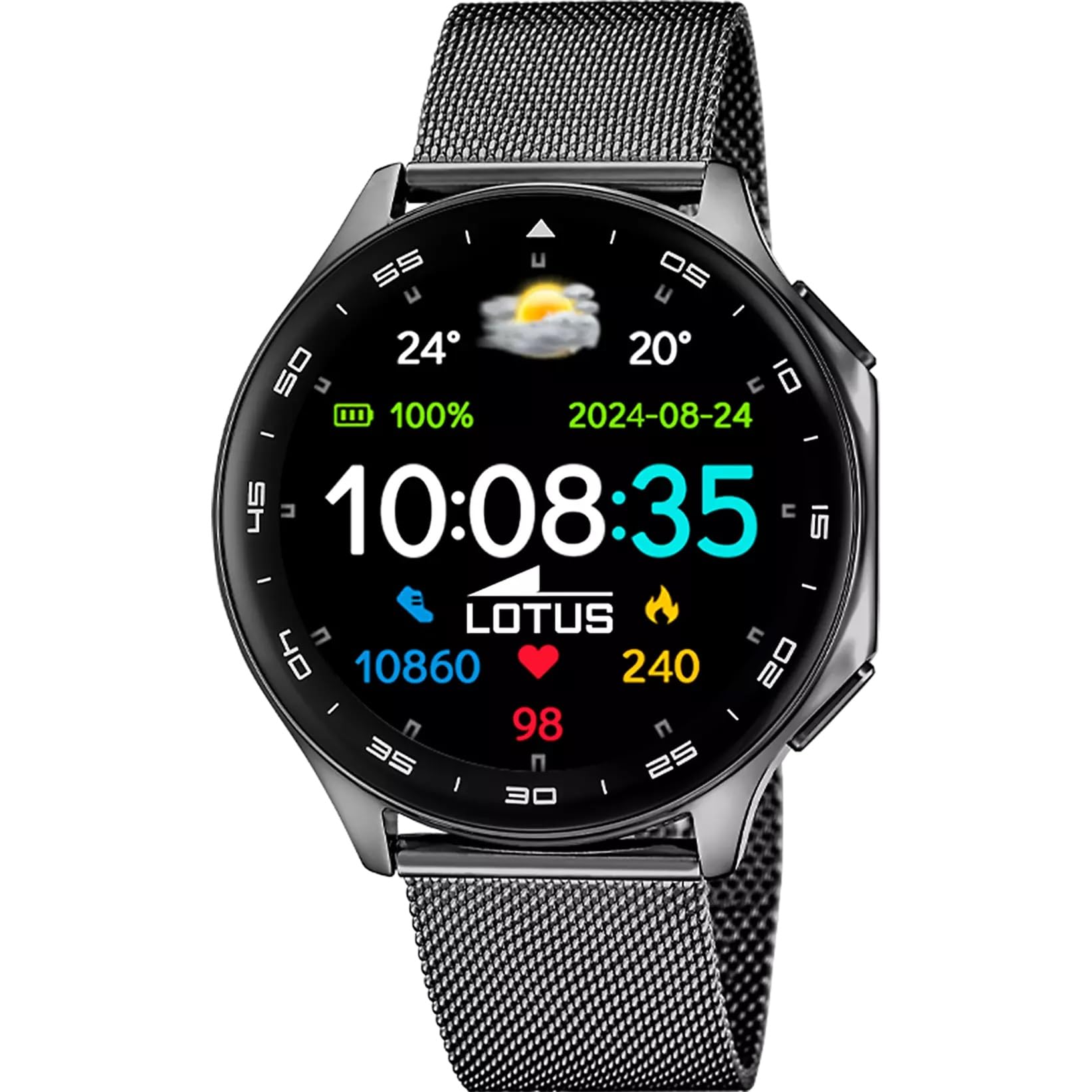
The Lotus Smartwatch 50050/4 is an outdoor sports watch designed for active lifestyles. It features a durable zinc alloy case, a black Milanese steel mesh strap, and a digital display. The watch offers a range of functions including sports tracking, health monitoring, and smart notifications.
Kaj je v škatli
- Lotus Smartwatch 50050/4
- Polnilni kabel
- Uporabniški priročnik (ta dokument)
- Dodatni trak
Nastavitev
1. Polnjenje pametne ure
Before initial use, fully charge your smartwatch. Connect the charging cable to the charging port on the back of the watch and plug the other end into a USB power adapter (not included) or a computer's USB port. The watch display will indicate charging status.
Opomba: Use a standard 5V/1A USB charger. Overcharging or using incompatible chargers may damage the device.
2. Vklop/izklop
- Za vklop: Press and hold the side button for a few seconds until the Lotus logo appears.
- Za izklop: Pritisnite in držite stranski gumb, nato pa na zaslonu izberite »Izklop«.
3. Namestitev in seznanjanje aplikacij
To unlock the full potential of your smartwatch, download the official Lotus Smartwatch application on your smartphone. The app is compatible with Android devices.
- Iskanje the "Lotus Smartwatch" app in your smartphone's app store (Google Play Store for Android).
- Namestite aplikacijo.
- Odprite aplikacijo in sledite navodilom na zaslonu, da ustvarite račun ali se prijavite.
- V pametnem telefonu omogočite Bluetooth.
- In the app, navigate to the device pairing section and select your Lotus Smartwatch 50050/4 from the list of available devices.
- Potrdite zahtevo za seznanitev tako na pametnem telefonu kot na pametni uri.
Once paired, the watch will synchronize time, date, and other settings with your smartphone.
Navodila za uporabo
Osnovna navigacija
- Zaslon na dotik: Swipe left, right, up, or down to navigate through menus and functions. Tap to select an item.
- Stranski gumb: Press to return to the previous screen or to the watch face. Press and hold for power options.
Ključne funkcije
- Športni načini: Access various sports modes (e.g., running, walking, cycling) to track your activity, including steps, calories burned, and distance.
- Spremljanje zdravja:
- Srčni utrip: Spremljajte svoj srčni utrip v realnem času.
- Kisik v krvi: Izmerite raven kisika v krvi.
- Sledenje spanju: Analyze your sleep patterns (deep sleep, light sleep, awake time).
- Dihalne vaje: Vodene dihalne vaje za sprostitev.
- Obvestila: Receive notifications for incoming calls, SMS messages, and app alerts directly on your watch. You can reject calls from the watch.
- Nadzor glasbe: Upravljajte predvajanje glasbe na povezanem pametnem telefonu (predvajanje, začasna ustavitev, preskakovanje skladb).
- vreme: View trenutne vremenske razmere in napovedi.
- Alarmi in časovniki: Set alarms, use the stopwatch, or set a countdown timer.
- Daljinski upravljalnik kamere: Uporabite svojo uro kot daljinski sprožilec za kamero pametnega telefona.
- Video Calculator: Access a video calculator function.
- AI Voice Calculator: Utilize an AI voice-activated calculator.
- Iskalnik telefona: Poiščite seznanjeni pametni telefon tako, da ga nastavite zvoniti.
- Svetilka: Activate the screen as a flashlight.
- Dial Customization: Change the watch face (dial) through the watch settings or the companion app.
- Posodobitev vdelane programske opreme: Update the watch's software via the companion app to ensure optimal performance and access new features.
- Language, Time, and Date: Adjust these settings through the watch or the companion app.
Vzdrževanje
Čiščenje in nega
- Zaslon in ohišje ure obrišite z mehko, suho krpo, ki ne pušča vlaken.
- Za trdovratne madeže rahlo dampkrpo sperite z vodo. Ne uporabljajte agresivnih kemikalij ali abrazivnih materialov.
- Pred polnjenjem se prepričajte, da so polnilni kontakti čisti in suhi.
Vodoodpornost (IP65)
The Lotus Smartwatch 50050/4 has an IP65 rating, meaning it is protected against dust ingress and low-pressure water jets from any direction. This rating indicates resistance to splashes and light rain. It is not suitable for swimming, showering, or submersion in water. Exposure to high-pressure water or prolonged submersion may cause damage.
Zamenjava traku
The watch comes with an additional strap. To replace the strap, locate the quick-release pins on the underside of the strap where it connects to the watch case. Slide the pin to detach the strap, then align the new strap and slide the pin back into place to secure it.
Odpravljanje težav
Ura se ne vklopi
- Prepričajte se, da je ura popolnoma napolnjena. Priključite jo na polnilnik za vsaj 30 minut.
- Poskusite pritisniti in držati stranski gumb 10–15 sekund, da prisilite ponovni zagon.
Seznanjanje s pametnim telefonom ni mogoče
- Prepričajte se, da je Bluetooth omogočen na vašem pametnem telefonu.
- Ensure the watch is within range of your smartphone (typically 10 meters).
- Znova zaženite pametni telefon in pametno uro.
- Clear the Bluetooth cache on your smartphone (if applicable) and try pairing again.
- Ensure the Lotus Smartwatch app is updated to the latest version.
Netočni zdravstveni podatki
- Prepričajte se, da je ura tesno pritisnjena na zapestje, vendar ne pretesno.
- Keep the sensor on the back of the watch clean and free from debris.
- Okoljski dejavniki in individualna fiziologija lahko vplivajo na natančnost senzorja.
Ponastavitev na tovarniške nastavitve
If you experience persistent issues, a factory reset may resolve them. This will erase all data on the watch and restore it to its original settings. Consult the watch's settings menu or the companion app for the factory reset option.
Specifikacije
| Številka modela | 50050/4 |
| Znamka | Lotus |
| Velikost zaslona | 46.7 mm |
| oblika | Okrogla |
| Material ohišja | Cinkova zlitina |
| Material traku | Milanese Steel Mesh |
| Vodoodpornost | IP65 (Splash and dust resistant) |
| Povezljivost | Bluetooth |
| Združljiv OS | Android (za spremljevalno aplikacijo) |
| GPS | št |
| Posebne lastnosti | Advanced sport and health functions |
Garancija in podpora
The Lotus Smartwatch 50050/4 comes with a 3-letna garancija from the date of purchase. This warranty covers manufacturing defects. It does not cover damage caused by misuse, accidents, unauthorized modifications, or failure to follow the instructions in this manual, including water damage beyond the specified IP65 rating.
For warranty claims or technical support, please contact your authorized Lotus retailer or visit the official Lotus webspletno mesto za informacije o storitvah za stranke.
Politika vračila: If purchased from Amazon, the product is subject to a 30-day return policy for refund or replacement, as per Amazon's terms.
Slika izdelka