
1. Pomembna varnostna navodila
Pred uporabo tekalne steze natančno preberite vsa navodila. Priročnik shranite za poznejšo uporabo.
- Tekalno stezo vedno postavite na ravno in stabilno površino.
- Zagotovite zadosten prostor okoli tekalne steze (vsaj 2 metra zadaj in 0.6 metra na vsaki strani).
- Med delovanjem tekalne steze ne približujte otrok in hišnih ljubljenčkov.
- Nosite primerno športno obutev in oblačila.
- Tekalne steze ne uporabljajte, če je kabel ali vtič poškodovan ali če ne deluje pravilno.
- Največja nosilnost uporabnika: 130 kg.
- Always use the safety key. Attach it to your clothing before starting your workout.
2. Izdelek je končanview
The TOPUTURE 2-in-1 Treadmill is designed for both walking and light running, offering a versatile fitness solution for home or office use. It features a powerful yet quiet motor, manual incline adjustment, and smart app connectivity.

Image: Two individuals demonstrating the TOPUTURE 2-in-1 Treadmill in use, highlighting its dual functionality for walking while working and running.
3. Nastavitev in montaža
This TOPUTURE 2-in-1 Treadmill features a space-saving design that requires minimal assembly. It is ready for use almost immediately out of the box.
3.1 Razpakiranje
- Tekalno stezo previdno vzemite iz embalaže.
- Check all components against the packing list to ensure everything is present.
3.2 Namestitev
- Place the treadmill on a firm, level surface.
- Prepričajte se, da je napajalni kabel lahko dostopen in da ni oviran.
3.3 Ročna nastavitev naklona
The treadmill offers manual incline settings to increase workout intensity. The original incline is 2°, and can be adjusted to 4.7° (9% incline rate).
- Locate the incline adjustment bolts at the rear of the treadmill.
- Pull out the bolt and turn the slope block to the desired position.
- Insert the bolt into the upper hole to secure the incline.

Image: A visual guide illustrating the two-step process for manually adjusting the treadmill's incline.
4. Navodila za uporabo
Your treadmill can be controlled via its LED display, remote control, or a smart application.
4.1 Vklop/izklop
- Priključite napajalni kabel v ustrezno vtičnico.
- Flip the main power switch located on the treadmill base to the 'ON' position.
- To turn off, flip the main power switch to 'OFF' and unplug the unit.
4.2 Using the LED Display and Remote Control
The multi-functional LED display shows real-time data including speed, distance, time, and calories burned. The remote control allows for easy adjustment of speed and modes.

Image: The treadmill's clear LED display provides real-time workout metrics, complemented by a convenient remote control for adjustments.
- Start/Stop: Press the 'Start' button on the display or remote to begin. Press 'Stop' to pause or end your workout.
- Prilagoditev hitrosti: Use the '+' and '-' buttons on the remote or display to increase or decrease speed (1-10 km/h).
- Programi: Select from 12 preset programs for varied workout routines.
- Temporary Pause: Use the 'Pause' button to temporarily stop your workout without losing data.
4.3 Smart App Connectivity
Connect your treadmill to fitness apps like 'FITSHOW' via Bluetooth (Bluetooth name: TP3) for enhanced training courses and data tracking.
- Prepričajte se, da je Bluetooth omogočen na vaši mobilni napravi.
- Open the 'FITSHOW' app (or compatible app) and search for 'TP3'.
- Pair your device with the treadmill.
- Follow the app's instructions to access various training courses and monitor your progress.

Image: The treadmill connects to fitness apps, allowing users to engage with virtual training courses and track their performance.
5. Vzdrževanje
Redno vzdrževanje zagotavlja dolgo življenjsko dobo in optimalno delovanje vaše tekalne steze.
5.1 Čiščenje
- Pred čiščenjem izključite tekalno stezo iz električnega omrežja.
- Wipe down the display and exterior surfaces with a damp krpo. Izogibajte se abrazivnim čistilom.
- Regularly vacuum under the treadmill to prevent dust buildup.
5.2 Mazanje jermena
The running belt requires periodic lubrication to reduce friction and extend its lifespan. Use silicone-based treadmill lubricant.
- Dvignite rob tekaškega traku.
- Apply a small amount of lubricant to the center of the deck, underneath the belt.
- Tekalno stezo nekaj minut zaženite pri nizki hitrosti, da se mazivo enakomerno porazdeli.
- Refer to the lubricant manufacturer's instructions for frequency, typically every 3-6 months depending on usage.
5.3 Nastavitev pasu
Če se tekalni trak premakne na eno stran ali zdrsne, ga je morda treba nastaviti.
- Consult the detailed instructions in the full product manual for specific belt tension and alignment procedures.
6. Odpravljanje težav
Če imate težave s tekalno stezo, si oglejte naslednje pogoste težave in rešitve.
| Težava | Možen vzrok | rešitev |
|---|---|---|
| Tekalna steza se ne vklopi. | Power cord not plugged in, main switch off, safety key not in place. | Check power connection, ensure main switch is ON, insert safety key. |
| Natikači za tekaški trak. | Jermen je preveč ohlapen, nezadostno mazanje. | Adjust belt tension (refer to full manual), lubricate the belt. |
| Nenavaden hrup med delovanjem. | Loose parts, belt friction, motor issue. | Check for loose bolts, lubricate belt, contact customer support if motor noise persists. |
| Napaka povezave aplikacije. | Bluetooth off, app not updated, incorrect pairing. | Ensure Bluetooth is on, update app, re-pair with 'TP3'. |
If the problem persists after attempting these solutions, please contact TOPUTURE customer support.
7. Specifikacije
| Funkcija | Specifikacija |
|---|---|
| Znamka | TOPUTURE |
| Moč motorja | 2.5 HP (Peak 3.0 HP) |
| Razpon hitrosti | 1–10 km/h |
| Naklon | Manual (0%, 5%, 10% equivalent to 2° and 4.7°/9%) |
| Tekaška površina | 1000 x 400 mm (approx. 39.4 x 15.7 inches) |
| Največja teža uporabnika | 130 kg (pribl. 286 lbs) |
| Nivo hrupa | < 45 dB |
| Dimenzije izdelka | 120.8 x 52.6 x 12.5 cm (približno 47.6 x 20.7 x 4.9 palca) |
| Teža izdelka | 21.69 kg (pribl. 47.8 lbs) |
| Povezljivost | Bluetooth (TP3) for APP control |
| Programi | 12 prednastavljenih programov |
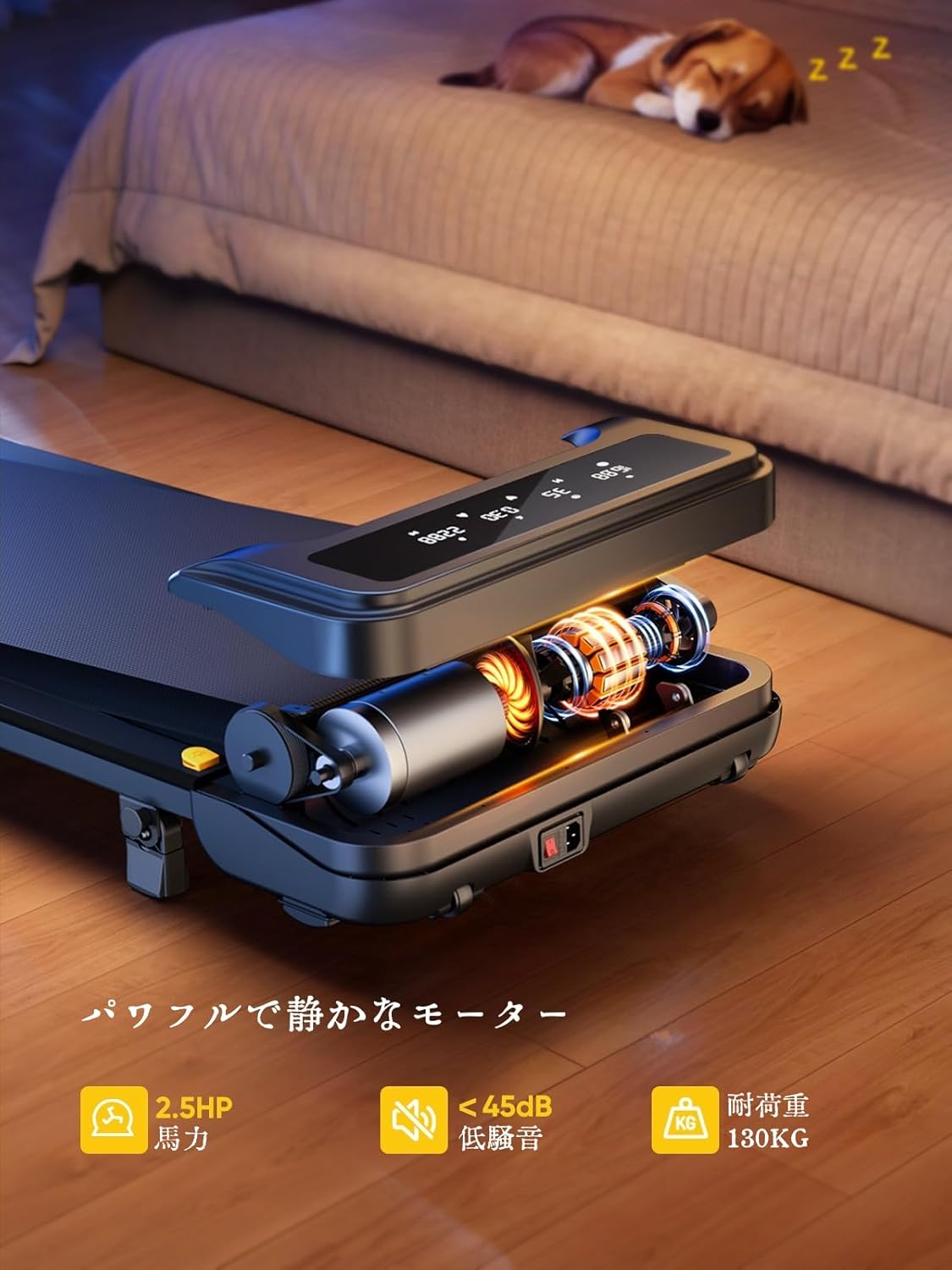
Image: The treadmill features a powerful 2.5 HP motor, operates quietly below 45dB, and supports users up to 130 kg.

Image: The compact design of the treadmill, highlighting its running surface dimensions for space efficiency.
8. Shranjevanje in prenosljivost
The TOPUTURE 2-in-1 Treadmill is designed for easy storage and portability, making it ideal for small spaces.
- The treadmill is lightweight (18.5 kg / 40.7 lbs) and features built-in wheels for effortless movement.
- It can be stored upright or flat under a bed or sofa when not in use, saving valuable space.
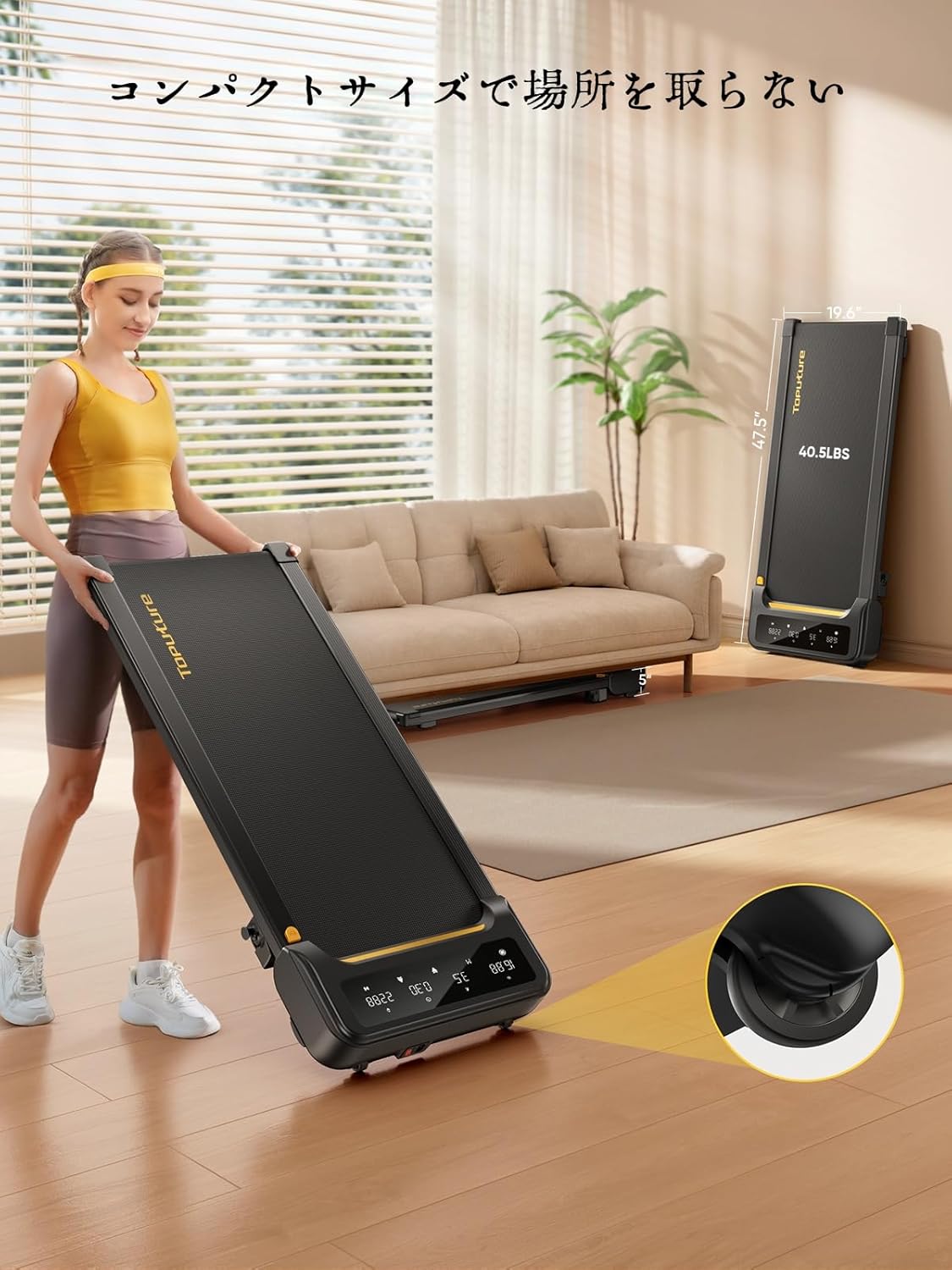
Image: A woman demonstrates the ease of moving the treadmill, highlighting its portability with integrated wheels.
9. Garancija in podpora
TOPUTURE provides a warranty for this product. Please refer to your purchase documentation for specific warranty terms and conditions.
9.1 Podpora strankam
For any questions, technical assistance, or warranty claims, please contact TOPUTURE customer support through the retailer where you purchased the product or visit the official TOPUTURE webmesto.
- Spletna podpora: Visit the TOPUTURE brand store on Amazon or the official webspletno mesto za pogosta vprašanja in kontaktne podatke.
- Podpora po e-pošti: Za e-poštni naslov službe za stranke glejte embalažo izdelka ali garancijski list.