
1. Uvod
Hvala za nakupasing the COLSUR K8-WHITE Portable Bluetooth CD Player. This device is designed to provide versatile audio entertainment, combining CD playback with modern features like Bluetooth connectivity, FM radio, and a multi-level table lamp. Please read this manual thoroughly before use to ensure proper operation and to maximize your enjoyment of the product.
2. Varnostne informacije
- Naprave ne izpostavljajte dežju, vlagi ali ekstremnim temperaturam.
- Naprave ne postavljajte v bližino virov toplote ali na neposredno sončno svetlobo.
- Naprave ne razstavljajte ali poskušajte popraviti sami. Vsa servisna dela prepustite usposobljenemu osebju.
- Napravo hranite stran od močnih magnetnih polj.
- Use only the provided Type-C charging cable and a compatible power adapter (not included) for charging.
- Med delovanjem naprave zagotovite ustrezno prezračevanje.
3. Vsebina paketa
Prosimo, preverite paket za naslednje artikle:
- COLSUR K8-WHITE Portable Bluetooth CD Player
- Polnilni kabel tipa C
- Uporabniški priročnik
- Komplet za stensko montažo (če je primerno)
- Table Stand (if applicable)
4. Izdelek je končanview
The COLSUR K8-WHITE is a versatile audio device designed for various listening experiences. It features a compact design suitable for tabletop placement or wall mounting.
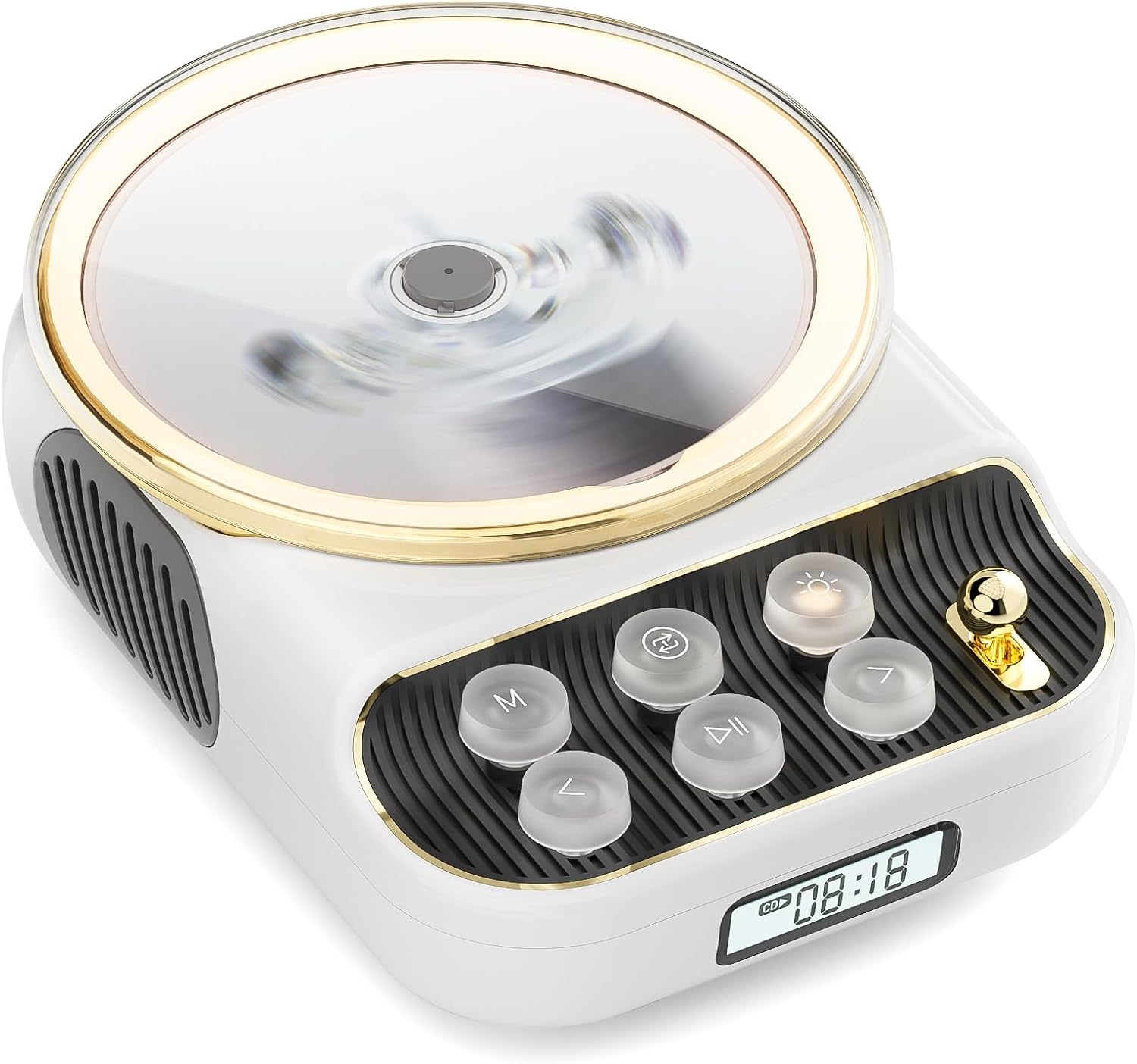
Spredaj view of the COLSUR K8-WHITE Portable Bluetooth CD Player, showcasing its circular CD compartment, control buttons, and digital display.

This image illustrates the multifunctionality of the COLSUR K8-WHITE, highlighting its capabilities for CD playback, Bluetooth mode, FM radio, TF card speaker, 3.5mm audio jack, and night light function.
Nadzorna postavitev

A detailed diagram showing the various buttons, ports, and features of the COLSUR K8-WHITE CD Player, including the CD cover, function buttons, display, Type-C charging port, TF card interface, and speaker.
- Predal za CD-je: Za vstavljanje avdio CD-jev.
- Zaslon: Shows current mode, track number, time, or FM frequency.
- Funkcijski gumbi: (M) Mode, (Loop) Repeat, (Light) Light/Bluetooth Transmit, (Play/Pause), (Previous/Volume Down), (Next/Volume Up).
- Gumb za glasnost: Prilagodi glasnost zvoka.
- Vrata za polnjenje Type-C: Za vhod napajanja in polnjenje notranje baterije.
- Vmesnik kartice TF: For playing music from a TF card.
- 3.5 mm avdio izhod: Za priklop slušalk ali zunanjih zvočnikov.
5. Nastavitev
5.1 Polnjenje naprave
The device has a built-in 4000mAh rechargeable Lithium-ion battery. Before first use, fully charge the device.
- Connect the provided Type-C charging cable to the Type-C port on the device.
- Connect the other end of the cable to a compatible USB power adapter (5V/2A recommended, not included).
- The charging indicator on the display will show charging status. It will turn off or change color when fully charged.
5.2 Vklop/izklop
To power on the device, press and hold the Power button (often integrated with Play/Pause or a dedicated button, refer to the control layout diagram). To power off, press and hold the Power button again.
5.3 Možnosti namestitve
The COLSUR K8-WHITE can be used as a tabletop device or mounted on a wall.
- Namizna uporaba: Place the device on a stable, flat surface. Ensure the non-slip feet are securely positioned.
- Montaža na steno: Use the provided wall mount kit (if included) to securely attach the device to a wall. Follow the instructions provided with the wall mount kit for safe installation.
6. Navodila za uporabo
6.1 Predvajanje CD-ja

The image shows the COLSUR K8-WHITE CD Player on a wooden table, playing a CD, and a separate image illustrating its use as a Bluetooth speaker connected to a smartphone.
The player supports CD, CD-R, CD-RW, MP3, and WMA formats.
- Odprite pokrov predala za CD-je.
- Carefully place a CD onto the spindle, ensuring it is seated correctly.
- Zaprite pokrov predala za CD.
- Pritisnite M (način) button repeatedly until "CD" mode is displayed.
- Pritisnite Predvajaj/Premor gumb za začetek predvajanja.
- Uporabite Prejšnje/Zmanjšanje glasnosti in Naprej / povečanje glasnosti gumbi za preskakovanje skladb.
- Glasnost prilagodite s tipko Gumb za glasnost.
- Pritisnite Zanka button to cycle through repeat modes (e.g., repeat one, repeat all, random).
6.2 Način sprejemnika Bluetooth
Connect your smartphone, tablet, or other Bluetooth-enabled devices to stream audio wirelessly. The device features Bluetooth version 5.3 for stable connection.
- Pritisnite M (način) button repeatedly until "BT" (Bluetooth) mode is displayed. The device will enter pairing mode, indicated by a flashing Bluetooth icon or specific sound.
- Na zunanji napravi omogočite Bluetooth in poiščite razpoložljive naprave.
- Select "COLSUR K8-WHITE" (or similar name) from the list to pair.
- Once paired, you can play music from your external device, and the audio will output through the CD player's speakers.
6.3 Način radia FM

The COLSUR K8-WHITE CD Player is shown on a desk, with its display showing an FM radio frequency, indicating its radio function.
Enjoy your favorite radio stations with the built-in FM tuner (frequency range: 76 MHz to 108 MHz).
- Pritisnite M (način) button repeatedly until "FM" mode is displayed.
- Pritisnite in držite Predvajaj/Premor button to initiate an automatic scan for FM stations. The device will save found stations.
- Uporabite Prejšnje/Zmanjšanje glasnosti in Naprej / povečanje glasnosti gumbe za navigacijo med shranjenimi postajami.
- Glasnost prilagodite s tipko Gumb za glasnost.
6.4 Predvajanje s kartice TF
Predvajaj glasbo files directly from a TF (MicroSD) card.
- Insert a TF card (with MP3/WMA files) into the TF card slot.
- Pritisnite M (način) button repeatedly until "TF" mode is displayed. The device should automatically start playing music from the card.
- Uporabite Prejšnje/Zmanjšanje glasnosti in Naprej / povečanje glasnosti gumbi za preskakovanje skladb.
- Glasnost prilagodite s tipko Gumb za glasnost.
6.5 AUX vhod
Connect external audio devices (e.g., MP3 players, older phones) via the 3.5mm AUX jack.
- Connect one end of a 3.5mm audio cable (not included) to the AUX port on the CD player.
- Drugi konec priključite na avdio izhod vaše zunanje naprave.
- Pritisnite M (način) button repeatedly until "AUX" mode is displayed.
- Control playback from your external device. Adjust volume using the Gumb za glasnost on the CD player.
6.6 Izhod za slušalke
For private listening, connect headphones to the 3.5mm audio output jack.
- Plug your headphones into the 3.5mm audio output jack.
- The internal speakers will automatically mute.
- Glasnost prilagodite s tipko Gumb za glasnost.
6.7 Tabela Lamp Function and Bluetooth Transmission

The COLSUR K8-WHITE CD Player is shown on a bedside table, emitting a soft glow, functioning as a night light while a person sleeps in the background.
The device includes a table lamp with three brightness levels and a Bluetooth transmission mode.
- Short Press the Light Button:
- First press: Activates a warm light (low brightness).
- Second press: Activates a flashing light (medium brightness).
- Third press: Turns off the light. The lights will cycle through these states.
- Long Press the Light Button: Activates the device's Bluetooth transmission mode. In this mode, the CD player can transmit audio to wireless headphones or other Bluetooth speakers.
7. Vzdrževanje
- Čiščenje: Za čiščenje zunanjosti naprave uporabite mehko, suho krpo. Ne uporabljajte tekočih čistil ali abrazivnih materialov.
- Skrb za CD: Handle CDs by their edges. Clean CDs with a soft, lint-free cloth, wiping from the center outwards.
- Shranjevanje: Ko naprave dalj časa ne uporabljate, jo shranite na hladnem in suhem mestu.
8. Odpravljanje težav
| Težava | Možen vzrok | rešitev |
|---|---|---|
| Naprava se ne vklopi. | Baterija je prazna. | Connect the device to a power source using the Type-C cable and charge it. |
| Ni zvoka iz zvočnikov. | Volume is too low or muted. Headphones are connected. Incorrect mode selected. | Increase volume. Disconnect headphones. Ensure correct mode (CD, BT, FM, TF, AUX) is selected. |
| CD se ne predvaja ali preskakuje. | CD is dirty, scratched, or inserted incorrectly. CD format not supported. | Clean the CD. Ensure the CD is inserted correctly. Try a different CD. Verify CD format compatibility. |
| Bluetooth seznanjanje ne uspe. | Device is not in pairing mode. External device Bluetooth is off or out of range. | Ensure the CD player is in Bluetooth mode and flashing. Move external device closer. Restart both devices. |
| Sprejem FM radia je slab. | Šibek signal. Motnje. | Reposition the device. Extend any external antenna if available. Try scanning again. |
9. Specifikacije
- Znamka: COLSUR
- Model: K8-WHITE
- barva: Bela
- Tehnologija povezljivosti: Bluetooth 5.3, AUX (3.5mm jack), Type-C (charging)
- Podprti medijski formati: Audio CD, CD-R, CD-RW, MP3, WMA (from CD or TF card)
- FM radijska frekvenca: 76 MHz - 108 MHz
- Baterija: 4000 mAh litij-ionska (polnilna)
- Posebne lastnosti: Built-in speaker, Table lamp with 3 brightness levels, TF card slot, Headphone output
- Združljive naprave: Headphones, Bluetooth speakers, Amplifiers, Bluetooth audio receivers
10. Garancija in podpora
For warranty information or technical support, please refer to the documentation included with your purchase or contact the retailer/manufacturer directly. Keep your proof of purchase for warranty claims.