
Epico Epico Keyboard Case
Epico iPad Keyboard Case User Manual
Model: Epico Keyboard Case
Uvod
Transform your iPad into a versatile workstation with the Epico iPad Keyboard Case. This innovative accessory features a detachable keyboard with seven-colour backlighting, a multi-finger gesture touchpad, and comprehensive iPadOS shortcuts. Designed for both functionality and protection, it enhances your iPad experience for typing, watching, and browsing.

Image: The Epico iPad Keyboard Case with an iPad inserted, shown in a tilted typing position.
Lastnosti
- Osvetljena tipkovnica: Seven distinct backlight colours with adjustable brightness levels for comfortable typing in any lighting condition.
- Funkcionalnost sledilne ploščice: Multi-finger gesture touchpad provides precise control and enhanced navigation capabilities.
- Shortcut Integration: Comprehensive range of iPadOS shortcuts built into the keyboard for efficient device control and workflow optimisation.
- Vsestranski dizajn: Includes detachable keyboard and tilted backside stand for multiple viewing angles and usage modes.
- Rešitev za napajanje: Equipped with Li-ion battery and USB-C charging capability, operating independently from iPad's power source.
Vsebina paketa
- Epico iPad Keyboard Case
- Polnilni kabel USB-C do USB-C
- Uporabniški priročnik (ta dokument)
Nastavitev
1. Polnjenje tipkovnice
Before first use, fully charge the keyboard. Connect the provided USB-C to USB-C charging cable to the keyboard's USB-C port and the other end to a compatible USB-C power adapter (not included).
Slika: Stran view of the keyboard case, highlighting the USB-C charging port.
2. Vstavljanje iPada
- Gently align your iPad with the case's frame.
- Press firmly but carefully to secure the iPad into the protective shell. Ensure all edges are properly seated.

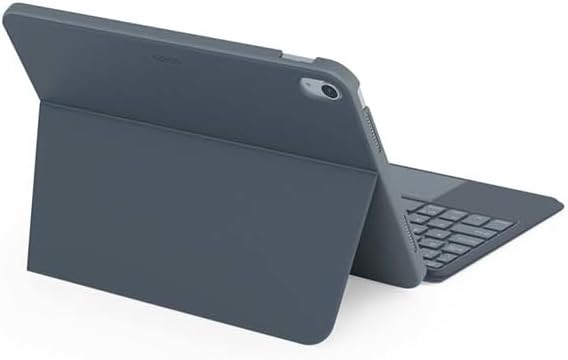
Slika: Zadaj view of the Epico iPad Keyboard Case, demonstrating the secure fit of the iPad.
3. Seznanjanje z iPadom
- Turn on the keyboard by sliding the power switch (usually located on the side or back of the keyboard).
- Na iPadu pojdite na nastavitve > Bluetooth.
- Enable Bluetooth. The keyboard should appear in the "Other Devices" list as "Epico Keyboard" or similar.
- Tap on the keyboard name to pair. Follow any on-screen prompts.
- Once paired, the keyboard's indicator light will change, and it will be ready for use.
Navodila za uporabo
Uporaba tipkovnice
The keyboard functions like a standard QWERTY keyboard. Ensure the keyboard is paired with your iPad before typing.

Slika: spredaj view of the Epico iPad Keyboard Case, displaying the full keyboard layout and touchpad.
Nadzor osvetlitve ozadja
- Pritisnite Žarnica key (often near the function keys) to cycle through backlight colours.
- Pritisnite Fn + žarnica key to adjust backlight brightness levels.
Poteze sledilne ploščice
The integrated touchpad supports multi-finger gestures for enhanced navigation:
- Dotik z enim prstom: Levi klik.
- Dotik z dvema prstoma: Desni klik (kontekstni meni).
- Dvoprstno pomikanje: Pomaknite se gor/dol ali levo/desno.
- Stisnite za povečavo: Povečaj/pomanjšaj vsebino.
- Refer to iPadOS settings for additional gesture customization.
iPadOS Shortcuts
The keyboard includes dedicated function keys for common iPadOS shortcuts. These may vary slightly by iPadOS version, but typically include:
- Domov: Vrnite se na začetni zaslon.
- Iskanje: Activate Spotlight search.
- Nadzor svetlosti: Prilagodite svetlost zaslona.
- Nadzor medijev: Play/Pause, Previous/Next track.
- Nadzor glasnosti: Prilagodite glasnost sistema.
- Zaklenjen zaslon: Lock your iPad.
Vzdrževanje
Čiščenje
- Use a soft, lint-free cloth to wipe the exterior of the case and keyboard.
- Za trdovratne madeže rahlo dampsl krpo z vodo ali blagim, neabrazivnim čistilom.
- Avoid getting moisture into the keyboard keys or ports.
- Ne uporabljajte agresivnih kemikalij, topil ali abrazivnih materialov.
Shranjevanje
When not in use for extended periods, store the keyboard case in a cool, dry place. Ensure the keyboard is turned off to preserve battery life.
Odpravljanje težav
- Tipkovnica se ne poveže:
Ensure the keyboard is charged and turned on. Check iPad's Bluetooth settings to confirm it's enabled and the keyboard is paired. Try unpairing and re-pairing the keyboard.
- Tipke se ne odzivajo:
Check battery level. Restart both the keyboard and your iPad. Ensure no debris is lodged under the keys.
- Osvetlitev ozadja ne deluje:
Ensure the keyboard is on and charged. Cycle through backlight settings using the dedicated key.
- Sledilna ploščica se ne odziva:
Ensure the touchpad is enabled (some keyboards have a function key to toggle it). Check iPadOS settings for touchpad functionality.
Specifikacije
| Znamka | Epski |
| Ime modela | Epico Keyboard Case |
| Združljive naprave | Apple iPad |
| Povezljivost | Bluetooth |
| Osvetlitev ozadja | 7-Colour, Adjustable Brightness |
| Sledilna ploščica | Multi-finger Gesture Support |
| Vrata za polnjenje | USB-C |
| Vir napajanja | Vgrajena litij-ionska baterija |
| Teža predmeta | 15.9 unče (približno 450 g) |
| Dimenzije izdelka (DxŠxV) | 9.94 x 7.24 x 0.48 palca (približno 25.25 x 18.39 x 1.22 cm) |
| Material | Plastika, Kovina |
Garancija in podpora
This Epico product is covered by a manufacturer's warranty. Please refer to the warranty card included with your purchase or visit the official Epico webza podrobne garancijske pogoje.
For technical support, troubleshooting assistance, or inquiries about your product, please contact Epico customer service through their official webspletnega mesta ali kontaktnih podatkov, navedenih na vašem računu.
Ask a question about this manual
Ask about setup, troubleshooting, compatibility, parts, safety, or missing instructions. Manuals+ will review the question and use this page’s manual context to help answer it.